Продукт бүттүview
The Ratakee Digital AM/FM Radio Alarm Clock (Model RA01SA) is designed for ease of use and clear readability, featuring large 1.4-inch LED digits. This versatile alarm clock offers multiple alarm sound options, an AM/FM radio with preset capabilities, a dimmable display, sleep timer, and snooze function. It operates via AC power with a battery backup for continued functionality during power outages.
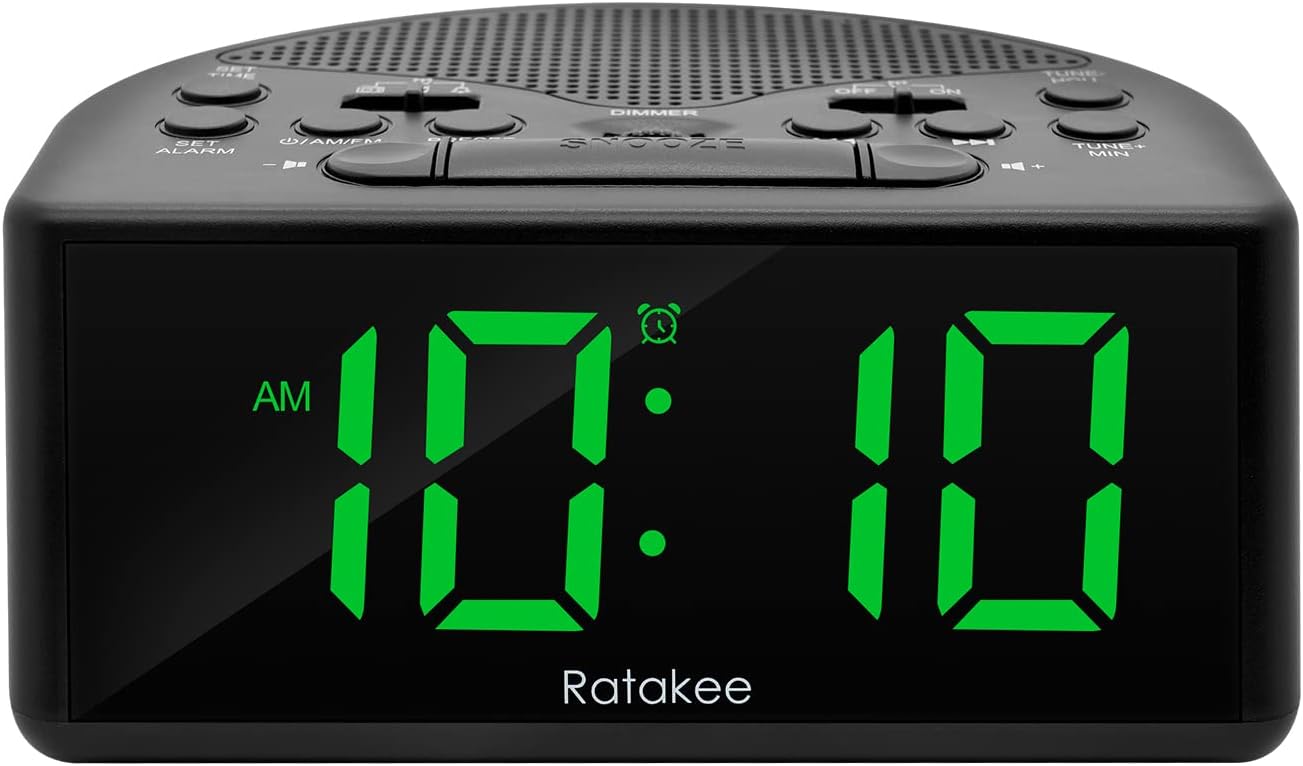
Сүрөт 1: Алдыңкы view of the Ratakee Digital AM/FM Radio Alarm Clock displaying 10:10 AM.
Жайгашуу
Ойготкуч саатты иштетүү
The alarm clock can be powered by an AC outlet or by batteries for backup.
- AC кубаттуулугу: Connect the included power cord to the AC120V outlet and plug it into a wall socket. The display will light up, and the radio will be operational.
- Батареянын камдык көчүрмөсү: Бийлик үчүнtage protection, insert 3 AA batteries (not included) into the battery compartment located on the bottom of the unit. When powered by batteries, the display will auto-dim after 20 seconds of no operation to conserve power, but the clock, alarm, and radio functions will remain active.

Figure 2: Illustration of the dual power methods: AC cord connection and battery compartment for 3 AA batteries.
Иштөө нускамалары
This section details the operation of your Ratakee alarm clock. Refer to Figure 3 for button and switch locations.

Figure 3: Top panel controls of the Ratakee Digital AM/FM Radio Alarm Clock.
Убакытты коюу
- басып, кармап туруңуз УБАКЫТ КОЙГУЛА button for 2 seconds. The hour digits will begin to flash.
- колдонуу TUNE+ HOU саатты жөндөө үчүн баскыч.
- колдонуу TUNE- MIN мүнөттү жөндөө үчүн баскыч.
- басыңыз УБАКЫТ КОЙГУЛА ырастоо жана убакыт орнотуу режиминен чыгуу үчүн кайра баскычын басыңыз.
Ойготкучту орнотуу
The alarm clock offers three selectable alarm sounds: AM/FM radio, music, or a classic beep.

Figure 4: The alarm clock offers three distinct alarm sound options.
- басып, кармап туруңуз АЛАРМДЫ КОЮУ баскычын 2 секунд басып туруңуз. Ойготкуч сааттын сандары күйүп-өчүп турат.
- колдонуу TUNE+ HOU ойготкучтун саатын коюу үчүн баскычты басыңыз.
- колдонуу TUNE- MIN ойготкучтун мүнөтүн коюу үчүн баскычты басыңыз.
- Slide the alarm tone switch (located near the АЛАРМДЫ КОЮУ button) to select your desired alarm sound: radio, music, or beep.
- басыңыз АЛАРМДЫ КОЮУ button again to confirm the alarm time and sound.
- To turn the alarm ON or OFF, use the dedicated ON/OFF slide switch for the alarm (located on the top panel, near the right side).
Ойготкучтун үнүн тууралоо: The alarm volume is adjustable from 5 to 15 levels. When using the radio as an alarm, the clock will play the last station you listened to at the set volume level.
AM/FM радиосу
The radio allows you to store up to 20 AM and 20 FM stations.

Figure 5: The alarm clock features AM/FM radio with strong reception capabilities.
- Turn Radio On/Off: басыңыз ON/AM/FM радиону күйгүзүү же өчүрүү үчүн баскыч.
- Которгуч тилкелери: Радио күйүп турганда, баскычын басыңыз ON/AM/FM AM жана FM диапазондорунун ортосунда которулуу үчүн баскычты басыңыз.
- Кол менен жөндөө: колдонуу TUNE+ HOU жана TUNE- MIN buttons to manually tune to your desired frequency.
- Auto Scan/Preset: басыңыз АЛДЫН АЛА button to scan and store available stations automatically.
- Алдын ала орнотууларды кайра чакырыңыз: колдонуу АЛДЫН АЛА button to cycle through stored stations.
- Үндү тууралоо: колдонуу VOLUME + жана Көлөмү - buttons to adjust the radio volume (1-16 levels).
Эскертүү: When listening to FM stations with earphones (via the earphone jack), stereo mode will automatically activate for enhanced sound.
Диммерди көрсөтүү
The alarm clock features a full-range dimmable LED display (0-100% brightness).

Figure 6: Adjusting the display brightness from 0% to 100% for optimal viewing.
айлантыңыз DIMMER knob (located on the top panel) to adjust the display brightness to your preferred level.
Уйку таймери
Уйку таймери радионун автоматтык түрдө өчүшүнөн мурун белгиленген убакытка чейин ойнотулушуна мүмкүндүк берет.
To activate the sleep timer, press the УЙКУ button. Each press will cycle through available sleep timer durations (e.g., 10, 20, 30, 60, 90 minutes). The radio will turn off automatically after the selected time.
Тындырма функциясы
Сигнал чыкканда чоң баскычты басыңыз СОЮЗ button (located on the top center) to temporarily silence the alarm for an additional 9 minutes of sleep.

Figure 7: Easily activate the snooze function for a short delay in your alarm.
Наушник уясы
A 3.5mm earphone jack is provided on the side of the unit for private listening. Plug in your earphones to enjoy radio content without disturbing others.
Техникалык тейлөө
- Тазалоо: To clean the unit, wipe it with a soft, dry cloth. Do not use abrasive cleaners or solvents.
- Батареяны алмаштыруу: If using battery backup, replace the 3 AA batteries when the display dims significantly or the clock functions become unreliable during a power outage. Жаңы батареяларды салууда туура полярдуулукту камсыз кылыңыз.
- Сактагыч: Эгерде түзмөктү узак убакытка сактап койсоңуз, агып кетпеши үчүн батарейкаларды алып салыңыз.
Проблемаларды чечүү
| Көйгөй | Мүмкүн болгон себеп / Чечим |
|---|---|
| Дисплей күңүрт же өчүк. |
|
| Ойготкуч угулбайт. |
|
| Начар радио кабыл алуу же статикалык. |
|
| Cannot set radio presets. |
|
Техникалык шарттар
| Өзгөчөлүк | Деталь |
|---|---|
| Бренд | Ratakee |
| Модель номери | RA01SA |
| Дисплей түрү | Digital LED (Green Digits) |
| Дисплей өлчөмү | 1.4 inches (LED Digits) |
| Power Source | Corded Electric (AC120V) / Battery Powered (3 AA batteries, not included) |
| Продукциянын өлчөмдөрү | 5.4"W x 2.4"H |
| Элемент Салмагы | 0.4 килограмм (14 унция) |
| Radio Bands | AM/FM (20 AM, 20 FM presets) |
| Сигнал Ringtones | 3 (AM/FM Radio, Music, Beep) |
| Ойготкучтун үнү | Adjustable (5-15 levels) |
| Диммерди көрсөтүү | 0-100% (Rotary Knob) |
| Уйку таймери | 10-90 мүнөт |
| Тындыруунун узактыгы | 9 мүнөт |
| Наушник уясы | Ооба |
| Материал | Пластик |
| Ички/тышкы колдонуу | Indoor |
Кепилдик жана колдоо
Кепилдик түрү: Өмүр бою кепилдик
For technical support, troubleshooting assistance, or warranty claims, please contact Ratakee customer service. Refer to the product packaging or the official Ratakee webакыркы байланыш маалыматы үчүн сайт.
You may also find helpful resources and frequently asked questions on the manufacturer's support page.
