1. Киришүү
Сатып алганыңыз үчүн рахматasing the DXQ K-1028E Universal Air Conditioner Remote Control. This remote is designed to provide convenient and comprehensive control over a wide range of air conditioning units. Its simple structure, large LCD display, and intelligent features make it an ideal replacement or secondary remote for your AC.
Негизги өзгөчөлүктөрү:
- Жалпы шайкештик: Controls over 1000 different global air conditioner brands.
- Оңой орнотуу: Features a one-button setting for quick configuration.
- Чоң LCD дисплей: Provides clear visibility of settings and status.
- Узак башкаруу аралык: Effective range of approximately 8 to 10 meters.
- Гуманизацияланган дизайн: Includes built-in clock, ON/OFF timer, and night light functions.
- Төмөн энергия керектөө: Efficient operation for extended battery life.

Image 1.1: Front and angled view of the DXQ K-1028E Universal AC Remote Control.

Image 1.2: The universal remote control demonstrating compatibility with various air conditioning units.
2. Орнотуу
2.1 Батареяны орнотуу
Алыстан башкаруу пульту эки (2) AAA батарейкасын талап кылат (кошулмага кирбейт). Аларды орнотуу үчүн төмөнкү кадамдарды аткарыңыз:
- Алыстан башкаруу пультунун артындагы батарея бөлүмүнүн капкагын ачыңыз.
- Бөлүмдүн ичинде көрсөтүлгөндөй туура полярдуулукту (+ жана -) камсыз кылып, эки AAA батарейкасын салыңыз.
- Батарея уясынын капкагын бекем жабыңыз.

Image 2.1: Illustration of battery installation in the remote control.
2.2 Code Setting (Pairing with AC Unit)
There are two methods to set up the remote control with your air conditioner:
Method 1: Manual Code Input
- Turn on your air conditioner manually.
- Refer to the "Applicable Brand and Code List" (Image 2.2) to find the 3-digit code(s) for your AC brand.
- басып, кармап туруңуз SET button on the remote control until the 3-digit code on the LCD display starts flashing.
- колдонуу Температура + or Температура - buttons to adjust the code until your brand's code appears.
- Once the correct code is displayed, press the OK button to confirm. The code will stop flashing.
- Test the remote control by pressing the КҮЙГҮЗҮҮ/ӨЧҮРҮҮ button. If the AC unit responds, the setup is complete. If not, try the next code for your brand or proceed to Method 2.
Method 2: Automatic Code Search
- Ensure your air conditioner is turned on manually.
- Point the remote control towards the AC unit.
- басып, кармап туруңуз SET button for approximately 6 seconds until the 3-digit code on the LCD display starts flashing and automatically cycles through codes.
- Observe your AC unit. When the AC unit responds (e.g., turns off, changes mode, or makes a sound), immediately release the SET баскычы.
- басыңыз OK кодду ырастоо үчүн баскычты басыңыз.
- Test the remote control by pressing various function buttons. If the AC unit responds correctly, the setup is complete. If not, repeat the automatic search process.
Эскертүү: For some popular brands, the remote may work directly after battery installation without needing to set a code.

Image 2.2: Applicable Brand and Code List for the K-1028E remote.
3. Иштөө нускамалары
3.1 Алыстан башкаруунун жайгашуусу жана функциялары
Familiarize yourself with the buttons and display on your K-1028E remote control:
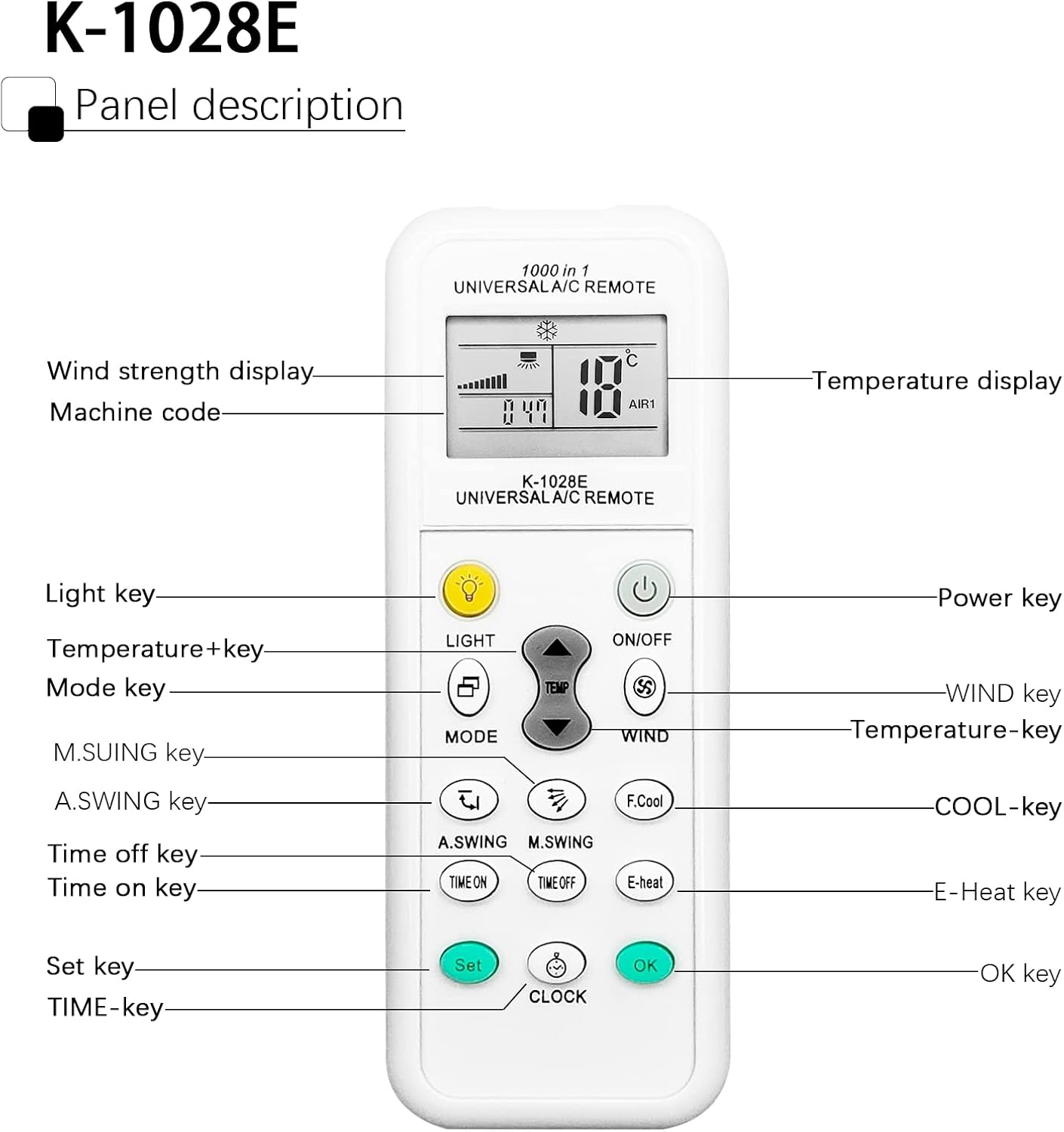
Image 3.1: Panel Description of the K-1028E Universal AC Remote.
- LCD дисплей: Shows temperature, mode, fan speed, timer status, and machine code.
- LIGHT Key: Activates the built-in night light function.
- КҮЙГҮЗҮҮ/ӨЧҮРҮҮ баскычы: Powers the AC unit on or off.
- MODE ачкычы: Иш режимдери (мисалы, муздак, жылытуу, желдеткич, кургак, авто) аркылуу өтөт.
- TEMP + / TEMP - Keys: Температуранын жөндөөсүн тууралайт.
- WIND Key: Желдеткичтин ылдамдыгын тууралайт (Авто, Төмөн, Орто, Жогорку).
- A.SWING / M.SWING Keys: Controls the vertical (A.SWING) and horizontal (M.SWING) swing of the air deflector.
- F.Cool Key: Activates the fast cool mode (if supported by AC).
- E-Heat Key: Activates the electric heat mode (if supported by AC).
- TIME ON / TIME OFF Keys: Sets the automatic power-on or power-off timer.
- CLOCK Key: Учурдагы убакытты орнотот.
- SET баскычы: Used for code setting (as described in Section 2.2).
- OK Ачкыч: Орнотууларды ырастайт.
3.2 Негизги операция
- Күйгүзүү/өчүрүү: басыңыз КҮЙГҮЗҮҮ/ӨЧҮРҮҮ баскычы.
- Режимди тандоо: басыңыз РЕЖИМ button repeatedly to cycle through available modes (e.g., Cool, Heat, Fan, Dry, Auto). The selected mode will be displayed on the LCD.
- Температураны жөндөө: колдонуу TEMP + or ТЕМПЕРАТУРА - каалаган температураны коюу үчүн баскычтар.
- Желдетүүчү ылдамдыгын жөндөө: басыңыз ШАМАЛ button to cycle through fan speed options.
- Control Airflow Direction: Колдонуу A.SWING жана M.SWING buttons to adjust the louver direction.

Image 3.2: Remote control effective distance and available operating modes.
3.3 Таймердин функциялары
The remote control allows you to set a timer for the AC unit to automatically turn on or off.
- Учурдагы убакытты орнотуу: басыңыз СААТ button. The time display will flash. Use TEMP + or ТЕМПЕРАТУРА - саатты жөндөө үчүн, андан кийин басыңыз СААТ again to adjust minutes. Press OK ырастоо үчүн.
- Setting ON Timer: басыңыз УБАКЫТ button. The time display will flash. Use TEMP + or ТЕМПЕРАТУРА - to set the desired power-on time. Press OK ырастоо үчүн.
- Setting OFF Timer: басыңыз Убакыт өчүк button. The time display will flash. Use TEMP + or ТЕМПЕРАТУРА - to set the desired power-off time. Press OK ырастоо үчүн.
- Canceling Timer: Тийиштүү баскычты басыңыз УБАКЫТ or Убакыт өчүк button again, then press OK.

Image 3.3: The remote's time switch function for automated operation.
4. Техникалык тейлөө
4.1 Батареяны алмаштыруу
When the remote control's display becomes dim or the remote becomes unresponsive, it's time to replace the batteries. Follow the battery installation steps in Section 2.1.
- Ар дайым эки батарейканы бир эле учурда алмаштырыңыз.
- Эски жана жаңы батарейкаларды же ар кандай типтеги батареяларды аралаштырбаңыз.
- Эгерде пульт көпкө чейин колдонулбаса, агып кетүүнүн алдын алуу үчүн батарейкаларды алып салыңыз.
- Колдонулган батарейкаларды жергиликтүү эрежелерге ылайык таштаңыз.
4.2 Тазалоо
Пультту тазалоо үчүн жумшак, кургак чүпүрөктү колдонуңуз. Суюк тазалоочу каражаттарды, чачыраткычтарды же абразивдүү материалдарды колдонбоңуз, анткени алар пульттун бетине же ички компоненттерине зыян келтириши мүмкүн.
5. Кыйынчылыктарды
| Көйгөй | Мүмкүн себеп | Чечим |
|---|---|---|
| Remote does not work or AC does not respond. | Incorrect code setting; Dead or weak batteries; Obstruction between remote and AC unit; Remote not pointed correctly. | Re-perform code setting (Section 2.2); Replace batteries; Remove any obstructions; Ensure remote is pointed directly at the AC unit's receiver. |
| Limited control distance. | Weak batteries; Obstruction; Interference. | Replace batteries; Ensure clear line of sight to AC unit; Avoid strong light sources or other infrared devices. |
| Кээ бир функциялар иштебейт. | AC unit does not support the function; Incorrect code. | Not all AC units support every function (e.g., F.Cool, E-Heat). Verify if your AC unit has this feature. Try another code for your brand (if available). |
| ЖК дисплей күңүрт же бош. | Батареялары аз. | Батареяларды алмаштырыңыз. |
6. Техникалык шарттар
| Өзгөчөлүк | Спецификация |
|---|---|
| Бренд | DXQ |
| Модель номери | K-1028E |
| Түс | Ак |
| Байланыш технологиясы | Инфракызыл |
| Шайкеш түзмөктөр | Кондиционер |
| Максималдуу диапазон | 10 метр (болжол менен 33 фут) |
| баскычтардын саны | 20 |
| Power Source | 2 x AAA Батареялар (киргизилген эмес) |
| Элемент Салмагы | 30 грамм |
7. Кепилдик жана колдоо
7.1 Кепилдик маалыматы
Specific warranty information for this product is not available in the provided documentation. Please refer to the seller or manufacturer's webкепилдик камтуу жана шарттары жөнүндө маалымат алуу үчүн сайт.
7.2 Кардарларды колдоо
If you encounter any issues or have questions not covered in this manual, please contact the seller or manufacturer's customer support. Keep your purchase receipt or order details handy for faster service.


