Introduction
Welcome to the user manual for your new Amkette Pocket Blast 5-in-1 FM Radio. This versatile device combines an FM radio, Bluetooth speaker, MP3 player, voice recorder, and FM song recorder into a compact and portable unit. Please read this manual carefully to understand the features and operation of your device and ensure optimal performance.

Figure 1: Amkette Pocket Blast 5-in-1 FM Radio
Пакеттин мазмуну
Сураныч, төмөнкү нерселер үчүн кутучаны белгилеңиз:
- 1 x Amkette Pocket Blast Unit
- 1 x User Manual
- 1 x заряддоо кабели (Type-C)
- 1 х AUX кабели
Продукт өзгөчөлүктөрү
The Amkette Pocket Blast is designed for versatile audio entertainment and utility.
- 5-ин-1 Функциясы: FM Radio, Bluetooth Speaker, MP3 Player (USB/SD/AUX), Voice Recorder, and FM Song Recorder.
- Үндүн жогорку сапаты: Equipped with a 6W speaker for clear audio with well-defined bass and pleasing vocals.
- Оңой навигация: Full number pad for direct song and FM station selection.
- Long Playback: Over 7 hours of battery life on Bluetooth mode.
- Камтылган микрофон: For voice recording and hands-free calls when connected via Bluetooth.
- Type-C заряддоо: Modern and reliable charging port.
- Тышкы антенна: FM кабыл алуусун жакшыртуу үчүн.

Figure 2: Key Features of the Pocket Blast

Figure 3: Compact Size with Powerful Audio
Башкаруу каражаттары жана порттор
Familiarize yourself with the buttons and ports on your Amkette Pocket Blast for seamless operation.
Front Panel (Number Pad and Display)
- Сандар тактасы (0-9): Used for direct input of FM frequencies or song numbers in MP3 mode.
- REC баскычы: Initiates voice or FM recording.
- DEL Button: Deletes recorded files.
- M (режим) баскычы: FM, Bluetooth, USB, SD жана AUX режимдеринин ортосунда которуштурат.
- Ойнотуу/тындыруу баскычы: Ойноону көзөмөлдөйт.
- Мурунку/Кийинки трек баскычтары: Navigates through songs or FM stations.
- Көлөмдү өйдө / ылдый баскычтары: Аудионун үнүн тууралайт.
- LCD дисплей: Shows current mode, FM frequency, track number, etc.
Side Panel (Ports)
- ON/OFF которуу: Аппаратты күйгүзөт же өчүрөт.
- DC 5V (Type-C) Port: Аппаратты заряддоо үчүн.
- USB порт: For USB flash drives (MP3 playback, recording storage).
- TF (Micro SD) карта уячасы: For Micro SD cards (MP3 playback, recording storage).
- AUX киргизүү: 3.5 мм аудио кабели аркылуу тышкы аудио түзмөктөрдү туташтыруу үчүн.
- Тышкы антенна: FM кабыл алуусун жакшыртуу үчүн кеңейтилүүчү антенна.

Figure 4: Number Pad for Direct Selection

Figure 5: Multi Playback Options
Жайгашуу
Баштапкы заряддоо
Before first use, fully charge your Amkette Pocket Blast.
- Connect the provided Type-C charging cable to the DC 5V port on the device.
- Кабелдин экинчи учун USB кубат адаптерине (кошумча эмес) же компьютердин USB портуна туташтырыңыз.
- The charging indicator on the device will illuminate. It will turn off or change color once fully charged.
- Толук кубаттоо, адатта, болжол менен 2 саатты талап кылат.
Күйгүзүү/өчүрүү
Slide the ON/OFF switch located on the side of the device to power it on or off.
Иштөө нускамалары
Bluetooth режими
Connect your smartphone or other Bluetooth-enabled devices to the Pocket Blast for wireless audio streaming and hands-free calls.
- Power on the Pocket Blast. It will automatically enter Bluetooth pairing mode (indicated by a flashing Bluetooth icon or voice prompt).
- Түзмөгүңүздө Bluetooth иштетиңиз жана жеткиликтүү түзмөктөрдү издеңиз.
- Select "Amkette Pocket Blast" from the list.
- Once paired, the device will confirm the connection. You can now play audio from your connected device.
- To answer/end calls, press the Play/Pause button. Use the built-in microphone for communication.
FM радиосунун иштеши
Enjoy your favorite FM radio stations with clear reception.
- басыңыз M (режим) button until "FM" mode is displayed.
- Extend the external antenna for optimal reception.
- Авто сканерлөө: көпкө басыңыз Ойнотуу/Тыныгуу жеткиликтүү FM станцияларын автоматтык түрдө сканерлөө жана сактоо үчүн баскыч.
- Кол менен жөндөө: колдонуу Мурунку/Кийинки трек жыштыгын тактоо үчүн баскычтар.
- Түз жыштык киргизүү: Use the number pad to directly enter the desired FM frequency (e.g., 94.3 for 94.3 MHz).
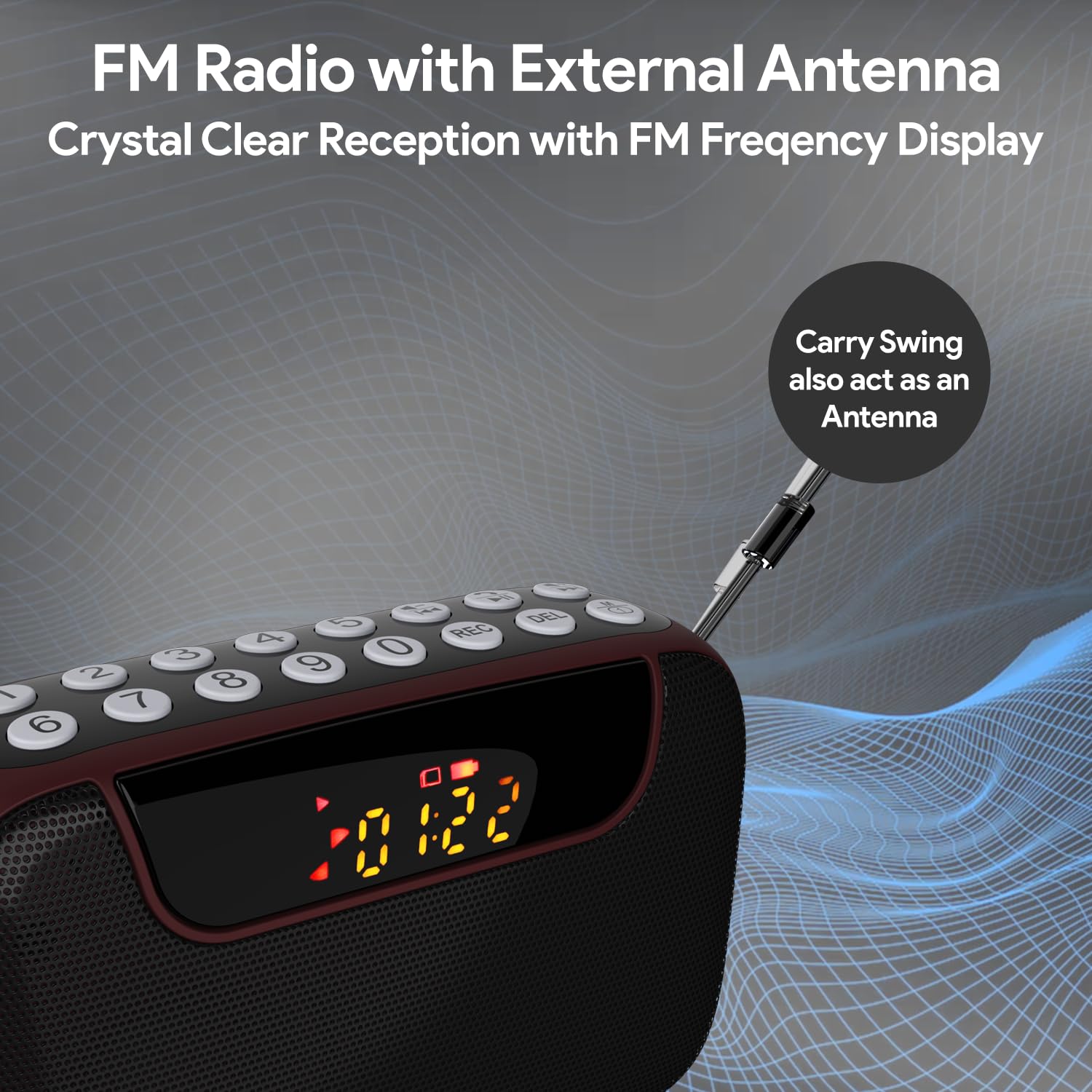
Figure 6: FM Radio with External Antenna
MP3 Playback (USB/SD/AUX)
Play music from USB drives, Micro SD cards, or external audio devices.
- USB/SD карта: Insert a USB flash drive or Micro SD card (with MP3 files) into the corresponding port. The device will automatically switch to USB/SD mode and begin playback. If not, press the M (режим) туура режимди тандоо үчүн баскычты басыңыз.
- AUX киргизүү: Connect an external audio device (e.g., smartphone, laptop) to the AUX port using the provided 3.5mm audio cable. Press the M (режим) AUX режимин тандоо үчүн баскычты басыңыз.
- колдонуу Ойнотуу/Тыныгуу жана Мурунку/Кийинки трек ойнотууну башкаруу үчүн баскычтар.
- Use the number pad for direct song selection (e.g., enter "007" for the 7th song).

Figure 7: MP3 Player with Track Selection
Үн жаздыруу
Record voice notes directly onto a connected USB drive or Micro SD card.
- Ensure a USB drive or Micro SD card is inserted into the device.
- басыңыз REC button to start recording. The display will show a recording indicator.
- Speak clearly into the built-in microphone.
- басыңыз REC button again to stop and save the recording.
- To play back recordings, switch to USB/SD mode and navigate to the recorded files.
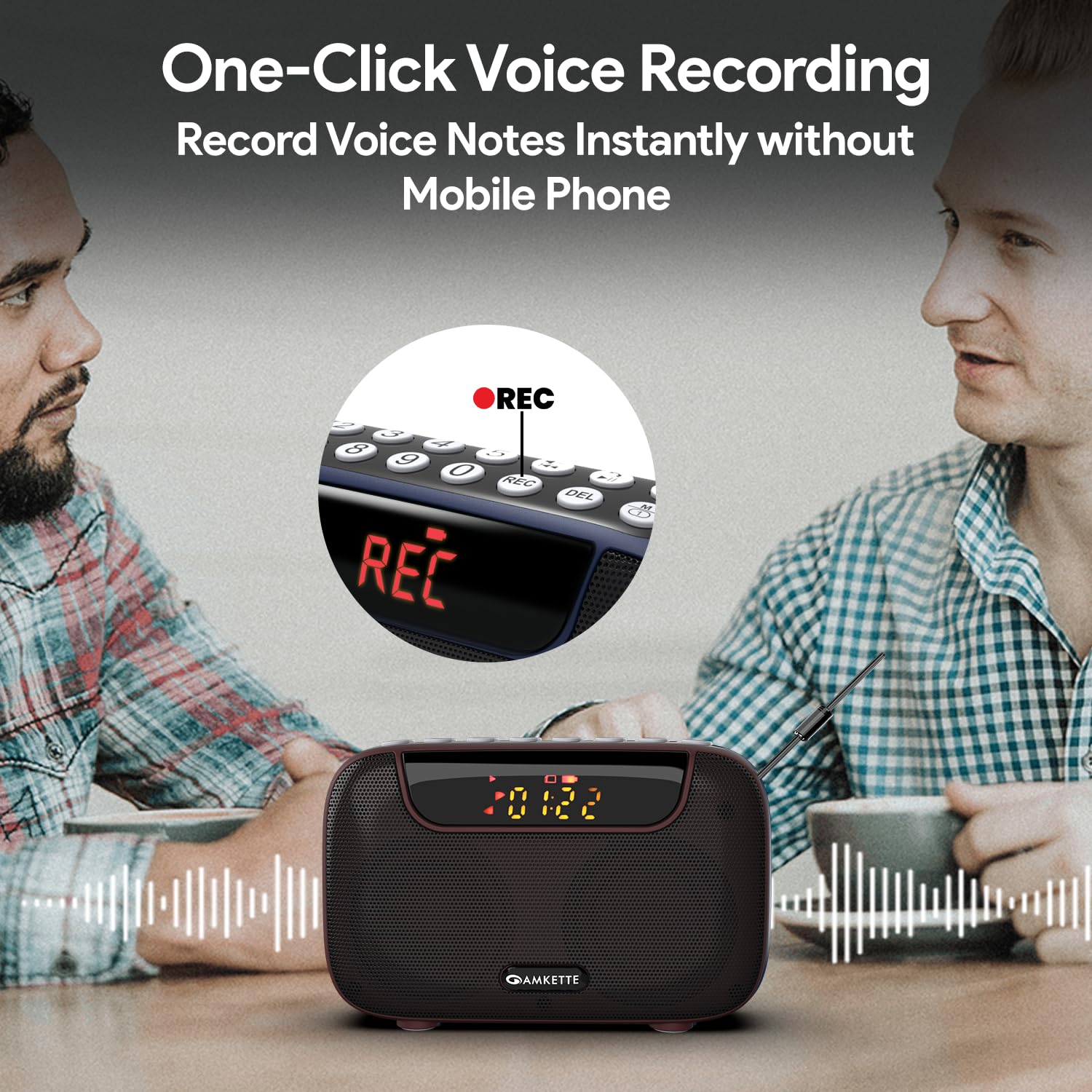
Figure 8: One-Click Voice Recording
FM Song Recording
Capture your favorite FM radio programs or songs directly from the radio.
- Ensure a USB drive or Micro SD card is inserted into the device.
- Switch to FM mode and tune to the desired station.
- басыңыз REC button to start recording the FM broadcast. The display will show a recording indicator.
- басыңыз REC button again to stop and save the recording.
- Recorded FM songs will be saved on the inserted storage device.

Figure 9: Built-in FM Song Recorder
Заряддоо
The Amkette Pocket Blast is equipped with a rechargeable Lithium Ion battery.
- Use only the provided Type-C charging cable.
- Connect to a standard USB power source (5V/1A recommended).
- Бузулган кабелдерди же заряддоо түзүлүштөрдү колдонуудан алыс болуңуз.
- Ашыкча температурада заряддабаңыз.
- The device offers over 7 hours of playback on a full charge (Bluetooth mode).

10-сүрөт: Узартылган ойнотуу убактысы
Техникалык тейлөө
Түзмөгүңүздүн узак мөөнөттүү иштешин жана оптималдуу иштешин камсыз кылуу үчүн, төмөнкү техникалык тейлөө көрсөтмөлөрүн аткарыңыз:
- Keep the device dry. Avoid exposure to water or excessive humidity.
- Аппаратты жумшак, кургак чүпүрөк менен тазалаңыз. Абразивдүү тазалагычтарды же эриткичтерди колдонбоңуз.
- Аппаратты колдонбогондо салкын, кургак жерде сактаңыз.
- Аппаратты түшүрүүдөн же катуу таасирлерден сактаныңыз.
- Түзмөктү өз алдынча бөлүктөргө бөлүүгө же оңдоого аракет кылбаңыз. Бул кепилдикти жокко чыгарат.
Проблемаларды чечүү
If you encounter any issues with your Amkette Pocket Blast, refer to the following common problems and solutions:
| Көйгөй | Мүмкүн себеп | Чечим |
|---|---|---|
| Түзмөк күйбөйт. | Low battery; Power switch is off. | Charge the device fully; Ensure the ON/OFF switch is in the "ON" position. |
| Үн жок. | Volume too low; Incorrect mode selected; Device not paired (Bluetooth). | Increase volume; Press "M" button to select correct mode; Re-pair Bluetooth device. |
| FM кабыл алуу начар. | Антенна узартылган эмес; Алсыз сигнал аймагы. | Fully extend the external antenna; Try moving to a location with better signal. |
| Жаздыруу мүмкүн эмес. | No USB/SD card inserted; Storage full; Card format issue. | Insert a compatible USB/SD card; Delete old files or use a new card; Ensure card is formatted correctly (FAT32). |
| Bluetooth тез -тез ажыратылат. | Device too far from Pocket Blast; Obstructions; Interference. | Keep devices within 10 meters (33 feet); Remove obstructions; Avoid strong electromagnetic interference. |
Техникалык шарттар
Detailed technical specifications for the Amkette Pocket Blast.
| Өзгөчөлүк | Деталь |
|---|---|
| Бренд | Amkette |
| Модель аты | Pocket Blast |
| Продукциянын өлчөмдөрү | 12 x 4.1 x 7.8 см |
| Элемент Салмагы | 264 г |
| Динамик чыгаруу күчү | 6 Ватт |
| Power Source | Батарея менен иштейт |
| Батарея түрү | Литий-ион (кошулган) |
| Батареянын иштөө мөөнөтү (орточо) | 7+ Hours (Bluetooth) |
| Заряддоо порту | С түрү (DC 5V) |
| Байланыш | Bluetooth, USB, SD карта, AUX |
| Tuner Technology | FM |
| Дисплей түрү | LCD |
| Келип чыккан өлкө | Кытай |
Кепилдик жана колдоо
Your Amkette Pocket Blast comes with a 1-Year Manufacturing Warranty.
For any issues, queries, or support, please contact our customer support team.
- Кардарларды колдоо: Please Call or WhatsApp our customer support team in case of any issues.
- Кепилдик дооматтары: Сатып алуу квитанциясын кепилдик дооматтары үчүн сатып алуунун далили катары сактаңыз.


