1. Киришүү
Сатып алганыңыз үчүн рахматasing the Xtreme 10W Fast Wireless Charger. This device is designed to provide convenient and efficient wireless charging for all Qi-enabled smartphones, including popular models from Apple, Samsung, Google, and Huawei. Please read this manual carefully before using the product to ensure proper operation and to maximize its lifespan.
2. Коопсуздук маалыматы
Продукциянын бузулушун же өзүңүзгө жана башкаларга жаракат келтирбөө үчүн, төмөнкү коопсуздук чараларын сактаңыз:
- Заряддоочу түзүлүштү сууга, нымдуулукка же экстремалдык температурага дуушар кылбаңыз.
- Do not disassemble, repair, or modify the device. This will void the warranty.
- Keep the charger away from strong magnetic fields.
- Do not place metal objects, credit cards, or other foreign objects on the charging pad during use, as this may interfere with charging or cause damage.
- Ensure the power adapter used is compatible with the charger's input voltage (5 вольт).
- Unplug the charger from the power source when not in use or during electrical storms.
3. Пакеттин мазмуну
Пакетте бардык буюмдар бар экенин текшериңиз:
- 1 x Xtreme 10W Fast Wireless Charger
- 1 x Power Cord (USB cable)
- 1 x USB Wall Adapter
- 1 х Колдонуучунун колдонмосу (бул документ)
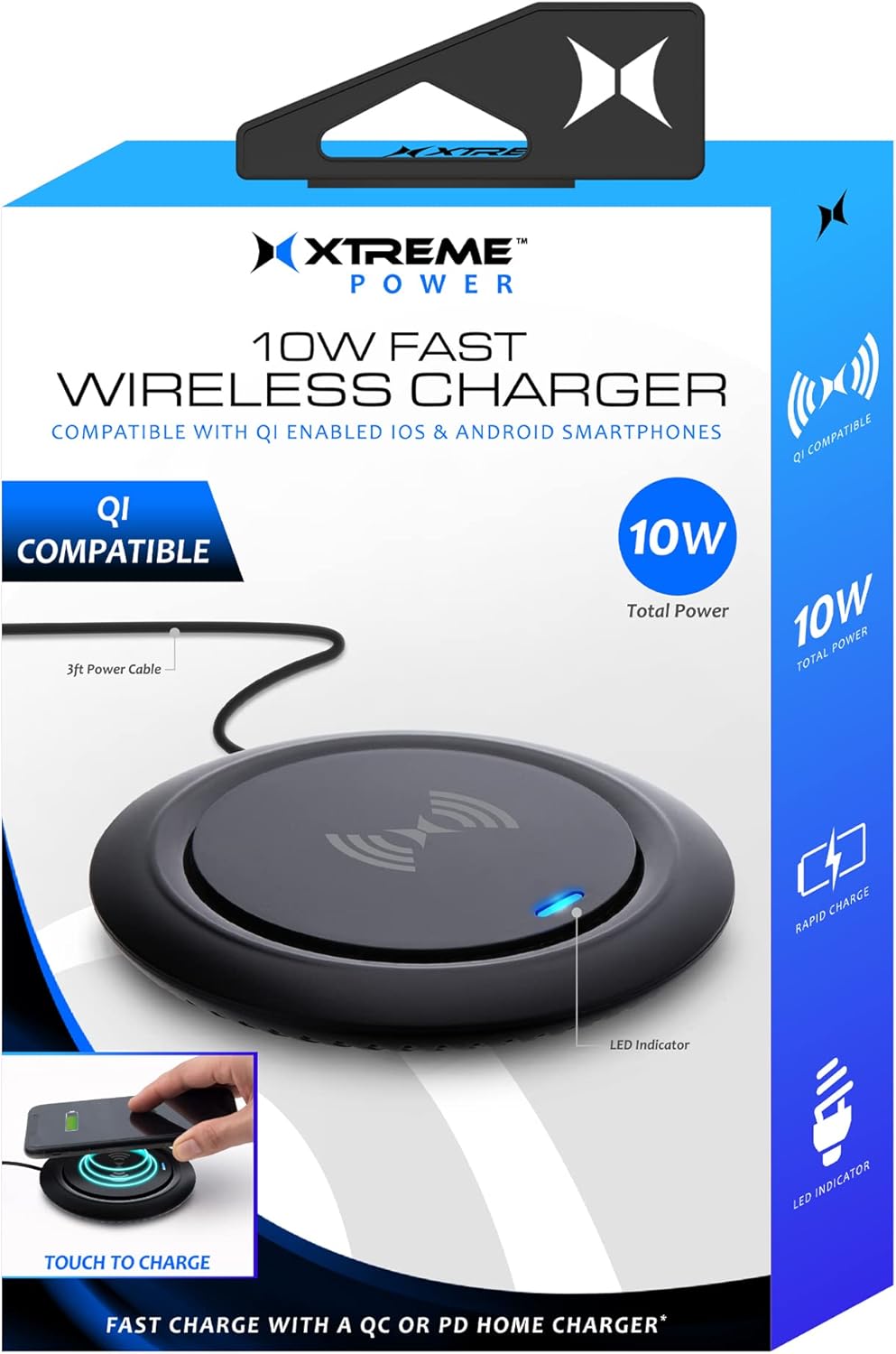
Image: The Xtreme 10W Fast Wireless Charger shown with its retail box, highlighting its compact design and key features like 10W total power and LED indicator.
4. Продукт бүтүп калдыview
The Xtreme 10W Fast Wireless Charger is a sleek and compact charging pad designed for convenience. It features a built-in LED indicator to show charging status and is compatible with a wide range of Qi-enabled devices.

Image: A close-up of the wireless charger, showing its minimalist design and the blue LED indicator light, which signifies power or charging status.
Негизги өзгөчөлүктөрү:
- 10W тез кубаттоо: Delivers efficient power to compatible devices.
- Qi-Enabled Device Compatibility: Works with iPhones, Samsung Galaxy, Google Pixel, LG, Huawei, and other Android smartphones that support Qi wireless charging.
- Built-in LED Light Indicator: Provides visual feedback on charging status.
- Жеңил жана компакт дизайн: Occupies minimal space, ideal for any desk or nightstand.
- 3ft Power Cord: Ийкемдүү жайгаштыруу варианттарын сунуштайт.
5. Орнотуу
- Кубат кабелин туташтыруу: Insert the small end of the included power cord (USB cable) into the input port on the back or side of the wireless charger.
- Кубат Булагына туташуу: Insert the USB-A end of the power cord into the included USB Wall Adapter.
- Розеткага сайыңыз: Plug the USB Wall Adapter into a standard wall outlet.
- Күйгүзүү: The LED indicator on the charger may briefly illuminate or flash upon receiving power, indicating it is ready for use.
6. Иштөө нускамалары
- Түзмөгүңүздү жайгаштырыңыз: Carefully place your Qi-enabled smartphone or other compatible device directly onto the center of the wireless charging pad. Ensure the device is centered for optimal charging.
- LED индикаторуна көңүл буруңуз:
- When a device is placed correctly and charging begins, the built-in LED light indicator will flash blue.
- If the LED does not flash blue, reposition your device until charging initiates.
- A solid blue light may indicate standby or full charge depending on the device. Refer to your device's charging indicators for confirmation.
- Заряддоо аяктады: Once your device is fully charged, remove it from the charging pad. The charger will return to standby mode.

Image: A smartphone is placed on the wireless charging pad, with the phone's screen indicating it is charging and the charger's LED glowing blue, demonstrating active charging.

Image: A hand is shown positioning a smartphone onto the wireless charger, illustrating the correct placement for initiating the charging process, with visual cues of the charging field.
7. Техникалык тейлөө
To ensure the longevity and optimal performance of your wireless charger, follow these maintenance guidelines:
- Тазалоо: Disconnect the charger from the power source before cleaning. Use a soft, dry, lint-free cloth to wipe the surface of the charging pad. Do not use harsh chemicals, cleaning solvents, or strong detergents.
- Сактагыч: Узак мөөнөткө колдонулбаганда, заряддагычты түз күндүн нурунан жана өтө температурадан алыс салкын, кургак жерде сактаңыз.
- Кабельге кам көрүү: Avoid bending or crimping the power cord excessively, as this can damage the internal wires.
8. Кыйынчылыктарды
If you encounter issues with your Xtreme 10W Fast Wireless Charger, please refer to the following common problems and solutions:
| Көйгөй | Мүмкүн себеп | Чечим |
|---|---|---|
| Charger LED is off / No power. | Not connected to power; faulty power adapter/cable; power outlet issue. | Ensure the power cord is securely connected to both the charger and the USB wall adapter. Try a different power outlet. Verify the USB wall adapter is functioning correctly. |
| Device is not charging / LED not flashing blue. | Device not Qi-enabled; device not centered; phone case too thick; foreign object on pad; faulty cable connection. |
|
| Жай кубаттоо. | Device not optimally placed; background apps running; non-fast charging adapter. | Ensure optimal placement. Close unnecessary background applications on your device. Use the included USB Wall Adapter for best performance. |
9. Техникалык шарттар
| Өзгөчөлүк | Деталь |
|---|---|
| Модель номери | XWC8-1022-BLK |
| Бренд | XTREME САНАРИПТИК ЖАШОО ТАРЗЫ АКСЕССУАРЛАРЫ |
| Байланыш технологиясы | Wireless (Qi Standard) |
| Киргизүү көлөмүtage | 5 вольт |
| Чыгуу күчү | Up to 10W Fast Wireless Charging |
| Шайкеш түзмөктөр | Qi-enabled smartphones (Apple iPhones, Samsung Galaxy, Google Pixel, Huawei, etc.) |
| Түс | Кара |
| Элемент Салмагы | 8 унция |
| Пакеттин өлчөмдөрү | 6.2 x 4.7 x 1.3 дюйм |
| Өндүрүүчү | Джем аксессуарлары |
| Келип чыккан өлкө | Кытай |
10. Кепилдик жана колдоо
This Xtreme product is covered by a standard manufacturer's warranty against defects in materials and workmanship. For specific warranty terms and conditions, please refer to the warranty card included with your purchase or contact the manufacturer directly.
For technical support, troubleshooting assistance, or warranty claims, please contact Xtreme Digital Lifestyle Accessories customer service. Contact information can typically be found on the product packaging or the brand's official webсайт.
Сураныч, кепилдик максаттары үчүн сатып алганыңыздын далилин сактап коюңуз.


