1. Киришүү
This manual provides instructions for the installation, operation, and maintenance of the Fanvil X3U Enterprise VoIP Phone. The Fanvil X3U is a cost-effective Gigabit IP phone featuring a high-resolution color display and multiple SIP lines, designed to enhance communication flexibility and productivity in business environments. It supports HD audio with G.722 and Opus wideband codecs for clear voice quality.
2. Пакеттин мазмуну
Орнотууну улантуудан мурун, таңгактагы бардык буюмдардын бар экендигин текшериңиз:
- Fanvil X3U IP телефон бирдиги
- Телефон
- Телефон шнур
- Ethernet кабели
- Телефон стенд
- Ыкчам орнотуу колдонмосу
- Note: Power adapter is not included and must be purchased separately if Power over Ethernet (PoE) is not used.
3. Физикалык бүтүрүүview
Familiarize yourself with the components of your Fanvil X3U phone.
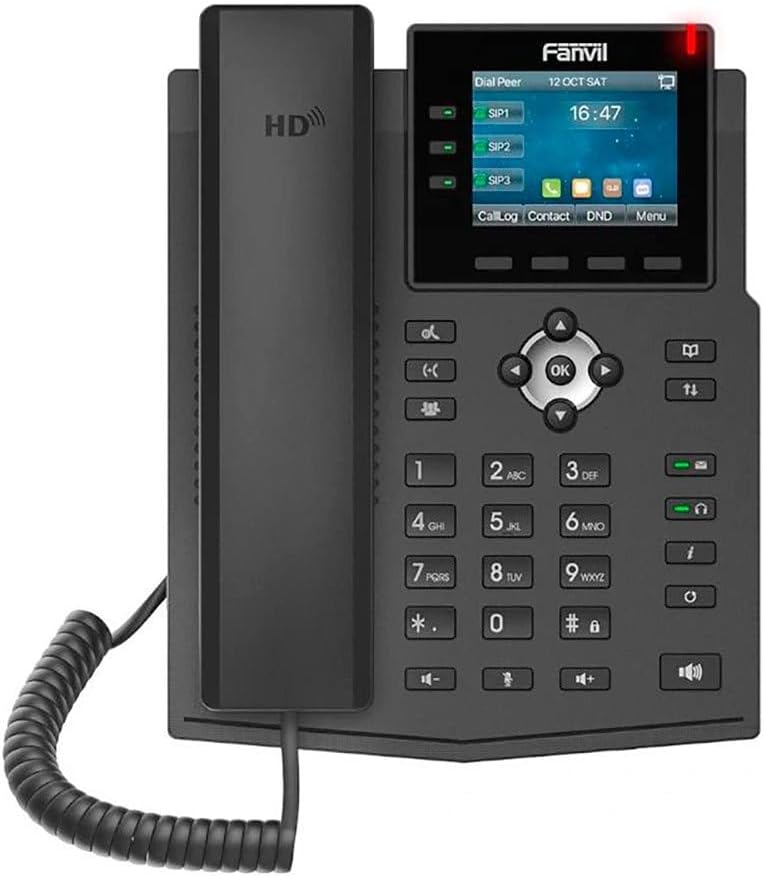
3.1-сүрөт: Фронт view of the Fanvil X3U IP Phone, showing the display, keypad, and handset.

3.2-сүрөт: Side view of the Fanvil X3U IP Phone, illustrating the ergonomic design and handset placement.

3.3-сүрөт: Side view of the Fanvil X3U IP Phone with its adjustable stand, showing the optimal viewбурч.
3.1 Баскычтоптун жайгашуусу
- Сап баскычтары: 3 programmable line keys with LED indicators for managing multiple SIP lines.
- Чабыттоо баскычтары: Менюну башкаруу үчүн Өйдө, Төмөн, Солго, Оңго жана ОК баскычтары.
- Жумшак баскычтар: Дисплейдин астындагы контекстти сезгич баскычтар.
- Функция баскычтары: Dedicated keys for features like Message, Headset, Mute, Hold, Transfer, Redial, Speakerphone, and Volume control.
- Сандык баскычтоп: Терүү үчүн стандарттуу 0-9, *, # баскычтары.
4. Орнотуу
4.1 Телефонду чогултуу
- Телефондук стендди тиркөө: Align the tabs on the phone stand with the slots on the back of the phone unit and push until it clicks into place.
- Телефонду туташтыруу: Оролгон трубканын шнурунун бир учун телефон түзмөгүндөгү трубканын портуна, экинчи учун трубкага сайыңыз.
- Ethernet кабелин туташтыруу: Plug one end of the Ethernet cable into the LAN port on the back of the phone and the other end into your network switch or router. If using PoE, this connection will also power the phone.
- Кубатты туташтырыңыз (эгер PoE колдонбосоңуз): If your network does not provide PoE, connect a compatible 5V/1A power adapter (not included) to the power port on the back of the phone and then to a power outlet.
- Гарнитураны туташтыруу (милдеттүү эмес): If using a wired headset, plug it into the headset port on the phone. The Fanvil X3U supports EHS wireless headsets.
4.2 Баштапкы тармак конфигурациясы
Upon first boot, the phone will attempt to obtain an IP address via DHCP. If successful, the IP address will be displayed on the screen. If not, you may need to configure network settings manually via the phone's menu or a web интерфейс.
4.3 SIP Account Registration
To make and receive calls, you must register at least one SIP account. This is typically done through the phone's web interface or by your system administrator. Consult your VoIP service provider or IT department for SIP account details (SIP server address, username, password).
- Телефонго кирүү web анын IP дарегин киргизүү менен интерфейс web браузер.
- Log in using the administrator credentials (default username and password can be found in the full user guide or from your administrator).
- Navigate to the SIP Account settings and enter the provided details.
- Save the settings and reboot the phone if prompted.
5. Иштөө нускамалары
5.1 Чалууларды жасоо
- Телефонду көтөрүңүз же басыңыз Динамик баскычы.
- Номерин тер сандык баскычтопту колдонуу менен.
- басыңыз Терүү soft key or wait a few seconds for the call to initiate automatically.
5.2 Чалууларга жооп берүү
Телефон шыңгырганда:
- Телефонду көтөрүңүз жооп берүү.
- Же болбосо, басыңыз Динамик баскычы же Жооп жумшак ачкыч.
5.3 Чалууларды башкаруу функциялары
- Кармап туруу: Активдүү чалуу учурунда, басыңыз кармап туруңуз Чалууну улантуу үчүн аны кайра басыңыз.
- өткөрүүсү: Активдүү чалуу учурунда, басыңыз Transfer баскычын басып, жаңы номерди териңиз, андан кийин басыңыз Transfer кайра (сокур которуу) же басуудан мурун экинчи тараптын жооп беришин күтүңүз Transfer (көчүрүүгө катышкан).
- Үнсүз: басыңыз Үнсүз button to mute your microphone. The LED will illuminate. Press again to unmute.
- Конференция: Активдүү чалуу учурунда, басыңыз Conf soft key, dial the third party's number, and then press Conf again to establish a three-way conference.
- Үн почтасы: басыңыз Кабар button to access your voicemail.
5.4 Дисплей жана меню навигациясы
The 2.8-inch color display shows call information, status, and menu options. Use the navigation keys (Up, Down, Left, Right, OK) and soft keys to browse and select options.
6. Техникалык тейлөө
6.1 Тазалоо
- Use a soft, dry cloth to clean the phone's surface and display.
- Do not use liquid cleaners or aerosol sprays directly on the phone.
- өжөр белгилери үчүн, жеңил гampчүпүрөктү суу же жумшак, абразивдүү тазалагыч менен жууп салыңыз.
6.2 Микропрограмма жаңыртуулары
Periodically check the Fanvil website or consult your system administrator for firmware updates. Firmware updates can provide new features, performance improvements, and security enhancements. Updates are typically applied via the phone's web интерфейс.
6.3 Айлана-чөйрөнү коргоо
- Телефонду түз күн нурунан, жылуулук булактарынан жана ашыкча нымдуулуктан алыс кармаңыз.
- Аппараттын айланасында жетиштүү желдетүүнү камсыз кылыңыз.
7. Кыйынчылыктарды
| Көйгөй | Мүмкүн себеп | Чечим |
|---|---|---|
| Телефон күйбөйт. | PoE же кубат адаптеринен кубат жок. | Check Ethernet cable connection (for PoE) or power adapter connection and outlet. Ensure power adapter meets specifications (5V/1A). |
| Чалууларды жасоо/кабыл алуу мүмкүн эмес. | SIP эсеби катталган эмес; Тармакка туташуу маселеси. | Verify SIP account settings in the web interface. Check network cable and IP address. Contact your VoIP provider or administrator. |
| Үн сапатынын начардыгы (жаңылык, статикалык). | Network congestion; Faulty cable/handset; Environmental interference. | Check network bandwidth. Replace handset cord or Ethernet cable. Move phone away from other electronic devices. |
| Дисплей бош же тоңуп калган. | Software error; Power issue. | Perform a power cycle (unplug and replug power). If issue persists, contact support. |
8. Техникалык шарттар
- Дисплей: 2.8-inch (320x240 pixel) color display
- SIP линиялары: 6
- Ethernet порттору: Эки порттуу гигабиттик Ethernet
- Аудио кодектер: HD audio with G.722 and Opus wideband codecs
- Гарнитураны колдоо: EHS wireless headset support
- Протоколдор: IPv4, IPv6
- Өлчөмдөрү (L x W x Y): 11 x 9 x 3 дюйм (болжол менен)
- Элемент Салмагы: 1.98 фунт (болжол менен)
- Кубат булагы: Зымдуу электр (кубат адаптери кошулган эмес, PoE колдоого алынат)
- Материал: Пластик
- Түсү: Кара
9. Кепилдик жана колдоо
9.1 Кепилдик маалыматы
The Fanvil X3U Enterprise VoIP Phone typically comes with a manufacturer's limited warranty. Please refer to the warranty card included with your product or visit the official Fanvil webдеталдуу кепилдик шарттары жана шарттары үчүн сайт. Сатып алуу квитанциясын кепилдик дооматтары үчүн сатып алуунун далили катары сактаңыз.
9.2 Техникалык колдоо
For technical assistance, troubleshooting beyond this manual, or inquiries regarding your device, please contact your authorized Fanvil reseller or your VoIP service provider's support team. You may also visit the official Fanvil support webКөп берилүүчү суроолор, документтер жана байланыш маалыматы үчүн сайт.
Фанвилдин расмий өкүлү Webсайт: www.fanvil.com


