1. Киришүү
The MOOER F4 Wireless Footswitch Controller is designed to provide seamless, hands-free control over your MOOER Prime P1, looper, and drum machine functions. This compact and versatile device enhances your performance and practice sessions by allowing quick preset switching, looper management, and drum pattern control. Optimized for clarity and ease of use, the F4 integrates effortlessly into your setup, offering robust wireless connectivity and extensive customization options via its dedicated mobile application.
2. Кутуда эмне бар
- MOOER F4 Wireless Footswitch Controller
- USB-C заряддоо кабели
- Колдонуучунун Колдонмосу (бул документ)
3. Продукт бүтүп калдыview
Familiarize yourself with the physical components and controls of your MOOER F4 Wireless Footswitch Controller.

Сүрөт 3.1: Жогорку view of the MOOER F4 Wireless Footswitch Controller, showing the four footswitches (A, B, C, D) and the central display screen.
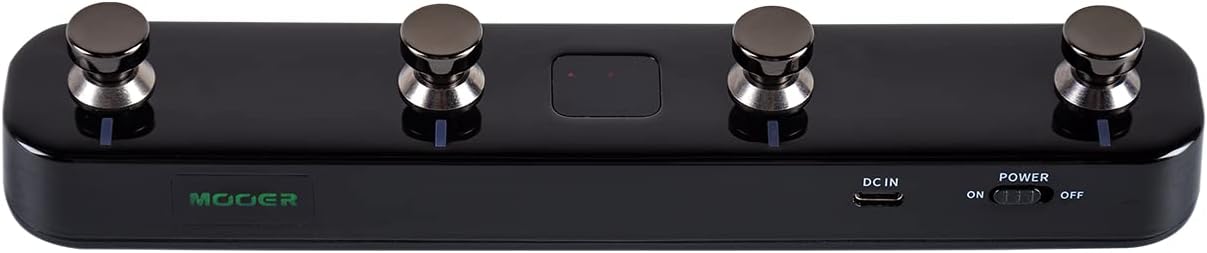
Сүрөт 3.2: Төмөнкү view of the MOOER F4 Wireless Footswitch Controller, highlighting the power switch, DC IN port, and USB port.
3.1 Башкаруу каражаттары жана көрсөткүчтөр
- Footswitches (A, B, C, D): Used for preset switching, looper control, drum machine functions, and custom MIDI commands.
- Дисплей экраны: Shows current bank/preset number, mode, and other relevant information.
- Кубат которгучу: Toggles the device on/off.
- DC IN порту: For external power supply (5V 1A adapter).
- USB порт: For charging the internal battery and connecting to a computer for firmware updates or MIDI over USB.
- LED көрсөткүчтөрү: Provide visual feedback on battery status, Bluetooth connection, and footswitch activity.
4. Орнотуу
4.1 Күйгүзүү/өчүрүү жана кубаттоо
- Күйгүзүү үчүн: Slide the POWER switch to the 'ON' position.
- Өчүрүү үчүн: Slide the POWER switch to the 'OFF' position.
- Заряддоо: Connect the F4 to a 5V 1A USB power adapter using the provided USB-C cable. The battery indicator LED will show charging status. A full charge typically provides several hours of operation.
4.2 Bluetooth жупташтыруу жана туташуу
The F4 connects wirelessly via Bluetooth to compatible MOOER devices and mobile applications.
- Ensure the F4 is powered on and within range of your MOOER device (e.g., Prime P1/P2) or mobile device.
- On your MOOER device or mobile app, initiate the Bluetooth pairing process.
- On the F4, press and hold footswitches A жана C simultaneously for a few seconds to enter pairing mode. The Bluetooth indicator LED will flash.
- Тандоо