1. Киришүү
Thank you for choosing the ErGear 63" x 55" Dual Motor L-Shaped Standing Desk. This manual provides essential information for the safe assembly, operation, and maintenance of your new electric height-adjustable desk. Please read these instructions carefully before use and retain them for future reference.

Image 1.1: The ErGear 63" x 55" L-Shaped Standing Desk, showcasing its spacious design and electric height adjustment feature.
2. Коопсуздук маалыматы
Коопсуз эксплуатацияны камсыз кылуу жана зыян келтирбөө үчүн төмөнкү коопсуздук эрежелерин сактаңыз:
- Колдонуудан мурун бардык компоненттердин бекем бекитилишин текшериңиз.
- Балдарды жана үй жаныбарларын бийиктикти тууралоодо столдон алыс кармаңыз.
- Үстөлдү ашыкча жүктөбөңүз. Максималдуу салмак сыйымдуулугу үчүн мүнөздөмөлөрдү караңыз.
- Суюктуктарды түздөн-түз башкаруу панелине же электрдик тетиктердин жанына коюудан алыс болуңуз.
- Тазалоодон же тейлөөдөн мурун электр энергиясын өчүрүңүз.
- Бул үстөл гана ички колдонуу үчүн иштелип чыккан.

Image 2.1: The desk is certified safe, meeting US federal and state air standards for low VOC emissions, and complies with FCC and UL safety standards.
3. Пакеттин мазмуну
The ErGear 63" L-Shaped Electric Standing Desk package includes all necessary components for assembly. Please verify that all parts are present and undamaged before beginning assembly.
- Desktop sections (multiple pieces for L-shape)
- Leg columns with dual motors
- Бут жаздыкчалары/негиздери
- Башкаруу панели
- Кубаттуу адаптер жана кабелдер
- Монтаждоочу жабдык (буроолор, болттар, шаймандар)
- Колдонмо
4. Орнотуу жана чогултуу
Assembly of the ErGear L-Shaped Standing Desk requires two people. A screwdriver is recommended for assembly. For detailed step-by-step instructions, please refer to the comprehensive PDF installation manual available online or included with your product.
4.1 Чогултуу параметрлери
The L-shaped desktop can be assembled with the longer section on either the left or right side, allowing you to customize the desk to fit your space and preference.
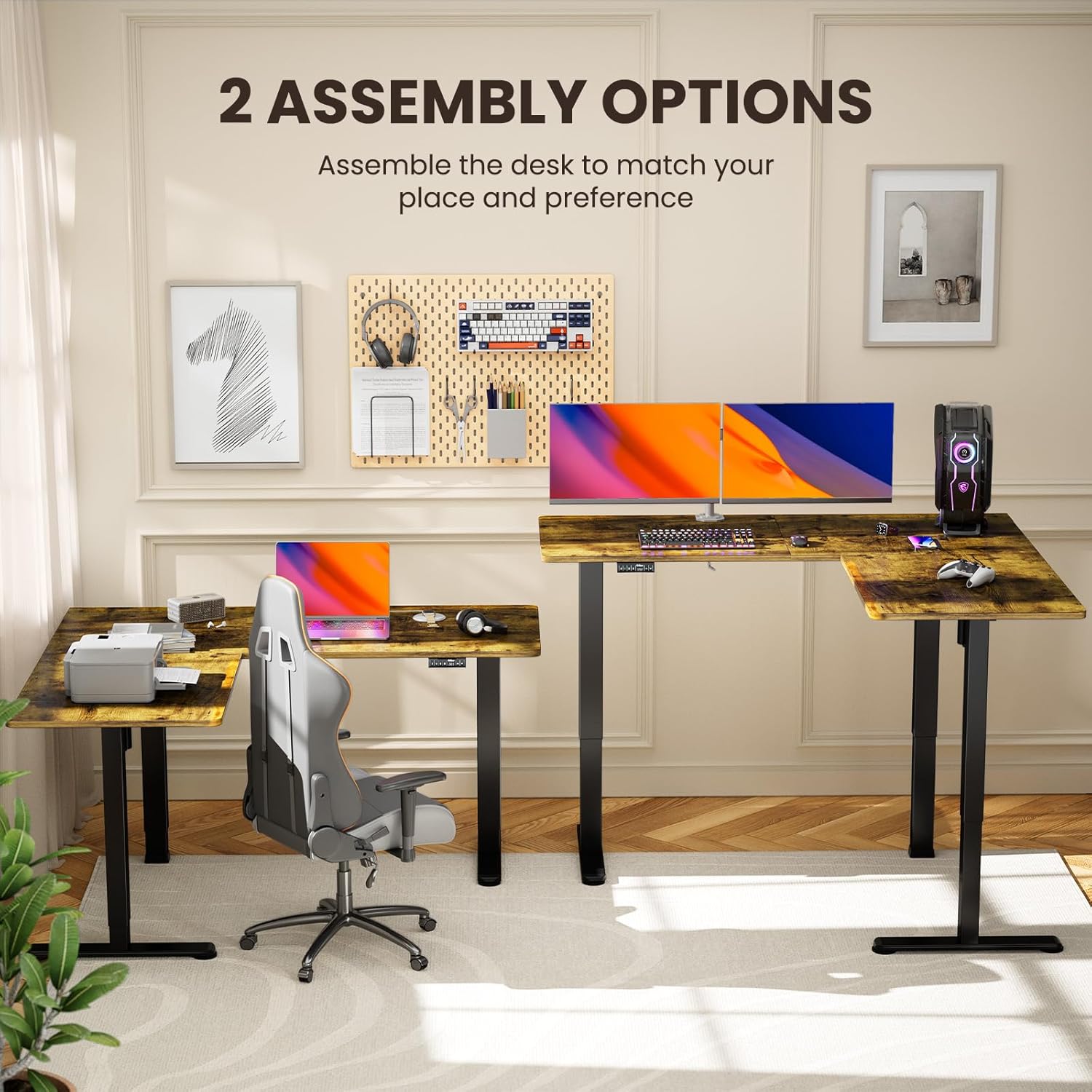
Image 4.1: Illustration of the two possible configurations for the L-shaped desktop, allowing for left or right-hand setup.

Сүрөт 4.2: үстүнкү view demonstrating the flexibility of assembling the desk with the longer section on either side.
4.2 General Assembly Steps (Refer to PDF for details)
- Бардык компоненттерди таңгактан чыгарып, бөлүктөрдүн тизмесине каршы текшериңиз.
- Attach the lifting columns to the desktop sections.
- Secure the foot pads to the lifting columns.
- Connect the motor cables and control panel to the main control box.
- Plug in the power adapter and perform initial calibration as per the detailed manual.
5. Иштөө нускамалары
Your ErGear standing desk features a dual-motor system for smooth and quiet height adjustments, along with a control panel for easy operation and memory presets.
5.1 Бийиктигин тууралоо
Use the up and down arrow buttons on the control panel to adjust the desk height. The desk can be adjusted from 28.35 inches to 46.46 inches.

Image 5.1: The desk in a standing position, demonstrating the electric height adjustment feature for ergonomic use.
5.2 Эстутум алдын ала орнотуулары
The control panel allows you to save custom sit and stand height settings for quick transitions. Consult your detailed manual for specific instructions on setting and recalling memory positions.
5.3 Dual Motor System
The desk is equipped with dual motors for faster, smoother, and quieter operation. This system ensures stable and reliable long-term performance.

Сүрөт 5.2: Ички view highlighting the dual motor mechanism responsible for the desk's smooth and efficient height adjustment.

Image 5.3: The quiet operation of the desk allows for an undisturbed work environment, as demonstrated by a sleeping cat.
6. Техникалык тейлөө
Regular maintenance helps prolong the life and performance of your desk.
- Тазалоо: Иш тактасын жана алкакты жумшак менен сүртүңүз, гamp кездеме. Катуу химиялык заттардан же абразивдүү тазалагычтардан алыс болуңуз.
- Кабелдик башкаруу: Periodically check and organize cables to prevent entanglement or damage during height adjustments.
- бекиткичтер: Occasionally check all screws and bolts to ensure they remain tight.
7. Кыйынчылыктарды
Үстөлүңүздө көйгөйлөргө туш болсоңуз, төмөнкү жалпы чечимдерди караңыз:
| Көйгөй | Мүмкүн себеп | Чечим |
|---|---|---|
| Иш стол кыймылдабайт | Power cable disconnected, overload, motor error | Check power connections. Reduce weight on desk. Refer to manual for error code interpretation and reset procedures. |
| Бир калыпта эмес бийиктикти жөнгө салуу | Obstruction, calibration issue | Ensure no obstructions. Perform a reset/calibration as per the detailed manual. |
| Unusual noise during adjustment | Loose fasteners, obstruction | Check all fasteners for tightness. Remove any objects that may be interfering with the lifting columns. |
If the problem persists, please contact ErGear customer support.
8. Техникалык шарттар
Key technical details for your ErGear L-Shaped Standing Desk:
- Модель номери: EGESD8V
- Продукциянын өлчөмдөрү: 55"D x 63"W x 28.35"H
- Минималдуу бийиктиги: 28.35 дюйм
- Максималдуу бийиктиги: 46.46 дюйм
- Maximum Салмагы сунуш: 220 фунт
- Негизги материал: Carbon Steel
- Top Материал түрү: Жыгач (ламинатталган)
- Моторлор: Кош мотор системасы
- Ассамблея: Милдеттүү (2 адам сунушталат)
- Кепилдик: 5 жыл кепилдик

Image 8.1: Detailed dimensions of the ErGear L-Shaped Standing Desk, including the adjustable height range.

Image 8.2: The desk's robust lifting system is tested to support up to 220 lbs, ensuring dependable performance.
9. Кепилдик жана колдоо
ErGear provides a 5-year warranty for this product, covering parts and labor. For warranty claims, technical assistance, or further inquiries, please visit the official ErGear store or contact customer support.
ErGear Store: Amazonдагы ErGear дүкөнүнө барыңыз
Орнотуу боюнча колдонмо (PDF): For a detailed installation guide, please refer to the official PDF document: PDF колдонмосун жүктөп алыңыз


