Introduction
Welcome to the user manual for your new vtech CS5209 DECT 6.0 Cordless Phone Expansion Handset. This manual provides detailed instructions for setting up, operating, and maintaining your new handset. For optimal performance, please read these instructions carefully before use.
Кутуда эмне бар
- CS5209 Cordless Handset
- Handset Battery Pack
- Handset Battery Cover
- Charger Cradle for Handset
- Заряддоочу беседка үчүн кубат адаптери
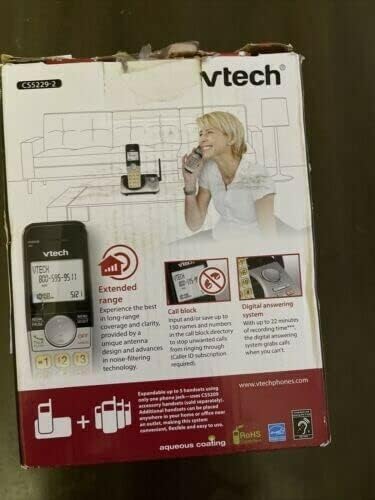
This image displays the product packaging for the vtech CS5209 DECT 6.0 Cordless Phone Expansion Handset. The box highlights key features including extended range for better coverage and clarity, a call block function capable of storing up to 150 numbers to prevent unwanted calls (requires Caller ID subscription), and a digital answering system with up to 17 minutes of recording time to capture messages when you are unavailable. The packaging also indicates that the system is expandable up to 5 handsets using only one phone jack.
Жайгашуу
1. Батареяны орнотуу
- Телефондун артындагы батарея отсегин табыңыз.
- Insert the battery pack into the compartment, ensuring the connector is properly aligned with the socket.
- Close the battery compartment with the battery cover until it clicks into place.
2. Телефонду заряддоо
- Connect the small end of the power adapter to the charger cradle.
- Кубат адаптеринин чоң учун стандарттуу электр розеткасына сайыңыз.
- Place the handset face forward into the charger cradle. The charge indicator light on the handset should illuminate, indicating it is charging.
- Батареянын толук сыйымдуулугун камсыз кылуу үчүн телефонду алгачкы колдонуудан мурун кеминде 16 саат кубаттоого уруксат бериңиз.
3. Телефонду каттоо
The CS5209 is an expansion handset and must be registered to a compatible vtech DECT 6.0 base unit (e.g., CS5229, CS5249) before use. Refer to your base unit's manual for specific registration instructions. Generally, the process involves:
- Place the CS5209 handset in its charger cradle.
- On your base unit, press and hold the БЕТ or АППАРАТТЫН локатору button for approximately 4 seconds until the registration light on the base unit begins to flash.
- 10 секунданын ичинде басыңыз # key on the CS5209 handset.
- The handset will display "Registering..." and then "Handset Registered" if successful. If registration fails, try again or consult the base unit's manual for troubleshooting.
Иштөө нускамалары
Чалууларды кабыл алуу жана кабыл алуу
- Чалуу үчүн: Басыңыз TALK / FLASH or any dial pad key, then dial the phone number.
- Чалууга жооп берүү үчүн: Телефон шыңгыраганда, басыңыз TALK / FLASH or any dial pad key.
- Чалууну аяктоо үчүн: Басыңыз ӨЧҮРҮҮ/ТААЗ or place the handset back in the charger cradle.
- Үндү тууралоо: Чалуу учурунда басыңыз VOL+ or VOL- on the side of the handset to adjust the earpiece volume.
Чалууларды бөгөттөө өзгөчөлүгү
The call block feature allows you to stop unwanted calls from ringing through. You can input and save up to 150 names and numbers in the call block directory. This feature requires a Caller ID subscription from your telephone service provider.
- Чалуучунун ID тарыхынан номерди бөгөттөө үчүн: Ал эми кайраviewing Caller ID history, press БЛОК to add the number to the block list.
- To Manually Add a Number to Block List: Access the Call Block menu through the handset's menu options and follow the prompts to add a number.
Санариптик жооп берүү тутуму
The digital answering system, integrated with your base unit, automatically answers calls and records messages when you are unavailable. It offers up to 17 minutes of recording time.
- Ойнотулган билдирүүлөр: Access the answering system menu on your handset or base unit to play new or old messages.
- Жарыяны жаздыруу: You can record a personalized outgoing announcement through the answering system menu.
- Кабарларды жок кылуу: Messages can be deleted individually or all at once through the answering system menu.
Домофон
If you have multiple registered handsets, you can use the intercom feature to communicate between them.
- Домофонду иштетүү үчүн: Басыңыз INT on the handset, then dial the number of the desired handset (e.g., 2 for Handset 2).
- To Answer Intercom: Басыңыз TALK / FLASH when an intercom call comes in.
Техникалык тейлөө
Телефонуңузду тазалоо
To keep your phone clean, wipe it with a soft, slightly damp cloth. Do not use cleaning sprays or harsh chemicals, as these may damage the finish or electrical components.
Батареяга кам көрүү
- Always charge the handset for at least 16 hours before initial use.
- If the handset will not be used for an extended period, remove the battery to prevent leakage.
- Replace the battery when the handset consistently shows a low battery warning or has significantly reduced talk/standby time. Use only the specified replacement battery pack.
Проблемаларды чечүү
| Көйгөй | Чечим |
|---|---|
| Handset does not register to the base unit. | Ensure the handset battery is charged. Follow the registration steps carefully. If issues persist, try resetting the base unit by unplugging its power for a few minutes, then plugging it back in and attempting registration again. |
| Терүү үнү жок. | Check that the base unit is properly connected to the telephone line and power outlet. Ensure the handset is registered to the base unit. |
| Poor call quality (static, interference). | Move the handset closer to the base unit. Avoid placing the base unit near other electronic devices (Wi-Fi routers, microwaves, computers) that may cause interference. |
| Автожооп берүүчү система билдирүүлөрдү жазбайт. | Check if the answering system is turned ON. Ensure there is sufficient recording time available (up to 17 minutes). Delete old messages to free up space if necessary. |
| Handset battery does not hold a charge. | Ensure the handset is properly seated in the charger cradle. Clean the charging contacts on both the handset and cradle. If the battery is old, it may need to be replaced. |
Техникалык шарттар
- Модел: CS5209
- Телефон түрү: Cordless DECT 6.0 Expansion Handset
- Түсү: Кара
- Кубат булагы: Corded Electric (for charger cradle)
- Терүүчү түрү: Жалгыз баскычтоп
- Жооп берүү системасынын түрү: Digital (integrated with compatible base unit)
- Жазуу жөндөмдүүлүгү: Up to 17 minutes (on compatible base unit)
- Шайкеш түзмөктөр: PSTN, ISDN (via compatible base unit)
- Көп линия операциясы: Multi-Line Operation (via compatible base unit)
- Чалуучунун идентификациясы: Yes (requires subscription from service provider)
- Өндүрүүчү: vtech
Кепилдик жана колдоо
For warranty information, technical support, or to purchase replacement parts, please visit the official vtech webсайтка же кардарларды тейлөөгө кайрылыңыз. Сатып алуу квитанциясын кепилдик дооматтары үчүн сатып алуунун далили катары сактаңыз.
Official vtech webсайт: www.vtechphones.com


