Nacon S55145063

Nacon S55145063 Unisex Adult Backpack User Manual

Модели: S55145063

1. Киришүү

Thank you for choosing the Nacon S55145063 Unisex Adult Backpack. This manual provides essential information for the proper use, care, and maintenance of your new backpack. Please read this manual thoroughly before using the product to ensure optimal performance and longevity.

2. Коопсуздук маалыматы

3. Продукт бүтүп калдыview

The Nacon S55145063 backpack is designed for versatile use, featuring multiple compartments and a durable construction. It includes a main storage area, front pockets, and adjustable shoulder straps for comfort.

Фронт view of the Nacon S55145063 backpack, black with a blue stripe and Nacon logo.

Сүрөт 3.1: Алдыңкы view of the Nacon S55145063 backpack, showcasing its sleek design and the Nacon logo at the bottom.

Side view of the Nacon S55145063 backpack with the main compartment open, revealing its spacious interior.

3.2-сүрөт: Каптал view of the backpack with the main compartment unzipped, illustrating the wide opening for easy access to contents.

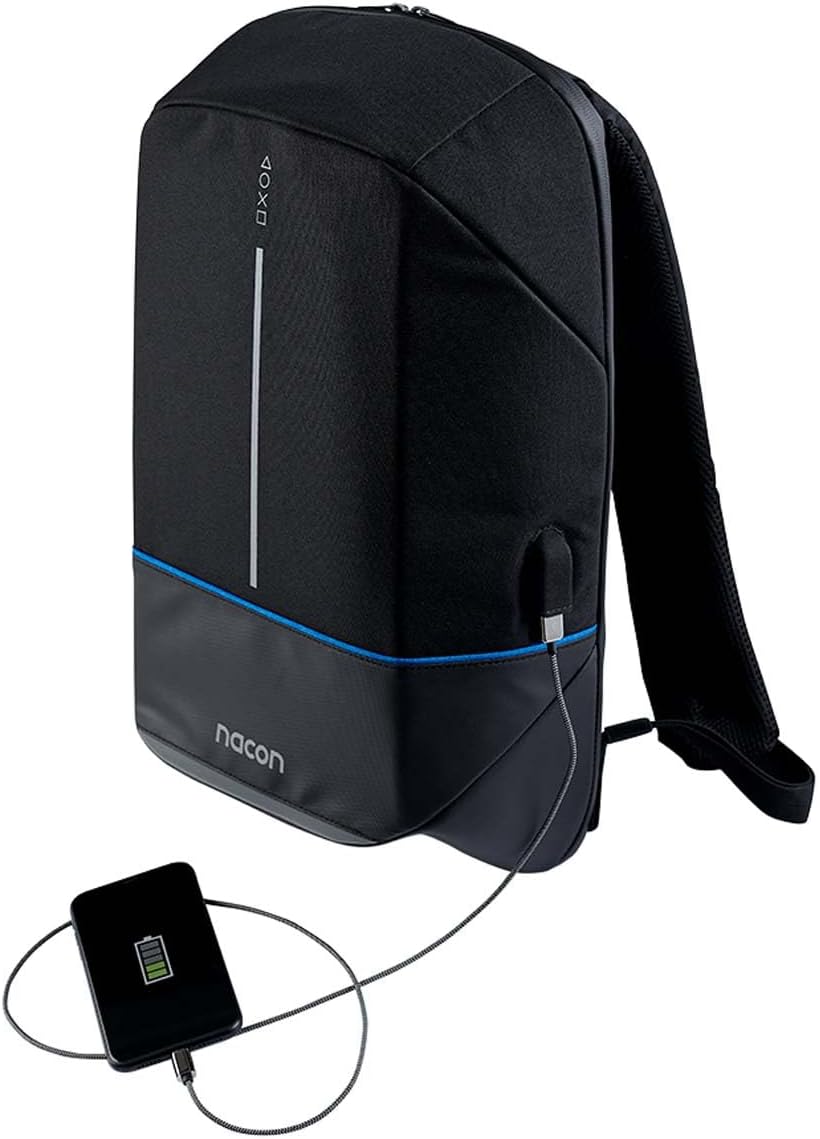
Side view of the Nacon S55145063 backpack showing an external USB charging port with a smartphone connected.

Figure 3.3: The backpack's integrated external USB charging port, demonstrating its utility for charging devices on the go (power bank not included).

4. Орнотуу

The Nacon S55145063 backpack requires minimal setup before use.

  1. Пакеттен чыгаруу: Remove the backpack from its packaging. Inspect for any signs of damage during transit.
  2. Боолорду тууралоо: Place the backpack on your back. Use the adjustable buckles on the shoulder straps to achieve a comfortable and secure fit. The backpack should sit snugly against your back, with the weight evenly distributed.
  3. USB Charging Port (if applicable): If your model includes an external USB charging port, locate the internal USB cable. Connect your portable power bank (not included) to this internal cable. You can then connect your device to the external USB port for charging.

5. Иштөө

Using your Nacon S55145063 backpack is straightforward.

6. Техникалык тейлөө

Proper care will extend the life of your backpack.

7. Кыйынчылыктарды

Жалпы маселелер жана аларды чечүү жолдору.

КөйгөйМүмкүн себепЧечим
Zipper stuck or difficult to moveFabric caught in zipper; lack of lubricationGently pull fabric away; apply zipper lubricant or wax.
Кездемедеги тактарКир же төгүлгөнSpot clean with mild soap and water, or machine wash according to care instructions.
Shoulder straps feel uncomfortableImproper adjustment; overloaded backpackAdjust straps for a snug fit; reduce load if too heavy.

8. Техникалык шарттар

ӨзгөчөлүкДеталь
Модель номериS55145063
БрендНакон
ТүсКөп түстүү
Өлчөмдөрү (L x W x Y)15.4 x 49.29 x 32.2 см (болжол менен 6.06 x 19.41 x 12.68 дюйм)
Салмагы1.06 килограмм (болжол менен 2.34 фунт)
Care InstructionsМашинада жуу

9. Кепилдик жана колдоо

Nacon products are manufactured to high-quality standards. For information regarding warranty coverage, please refer to the warranty card included with your purchase or visit the official Nacon website. For technical support or inquiries, please contact Nacon customer service through their official channels.

Онлайн колдоо: Visit the official Nacon webКөп берилүүчү суроолор, колдоо ресурстары жана байланыш маалыматы үчүн сайт.

Өндүрүүчү: Након

Тектеш документтер - S55145063

Preview Nacon RIG 600 PRO зымсыз оюн гарнитурасы колдонуучусунун колдонмосу
Nacon RIG 600 PRO зымсыз оюн гарнитурасы үчүн кеңири колдонуучу колдонмосу, анда PS5, PS4, PC жана Nintendo Switch үчүн орнотуулар, жупташтыруу боюнча нускамалар, режимдин түшүндүрмөлөрү, Companion колдонмосу аркылуу ыңгайлаштыруу, коопсуздук чаралары жана колдоо маалыматы камтылган.
Preview RIG 900 MAX HX колдонуучусунун колдонмосу - Nacon зымсыз оюн гарнитурасы
Nacon RIG 900 MAX HX зымсыз оюн гарнитурасы үчүн кеңири колдонуучу колдонмосу, Xbox, PlayStation, PC жана Switch үчүн орнотуулар, кубаттоо, зымсыз режимдер, жупташтыруу, RIG Navigator колдонмосу аркылуу ыңгайлаштыруу жана техникалык мүнөздөмөлөр.
Preview Nacon CL-210 Gaming Keyboard: Features, Setup & Support
Explore the Nacon CL-210 Gaming Keyboard. This guide provides essential information on setup, features like RGB backlighting and macro keys, technical specifications, and support resources for gamers.
Preview NACON GC-200WLRGB зымсыз компьютер контроллеринин колдонуучу колдонмосу
NACON GC-200WLRGB зымсыз компьютер контроллери үчүн толук колдонуучу колдонмосу, анда продуктунун мүнөздөмөлөрү, таңгактын мазмуну, башкаруу элементтери, орнотуу, кубаттоо, D/X которгучу жана жарыктандыруу сыяктуу функциялар, маанилүү коопсуздук чаралары, эргономика, техникалык мүнөздөмөлөр жана кардарларды колдоо боюнча маалымат камтылган.
Preview Nacon MG-X контроллери: Колдонуучунун колдонмосу жана мүнөздөмөлөрү
Android телефондору үчүн Nacon MG-X зымсыз контроллеринин кеңири колдонуучу колдонмосу. Функциялары, орнотуулары, техникалык мүнөздөмөлөрү жана коопсуздук чаралары.
Preview Nacon MG-X Controller User Manual and Features
Comprehensive user manual for the Nacon MG-X Controller for iPhone, detailing features, setup, usage, compatibility, and technical specifications. Learn how to connect, charge, and reconfigure your controller for an enhanced gaming experience.