1. Киришүү
The CNBINGO RSR04 WiFi Smart Switch Module allows you to convert traditional light switches into smart switches, enabling control via a smartphone application, voice commands through Amazon Alexa or Google Assistant, and scheduled automation. This module is designed for integration behind existing wall switches, offering a discreet smart home upgrade.
2. Коопсуздук маалыматы
- Электр коркунучу: Installation involves working with high voltage electricity. Always turn off the main power supply at the circuit breaker before installation, wiring, or maintenance.
- Кесиптик орнотуу: Эгер сиз электр зымдарын орнотууну билбесеңиз, квалификациялуу электрикке кайрылыңыз.
- Үй ичинде гана колдонуу: This device is intended for indoor use in dry environments.
- Жүктөө жөндөмдүүлүгү: 1000 Вт максималдуу жүктөө кубаттуулугунан ашпаңыз.
- Шайкештик: Ensure your existing wiring and switch box are compatible with the module's dimensions.
3. Пакеттин мазмуну
- CNBINGO RSR04 WiFi Smart Switch Module (Quantity: 4)
- Capacitor (Quantity: 4)
- User Manual (Quantity: 4)
4. Техникалык шарттар
| Параметр | Нарк |
|---|---|
| Модель номери | RSR04 |
| Өлчөмдөрү (L x W x Y) | 5.5 x 3.8 x 2.5 см |
| Weight (per module) | Болжол менен 32.5 г |
| Электр камсыздоо | AC 180-240V, 50-60Гц |
| Максималдуу жүктөө күчү | 1000 Вт |
| Зымсыз стандарт | Wi-Fi 2.4 ГГц (IEEE 802.11 b/g/n) |
| Иштөө температурасы | -20°Cден +70°Cге чейин |
| Материал | Fire-resistant PC plastic |
| Сертификаттар | CE, RoHS, FCC |
5. Орнотуу жана орнотуу
5.1 Орнотууга чейинки текшерүү тизмеси
- Ensure the main power supply to the circuit is OFF at the breaker.
- Wi-Fi тармагыңыз 2.4 ГГц экенин ырастаңыз. 5 ГГц тармактары колдоого алынбайт.
- Verify sufficient space in your wall switch box for the module (5.5 x 3.8 x 2.5 cm). Deeper back boxes may be required for a proper fit.
5.2 Электр зымдары боюнча нускамалар
The CNBINGO RSR04 module is designed for installations where a neutral wire may not be present at the switch location. However, a capacitor must be installed at the lamp fixture, connecting to the neutral line there. Follow the diagrams carefully.

Figure 1: CNBINGO Smart Switch Module installed behind a traditional wall switch, illustrating its compact design and how it fits within a standard wall box.
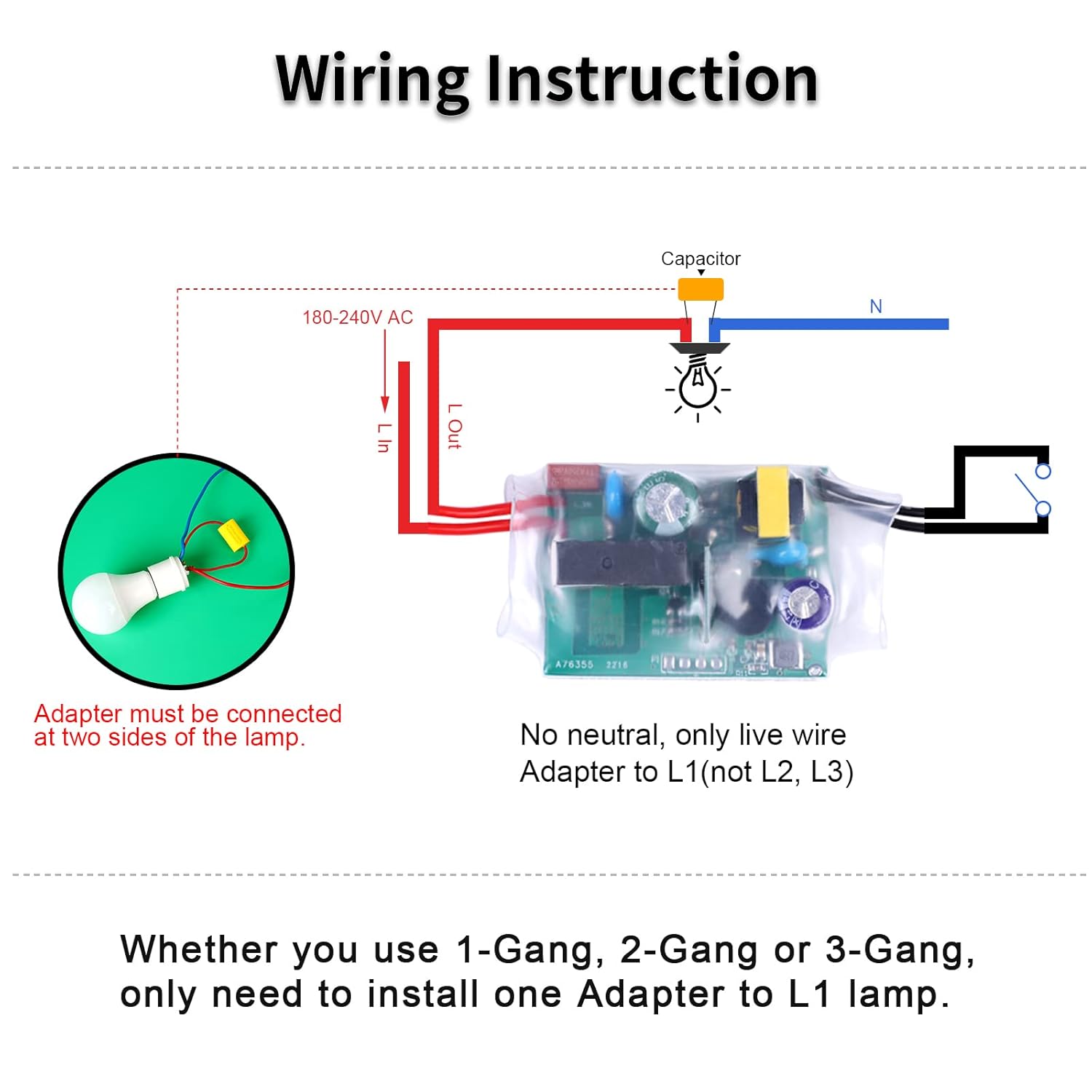
Figure 2: Detailed dimensions of the CNBINGO Smart Switch Module, measuring 47mm in length, 35mm in width, and 20mm in height, crucial for assessing fit within existing switch boxes.

Figure 3: Basic wiring diagram for the CNBINGO Smart Switch Module. Connect the Live In (L In) and Live Out (L Out) wires to the module. The capacitor must be connected across the lamp's Live Out and Neutral terminals. The module itself does not require a neutral connection at the switch box.
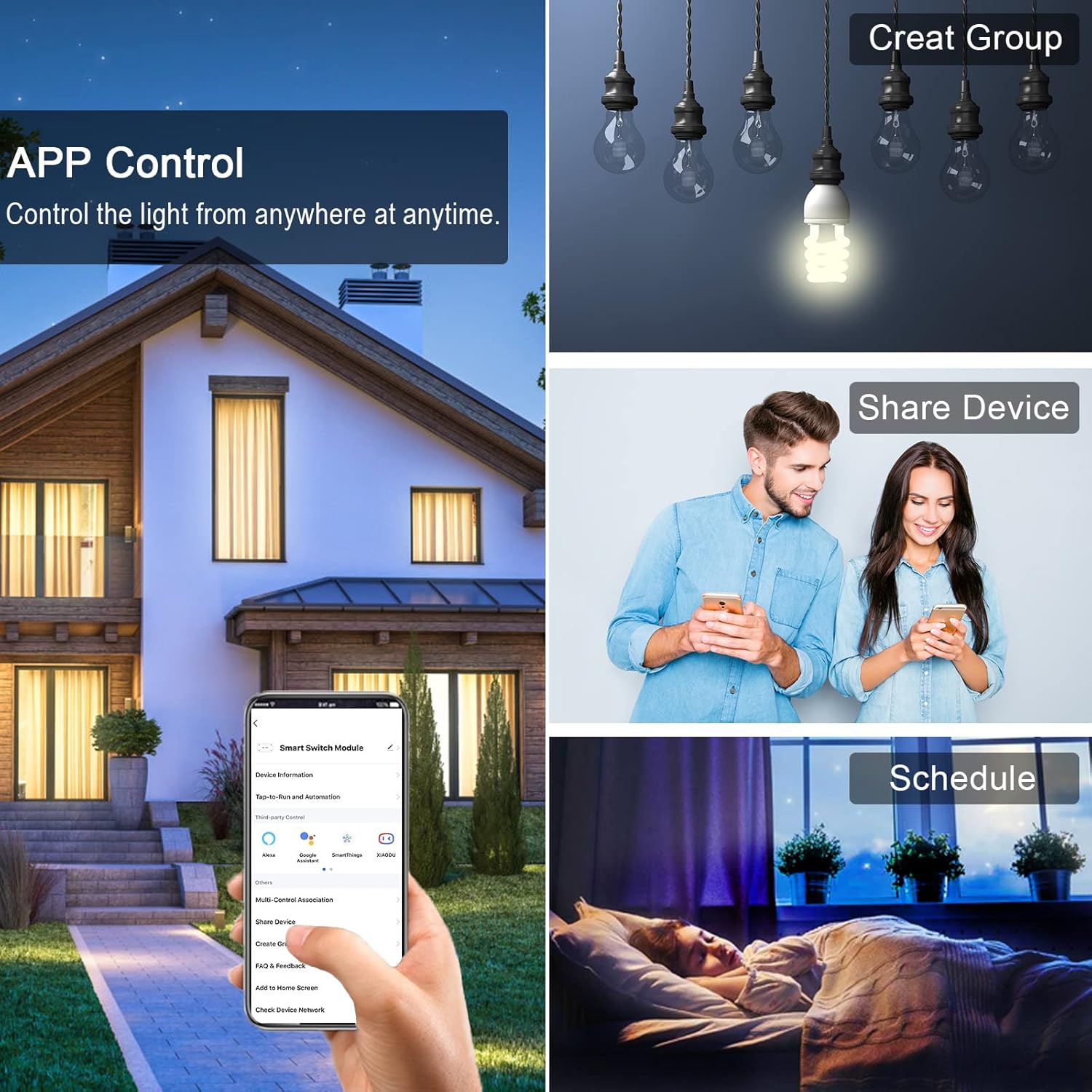
Figure 4: Advanced wiring diagrams. Top diagram shows connection for a 2-way switch setup. Bottom diagram illustrates a setup for app-only control, where no physical wall switch is connected to the module.
- Кубатты өчүрүү: Өчүргүчтүн негизги кубаты өчүрүлгөнүн текшериңиз.
- Туташуу модулу: Wire the Live In (L In) and Live Out (L Out) from your electrical circuit to the corresponding terminals on the CNBINGO module.
- Конденсаторду орнотуу: Connect the provided capacitor across the Live Out and Neutral terminals of your lamp fixture. This is essential for stable operation, especially with LED lights.
- Дубалга орнотулган өчүргүчтү туташтыруу (милдеттүү эмес): If you wish to retain physical switch control, connect your traditional wall switch to the designated terminals on the module as shown in the diagrams.
- Коопсуз модулу: Carefully place the module and wiring into the wall switch box. Ensure no wires are pinched.
- Күчтү калыбына келтирүү: Бардык туташуулар коопсуз болуп, модуль коопсуз орнотулгандан кийин автоматтык өчүргүчтөгү кубатту калыбына келтириңиз.
5.3 Колдонмолорду жупташтыруу
- Колдонмону жүктөп алуу: Download the 'Smart Life' app from your smartphone's app store (available for iOS and Android).
- Катталуу/Кирүү: Колдонмону ачып, жаңы аккаунт түзүңүз же бар аккаунт менен кириңиз.
- Жупташтыруу режимине кирүү: After restoring power, quickly toggle the connected light switch ON and OFF 5 times. The connected light should blink rapidly, indicating the module is in pairing mode. If no physical switch is connected, you may need to use the reset button on the module (refer to troubleshooting if unable to locate).
- Түзмөк кошуу: In the Smart Life app, tap the '+' icon (usually in the top right corner) to add a new device. The app should automatically detect the module. If not, manually select 'Electrical' > 'Switch (Wi-Fi)'.
- Wi-Fi'га туташуу: Follow the in-app instructions to connect the module to your 2.4GHz Wi-Fi network.
- Түзмөктүн атын өзгөртүү: Once connected, you can rename the switch for easier identification (e.g., 'Living Room Light').
6. Иштөө нускамалары
6.1 Колдонмону башкаруу
The Smart Life app provides comprehensive control over your CNBINGO smart switch module.

Figure 5: The Smart Life app interface, showing options for controlling lights, creating device groups, and setting schedules for automated operation.
- Күйгүзүү/өчүрүү башкаруу: Tap the switch icon in the app to turn the connected light on or off from anywhere.
- Пландаштыруу: Set timers or countdowns to automatically turn lights on or off at specific times or after a set duration.
- Топтоо: Combine multiple CNBINGO modules or other Smart Life devices into groups for simultaneous control.
- Түзмөктү бөлүшүү: Share control of your smart switch with family members through the app.
6.2 Үн менен башкаруу
Integrate your CNBINGO smart switch with voice assistants for hands-free control.

Figure 6: Voice control setup with Amazon Alexa and Google Assistant, allowing users to command their smart lights using spoken instructions.
- Amazon Alexa: Link your Smart Life account in the Alexa app. Use commands like, "Alexa, turn on [Device Name]" or "Alexa, turn off [Device Name]."
- Google Жардамчысы: Link your Smart Life account in the Google Home app. Use commands like, "Hey Google, turn on [Device Name]" or "Hey Google, turn off [Device Name]."
7. Техникалык тейлөө
The CNBINGO RSR04 WiFi Smart Switch Module requires minimal maintenance. Ensure the module is kept dry and free from dust. Periodically check for firmware updates within the Smart Life app to ensure optimal performance and security.
8. Кыйынчылыктарды
- Түзмөк жупташпай жатат:
- Wi-Fi тармагыңыз 2.4 ГГц экенин текшериңиз.
- Confirm the module is in pairing mode (light blinking rapidly after 5 quick ON/OFF toggles).
- Move closer to your Wi-Fi router during pairing.
- Check if your router has too many devices connected, which might prevent new connections.
- Light Turns Off After a Few Seconds:
- This often indicates an issue with the capacitor installation or an incompatible load. Ensure the capacitor is correctly wired across the lamp's Live Out and Neutral terminals.
- l текшериңизampватtage is within the module's supported range (up to 1000W).
- Module Does Not Fit in Wall Box:
- The module dimensions are 5.5 x 3.8 x 2.5 cm. If your existing wall box is too shallow, you may need to replace it with a deeper one.
- Clicking or Buzzing Sound:
- Some users report a faint clicking or buzzing sound, often associated with the capacitor or the relay within the module. While typically not a safety concern, if the noise is excessive or accompanied by other issues, contact support.
- Үн жардамчысынан жооп жок:
- Ensure your Smart Life account is correctly linked to your Alexa or Google Home app.
- Verify the device name in Smart Life matches the name you are using for voice commands.
- Интернет байланышыңызды жана үн жардамчы түзмөгүңүздүн абалын текшериңиз.
9. Кепилдик жана колдоо
For warranty information or technical support, please contact CNBINGO customer service through their official website or the contact details provided with your purchase. Please have your model number (RSR04) and purchase details ready.


