1. Продукт бүтүп калдыview
The OOYCYOO MPPT 60A Solar Charge Controller is an advanced device designed to manage power flow from your solar panels to your battery bank, ensuring efficient charging and protecting your batteries from overcharge and over-discharge. It features innovative Maximum Power Point Tracking (MPPT) technology for high efficiency and supports various battery types.

Сүрөт 1: Алдыңкы view of the OOYCYOO MPPT 60A Solar Charge Controller, showing the LCD display and control buttons.
2. Негизги өзгөчөлүктөрү
- Өркүндөтүлгөн MPPT технологиясы: Achieves a tracking efficiency of at least 99.99% and a conversion efficiency of up to 99%, maximizing power harvest from solar panels.
- Automatic System Voltage Detection: 12V же 24V DC системасын автоматтык түрдө аныктайтtages.
- Батареянын кең шайкештиги: Supports sealed, gel, AGM, flooded, and lithium battery types.
- Комплекстүү коргоо: Includes protection against overcharge, over-discharge, overload, short circuits, reverse polarity, overheating, and battery undervoltage.
- Колдонуучуга ыңгайлуу LCD дисплей: Provides clear data display and system status monitoring.
- Конфигурациялануучу Орнотуулар: Allows users to reset parameters, open/close load with a single key, and restore factory settings.

Figure 2: The MPPT Solar Controller emphasizing its protective functions, ensuring system safety.
3. Компоненттер камтылган
The package for the OOYCYOO MPPT 60A Solar Charge Controller typically includes the following items:
- 1 x OOYCYOO MPPT 60A Solar Charge Controller
- 1 x Температура сенсору
- 1 x Англис колдонуучу колдонмо
4. Орнотуу жана орнотуу
Proper installation is crucial for the safe and efficient operation of your solar charge controller. Please follow these steps carefully:
- Монтаждоо: Choose a dry, well-ventilated location away from direct sunlight and heat sources. Ensure adequate space around the controller for air circulation and heat dissipation. Use the mounting holes provided to secure the controller firmly.
- Зымдарды тартуу ырааттуулугу:
- Step 1: Connect the Battery. Connect the battery to the controller's battery terminals (marked with + жана -). Ensure correct polarity. The controller will automatically detect the battery voltage (12V же 24V).
- Step 2: Connect the Load. Connect your DC loads to the controller's load terminals (marked with + жана -). Ensure correct polarity.
- Step 3: Connect the Solar Panel. Connect your solar panel array to the controller's solar panel terminals (marked with + жана -). Ensure correct polarity.
Маанилүү эскертүү: Always connect the battery first, then the load, and finally the solar panel. Disconnect in the reverse order (solar panel, then load, then battery).
- Температура сенсорунун туташуу: Connect the included temperature sensor to the designated port on the controller. This allows for accurate temperature compensation during charging.
- RS485 байланыш порту: The RS485 communication port is reserved for future expansion or connection to external display units (additional purchase may be required).

3-сүрөт: Детальдуу view of the controller with all terminals and ports labeled for easy identification during installation.
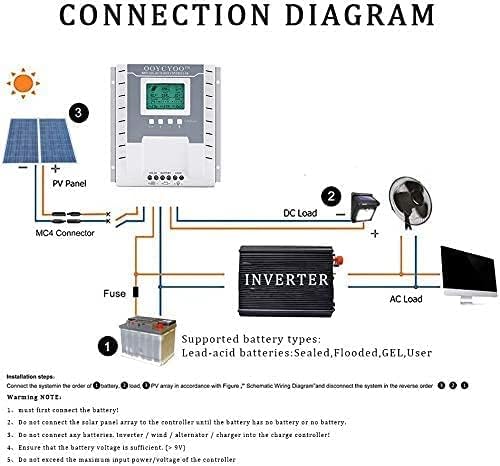
Figure 4: Schematic wiring diagram illustrating the connection of solar panels, battery, and loads to the MPPT controller.
5. Иштөө нускамалары
The OOYCYOO MPPT 60A Solar Charge Controller is designed for ease of use with its intuitive LCD display and control buttons.
5.1 LCD дисплей жана индикаторлор
The LCD screen provides real-time information about the system's operation, including PV voltagд, батарея томtage, charging current, load status, and more. Multiple LED indicators also provide quick status checks.
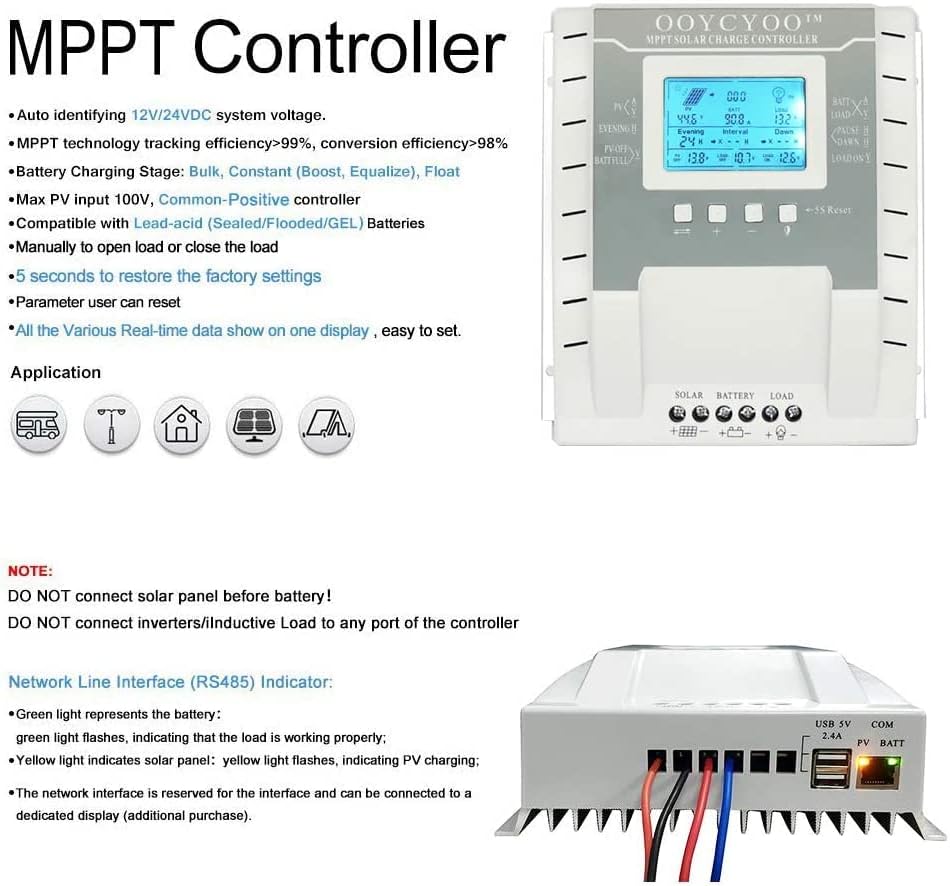
Figure 5: The LCD display showing real-time data such as PV voltagд, батарея томtage, and load status, along with various application icons.
5.2 Баскыч функциялары
- Тандоо баскычы: Used to navigate through different display screens and menu options.
- Plus (+) баскычы: Used to increase values or move forward in menu options.
- Минус (-) баскычы: Used to decrease values or move backward in menu options.
- Load Control Button: A dedicated button to manually turn the DC load ON or OFF.
- 5S Reset Button: Заводдук орнотууларды калыбына келтирүү үчүн 5 секунд басып туруңуз.
5.3 Батареяны заряддоо Stages
The controller employs intelligent multi-stage charging to optimize battery life:
- Жапырт акы: Charges the battery at maximum current until voltage rises to the absorption level.
- Constant (Boost/Equalize) Charge: Туруктуу көлөмдү сактайтtage to fully charge the battery. Equalization is performed periodically for flooded batteries.
- Float акысы: Reduces voltage to a lower level to maintain the battery at full charge, compensating for self-discharge.
6. Техникалык шарттар
| Параметр | Нарк |
|---|---|
| Модел | MPPT 60A |
| Максималдуу кубат тогу | 60 А |
| System Voltage | 12V/24V Auto Detection |
| Max. Solar Panel Power (12V System) | 750 Вт |
| Max. Solar Panel Power (24V System) | 1500 Вт |
| Макс. Open Circuit Voltage of Solar Panel | ≤ 96 В |
| Battery Float Voltage (12V системасы) | 13.8 V |
| Battery Float Voltage (24V системасы) | 27.6 V |
| Батарея Undervoltage Protection (12V System) | 10.6 V |
| Батарея Undervoltage Protection (24V System) | 21.2 V |
| Battery Recovery Voltage (12V системасы) | 12.6 V |
| Battery Recovery Voltage (24V системасы) | 25.2 V |
| System Load Loss | ≤ 13 мА |
| Buck Loop | ≤ 100 мВ |
| Иштөө температурасы | -10 ℃ден 60 ℃ге чейин |
| Сактоо температурасы | -30 ℃ден 70 ℃ге чейин |
| Иштөө нымдуулугу | ≤ 90% (конденсацияланбаган) |
| Температураны компенсациялоо | -4 mV/cell/℃ |
| Өлчөмдөрү (пакет) | 21.1 x 20.7 x 8.4 см |
| Салмагы | 1.34 кг |
| Дисплей түрү | LCD |

6-сүрөт: Каптал view of the controller, illustrating the heat sink design for efficient thermal management.
7. Коопсуздук маалыматы
Please read and understand all safety instructions before installing or operating the controller. Failure to do so may result in injury or damage to the equipment.
- Always ensure proper polarity when connecting wires. Reverse polarity can damage the controller and connected devices.
- Максималдуу киргизүү көлөмүн ашпаңызtage or current ratings of the controller.
- Ensure all connections are tight and secure to prevent loose connections and potential arcing.
- Install the controller in a dry, well-ventilated area, away from flammable materials and corrosive gases.
- Контроллерди өз алдынча бөлүктөргө бөлүүгө же оңдоого аракет кылбаңыз. Тейлөө үчүн квалификациялуу адистерге кайрылыңыз.
- Wear appropriate personal protective equipment (PPE) such as safety glasses and insulated gloves during installation.
8. Кыйынчылыктарды
This section provides solutions to common issues you might encounter with your MPPT solar charge controller.
8.1 Жалпы маселелер жана чечимдер
- Дисплей жок/кубат жок:
- Check battery connections and ensure they are secure and have correct polarity.
- Батареянын көлөмүн текшериңизtage is within the operating range (12V or 24V).
- Батарея заряддалбай жатат:
- Check solar panel connections and polarity.
- Ensure solar panels are receiving adequate sunlight.
- Verify solar panel open circuit voltage (Voc) is within the controller's acceptable range (18V-48V for 12V system, 36V-96V for 24V system).
- Check for any blown fuses in the system.
- Жүктөө иштебей жатат:
- Check load connections and polarity.
- Ensure the load control function is enabled on the controller.
- Батареянын көлөмүн текшериңизtage төмөнкү көлөмдөн жогоруtage disconnect (LVD) threshold.
- Check if the load is overloaded or short-circuited.
- Контроллердин ысып кетиши:
- Ensure the installation location has sufficient ventilation.
- Reduce the load or solar input if consistently operating at high temperatures.
Эгер бул кадамдарды аткаргандан кийин маселе чечилбесе, кардарларды колдоо менен байланышыңыз.
9. Техникалык тейлөө
Regular maintenance helps ensure the longevity and optimal performance of your OOYCYOO MPPT Solar Charge Controller.
- Periodically Inspect Connections: Check all wiring connections (battery, solar panel, load) for tightness and corrosion. Tighten any loose connections.
- Контроллерди тазалоо: Keep the controller clean and free from dust and debris. Use a dry cloth to wipe the surface. Do not use liquid cleaners.
- Вентиляцияны текшерүү: Ensure that the ventilation openings are not blocked and that there is adequate airflow around the controller to prevent overheating.
- Monitor System Performance: Regularly check the LCD display for normal operating parameters and any error codes.
- Батареяны тейлөө: Follow the maintenance guidelines for your specific battery type (e.g., checking electrolyte levels for flooded batteries).
10. Кепилдик жана колдоо
OOYCYOO products are manufactured to high quality standards. For warranty information and technical support, please refer to the contact details provided with your purchase or visit the official OOYCYOO webсайт.
When contacting support, please have your product model (K 60A) and purchase details ready.


