Продукт бүттүview
The LINQ byELEMENTS LQ48022 8-in-1 8K Pro Studio SSD USB-C Multiport Hub is a compact and versatile connectivity solution designed to expand the capabilities of your MacBook or laptop. It delivers ultra-sharp 8K video and audio, provides high-speed data transfer, and offers a stable wired internet connection, along with integrated SSD storage options.

Image: The LINQ byELEMENTS LQ48022 8-in-1 8K Pro Studio SSD USB-C Multiport Hub, showcasing its compact design and multiple ports.
Негизги өзгөчөлүктөрү
- 8K HDMI чыгышы: Supports 8K resolution at 30Hz or 4K resolution at 60Hz for crystal clear video and audio.
- SuperSpeed+ USB 3.2 Gen2 Ports: Includes USB-A and USB-C ports with data transfer speeds up to 10 Gbps.
- Multi-Gigabit Ethernet: Provides a wired network connection with speeds up to 2.5 Gbps for fast and stable internet.
- Кубат жеткирүү (PD) заряддоо: Supports up to 100W PD charging for your laptop.
- Integrated SSD Storage Option: Offers a convenient option for expanding storage.
- Peripheral USB-A Ports: Two USB-A ports for connecting essential peripherals like keyboards, mice, printers, and scanners.
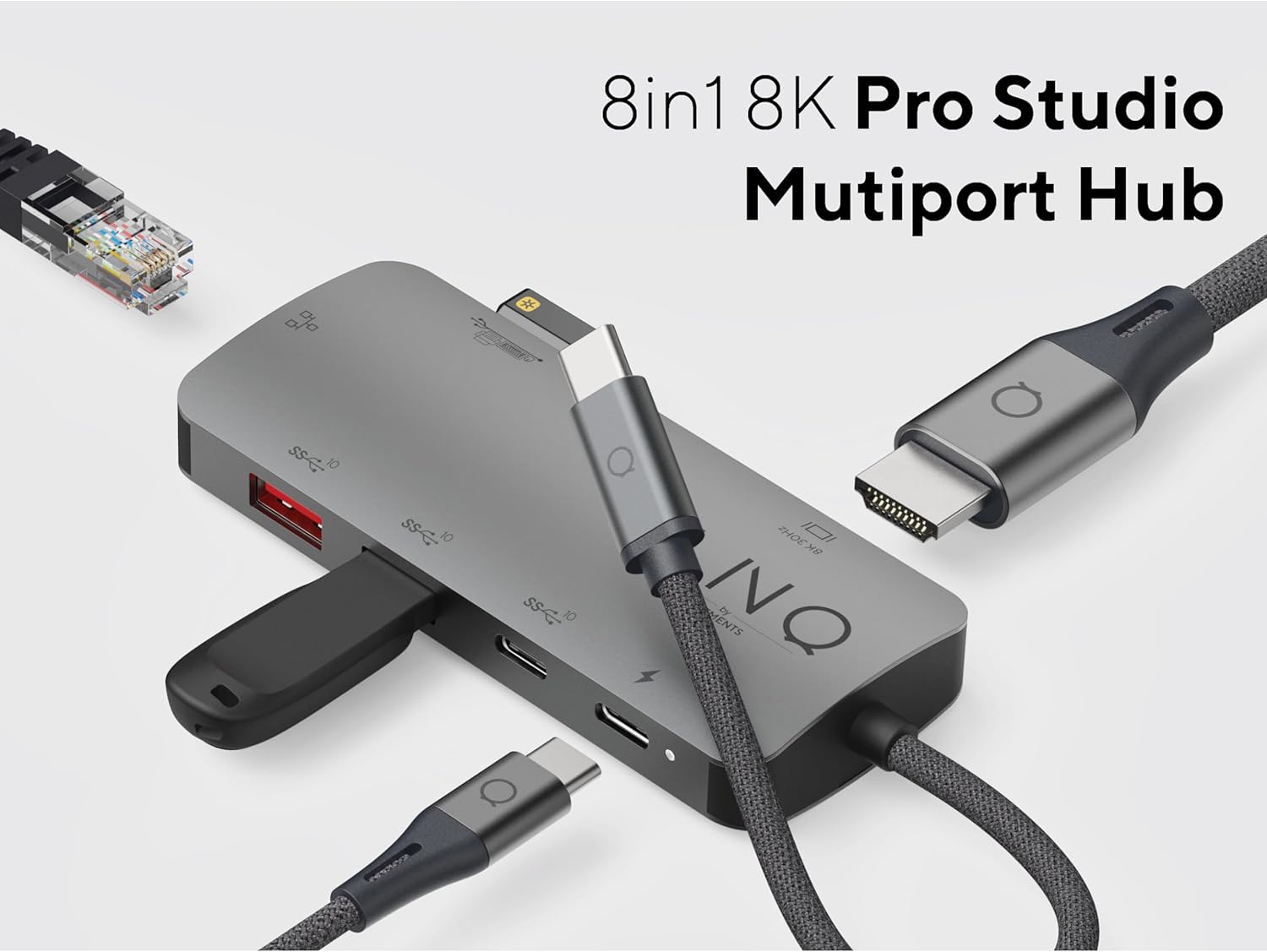
Image: The LINQ Multiport Hub connected to various devices, illustrating its 8-in-1 functionality and multiple port types.
Орнотуу колдонмосу
- Хост түзмөккө туташуу: Plug the integrated USB-C cable of the LINQ Hub into an available USB-C port on your MacBook or laptop. Ensure the USB-C port on your host device supports DisplayPort Alternate Mode (Alt Mode) and Power Delivery for full functionality.
- Электр энергиясына туташуу (милдеттүү эмес, бирок сунушталат): For optimal performance and to charge your laptop, connect your laptop's USB-C power adapter (up to 100W) to the USB-C PD port on the hub.

Image: Close-up of the USB-C Power Delivery port on the LINQ Hub, indicating support for up to 100W charging.
- Операциялык системанын шайкештиги: The hub is compatible with Mac OS 9 and Windows 10. No specific driver installation is typically required for basic functionality (plug-and-play).
Иштөө нускамалары
Connecting External Displays (HDMI)
Connect an HDMI cable from your external monitor or TV to the HDMI port on the LINQ Hub. Your host device should automatically detect the display. Adjust display settings (resolution, orientation) through your operating system's display preferences.
- Колдоого алынган чечимдер:
- Up to 8K (7680x4320) at 30Hz
- Up to 4K (3840x2160) at 60Hz

Image: Close-up of the 8K HDMI port on the LINQ Hub, highlighting its high-definition video output capability.
Using USB Data Ports
The hub features multiple USB ports for connecting various devices:
- USB 3.2 Gen2 (10 Gbps) Ports: Use the SuperSpeed+ USB-A and USB-C data ports for high-speed data transfer with external SSDs, flash drives, or other compatible devices. These ports support speeds up to 10 Gbps.

Image: Close-up of the USB 3.2 Gen 2 ports on the LINQ Hub, illustrating their high-speed data transfer capabilities.
- Peripheral USB-A Ports: Connect your keyboard, mouse, printer, scanner, or other lower-speed USB peripherals to these dedicated ports.

Image: Close-up of the peripheral USB-A ports on the LINQ Hub, ideal for connecting standard input devices and printers.
Connecting to a Wired Network (Ethernet)
For a stable and secure internet connection, connect an Ethernet cable from your router or modem to the Multi-Gigabit Ethernet port on the hub. This port supports speeds up to 2.5 Gbps.

Image: Close-up of the Multi-Gigabit Ethernet port on the LINQ Hub, designed for ultra-fast and stable wired network connections.
Техникалык тейлөө
- Тазалоо: Use a soft, dry cloth to clean the surface of the hub. Avoid using liquid cleaners or aerosols.
- Сактагыч: Колдонулбаган учурда хабды күн тийбеген жана өтө температурадан алыс салкын, кургак жерде сактаңыз.
- Колдонуу: Бордду этияттык менен кармаңыз. Аны түшүрүп албоодон же катуу соккуга дуушар кылбоодон сак болуңуз.
- Кабелдик башкаруу: Ensure cables connected to the hub are not excessively bent or strained to prevent damage to the ports or cables.
Проблемаларды чечүү
- No display output via HDMI:
- Ноутбугуңуздун USB-C порту DisplayPort Alt режимин колдой турганын текшериңиз.
- Check the HDMI cable connection at both the hub and the monitor.
- Жабдуулардын бузулушуна жол бербөө үчүн башка HDMI кабелин же мониторду колдонуп көрүңүз.
- Ноутбугуңузду өчүрүп күйгүзүңүз.
- Verify display settings in your operating system.
- USB devices not recognized or slow data transfer:
- Ensure the hub is properly connected to your laptop.
- If using high-power devices, ensure the hub is connected to a power source via the PD port.
- Анын иштеп жатканын текшерүү үчүн USB түзмөгүн түздөн-түз ноутбукка туташтырып көрүңүз.
- USB түзмөгүн ажыратып, хабга кайра туташтырыңыз.
- Ethernet туташуу маселелери:
- Хабдагы жана роутериңиздеги/модемиңиздеги Ethernet кабелинин туташуусун текшериңиз.
- Роутериңиз/модемиңиз туура иштеп жатканын текшериңиз.
- Ноутбугуңуздагы тармак жөндөөлөрүн текшериңиз.
- Башка Ethernet кабелин колдонуп көрүңүз.
- Laptop not charging via PD port:
- Ensure your laptop's USB-C port supports Power Delivery.
- Verify that your power adapter is connected to the hub's PD port and is functioning.
- Ватты текшериңизtage of your power adapter; it should be sufficient for your laptop's charging requirements (up to 100W supported by hub).
Техникалык шарттар
| Өзгөчөлүк | Деталь |
|---|---|
| Модель номери | LQ48022 |
| Бренд | Linq |
| HDMI чыгышы | 8K@30Hz, 4K@60Hz |
| USB-C маалымат порт | 1 x USB 3.2 Gen2 (10 Гбит/сек) |
| USB-A маалымат порту | 1 x USB 3.2 Gen2 (10 Гбит/сек) |
| Peripheral USB-A Ports | 2 x USB-A (lower speed) |
| Ethernet порту | Multi-Gigabit (up to 2.5 Gbps) |
| Кубат жеткирүү (PD) | 100 Вт чейин |
| Интегралдык сактагыч | SSD option |
| Операциялык системанын шайкештиги | Mac OS 9, Windows 10 |
| Өлчөмдөрү (LxWxH) | 1.69 x 3.12 x 0.27 дюйм |
| Салмагы | 2.43 унция |
| Түс | Боз |
Кепилдик жана колдоо
For warranty information and technical support, please refer to the official Linq byELEMENTS webсайтка же түздөн-түз кардарларды тейлөөгө кайрылыңыз. Сатып алуу квитанциясын кепилдик дооматтары үчүн сатып алуунун далили катары сактаңыз.
Эскертүү: Кепилдиктин конкреттүү шарттары аймакка жана сатуучуга жараша өзгөрүшү мүмкүн.


