1. Киришүү
The JCLOUD Smart Scent Air Machine utilizes advanced cold air diffusion technology to convert essential oils into fine micro-particles, effectively scenting areas up to 2000 sq. ft. This waterless and heatless diffusion method ensures the purity of essential oils and offers a consistent, long-lasting fragrance experience. This manual provides detailed instructions for the setup, operation, maintenance, and troubleshooting of your device.

Сүрөт 1.1: Алдыңкы view of the JCLOUD Smart Scent Air Machine.
2. Коопсуздук маалыматы
- Суюлтулган эфир майлары менен түздөн-түз териге тийбеңиз.
- Түзмөктү жана эфир майларын балдар жана үй жаныбарлары жетпеген жерде сактаңыз.
- Ensure proper ventilation in the area where the device is used.
- Do not block the air vents of the machine.
- Use only pure essential oils as recommended by the manufacturer.
- Аппаратты өз алдынча бөлүүгө же оңдоого аракет кылбаңыз. Жардам алуу үчүн кардарларды колдоо бөлүмүнө кайрылыңыз.
- Түзмөктү тазалоодон мурун же узак убакыт бою колдонулбай турганда, аны электр кубатынан ажыратыңыз.
3. Пакеттин мазмуну
Пакетте бардык буюмдар бар экенин текшериңиз:
- JCLOUD Smart Scent Air Machine (Model A311)
- Instruction Manual
- Кубаттуу адаптер
- Essential Oil Bottle (pre-installed or separate, depending on package)
- HVAC Connection Kit (if applicable to your model)
4. Продукт бүтүп калдыview
The JCLOUD Smart Scent Air Machine is designed for efficient and mess-free aromatherapy. Key features include:
- Cold Air Diffusion Technology: Converts essential oils into micro-particles without heat or water.
- Bluetooth App Control: Manage settings, working time, and scent intensity via a smartphone app.
- Large Coverage Area: Effectively scents up to 2000 sq. ft.
- Waterless Operation: Eliminates the need for water, reducing maintenance and mess.
- HVAC Connect Compatibility: Allows for integration with HVAC systems for broader scent distribution.
- Kid & Pet Friendly: Uses pure essential oils without dilution, making it safe for environments with children and pets.

Image 4.1: Key features of the JCLOUD Smart Scent Air Machine.
Продукциянын өлчөмдөрү
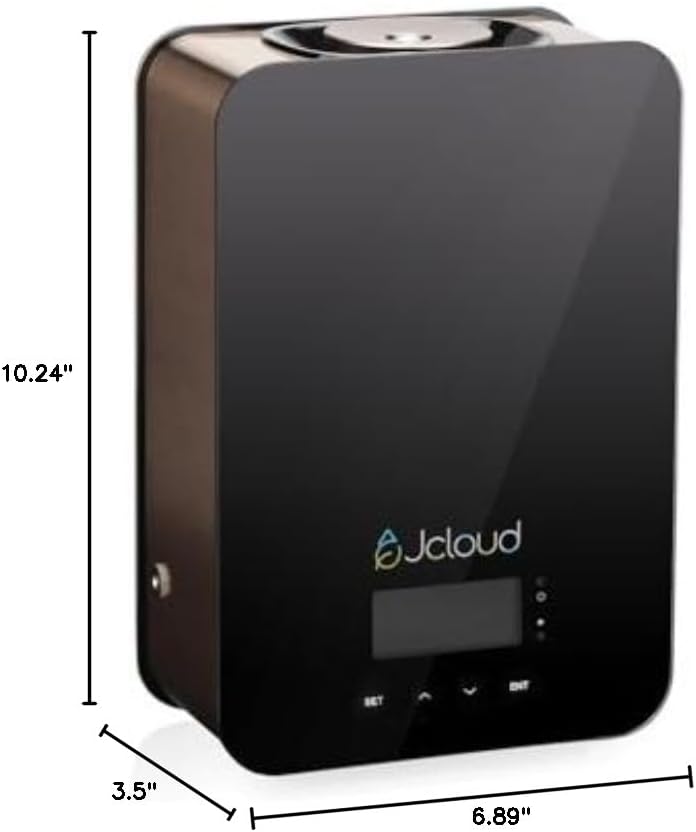
Image 4.2: Dimensions of the JCLOUD Smart Scent Air Machine.
5. Орнотуу
- Аппаратты таңгактан чыгаруу: Carefully remove the JCLOUD Smart Scent Air Machine and all accessories from its packaging.
- Аппаратты жайгаштырыңыз: Position the device on a stable, flat surface in your desired location. Ensure it is away from direct sunlight, heat sources, and sensitive materials.
- Insert Essential Oil: Open the essential oil compartment (refer to the device diagram for location). Insert the bottle of pure essential oil into the designated slot. Ensure the bottle is securely attached to the diffusion nozzle.
- Туташуу кубаты: Plug the power adapter into the device and then into a standard electrical outlet. The device display should illuminate.
- HVAC Connection (Optional): If you intend to connect the device to your HVAC system, follow the specific instructions provided with the HVAC connection kit. This typically involves connecting a tube from the diffuser to your HVAC ductwork.
6. Иштөө нускамалары
6.1 Bluetooth колдонмосун башкаруу
The JCLOUD Smart Scent Air Machine is primarily controlled via a dedicated Bluetooth application, offering comprehensive scheduling and intensity settings.
- Колдонмону жүктөп алыңыз: Издөө the 'JCLOUD Scent' app (or similar, refer to packaging for exact name) on your smartphone's app store (iOS or Android).
- Bluetooth иштетүү: Смартфонуңузда Bluetooth иштетилгенин текшериңиз.
- Түзмөккө туташуу:
- Press the 'BT' button on the device (if available, or follow app instructions to enter pairing mode).
- Open the app and search for available devices. Select your JCLOUD machine from the list.
- Демейки сырсөздү киргизиңиз: 8888.
- Set Working Time and Scent Grade: Use the app interface to customize the operating schedule (e.g., specific days, start/end times) and scent intensity (9 grades available, or custom settings).

Image 6.1: Steps for connecting the device to the mobile application.
6.2 Manual Operation (Default Mode)
If the app is not used, the machine will operate in a default mode:
- The device will operate for 5 seconds, then pause for 240 seconds.
- Бул цикл үзгүлтүксүз кайталанат.
- This is a standard operating pattern for cold air diffusers and does not indicate a malfunction.
6.3 Adjusting Scent Intensity and Schedule
Through the Bluetooth app, you can precisely control the scent output:
- Scent Grades: Choose from 9 predefined scent grades (G1-G9) to adjust the intensity.
- Ыңгайлаштырылган жөндөөлөр: The app allows for customized working intervals and durations to fine-tune the fragrance output to your preference.
- Пландаштыруу: Set daily or weekly schedules for the diffuser to operate automatically.

Image 6.2: Setting scent grades and schedules via the device interface or app.
6.4 HVAC Connection
For scenting larger areas or distributing fragrance throughout an entire building, the JCLOUD Smart Scent Air Machine can be connected to your HVAC system.
- Refer to the specific instructions provided with your HVAC connection kit for detailed installation steps.
- Ensure proper sealing and placement of the connection tube to maximize scent distribution efficiency.

Image 6.3: HVAC connection for wide area scent distribution.
7. Техникалык тейлөө
The JCLOUD Smart Scent Air Machine is designed for low maintenance due to its waterless operation. Regular cleaning helps ensure optimal performance and longevity.
- Тышкы тазалоо: Аппараттын сыртын жумшак, кургак чүпүрөк менен сүртүңүз. Абразивдүү тазалагычтарды же эриткичтерди колдонбоңуз.
- Соплолорду тазалоо: If you notice reduced scent output or clogging, gently wipe the diffusion nozzle with a cotton swab lightly dampened with rubbing alcohol. Ensure the device is unplugged before cleaning.
- Oil Bottle Replacement: When the essential oil bottle is empty, replace it with a new one. Ensure the new bottle is securely screwed into the diffusion mechanism.
- Сактагыч: If storing the device for an extended period, remove the essential oil bottle, clean the nozzle, and store the device in a cool, dry place.
8. Кыйынчылыктарды
If you encounter issues with your JCLOUD Smart Scent Air Machine, please refer to the following common problems and solutions:
| Көйгөй | Мүмкүн себеп | Чечим |
|---|---|---|
| Түзмөк күйбөйт. | Кубат адаптери туташкан эмес же туура эмес розетка. | Ensure the power adapter is securely plugged into both the device and a working electrical outlet. Test the outlet with another device. |
| No scent or weak scent output. | Empty essential oil bottle, clogged nozzle, low scent grade setting, or device in default mode. | Check if the essential oil bottle is empty and replace if necessary. Clean the diffusion nozzle. Increase the scent grade setting via the app. If in default mode, consider using the app for more control. |
| Bluetooth app cannot connect to the device. | Bluetooth not enabled, device not in pairing mode, incorrect password, or app issue. | Ensure Bluetooth is enabled on your phone. Press the 'BT' button on the device to enter pairing mode. Verify the default password (8888). Restart the app and try again. |
| Device is making unusual noise. | Obstruction in the fan or pump mechanism. | Unplug the device and inspect for any visible obstructions. If the noise persists, contact customer support. |
If the problem persists after attempting these solutions, please contact JCLOUD Customer Support for further assistance.
9. Техникалык шарттар
| Өзгөчөлүк | Деталь |
|---|---|
| Бренд | JCLOUD |
| Модель аты | A311 |
| Түс | Кара |
| Сунушталган Колдонуулар | Home, Office, Large Rooms |
| Материал | Пластмасса, чайыр |
| Өзгөчөлүктөр | No water needed, HVAC compatible, Smart Bluetooth control, Kids & pets friendly, Pure essential oils only |
| Power Source | Электр зымдары |
| Эфир майынын кубаттуулугу | 100 миллилитр |
| Камтуу аймагы | 2000 чарчы футка чейин |
| Ватtage | 10 ватт |
| Продукциянын өлчөмдөрү (L x W x Y) | 6.89" x 3.5" x 10.24" |
| Auto чылбыры | Ооба |
| Элемент Салмагы | 5.5 фунт |
| UPC | 769326894648 |
10. Кепилдик жана колдоо
10.1 Продукциянын кепилдиги
The JCLOUD Smart Scent Air Machine (Model A311) comes with a 1 жылдык кепилдик сатып алынган күндөн тартып. Бул кепилдик нормалдуу колдонуудагы өндүрүш кемчиликтерин камтыйт. Кепилдик дооматтары үчүн сатып алганыңыздын далилин сактап коюңуз.
10.2 Кардарларды колдоо
JCLOUD is committed to providing exceptional customer service. If you have any questions, require assistance with installation, operation, or troubleshooting, or need to make a warranty claim, please contact us:
- Via Brand Mail: Refer to the service card included in your package for contact details.
- Via Amazon Mail: Contact us through the Amazon messaging system.
Our team is ready to assist you every step of the way to ensure your satisfaction.


