1. Киришүү
This manual provides detailed instructions for the proper use and maintenance of your ATUMTEK 60" Selfie Stick Tripod. Please read this manual thoroughly before operating the device to ensure optimal performance and longevity.

Image 1.1: The ATUMTEK 60" Selfie Stick Tripod, showcasing its versatility as both a selfie stick and a tripod, along with its Bluetooth remote.
2. Кутуда эмне бар
Таңгактан чыгарганда бардык буюмдар бар экенин текшериңиз:
- 60" Selfie Stick Tripod
- Rechargeable Bluetooth Remote Shutter
- USB кабели
- User Manual
3. Продукциянын өзгөчөлүктөрү
- Extra-long Telescopic Pole: Extends up to 60 inches with 7 adjustable sections, allowing for broader views in photos and videos.
- Туруктуу штативдин негизи: Features a 10.6-inch tripod base with three non-slip silicone pads for enhanced stability.
- One-piece Design: Integrates selfie stick and tripod functions into a single unit, collapsing to 12.8 inches for portability.
- Эргономикалык кармагыч: Handle designed with a lychee texture for comfortable and secure holding.
- 360° айлануу: The phone holder allows for 360° rotation and 180° left/right tilt for optimal shooting angles.
- Премиум курулуш: Made from aviation-grade aluminum alloy for durability.
- Bluetooth Remote жапкыч: Detachable remote for hands-free operation, with a range of up to 33 feet (10 meters).
- Кеңири шайкештик: Supports most smartphones with widths between 2.2 and 3.5 inches (thick cases may not be suitable).

Image 3.1: Various height configurations of the selfie stick tripod, from compact (12.8") to fully extended (60").

Image 3.2: The ergonomic gripping handle and integrated one-piece design for ease of use and portability.
4. Орнотуу нускамалары
4.1 Штативди жайып салуу
- Hold the handle of the selfie stick firmly.
- Locate the "PUSH" button on the side of the handle.
- Press the "PUSH" button to release the tripod legs. The handle will expand into three legs, forming a stable tripod base.
- Ensure the legs are fully extended and locked into position for maximum stability.

Image 4.1: The one-touch button mechanism for deploying the tripod legs.
4.2 Смартфонуңузду тиркөө
- Gently pull apart the spring-loaded phone holder at the top of the stick.
- Carefully insert your smartphone into the holder, ensuring it is securely gripped. The holder supports devices from 2.2 to 3.5 inches wide.
- Абайлаңыз: Be mindful of your fingers when attaching or removing the phone to avoid pinching.

Image 4.2: The phone holder's adjustable width and compatibility with various smartphone models.
4.3 Bluetooth пультун жупташтыруу
- Remove the Bluetooth remote from its slot on the selfie stick handle.
- Press and hold the button on the remote until the indicator light flashes, indicating it is in pairing mode.
- Смартфонуңуздан Bluetooth жөндөөлөрүнө өтүп, жеткиликтүү түзмөктөрдү издеңиз.
- Select "ATUMTEK" or a similar device name to pair. The indicator light will stop flashing once successfully paired.
- The remote will automatically reconnect to your phone once turned on after initial pairing.

Image 4.3: The detachable Bluetooth remote and its charging port.
5. Иштөө нускамалары
5.1 Extending the Pole
- With the phone securely in the holder, gently pull the top section of the pole upwards.
- Extend the pole to your desired length. The pole has multiple sections that can be extended individually.
- For selfie stick use, hold the handle firmly. For tripod use, ensure the legs are deployed and stable before extending the pole to its full height.
5.2 Adjusting Phone Angle and Orientation
- The phone holder can be rotated 360° horizontally. Loosen the knob if present, adjust, and tighten.
- The phone holder can also be tilted 180° vertically (forward and backward). Adjust to achieve the desired angle.
- Effortlessly switch between portrait and landscape modes by rotating the phone holder.
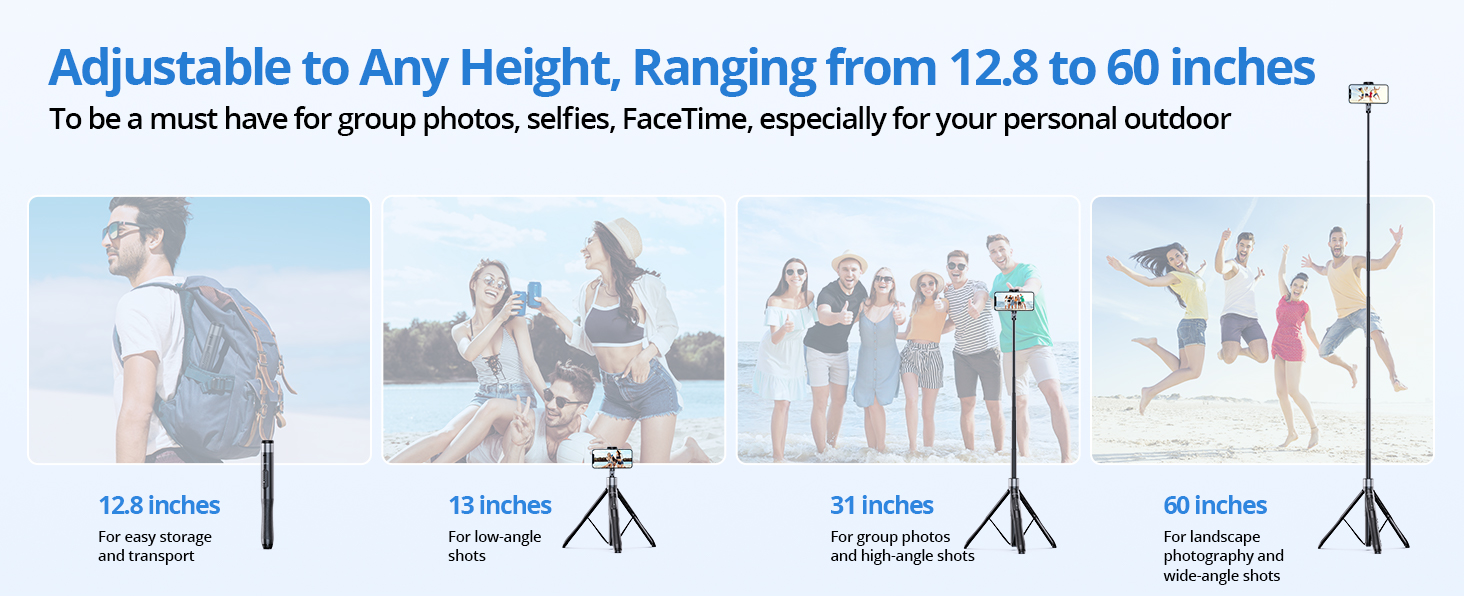
Image 5.1: Demonstrating the full range of motion for the phone holder.
5.3 Bluetooth пультун колдонуу
- Once paired, open your smartphone's camera application.
- Press the button on the Bluetooth remote to trigger the camera shutter.
- The remote can be used for both photos and video recording (start/stop).

Image 5.2: The Bluetooth remote allows for hands-free capture of moments.
6. Техникалык тейлөө
- Тазалоо: Wipe the selfie stick tripod with a soft, dry cloth. Avoid using harsh chemicals or abrasive materials.
- Сактагыч: Store the device in a cool, dry place away from direct sunlight and extreme temperatures. Ensure it is fully collapsed before storage.
- Батарея: Recharge the Bluetooth remote regularly using the provided USB cable to maintain battery health.
- Ашыкча жүктөөдөн качыңыз: Do not exceed the recommended weight limit of 15 kg (33 lbs) for the tripod.
7. Кыйынчылыктарды
7.1 Bluetooth Remote Not Connecting
- Пульттун заряддалганын текшериңиз.
- Turn off and on the remote, then re-attempt pairing.
- Check your phone's Bluetooth settings to ensure it's enabled and visible.
- Эгер мурда жупташтырылган болсоңуз, телефонуңуздун Bluetooth жөндөөлөрүнөн түзмөктү унутуп, кайра жупташтырып көрүңүз.
7.2 Remote Button Not Triggering Camera (Android Specific)
Some Android phones use the volume keys for functions other than shutter release (e.g., zoom). If your remote button is not triggering the camera:
- Open your phone's camera app.
- Go to Camera Settings (often represented by a gear icon).
- Look for "Shooting methods" or similar options.
- Find the "Press Volume keys to" setting and ensure it is set to "take picture or record video" or "shutter." Do not select zoom or focus.

Image 7.1: Adjusting Android camera settings for remote shutter functionality.
7.3 Штативдин туруксуздугу
- Ensure the tripod legs are fully extended and locked.
- Штативди тегиз, туруктуу бетке коюңуз.
- Avoid extending the pole to its maximum height in windy conditions or on uneven terrain.
8. Техникалык шарттар
| Өзгөчөлүк | Спецификация |
|---|---|
| Модель аты | ATSS067 |
| Продукциянын өлчөмдөрү (жыймаланган) | 2.36 x 2.36 x 13.31 дюйм |
| Элемент Салмагы | 14.1 унция (400 грамм) |
| Максималдуу бийиктик | 60 дюйм |
| Салмагы Limit | 15 килограмм (33 фунт) |
| Материал | Алюминий, поликарбонат (PC) |
| Батарея (Алыстан) | 1 литий металл батарейка (кошулган) |
| Туура келген телефондун кеңдиги | 2.2 - 3.5 дюйм |
| Bluetooth алыстан башкаруу диапазону | 33 фут (10 метр) чейин |
| FCC ID | 2ASUP-ATSS055 |
9. Кепилдик жана колдоо
ATUMTEK provides a worry-free 3-year warranty for this product. For any questions, technical support, or warranty claims, please contact ATUMTEK customer service through their official channels or the retailer where the product was purchased.
You can also refer to the official ATUMTEK webкошумча колдоо жана продукт маалымат үчүн сайт.


