Introduction
Thank you for choosing the HTC True Wireless Earbuds 7. This manual provides essential information for setting up, operating, maintaining, and troubleshooting your new earbuds. Please read it thoroughly before use to ensure optimal performance and longevity of your device.
Пакеттин мазмуну
Пакетте бардык буюмдар бар экенин текшериңиз:
- 2 x HTC Wireless Earbuds (Left and Right)
- 1 х заряддоо кутусу
- 1 x USB-C кабели
- 2 Pairs x Silicone Earplugs (S, L) - Note: Medium size earplugs are pre-installed on the earbuds.
- 1 x English Manual (This document)

Image: HTC True Wireless Earbuds 7, charging case, and USB-C cable.
Орнотуу колдонмосу
1. Баштапкы заряддоо
Биринчи колдонуудан мурун, кулакчындарды жана заряддоо кутучасын толук заряддаңыз.
- Кулакчындардын экөөнү тең зарядкага салыңыз.
- Connect the provided USB-C cable to the charging port on the case and a power source (e.g., USB wall adapter, computer USB port).
- The indicator lights on the charging case will illuminate to show charging status. All three indicator lights will show blue when fully charged.
Заряддоо убактысы:
- Кулакчындар: Болжол менен 40 мүнөт
- Charging Case: Approximately 1.5 hours

Image: HTC True Wireless Earbuds 7 charging case showing battery indicator lights.
Video: Demonstrates charging the HTC True Wireless Earbuds 7 charging case using the USB-C cable.
2. Түзмөгүңүз менен жупташтыруу (бир кадамдуу жупташтыруу)
The earbuds utilize advanced Bluetooth 5.3 technology for fast and stable connection.
- Заряддоо кутучасын ачыңыз. Кулакчындар жупташтыруу режимине автоматтык түрдө кирет.
- Түзмөгүңүздө (смартфон, планшет, компьютер) Bluetooth иштетиңиз.
- Издөө "HTC TWS7" in the list of available Bluetooth devices.
- Select "HTC TWS7" to connect. Once paired, the earbuds will automatically connect to your device in the future when taken out of the case.
Important Tip: When pairing for the first time, please take both earbuds out of the charging box for pairing.

Image: Illustrates the one-step pairing process with a smartphone.
3. Adjusting Earplugs for Best Fit
For optimal sound quality and comfort, choose the silicone earplugs that best fit your ears. The earbuds come with medium-sized earplugs pre-installed, and S/L sizes are included in the package.
- Gently remove the pre-installed earplug from the earbud.
- Select a different size (S or L) and carefully attach it to the earbud's nozzle, ensuring it is securely fastened.
- Test the fit and sound quality. A good seal will provide better bass and noise isolation.

Image: Close-up of an earbud highlighting the soft silicone eartips for a comfortable fit.
Иштөө нускамалары
Smart Touch Controls
The HTC True Wireless Earbuds 7 feature intuitive touch controls on each earbud. The touch-sensitive area is located on the outer surface of each earbud.
| Функция | Акция |
|---|---|
| Ойнотуу/Тыныгуу | Кулакчындарды бир жолу таптаңыз. |
| Чалууга жооп бер/түп коюу | Кулакчындарды бир жолу таптаңыз. |
| Мурунку ыр | Сол кулакчынды эки жолу таптаңыз. |
| Кийинки ыр | Оң кулакчынды эки жолу таптаңыз. |
| Үн жардамчысы | Кулакчындын бирин үч жолу таптаңыз. |
| Чакырууну четке кагуу | 2 секунд басып, кармап туруңуз. |
| Оюн режими күйгүзүү/өчүрүү | 2 секунд басып, кармап туруңуз. |
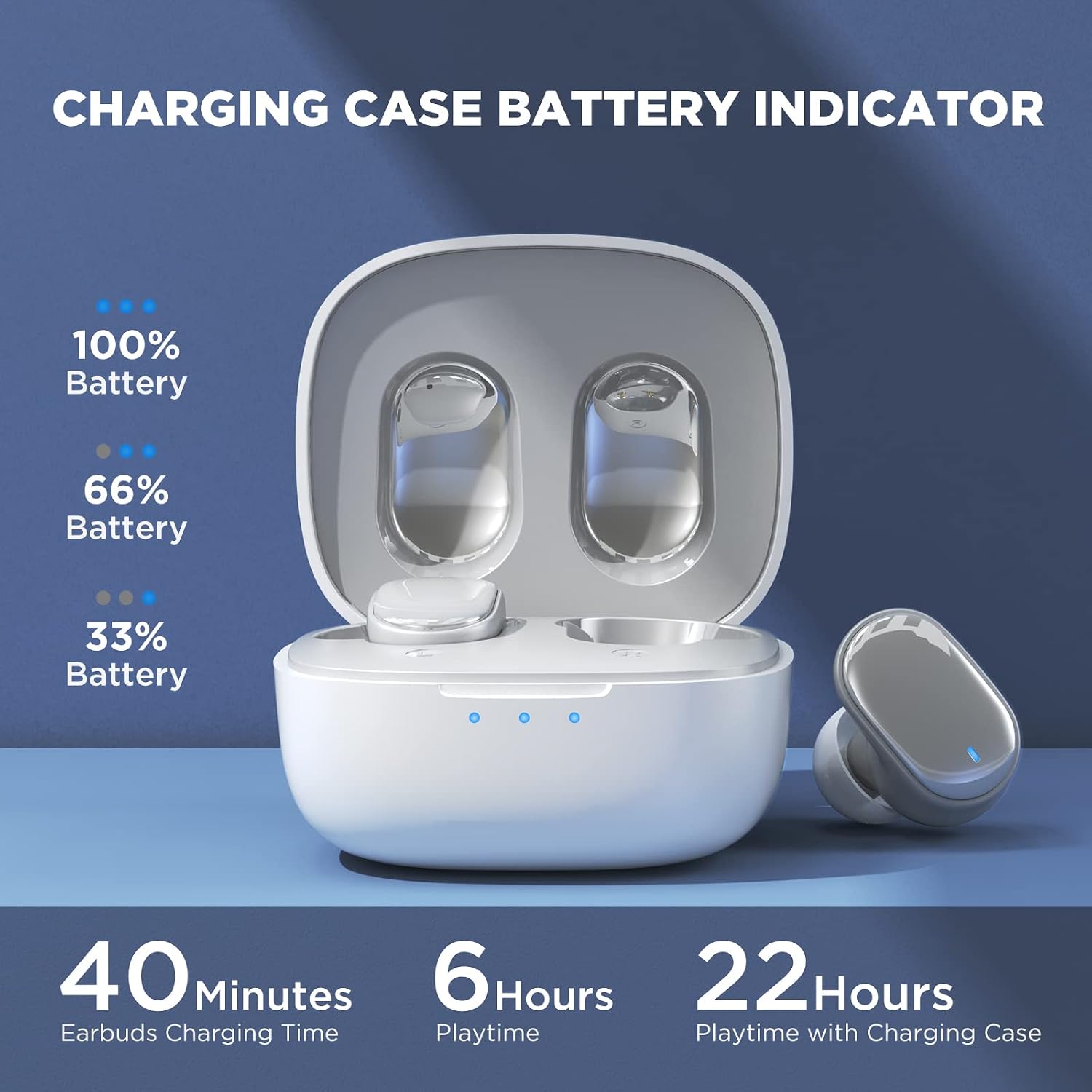
Image: Visual guide to the smart touch controls on the earbud.
Оюн режими
Designed specifically for gaming, Game Mode provides an ultra-low latency of 45ms, ensuring audio and video remain synchronized for a smoother gaming experience. To activate or deactivate Game Mode, tap and hold either earbud for 2 seconds.

Image: Earbuds shown in a gaming context, highlighting the 40ms ultra-low latency Game Mode.
Аудио сапаты
The earbuds are equipped with 10mm drivers, producing powerful bass and stunning treble for a rich audio experience.

Сүрөт: жарылды view diagram illustrating the 10mm speaker driver components.
Техникалык тейлөө жана кам көрүү
- Тазалоо: Кулакчындарды жана заряддоо кутусун жумшак, кургак, түксүз чүпүрөк менен дайыма тазалап туруңуз. Катуу химиялык заттарды же абразивдүү материалдарды колдонбоңуз.
- Earplug Care: Remove the silicone earplugs periodically and clean them with mild soap and water. Ensure they are completely dry before reattaching.
- Суу каршылык: The earbuds are IPX4 waterproof, meaning they are resistant to sweat and splashing water. Do not submerge them in water or expose them to heavy rain.
- Сактагыч: Колдонулбаганда, кулакчындарды коргоо жана кубаттоо үчүн кубаттоочу кутучага сактаңыз. Салкын, кургак жерде, экстремалдык температурадан алыс сактаңыз.
- Батареянын иштөө мөөнөтү: Батареянын иштөө мөөнөтүн узартуу үчүн, кулакчындарды жана кубаттоочу кутучаны тез-тез толук зарядсыздандырбаңыз. Аларды көпкө колдонулбаса дагы, үзгүлтүксүз кубаттап туруңуз.
Проблемаларды чечүү
| Көйгөй | Мүмкүн чечим |
|---|---|
| Кулакчындар түзмөк менен жупташкан жок. |
|
| Бир гана кулакчын иштеп жатат. |
|
| Көлөмү төмөн же үн сапаты начар. |
|
| Кулакчындар заряддалбай жатат. |
|
| Сенсордук башкаруу жооп бербей жатат. |
|
Техникалык шарттар
| Өзгөчөлүк | Деталь |
|---|---|
| Модель аты | TWS7 |
| Bluetooth версиясы | 5.3 |
| Байланыш технологиясы | Зымсыз (Bluetooth) |
| Аудио кечигүү | 45 миллисекунд (Оюн режими) |
| Ойнотуу убактысы (Бир кубаттоо) | 6 XNUMX сааттан ашык |
| Жалпы ойноо убактысы (заряддоо кутусу менен) | 22 саатка чейин |
| Кулакчындарды заряддоо убактысы | 40 мүнөт |
| Заряддоо корпусунун заряддоо убактысы | 1.5 саат |
| Айдоочунун өлчөмү | 10мм динамикалык драйвер |
| Суу каршылык | IPX4 (терге чыдамдуу) |
| Башкаруу түрү | Сенсордук башкаруу, Үн менен башкаруу |
| Bluetooth диапазону | 10 метрге чейин (32.8 фут) |
| Жыштык диапазону | 20 Гц - 20 000 Гц |
| Шайкеш түзмөктөр | iOS, Android, Windows түзмөктөрү |
Кепилдик маалымат
Your HTC True Wireless Earbuds 7 come with a 360 Days Warranty Extension. Please retain your proof of purchase for warranty claims.
Бул кепилдик өндүрүш кемчиликтерин жана нормалдуу колдонуудан келип чыккан маселелерди камтыйт. Бул туура эмес пайдалануу, кырсыктар, уруксатсыз өзгөртүүлөр же туура эмес тейлөөдөн улам келтирилген зыянды камтыбайт.
Кардарларды колдоо
For any questions, concerns, or technical assistance, please contact HTC customer support:
- Жандуу чатты колдоо: Available 7 days a week, 24 hours a day. Refer to the product packaging or official HTC webконкреттүү байланыш маалыматы үчүн сайт.
- Онлайн ресурстар: Visit the official HTC website for FAQs, updated manuals, and additional support resources.
We are committed to ensuring your satisfaction with our in-ear headphones.


