1. Киришүү
The AeroCool Blade is an ATX semi-tower PC case designed for optimal airflow and aesthetic appeal. It features an RGB front panel with preset lighting modes, a full tempered glass side window, and ample space for component installation. This manual provides essential information for the proper setup, operation, and maintenance of your PC case.
Коопсуздук маалыматы: Always disconnect power from your system before performing any installation or maintenance. Handle components with care to avoid damage. Refer to individual component manuals for specific installation instructions.
2. Пакеттин мазмуну
- AeroCool Blade ATX Semi-Tower PC Case
- 1 x 120mm RGB Rear Fan (pre-installed)
- 3 x 120mm Front Fans (pre-installed)
- Кошумча жабдуулар топтому (бурамалар, бекиткичтер, кабелдик байлагычтар)
3. Орнотуу жана орнотуу
3.1 Ишти даярдоо
Carefully remove the case from its packaging. Place it on a stable, flat surface. Remove the tempered glass side panel by unscrewing the thumb screws at the rear of the case and gently pulling the panel away.

3.1-сүрөт: Ички view of the AeroCool Blade PC case, illustrating the layout for component installation.
3.2 Motherboard орнотуу
- Install the necessary motherboard standoffs into the motherboard tray according to your motherboard's form factor (ATX, Micro-ATX, Mini-ITX).
- Киргизүү/чыгаруу калканчын корпустун арткы тешигине орнотуңуз.
- Этияттык менен энелик платаңызды буроо тешикчелерин тегиздеп, стендтерге жайгаштырыңыз.
- Берилген бурамалар менен энелик тактаны бекитиңиз.
3.3 Электр менен камсыздоо блогун (PSU) орнотуу
The AeroCool Blade supports bottom-mounted PSUs. Slide your PSU into the dedicated compartment at the bottom rear of the case. Secure it with screws from the rear of the case.
3.4 Сактоочу дискти орнотуу
- 3.5" HDD: Install 3.5" hard drives into the drive cage located beneath the PSU shroud.
- 2.5" SSD/HDD: Install 2.5" drives onto the dedicated mounting points on the motherboard tray or behind it.

Сүрөт 3.2: Арткы ички view, highlighting cable management routes and 2.5-inch drive mounting locations.
3.5 Кеңейтүү картасын (GPU) орнотуу
Remove the necessary expansion slot covers from the rear of the case. Insert your graphics card or other expansion cards into the PCIe slots on your motherboard and secure them with screws.
3.6 Fan and Cooling Installation
The case comes with one 120mm RGB fan pre-installed at the rear and three 120mm fans pre-installed at the front. Ensure all fan cables are connected to appropriate headers on your motherboard or fan controller.

Figure 3.3: A 120mm RGB fan, similar to those pre-installed in the AeroCool Blade case.
3.7 Алдыңкы панелдин киргизүү/чыгаруу туташуулары
Connect the front panel cables (USB 3.0, USB 2.0, HD Audio, Power Switch, Reset Switch, LED Switch, Power LED, HDD LED) to the corresponding headers on your motherboard. Refer to your motherboard manual for exact pin configurations.
4. Иштөө нускамалары
4.1 Күйгүзүү
Once all components are installed and connected, replace the side panel. Connect your monitor, keyboard, mouse, and power cable to the PSU. Press the Power button located on the top panel of the case to turn on your system.

4.1-сүрөт: үстүнкү алдыңкы view of the case, indicating the location of the power button and front I/O ports.
4.2 RGB жарыкты башкаруу
The AeroCool Blade features an RGB front panel. Use the dedicated LED button on the top panel to cycle through various preset lighting modes and effects. Pressing the button will change the lighting pattern or color.

Сүрөт 4.2: Алдыңкы view of the AeroCool Blade case with its distinctive RGB lighting.
4.3 Алдыңкы панелдин порттору
The top panel provides convenient access to:
- 1 x USB 3.0 порту
- 2 x USB 2.0 порттору
- HD Audio output
- Микрофон киргизүү
Connect your USB devices, headphones, and microphone to these ports as needed.
5. Техникалык тейлөө
5.1 Чаң чыпкасын тазалоо
Regularly check and clean the dust filters to maintain optimal airflow and prevent dust buildup inside the case. Dust filters are typically located at the top, front, and bottom (under the PSU). Gently remove them and clean with compressed air or rinse with water (ensure they are completely dry before re-installation).
5.2 Тышкы тазалоо
Корпустун сырткы беттерин жумшак менен сүртүңүз, гamp кездеме. Каптоого же чыңалган айнекке зыян келтире турган катуу химиялык заттарды же абразивдүү материалдарды колдонуудан алыс болуңуз.
6. Кыйынчылыктарды
- Система күйбөй жатат:
Ensure the PSU is switched on and properly connected to the wall outlet. Verify all power cables from the PSU are correctly connected to the motherboard and components. Check the front panel power switch connection to the motherboard. - RGB жарыктандыруу иштебейт:
Ensure the RGB controller (if applicable) and fan RGB cables are securely connected. Press the LED button on the top panel to cycle through modes. If connected to a motherboard header, check motherboard software settings. - Айланбаган күйөрмандар:
Verify that all fan power cables are securely connected to the motherboard fan headers or a fan controller. Check BIOS/UEFI settings for fan speed control. - Алдыңкы панелдеги USB/аудио иштебейт:
Ensure the USB and HD Audio cables from the front panel are correctly connected to the corresponding headers on your motherboard.
7. Техникалык шарттар
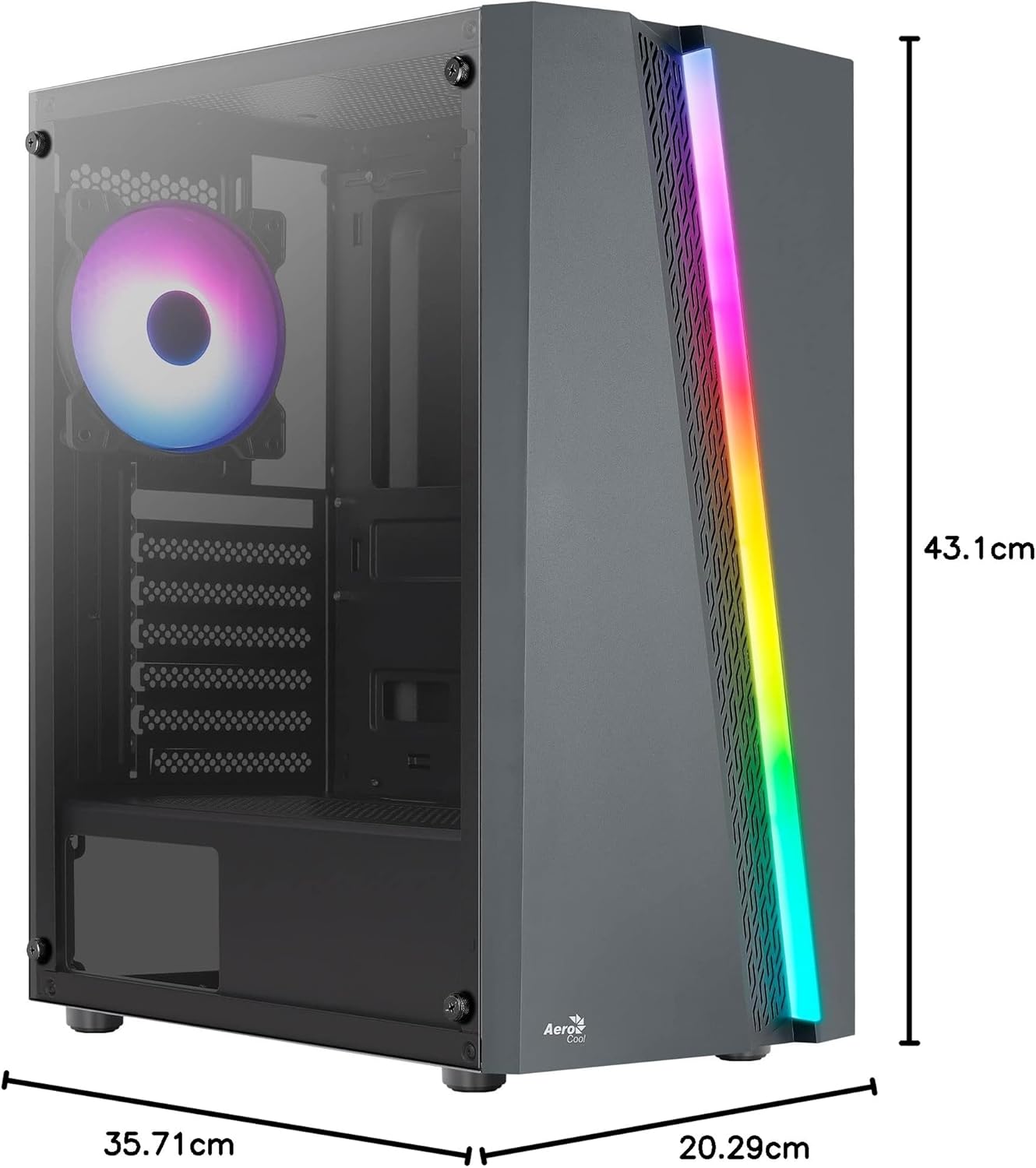
Figure 7.1: Dimensions of the AeroCool Blade PC Case.
| Өзгөчөлүк | Спецификация |
|---|---|
| Бренд | AeroCool |
| Модель аты | BLADEBK |
| Иштин түрү | Semi-Tower |
| Motherboard шайкештиги | ATX, Micro ATX, Mini ITX |
| Материал | Tempered Glass (Side Panel) |
| Продукциянын өлчөмдөрү (L x W x Y) | 43.1 x 20.3 x 35.7 см |
| Элемент Салмагы | 4 кг |
| Drive Bays | 2 x 3.5", 2 x 2.5" |
| GPU тазалоо | 307 мм чейин |
| CPU муздаткычтын бийиктиги | 155 мм чейин |
| Алдыңкы I / O порттору | 1 x USB 3.0, 2 x USB 2.0, HD Audio, Mic, LED Control, Power |
| Алдын ала орнотулган күйөрмандар | 1 x 120mm RGB Rear, 3 x 120mm Front |
| Муздатуу ыкмасы | Аба |
8. Кепилдик жана колдоо
Кепилдик жөнүндө маалымат жана техникалык колдоо алуу үчүн, расмий AeroCool компаниясына кайрылыңыз webсайтына кириңиз же жергиликтүү сатуучуңузга кайрылыңыз. Кепилдик талаптары үчүн сатып алганыңызды тастыктаган документти сактап коюңуз.
Байланыш маалыматы: Кошумча жардам алуу үчүн, кириңиз www.aerocool.io.


