1. Киришүү
This manual provides comprehensive instructions for the installation, operation, and maintenance of your PNI House AHD25 5MP Dome CCTV Camera. Please read this manual thoroughly before using the product to ensure proper functionality and safety. The PNI House AHD25 is a versatile surveillance camera designed for both indoor and outdoor use, featuring high-resolution imaging and night vision capabilities.
2. Коопсуздук маалыматы
- электр менен жабдууну камсыз кылуу voltage matches the camera's requirements (12V ± 10%).
- Do not expose the camera to extreme temperatures outside its operating range (-26°C to +80°C).
- Avoid direct exposure to water jets or submersion, despite its IP66 rating, to prevent damage.
- Installation should be performed by qualified personnel if you are unsure about electrical connections.
- Камераны күчтүү магниттик талаалардан алыс кармаңыз.
3. Пакеттин мазмуну
Пакетте бардык буюмдар бар экенин текшериңиз:
- PNI House AHD25 5MP Dome CCTV Camera
- User Manual
- Mounting Screws and Plugs (typically included)

Image 3.1: PNI House AHD25 camera with its retail packaging, highlighting key features like 5MP resolution and 4-in-1 video signal compatibility.
4. Продукт бүтүп калдыview
The PNI House AHD25 camera is a compact dome-style surveillance unit. Key components include:
- Объектив: Fixed 3.6mm lens for a wide field of view.
- IR Диоддордон: 36 infrared LEDs for night vision up to 25 meters.
- Сенсор: 5MP image sensor for high-resolution video.
- Турак жай: Durable metal housing with IP66 weather resistance.
- Видео чыгаруу: BNC connector for analog video output.
- Кубат киргизүү: DC 12V электр киргизүү.
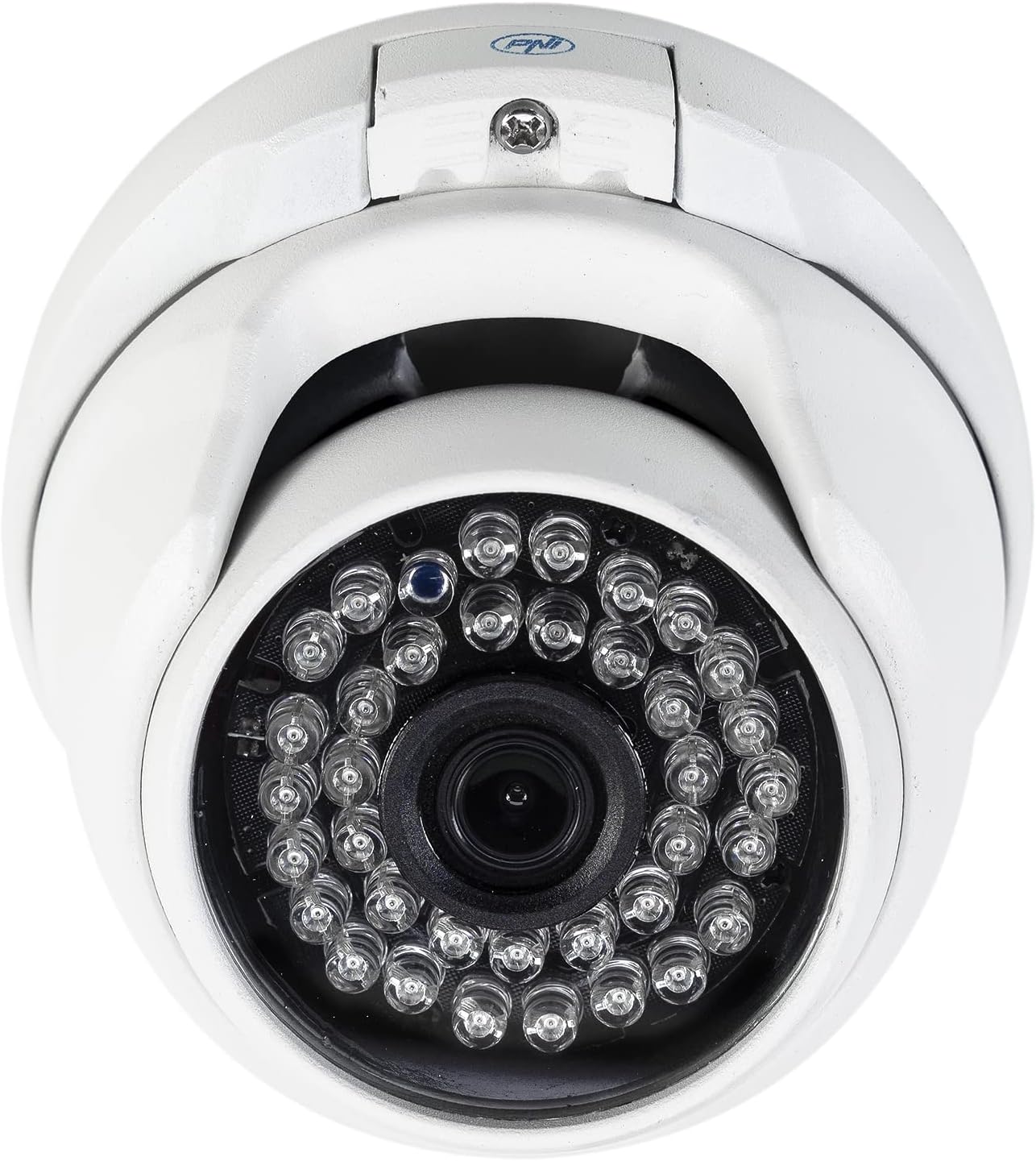
4.1-сүрөт: Алдыңкы пландагы сүрөт view of the PNI House AHD25 camera, detailing the central lens surrounded by 36 infrared LEDs.

Image 4.2: The PNI House AHD25 camera shown with its integrated BNC video output cable and DC power input cable.
5. Орнотуу
5.1 Камераны орнотуу
The PNI House AHD25 camera is designed for both indoor and outdoor ceiling mount installations. Its metal housing and IP66 rating ensure durability in various environments.
- Choose a suitable mounting location that provides the desired field of view жана электр жана видео кабелдеринин жетүүчү аралыгында жайгашкан.
- Use the camera base as a template to mark drilling points on the ceiling or wall.
- Drill pilot holes and insert the provided wall plugs (if mounting on masonry).
- Камеранын негизин берилген бурамалар менен бекитиңиз.
- Adjust the camera's angle to achieve the optimal viewаймак.

Сүрөт 5.1: Каптал view of the PNI House AHD25 camera, illustrating its adjustable dome mechanism for precise positioning after mounting.
5.2 Камераны туташтыруу
The camera requires a 12V DC power supply and connects via a BNC cable for video transmission.
- Connect the DC 12V power adapter (not included) to the camera's power input cable.
- Connect the BNC video output cable from the camera to the corresponding video input on your Digital Video Recorder (DVR) or monitor.
- Сигналдын жоголушуна жол бербөө үчүн бардык туташуулар коопсуз экендигин текшериңиз.
Эскертүү: This camera supports AHD, TVI, CVI, and CVBS video signal types. Ensure your DVR is compatible with one of these formats. The camera's video signal type can typically be switched via a small button or OSD menu accessible through a compatible DVR.
6. Операция
6.1 Күйгүзүү
Once the camera is securely mounted and connected to power and your DVR, plug in the 12V power adapter. The camera will power on automatically.
6.2 Video Output and Resolution
The PNI House AHD25 provides a 5MP resolution (2560 x 1920 pixels) for clear and detailed surveillance footage. It is compatible with various analog video signal types: AHD, TVI, CVI, and CVBS. This 4-in-1 compatibility allows integration with a wide range of DVR systems.
To ensure optimal image quality, configure your DVR to recognize the camera's 5MP resolution and the correct video signal type. Refer to your DVR's manual for specific settings.
6.3 Түнкү көрүнүш
Equipped with 36 IR LEDs, the camera automatically activates night vision in low-light conditions, providing clear black and white images up to a distance of 25 meters. The IR cut filter ensures accurate color reproduction during daylight hours.
6.4 Кыймылды аныктоо жана эскертүүлөр
The camera supports motion-only alerts. When connected to a compatible DVR, you can configure motion detection zones and sensitivity settings. The DVR will then record footage or send notifications upon detecting movement within the specified areas.
6.5 Remote Control and Smartphone Compatibility
While the camera itself is wired, its integration with a Wi-Fi enabled DVR or NVR system allows for remote control and viewing via a smartphone application. Consult your DVR/NVR manual for details on setting up remote access and smartphone compatibility.
7. Техникалык тейлөө
- Тазалоо: Мезгил-мезгили менен камеранын линзасын жана корпусун жумшак, гamp кездеме. Катуу химиялык заттарды же абразивдүү тазалагычтарды колдонбоңуз.
- Кабелдик текшерүү: Regularly check all cables for signs of wear or damage, especially for outdoor installations.
- Программалык камсыздоонун жаңыртуулары: If connected to a network-enabled DVR, check the DVR manufacturer's website for any available firmware updates that might improve camera compatibility or performance.
- Курчап турган чөйрөнү коргоо: The IP66 rating protects against dust and powerful water jets. However, avoid prolonged submersion or high-pressure washing.
8. Кыйынчылыктарды
| Көйгөй | Мүмкүн себеп | Чечим |
|---|---|---|
| Экранда сүрөт жок |
|
|
| Сүрөттүн сапаты начар / бүдөмүк сүрөт |
|
|
| Түнкү көрүнүш иштебейт |
|
|
9. Техникалык шарттар
| Өзгөчөлүк | Деталь |
|---|---|
| Модель аты | AHD25 |
| Image Sensor Resolution | 5 MP (2560 x 1920 pixels) |
| Объектив | 3.6 мм |
| Түнкү көрүнүш | 36 IR LEDs, up to 25 meters range |
| Минималдуу жарыктандыруу | 0.01 люкс |
| Video Signal Types | AHD, TVI, CVI, CVBS (4-in-1) |
| Video Output | BNC Connector (1.0Vp-p, 75Ω) |
| Электр камсыздоо | DC 12V ± 10% |
| Max. Energy Consumption | 6 Вт |
| Иштөө температурасы | -26°C ~ +80°C |
| Кирүү коргоо рейтинги | IP66 (Dust tight and protected against powerful water jets) |
| Турак жай материалы | Металл |
| Өлчөмдөрү (L x W x Y) | 3.94 x 4.13 x 2.76 дюйм (100 x 105 x 75 мм) |
| Элемент Салмагы | 8.6 унция (245 грамм) |
| Түс | Ак |
| Өндүрүүчү | Onlineshop SRL |
| Дата биринчи жеткиликтүү | 16-август, 2022-жыл |

Сүрөт 9.1: Төмөнкү view of the PNI House AHD25 camera, showing the product label with manufacturer details, voltage, and CE mark. The serial number is 2522031996.
10. Кепилдик жана колдоо
For warranty information and technical support, please refer to the documentation provided at the time of purchase or visit the official PNI webсайт. Сатып алуу квитанциясын кепилдик дооматтары үчүн сатып алуунун далили катары сактаңыз.
Сиз да зыярат кылсаңыз болот Amazonдагы PNI дүкөнү кошумча продукт маалымат жана колдоо ресурстар үчүн.


