1. Продукт бүтүп калдыview
The UNV NVR302-16E2 is a high-performance Network Video Recorder (NVR) designed for advanced surveillance systems. It supports 4K resolution recording and playback, offering robust video management capabilities for up to 32 channels. This NVR is compatible with various camera protocols, including ONVIF, and features Ultra H.265 compression for efficient storage.
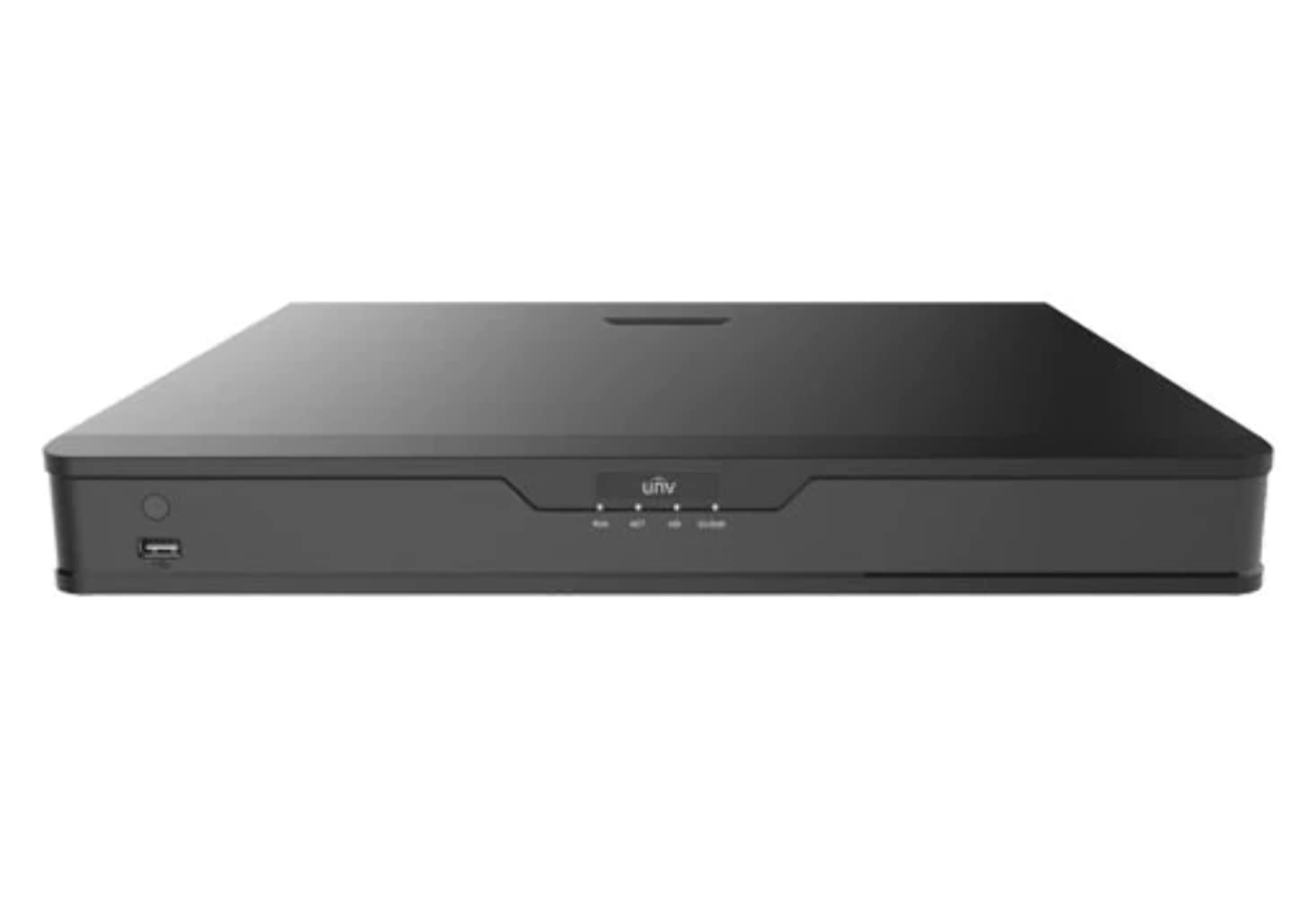
Сүрөт 1: Алдыңкы view of the UNV NVR302-16E2 4K NVR. The front panel includes a power button, a USB port, and indicator lights for power, HDD activity, network status, and alarm.
2. Негизги өзгөчөлүктөрү
- Supports Ultra H.265/H.265/H.264 video formats for efficient compression.
- 8/16-channel input with Plug & Play functionality via independent PoE network interfaces.
- Compatibility with mainstream cameras supporting ONVIF conformance (Profile S, Profile G, Profile T) and RTSP protocols.
- Equipped with 1-channel HDMI and 1-channel VGA outputs, with HDMI supporting up to 4K (3840x2160) resolution.
- Independent HDMI and VGA outputs for flexible display options.
- Supports recording resolutions up to 12 Megapixels.
- Accommodates 2 SATA HDDs, with support for up to 10TB per HDD.
- Features various fisheye dewarping modes for live view and playback, accessible via both web interface and GUI.
- Incorporates ANR (Automatic Network Replenishment) technology to enhance storage reliability during network disconnections.
- Supports cloud upgrade for convenient firmware updates.
3. Пакеттин мазмуну
Please check the package contents upon unboxing. If any items are missing or damaged, contact your vendor immediately.
- UNV NVR302-16E2 NVR Unit
- Кубаттуу адаптер
- USB чычкан
- SATA Data Cables (for HDD installation)
- HDD орнотуучу бурамалар
- Quick Start Guide
4. Орнотуу
4.1 Физикалык орнотуу
- HDD орнотуу:
Unscrew and remove the NVR cover. Securely mount the SATA hard disk drives (HDDs) into the designated bays using the provided screws. Connect the SATA data and power cables from the NVR motherboard to the HDDs. Replace the NVR cover and secure it with screws.
- Дисплейди туташтыруу:
Connect a monitor to the NVR's HDMI or VGA output port using a compatible cable.
- Чычканды туташтыруу:
USB чычканын NVRдин USB портторунун бирине сайыңыз.
- Тармакка туташуу:
NVRдин LAN портунан Ethernet кабелин тармактык роутериңизге же коммутаторуңузга туташтырыңыз.
- Камераларды туташтыруу:
For PoE cameras, connect them directly to the NVR's independent PoE ports. For non-PoE cameras, ensure they are connected to the same network as the NVR and powered separately.
- Туташуу кубаты:
Кубат адаптерин NVRдин кубат киргизүү булагына туташтырып, андан кийин аны розеткага сайыңыз. NVR автоматтык түрдө күйөт.
4.2 Баштапкы конфигурация
Upon the first boot, the NVR will guide you through an initial setup wizard. Follow the on-screen prompts to configure essential settings.
- Администратордун сырсөзүн коюңуз: Create a strong password for the 'admin' user. This is crucial for security.
- Тармак орнотуулары: Configure the NVR's IP address (DHCP or Static IP). Ensure it is on the same network as your cameras for proper communication.
- Дата жана убакыт: Туура датаны, убакытты жана убакыт алкагын коюңуз.
- Катуу дискти инициализациялоо: The NVR will prompt you to initialize (format) the newly installed HDDs. This step is necessary before recording can begin.
- Камерадан издөө жана кошуу: The NVR will automatically search for connected cameras. Select and add the cameras you wish to manage.
5. NVRди иштетүү
5.1 Live View
Орнотуудан кийин, NVR түз эфирди көрсөтөт view туташкан камералардын саны. Сиз бир камералуу камералардын ортосунда которула аласыз view, көп камералуу торчо view, and customize the display layout.
- Канал тандоо: Click on a channel window to select it.
- PTZ башкаруу: If using PTZ cameras, use the on-screen controls or joystick (if connected) to pan, tilt, and zoom.
- Ыкчам ойнотуу: Right-click on a channel and select "Instant Playback" to view акыркы жазуулар.
5.2 Жазууну башкаруу
The NVR supports various recording modes.
- Пландаштырылган жаздыруу: Configure recording schedules based on time, day, and event (e.g., motion detection).
- Кыймылды аныктоо жазуусу: Set up motion detection zones and sensitivity for each camera to trigger recording only when movement is detected.
- Кол менен жаздыруу: Start or stop recording manually from the live view интерфейс.
5.3 Ойнотуу
Жазылган footagкайра үчүн eview.
- Navigate to the "Playback" menu.
- Select the camera(s) and date/time range for playback.
- Жаздырууларды карап чыгуу үчүн убакыт тилкесин колдонуңуз.
- Options include fast forward, rewind, pause, and frame-by-frame playback.
5.4 Камдык көчүрмө
Export recorded video clips to an external USB drive.
- Insert a USB flash drive into the NVR's USB port.
- Go to the "Backup" menu.
- Select the camera, time range, and desired video format for export.
- Start the backup process.
5.5 Remote Access
Access your NVR remotely via a web browser or mobile application.
- Web Браузер: Enter the NVR's IP address into a web browser on a computer connected to the same network. Log in with your credentials.
- Мобилдик колдонмо: Download the official Uniview mobile application (e.g., EZView). Register an account, add your NVR by scanning the QR code or entering its serial number, and view live feeds or playback remotely.
6. Техникалык тейлөө
6.1 Микропрограмма жаңыртуулары
Regularly check for and install firmware updates to ensure optimal performance, security, and access to new features. Updates can typically be performed via the NVR's web interface or local GUI, often with cloud upgrade support.
6.2 Катуу дискти башкаруу
Monitor the health and status of your hard drives. The NVR provides tools to check HDD status, format drives, and configure overwrite settings when storage is full.
6.3 Системалык журналдар
Review system logs for any errors, warnings, or important events. This can assist in troubleshooting and system monitoring.
7. Кыйынчылыктарды
| Көйгөй | Мүмкүн себеп | Чечим |
|---|---|---|
| Монитордо видео чыгаруу жок. | Loose cable connection; incorrect display resolution; NVR not powered on. | Check HDMI/VGA cable connections. Ensure NVR is powered. Try a different monitor or cable. Adjust NVR output resolution if possible. |
| Камералар көрсөтүлбөй жатат. | Network issue; incorrect camera IP; camera not powered; camera not added to NVR. | Verify network connectivity. Ensure cameras are powered. Check camera IP addresses and add them to the NVR if not already done. |
| NVRге алыстан кирүү мүмкүн эмес. | Network configuration issue (port forwarding, DDNS); NVR offline; incorrect credentials. | Verify NVR's network settings. Ensure necessary ports are forwarded on your router. Check internet connection. Confirm login credentials. |
| Жаздыруу жок. | HDD not initialized or full; recording schedule not set; camera not recording. | Initialize the HDD. Check recording schedules and ensure they are active. Verify camera status and ensure it's configured to record. |
8. Техникалык шарттар
| Өзгөчөлүк | Деталь |
|---|---|
| Модель номери | NVR302-16E2 |
| Видео форматтары колдоого алынат | Ultra H.265 / H.265 / H.264 |
| Канал киргизүү | 8/16-channel (with independent PoE interfaces) |
| HDMI чыгышы | 1-channel, up to 4K (3840x2160) resolution |
| VGA чыгаруу | 1-канал |
| Max Resolution Recording Resolution | 12 мегапикселге чейин |
| HDD колдоосу | 2 SATA HDDs, up to 10TB each (20TB total) |
| Байланыш технологиясы | HDMI, VGA, Ethernet, USB |
| Шайкеш түзмөктөр | IP Cameras (ONVIF Profile S, G, T; RTSP) |
| Продукциянын өлчөмдөрү | 18 x 14 x 4 дюйм (45.72 x 35.56 x 10.16 см) |
| Элемент Салмагы | 3.97 фунт (1.8 кг) |
| Өндүрүүчү | Uniview |
9. Кепилдик жана колдоо
Uniview products typically come with a limited manufacturer's warranty. For specific warranty terms and conditions, please refer to the warranty card included with your product or visit the official Uniview webсайт.
For technical support, troubleshooting assistance, or service inquiries, please contact Uniview customer support through their official channels. You can usually find contact information, FAQs, and support resources on the Uniview webсайт (www.uniview.com).
Тектеш документтер - NVR302-16E2
 |
Uni көйгөйүн чечүүview NVR эки тараптуу аудио маселелери | Uniview Колдоо Uni'деги эки тараптуу аудио көйгөйлөрүн чечүү жана чечүү үчүн комплекстүү колдонмоview NVR жана камералар. үчүн кадамдарды камтыйт web интерфейс, мобилдик колдонмо жана NVR GUI. |
 |
Uniview Тармактык видео жазгычтын Ыкчам колдонмосу Uni үчүн кыска жолview Түзмөктүн индикаторлорун камтыган тармактык видео жазгычтар (NVRs), интерфейс порттору, ар кандай HDD конфигурациялары үчүн диск орнотуу (1, 2, 4, 8, 9, 16-бай), ишке киргизүү жана өчүрүү процедуралары, IP түзмөктөрдү кошуу жана ойнотуу сыяктуу жергиликтүү операциялар, UNV-Link мобилдик тиркемесин колдонуу, web кирүү жана маанилүү коопсуздук эскертүүлөрү, жоопкерчиликтен баш тартуулар жана ченемдик укуктук актыларга ылайык маалымат. |
 |
Uni кантип өзгөртүү керекview NVR убакыт орнотуулары Uni үчүн убакыт жана дата жөндөөлөрүн кантип тууралоо боюнча этап-этабы менен жолview Тармактык видео жазгычтар (NVRs), анын ичинде ар кандай ыкмаларды колдонуу web интерфейси, түз монитор мүмкүнчүлүгү, EZTools программасы жана EZ сыяктуу мобилдик колдонмолорView жана UNV-Link. |
 |
Uniview XVR301-G3 сериясындагы санариптик видео жазгыч: NDAA шайкеш келген маалымат баракчасы Университеттин толук маалымат баракчасыview XVR301-G3 сериясындагы санариптик видео жазгыч, анын ичинде XVR301-04G3, XVR301-08G3 жана XVR301-16G3 моделдери. Функциялары, мүнөздөмөлөрү, туташуусу жана шайкештиги жөнүндө маалымат. |
 |
Uniview 2021 Продукт колдонмосу: Тармак камералары, NVRs, VMS жана Коопсуздук чечимдери Комплекстүү Uni табыңызview 2021 Product Guide, detailing a wide array of professional video surveillance solutions. This guide covers Network Cameras, NVRs, VMS, Professional Storage, Display & Control systems, and Accessories, featuring advanced technologies like LightHunter and PixelSense. Find detailed specifications and model information for Easy, Prime, and Pro series products, suitable for various applications from residential security to large-scale enterprise deployments. |
 |
NVR-B3601.33.45.221212 Release Notes - Zhejiang Uniview Technologies Official release notes for Zhejiang Uniview Technologies' NVR-B3601.33.45.221212 Network Video Recorder software, detailing version information, new features, changes, and upgrade procedures. |