1. Киришүү
The ThermoPro TP410 Infrared Thermometer Gun is a non-contact laser thermometer designed for quick and accurate temperature measurements of surfaces. It is ideal for various applications including cooking, pizza ovens, griddles, grills, HVAC systems, and engine diagnostics. This device is not intended for human body temperature measurement.
Key features include a wide temperature range, adjustable emissivity for improved accuracy, a 12:1 distance-to-spot ratio for safe measurements from a distance, and a multi-temperature display showing maximum, minimum, and average readings.

Image 1.1: The ThermoPro TP410 Infrared Thermometer Gun, showing its compact design and laser pointer in action.
2. Продукциянын өзгөчөлүктөрү
- Чөнтөк өлчөмүндөгү дизайн: Small, light-weight, convenient, and portable for both home and industrial use.
- Жогорку тактык: Utilizes a Thermopile Sensor for quick and precise measurements.
- Жөнгө салынуучу эмиссивдүүлүк: Allows customization (0.1 to 1.0) to match different surface textures for improved accuracy.
- Safe Non-Contact Measurement: 12:1 distance-to-spot ratio and 0.5-second response time enable safe temperature readings from a distance.
- Multi-Temperature Display: Shows maximum, minimum, and average temperatures for comprehensive analysis.
- Кеңири өлчөө диапазону: -58 ° F ден 1022 ° F (-50 ° Cден 550 ° C).
- Арткы жарык дисплей: Ар кандай жарык шарттарында окулушун камсыз кылат.
- Автоматтык өчүрүү функциясы: Automatically shuts off after 90 seconds of inactivity to conserve battery.
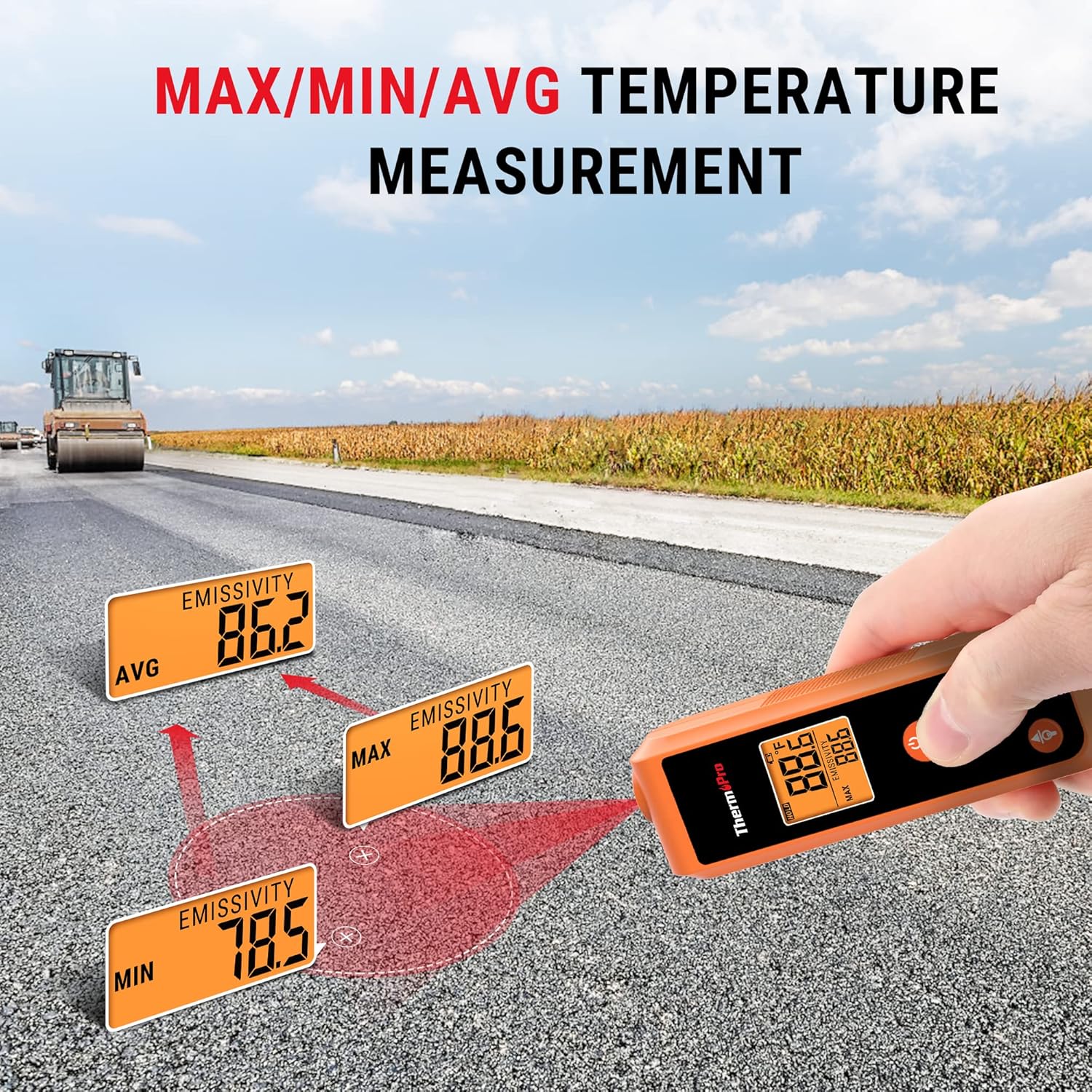
Image 2.1: Size comparison illustrating the compact, pocket-sized design of the ThermoPro TP410 compared to other larger thermometer guns.
3. Орнотуу
3.1. Батареяны орнотуу
The ThermoPro TP410 requires 2 AAA batteries (included). To install the batteries:
- Аппараттын артындагы батарея бөлүкчөсүнүн капкагын табыңыз.
- Капкакты жылдырыңыз.
- Туура полярдуулукту (+ жана -) камсыз кылып, 2 AAA батарейкасын салыңыз.
- Батарея уясынын капкагын бекем жабыңыз.
3.2. Баштапкы күйгүзүү
Батареяларды орноткондон кийин, баскычын басыңыз SCAN button to power on the device. The display will light up, and the current temperature reading will be shown.
4. Иштөө нускамалары
4.1. Температураны өлчөө
To measure the temperature of a surface:
- Point the laser pointer at the center of the surface you wish to measure.
- басып, кармап туруңуз SCAN button. The temperature reading will appear on the display instantly.
- бошотуңуз SCAN button to hold the current temperature reading on the display.

Image 4.1: Demonstrating non-contact temperature measurement using the laser pointer to target a hot surface, such as inside a pizza oven.
4.2. Understanding Distance-to-Spot Ratio (D:S)
The TP410 has a 12:1 D:S ratio. This means that at a distance of 12 inches, the measurement spot size will be 1 inch. As you move further away, the spot size increases. For accurate readings, ensure the target area is larger than the spot size.
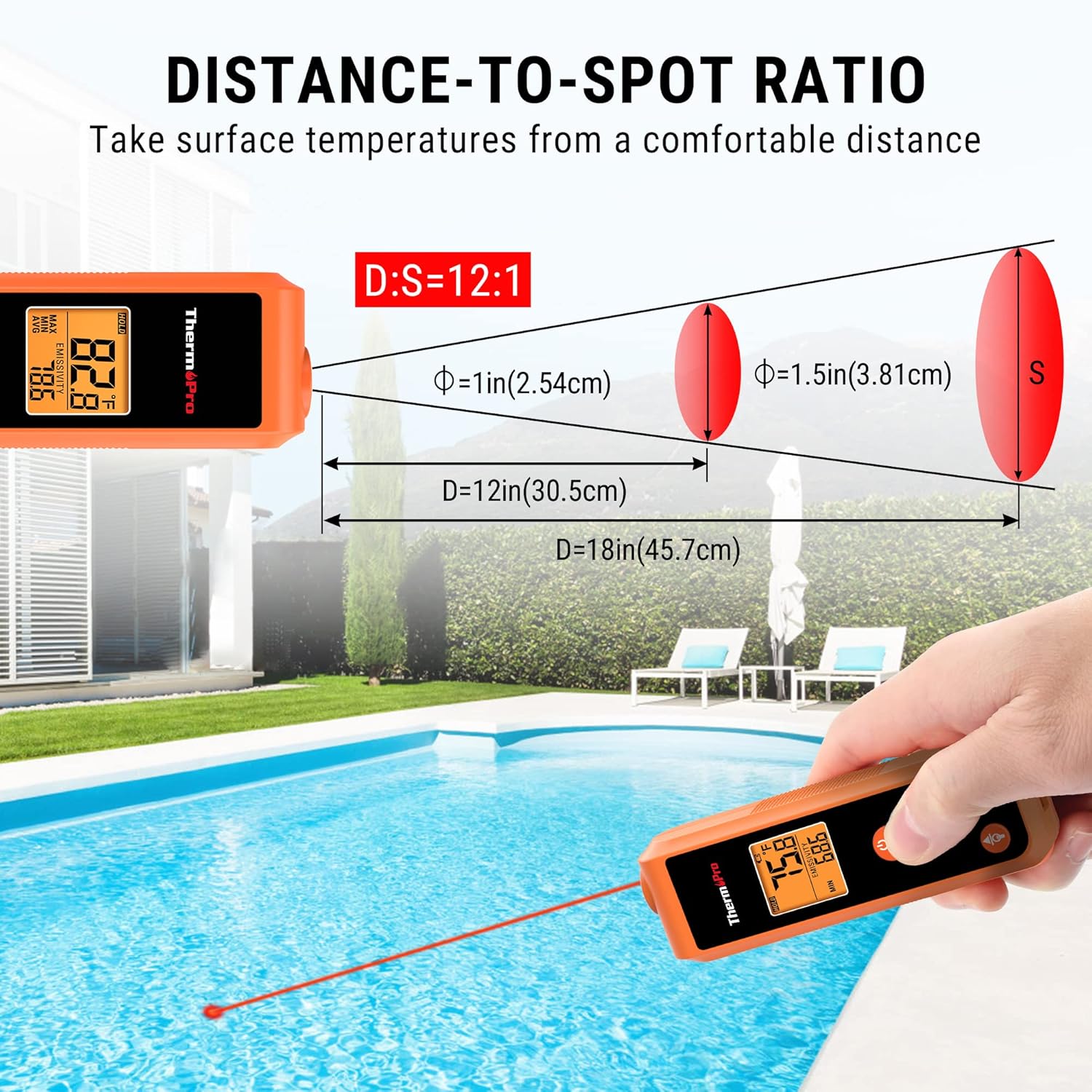
Image 4.2: Diagram illustrating the 12:1 distance-to-spot ratio, showing how the measurement area expands with increased distance from the target.
4.3. Эмиссияны жөндөө
Emissivity is the ability of a material to emit energy by radiation. Different materials have different emissivity values. For the most accurate readings, adjust the emissivity setting to match the surface being measured. The TP410 allows adjustment from 0.1 to 1.0.
- басыңыз РЕЖИМ button to cycle through display modes until "EMISSIVITY" is shown.
- колдонуу Up жана Төмөн arrow buttons to adjust the emissivity value.
- Refer to common emissivity values for various materials (e.g., wood: 0.94, ice: 0.98, concrete: 0.95, oil: 0.94).
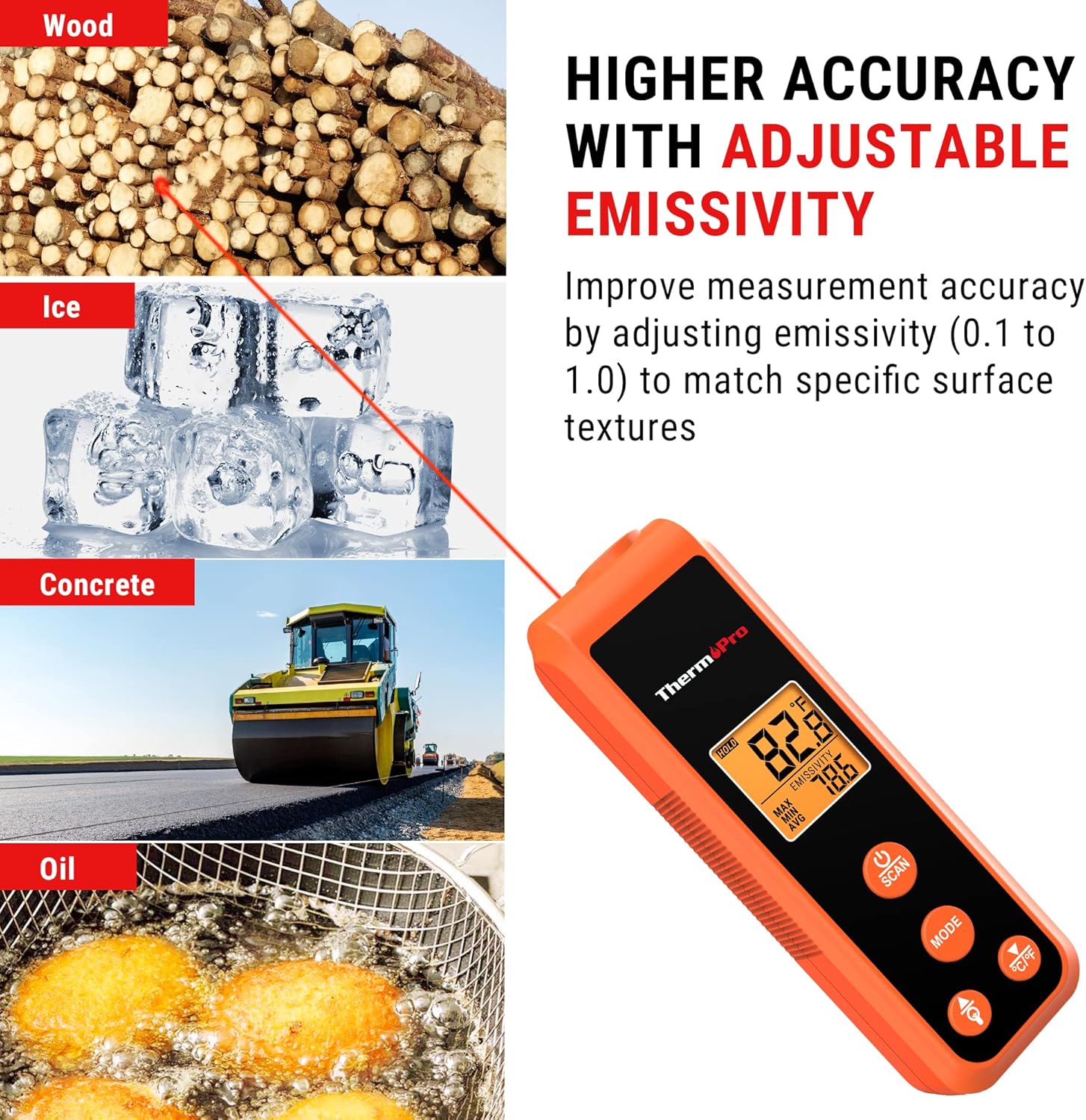
Image 4.3: Visual representation of how adjustable emissivity improves measurement accuracy across different surface types like wood, ice, concrete, and oil.
4.4. Multi-Temperature Display Modes
The TP410 can display various temperature readings:
- МАКС: Displays the maximum temperature recorded during a scan.
- МИН: Displays the minimum temperature recorded during a scan.
- AVG: Displays the average temperature recorded during a scan.
басыңыз РЕЖИМ button repeatedly to cycle through these display options.
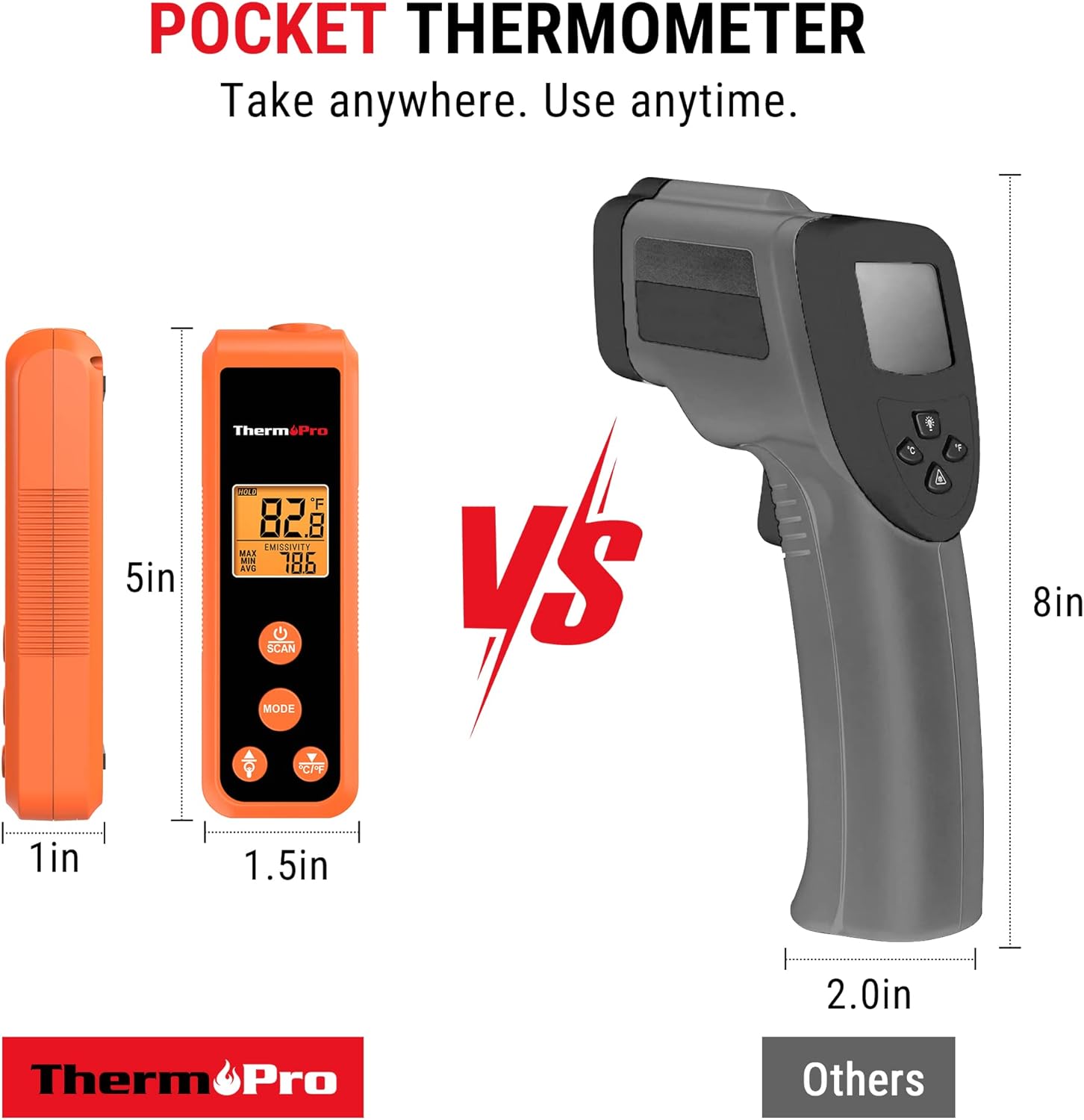
Image 4.4: The thermometer displaying maximum, minimum, and average temperature readings, useful for diagnosing temperature fluctuations across a surface.
4.5. Температураны өлчөө бирдиктерин которуу (°C/°F)
Цельсий (°C) жана Фаренгейт (°F) ортосунда которулуу үчүн, баскычын басыңыз ° C / ° F button located on the device.
4.6. Арткы жарыкты башкаруу
To turn the display backlight on or off, press the Электр лампасы баскычы.
4.7. Автоматтык өчүрүү
The device will automatically turn off after 90 seconds of inactivity to conserve battery life.
5. Multiple Applications
The ThermoPro TP410 is versatile and can be used for a wide range of home and industrial applications, including but not limited to:
- Food preparation (e.g., checking surface temperature of griddles, pizza ovens, oil for frying).
- HVAC system diagnostics (e.g., checking vent temperatures).
- Automotive maintenance (e.g., engine temperature checks).
- Home repairs and general temperature monitoring.

Сүрөт 5.1: Мисamples of the thermometer's diverse applications, including measuring temperatures for oil-fried foods, griddles, HVAC systems, and car engines.
5.1. Official Product Video: ThermoPro TP410 IR Pocket Infrared Thermometer
Video 5.1: An official product video from ThermoPro US showcasing the features and various uses of the TP410 Infrared Thermometer.
6. Техникалык тейлөө
6.1. Тазалоо
To clean the thermometer, wipe it with a damp cloth. Do not immerse the device in water or use abrasive cleaners. Ensure the lens is clean for accurate readings.
6.2. Сактоо
Колдонулбаган учурда термометрди салкын, кургак жерде сактаңыз. Агып кетпеши үчүн, көпкө сактасаңыз, батарейкаларын алып салыңыз.
7. Кыйынчылыктарды
| Көйгөй | Мүмкүн себеп | Чечим |
|---|---|---|
| Дисплей бош же күңүрт. | Батареялардын заряды аз же батарея туура эмес орнотулган. | Туура полярдуулукту камсыз кылуу менен батарейкаларды жаңы AAA батарейкалары менен алмаштырыңыз. |
| Туура эмес окуулар. | Туура эмес нурлантуу жөндөөсү, кир линза же бута өтө кичинекей/алыс. | Adjust emissivity to match material, clean the lens, ensure target is within D:S ratio. |
| Лазер көрүнбөйт. | Operating in bright light or laser malfunction. | Use in lower light conditions if possible. If persistent, contact support. |
8. Техникалык шарттар
- Модель аты: TP410
- Бренд: ThermoPro
- Өлчөө диапазону: -58°F – 1022°F (-50°C – 550°C)
- Тактыгы: ±3°F
- Аралыктын чекитке болгон катышы (D:S): 12:1
- Жооп убактысы: 0.5 секунд
- Чыгаруучу: Жөнгө салынуучу (0.1ден 1.0га чейин)
- Дисплей түрү: Арткы жарык менен санарип
- Кубат булагы: 2 x AAA батарейкалар (киргизилген)
- Элемент Салмагы: 5 унция
- Өлчөмдөрү (болжол менен): 4.9 дюйм (узундугу)
- Өзгөчө өзгөчөлүгү: Байланышсыз
- Сертификаттар: CE, FCC
9. Кепилдик жана колдоо
ThermoPro products come with a warranty. For specific warranty details and to register your product, please visit the official ThermoPro webсайтка кириңиз же продуктунун таңгагында камтылган кепилдик картасын караңыз.
For technical support, troubleshooting assistance, or any inquiries regarding your ThermoPro TP410, please contact ThermoPro Customer Service. Contact information can typically be found on the product packaging, the official ThermoPro webсайтында же тиркелген документтердин ичинде.
Official ThermoPro Store: Дүкөнгө кириңиз


