Introduction
This manual provides instructions for the Gmatrix Replacement Voice Remote Control, designed for use with various Samsung Smart TVs. It covers setup, operation, compatibility, and troubleshooting to ensure optimal performance of your new remote.

Figure 1: Gmatrix Replacement Voice Remote Control. This image displays the sleek, black remote control with its various buttons, including the prominent voice control microphone icon at the top.
Important Note: This remote is NOT compatible with IR (Infrared) technology. Voice control functionality is supported only for Samsung TV models with Bixby/Alexa built-in.
Жайгашуу
1. Батареяны орнотуу
Алыстан башкаруу пульту эки (2) AAA батарейкасын талап кылат (кошулмага кирбейт). Аларды орнотуу үчүн төмөнкү кадамдарды аткарыңыз:
- Пульттун артындагы батарея бөлүкчөсүнүн капкагын табыңыз.
- Бөлүмдү ачуу үчүн капкакты ылдый жылдырыңыз же кулпуну (эгер бар болсо) басыңыз.
- Оң (+) жана терс (-) терминалдары бөлүмдүн ичиндеги белгилер менен туура дал келишин камсыз кылып, эки AAA батарейкасын салыңыз.
- Батарея бөлүкчөсүнүн капкагын бекем чыккыча ордуна коюңуз.

Figure 2: Battery compartment of the Gmatrix remote. This image shows the back of the remote with the battery cover removed, illustrating where to insert two AAA batteries.
2. Pairing the Remote with Your TV
To enable full functionality, including voice control, you must pair the remote with your Samsung Smart TV. This process establishes a wireless connection between the remote and the television.
- Сыналгыңыз күйгүзүлгөнүн текшериңиз.
- Алыстан башкаруу пультун телевизоруңузга багыттаңыз.
- Simultaneously press and hold the "Кайтуу" button and the "Ойнотуу/Тыныгуу" button for approximately 5 seconds.
- Release the buttons when a pairing confirmation message appears on your TV screen. The message typically indicates that the remote is connected or paired.

Figure 3: Voice Control feature on the Gmatrix remote. This image highlights the microphone button and illustrates the concept of voice commands, which are enabled after successful pairing.
Иштөө нускамалары
Үн менен башкаруу функциясы
Once paired, the remote's voice control feature allows for hands-free navigation and command execution. This feature is available for Samsung TV models equipped with Bixby or Alexa built-in.
- басып, кармап туруңуз Микрофон button (usually located near the top of the remote).
- Speak your command clearly into the remote. Examples камтыйт:
- "Decrease TV Brightness"
- "Turn Up the Volume"
- "Open movie channel"
- "Fast forward to 28'26''"
- "Show me sports channels"
- Release the Microphone button after speaking your command.

Figure 4: A user demonstrating voice command functionality. This image shows a person speaking into the remote, with example commands displayed on the screen, illustrating how voice control simplifies interaction with the TV.
Жарлык баскычтары
The remote features dedicated shortcut buttons for quick access to popular streaming services and functions:
- Netflix: Direct access to Netflix.
- Prime Video: Direct access to Amazon Prime Video.
- Samsung TV Plus: Direct access to Samsung's free streaming service.
- Hulu: Direct access to Hulu.
- WWW: кирүү мүмкүнчүлүгү web браузер.
- Rakuten TV: Direct access to Rakuten TV.

Figure 5: The Gmatrix remote highlighting its shortcut buttons. This image clearly labels the dedicated buttons for Netflix, Prime Video, Samsung TV Plus, Hulu, WWW, and Rakuten TV, providing quick access to these services.
Жалпы колдонуу
The remote is designed for ease of use and offers a reliable connection up to 15 meters (50 feet) from your television, thanks to its upgraded chip design.

Figure 6: A user holding the Gmatrix remote, demonstrating its effective operating range. The image shows the remote being used comfortably from a distance, with the TV screen visible in the background.
Шайкештик
This Gmatrix replacement remote is compatible with a wide range of Samsung Smart TVs, including LED, QLED, OLED, and 4K UHD models. It is also compatible with several original Samsung remote control models.
Samsung телевизорлорунун шайкеш келген моделдери:
The remote supports various Samsung TV series from 2021 and 2022, including but not limited to:
- 2022 Сериялар: QN82Q70RAFXZA, QN82Q70R, QN49LS03RAFXZA, QN49LS03R, QN75Q70RAFXZA, QN75Q70R, QN55Q60RAFXZA, QN55Q60R, QN65Q70RAFXZA, QN65Q70R, QN55Q70RAFXZA, QN55Q70R, QN55LS03RAFXZA, QN55LS03R, QN65LS03RAFXZA, QN65LS03R, QN49Q70RAFXZA, QN49Q70R, QN82Q60RAFXZA, QN82Q60R, QN43Q60RAFXZA, QN43Q60R, QN75Q60RAFXZA, QN75Q60R, QN43LS03RAFXZA, QN43LS03R, QN65Q60RAFXZA, QN65Q60R, QN55LS01RAFXZA, QN49Q60RAFXZA, QN49Q60R
- 2021 Сериялар:
- Q60A: QN50Q60AAFXZA, QN55Q60AAFXZA, QN60Q60AAFXZA, QN65Q60AAFXZA, QN70Q60AAFXZA, QN75Q60AAFXZA, QN85Q60AAFXZA
- Q70A: QN55Q70AAFXZA, QN65Q70AAFXZA, QN75Q70AAFXZA, QN85Q70AAFXZA
- Q80A: QN50Q80AAFXZA, QN55Q80AAFXZA, QN65Q80AAFXZA, QN75Q80AAFXZA, QN85Q80AAFXZA
- QN85A: QN55QN85AAFXZA, QN65QN85AAFXZA, QN75QN85AAFXZA, QN85QN85AAFXZA
- QN90A: QN43QN90AAFXZA, QN50QN90AAFXZA, QN55QN90AAFXZA, QN65QN90AAFXZA, QN75QN90AAFXZA, QN85QN90AAFXZA, QN98QN90AAFXZA
- QN800A: QN65QN800AFXZA, QN75QN800AFXZA, QN85QN800AFXZA
- QN900A: QN65QN900AFXZA, QN75QN900AFXZA, QN85QN900AFXZA
- AU8000: UN43AU8000FXZA, UN50AU8000FXZA, UN55AU8000FXZA, UN65AU8000FXZA, UN75AU8000FXZA, UN85AU8000FXZA
- TU9010: UN86TU9010FXZA
- Other Compatible Series: QN800B, QN90B, QN95B, QN85B, Q900TS, AU8000, M5, TU9010, Q60T Series, etc.
Compatible Samsung Remote Models:
- BN68-13897A
- BN59-01363A
- BN59-01330A
- BN59-01329A
- BN59-01330N
- BN68-11568A
- BN59-01330H
- BN59-01357A, BN59-01357F, BN59-01357L, BN59-01363A, BN59-01363C, BN59-01363L, BN59-01380A, BN59-01385A, BN59-01385B, BN59-01385D, BN59-01386D, BN59-01391A, etc.
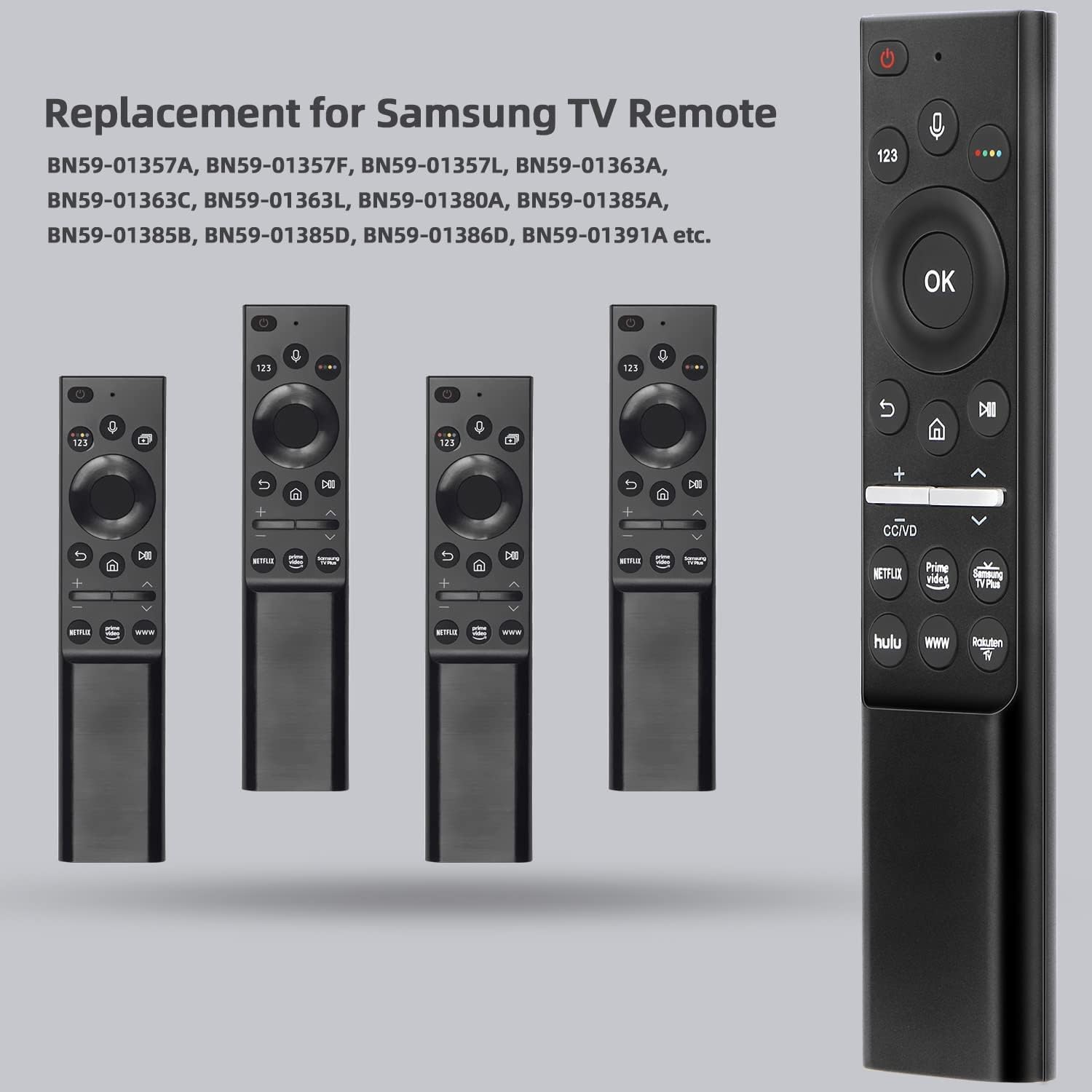
Figure 7: The Gmatrix remote positioned next to several original Samsung remote models it is designed to replace. This image visually confirms its role as a compatible replacement.

Figure 8: The Gmatrix remote displayed alongside two different Samsung Smart TVs, illustrating its broad compatibility with various Samsung LED, QLED, OLED, and 4K UHD models.
Техникалык шарттар
| Өзгөчөлүк | Деталь |
|---|---|
| Продукциянын өлчөмдөрү | 0.7 x 1 x 3 дюйм |
| Элемент Салмагы | 2.18 унция |
| Бренд | Gmatrix |
| Өзгөчө өзгөчөлүк | Ergonomic design, Voice Control |
| Колдоого алынган түзмөктөрдүн максималдуу саны | 1 (one TV) |
| Шайкеш түзмөктөр | Samsung акылдуу телевизорлору |
| Байланыш технологиясы | Wireless (not Infrared) |
| Power Source | 2 x AAA Батареялар (киргизилген эмес) |
Проблемаларды чечүү
If you encounter issues with your Gmatrix Replacement Voice Remote Control, please refer to the following common solutions:
- Remote is unresponsive or not working:
- Check battery installation: Ensure batteries are inserted correctly with proper polarity (+/-).
- Replace batteries: If batteries are low or depleted, replace them with fresh AAA batteries.
- Re-pair the remote: Follow the "Pairing the Remote with Your TV" steps in the Setup section to re-establish the connection.
- Ensure line of sight: While wireless, obstructions can sometimes interfere. Try using the remote closer to the TV.
- Voice control is not working:
- Confirm pairing: Voice control requires the remote to be successfully paired with the TV. Refer to the pairing instructions.
- Check TV compatibility: Voice control is only supported on Samsung Smart TV models that have Bixby or Alexa built-in. Verify your TV model's specifications.
- Speak clearly: Ensure you are speaking clearly and directly into the remote's microphone.
- Hold the microphone button: The microphone button must be pressed and held while speaking your command.
- Баскычтар жабышчаак же жооп бербей жатат:
- Clean the remote: Dust or debris might be affecting button performance. Refer to the Maintenance section for cleaning instructions.
- Re-pair the remote: Sometimes a fresh connection can resolve minor communication glitches.
- Remote does not control TV functions (e.g., volume, channels):
- Ensure the remote is paired correctly.
- Confirm your TV model is listed in the Compatibility section. This remote is specifically designed for Samsung Smart TVs and is not an IR remote.
Техникалык тейлөө
Тийиштүү кам көрүү жана техникалык тейлөө пультуңуздун иштөө мөөнөтүн узартат.
- Тазалоо: Пультту аарчуу үчүн жумшак, кургак чүпүрөктү колдонуңуз. Өтө кир болсо, бир азampчүпүрөктү суу же жумшак, абразивдүү тазалагыч менен жууп салыңыз. Ашыкча нымдуулуктан жана катаал химиялык заттардан алыс болуңуз.
- Батареяны алмаштыруу: Replace batteries promptly when the remote's performance degrades. Always use new AAA batteries and dispose of old batteries responsibly according to local regulations.
- Сактагыч: Пультту салкын, кургак жерде, күндүн түз тийген нурунан жана өтө жогорку температурадан алыс сактаңыз. Эгер узак убакытка сактасаңыз, агып кетпеши үчүн батарейкаларды алып салыңыз.
Кепилдик жана колдоо
Gmatrix provides a 30-day warranty for this product, offering a no-condition refund or replacement. If you believe you have received a wrong type or experience any issues within this period, please contact customer support for assistance.
For further support or inquiries, please refer to the seller's contact information on the product's purchase page or through your order history.


