1. Киришүү
Thank you for choosing the XUANZIT LED Digital Wall Clock, Model XZT74W. This manual provides essential information for the proper setup, operation, and maintenance of your new clock. Please read these instructions carefully before use to ensure optimal performance and longevity of the product. Keep this manual for future reference.

Figure 1: XUANZIT LED Digital Wall Clock (Model XZT74W)
2. Продукт бүтүп калдыview
Негизги өзгөчөлүктөрү
- Чоң дисплей: Features 2.8-inch digits for enhanced readability from a distance.
- Автоматтык караңгылатуу: Built-in light sensor automatically adjusts display brightness across three levels (high, moderate, low) based on ambient light conditions.
- 12/24 сааттык формат: Easily switch between 12-hour and 24-hour time display formats.
- Эстутум функциясы: A CR2032 backup battery (not for main power) preserves time settings during power outages.
- Оңой орнотуу: Designed with positioning pins and multiple mounting options for various wall types.
- Кеңейтилген электр кабели: Includes a 10-foot USB power cable for flexible placement.
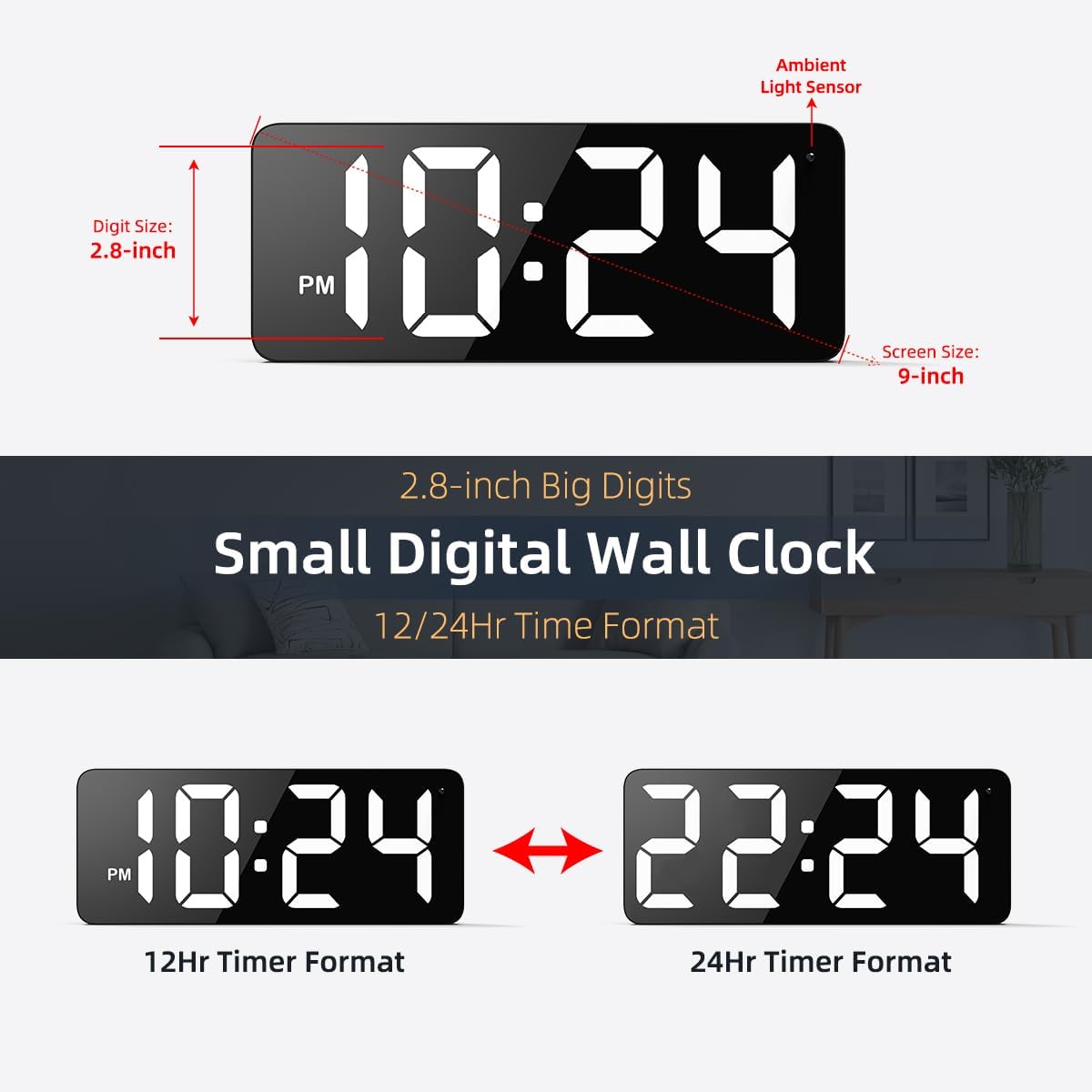
Figure 2: Clock Display Features and Dimensions
Пакеттин мазмуну
Төмөндө тизмеленген нерселердин баары пакетиңизге камтылганын текшериңиз:
- 1 x XUANZIT LED Digital Wall Clock (Model XZT74W)
- 1 x USB кубат адаптери (DC 5V/1A)
- 1 x USB Power Cable (10 Ft)
- 2 x чаптама илгичтер
- 2 x Plastic Anchors & Screws
- 1 x User Manual

3-сүрөт: Пакеттин мазмуну
3. Коопсуздук маалыматы
Маанилүү: This is a PLUG-IN electric wall clock. It requires continuous power from the included USB power adapter and cable to operate. It is NOT battery-operated for its primary function. The internal CR2032 battery serves only as a backup to preserve time settings during a power outage, not to power the display.
- Use only the provided USB power adapter (DC 5V/1A) and cable.
- Саатты сууга же ашыкча нымдуулукка дуушар кылбаңыз.
- Саатты күндүн нуру түз тийген жерге же жылуулук булактарынын жанына койбоңуз.
- Саатты өз алдынча бөлүктөргө бөлүүгө же оңдоого аракет кылбаңыз. Жардам алуу үчүн кардарларды колдоо кызматына кайрылыңыз.
4. Орнотуу нускамалары
4.1 Кубат туташтыруу
- Insert the small end of the USB power cable into the concealed power jack on the back of the clock.
- Plug the large end of the USB power cable into the USB power adapter.
- Plug the USB power adapter into a standard wall outlet. The clock display will illuminate.
4.2 Backup Battery Installation (Optional, for Memory Function)
The clock uses a CR2032 button cell battery (not included) for its memory function. This battery ensures that time settings are retained if the main power is disconnected.
- Сааттын артындагы батарея отсегин табыңыз.
- Бөлүмдүн капкагын ачыңыз.
- Insert one CR2032 battery with the positive (+) side facing up.
- Батарея уясынын капкагын бекем жабыңыз.
4.3 Саатты орнотуу
The clock features two positioning pins on the back to assist with marking installation points, along with hanging holes for secure mounting.

4-сүрөт: Арткы View with Buttons and Mounting Points
- Marking Points: Press the entire clock against the desired wall location to mark where the nails or screws should go using the positioning pins.
- Дубалды даярдоо: Depending on your wall type, install the appropriate hardware:
- үчүн Ceramic Tiles Wall: Use the provided adhesive hooks.
- үчүн Жыгач дубал: Hammer in nails or screw in the provided screws directly.
- үчүн Concrete Wall: Drill holes, insert plastic anchors, then screw in the provided screws.
- Асма саат: Carefully align the hanging holes on the back of the clock with the installed nails or screws and hang the clock securely.

Figure 5: Applicable Wall Types and Mounting Hardware
5. Иштөө нускамалары
The clock features easy-setting buttons located on the back for time adjustment and format switching.
5.1 Убакытты коюу
Specific button functions for setting the time are typically detailed on the clock's rear panel or in the included quick start guide. Generally, there are buttons for 'SET', 'UP', and 'DOWN' or similar. Refer to the labels on your clock for precise button identification.
- Press the 'SET' button (or equivalent) to enter time setting mode. The hour digits will typically start flashing.
- Use the 'UP' and 'DOWN' buttons (or equivalent) to adjust the hour.
- Press 'SET' again to confirm the hour and move to minute adjustment. The minute digits will flash.
- Use the 'UP' and 'DOWN' buttons to adjust the minutes.
- Press 'SET' one more time to confirm the minutes and exit setting mode.
5.2 Switching 12/24-Hour Format
To switch between 12-hour (with AM/PM indicator) and 24-hour formats, simply press the designated button (often labeled '12/24H' or integrated with the 'SET' button for a quick press). The display will instantly change to the selected format.

Figure 6: 12/24-Hour Time Format Switching
5.3 Auto-Brightness Function
The clock is equipped with an ambient light sensor that automatically adjusts the display brightness to one of three levels:
- Жогорку жарыктык: For clear visibility during daylight hours.
- Орто жарыктык: To create a comfortable ambiance indoors at night.
- Төмөн жарыктык: For complete darkness, ensuring a peaceful sleep environment.
This feature operates automatically and does not require manual adjustment.

Figure 7: 3-Level Auto-Brightness in action
6. Техникалык тейлөө
To maintain your XUANZIT LED Digital Wall Clock in optimal condition:
- Тазалоо: Gently wipe the clock's surface with a soft, dry cloth. Do not use abrasive cleaners, solvents, or chemical sprays, as these can damage the finish or display.
- Жайгашкан жери: Ensure the clock is placed in a stable location, away from direct sunlight, extreme temperatures, and high humidity.
- Кубат кабели: Periodically check the USB power cable for any signs of damage. If damaged, discontinue use and replace with a compatible cable.
7. Кыйынчылыктарды
If you encounter issues with your clock, refer to the following common problems and solutions:
| Көйгөй | Мүмкүн себеп | Чечим |
|---|---|---|
| Сааттын дисплейи өчүк. | Электр энергиясы жок. | Ensure the USB power cable is securely connected to the clock and the adapter, and the adapter is plugged into a working wall outlet. |
| Убакыт бийликтен кийин туура эмесtage. | Камдык батарея жок же түгөнүп калган. | Install a fresh CR2032 battery in the battery compartment. Reset the time manually. |
| Дисплей өтө күңүрт же өтө жарык. | Ambient light sensor reacting to environment. | The auto-brightness feature adjusts automatically. Ensure the light sensor (small dot on the clock face) is not obstructed. This is normal operation. |
| Cannot change time/settings. | Incorrect button usage. | Refer to Section 5.1 for detailed instructions on setting the time. Ensure you are pressing the correct buttons in sequence. |
If the problem persists after attempting these solutions, please contact XUANZIT customer support for further assistance.
8. Техникалык шарттар
| Өзгөчөлүк | Деталь |
|---|---|
| Бренд | СЮАНЦИТ |
| Модель номери | XZT74W |
| Дисплей түрү | LED |
| Цифранын өлчөмү | 2.8 дюйм |
| Продукциянын өлчөмдөрү (W x H) | 3.5" x 1.14" (Note: This seems to be a partial dimension, likely referring to depth and height. The overall screen size is 9-inch as per images.) |
| Power Source | Corded Electric (DC 5V/1A USB Adapter) |
| Камдык батарея | 1x CR2032 (for memory function only, not included) |
| Материал | Акрилонитрил бутадиен стирол (ABS) |
| Элемент Салмагы | 0.55 фунт (болжол менен 8.8 унция) |
| Өзгөчөлүктөр | 10ft Long USB Cable, Built-in Light Sensor for Auto-Brightness, Large Display |

Сүрөт 8: Продукциянын өлчөмдөрү
9. Кепилдик жана колдоо
XUANZIT products are designed for reliability and performance. For warranty information or technical support, please refer to the contact details provided with your purchase documentation or visit the official XUANZIT webсайт. Сураныч, кепилдик дооматтар үчүн сатып алуу далилиңизди сактап коюңуз.