1. Киришүү
Thank you for choosing the TECLAST P25T Tablet. This manual provides essential information for setting up, operating, maintaining, and troubleshooting your device. The TECLAST P25T is a 10.1-inch Android 12 tablet designed for a smooth and versatile user experience, featuring Wi-Fi 6 connectivity, a powerful 4-core processor, and a vibrant IPS display.

Figure 1.1: TECLAST P25T Tablet Front View
This image displays the TECLAST P25T tablet from the front, showcasing its 10.1-inch screen with the Android 12 and Wi-Fi 6 logos prominently displayed. The tablet has a sleek design with thin bezels.
2. Кутуда эмне бар
Пакетти ачканда, төмөндө көрсөтүлгөн нерселердин бардыгы бар экенин жана жакшы абалда экендигин текшериңиз:
- TECLAST P25T Tablet
- Type-C заряддагыч
- Маалымат кабели (С түрү)
- Эжекция пин
- User Manual

2.1-сүрөт: Пакеттин мазмуну
This image illustrates the items included in the TECLAST P25T tablet package: the tablet itself, a power adapter, a data cable, an ejection pin, and the user manual.
3. Продукт бүтүп калдыview
Familiarize yourself with the physical components and ports of your TECLAST P25T tablet.
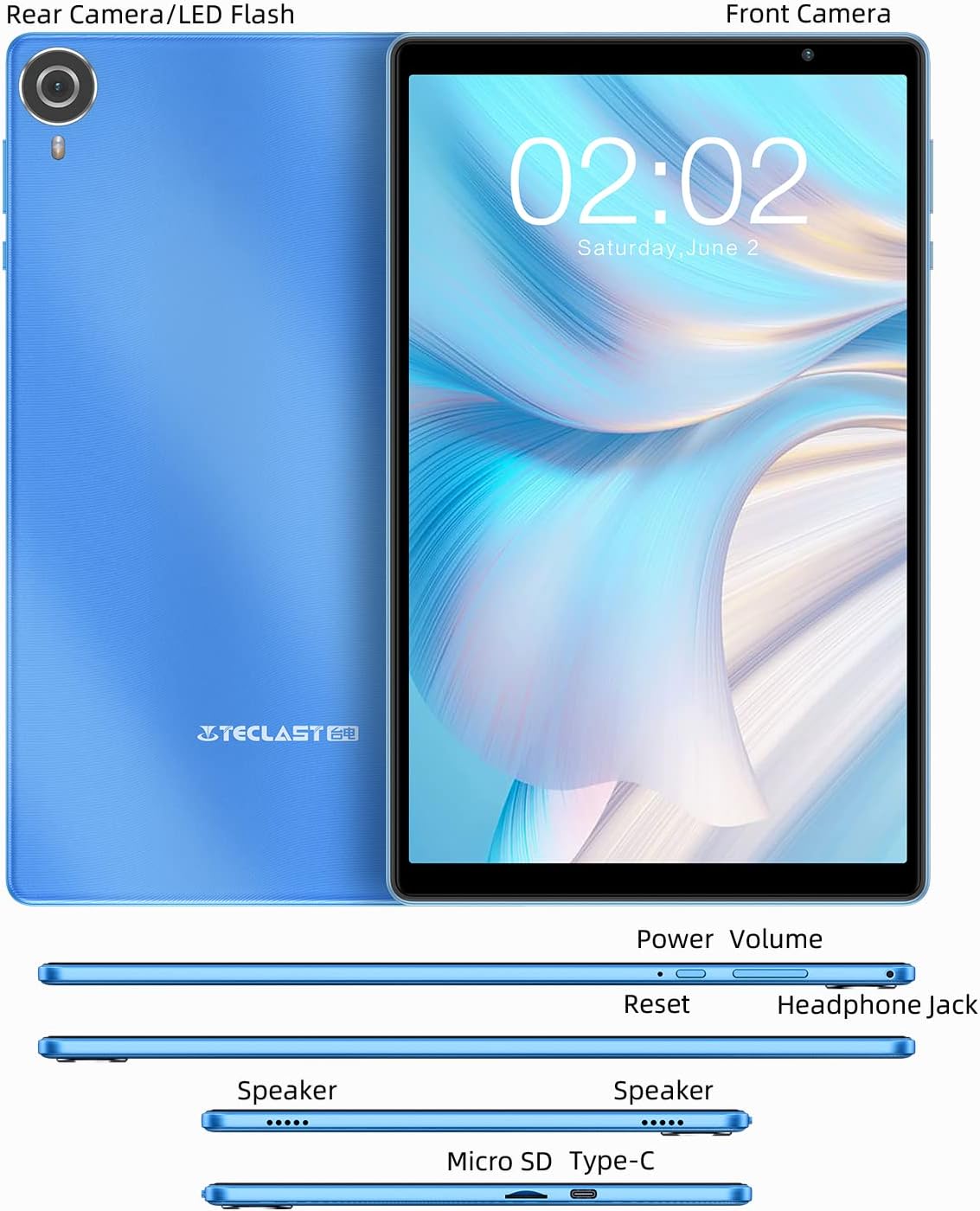
Figure 3.1: Tablet Components and Ports
This diagram shows the various components and ports of the TECLAST P25T tablet, including the front camera, rear camera/LED flash, power button, volume buttons, reset button, headphone jack, speakers, Micro SD card slot, and Type-C port.
Негизги өзгөчөлүктөрү:
- 10.1 дюймдук IPS дисплей: High-resolution 1280x800 screen for clear visuals and wide viewбурчтар.
- Android 12 операциялык системасы: Enhanced system interaction, security, and privacy features.
- Allwinner A133 4-core CPU: Provides smooth operation for daily tasks.
- 3 ГБ RAM + 64 ГБ ROM: Sufficient memory for multitasking and storage, expandable up to 1TB via MicroSD.
- Wi-Fi 6 жана Bluetooth 5.0: For stable and fast wireless connectivity.
- Кош камералар: 2MP front camera for video calls and 5MP rear autofocus camera with LED flashlight.
- 5000 мАч Батарея: Designed for extended use.
- USB Type-C & 3.5mm Headphone Port: For versatile connectivity.
4. Орнотуу
4.1 Алгачкы заряддоо
Before first use, fully charge your tablet using the provided Type-C charger and data cable. The charging indicator will typically show progress on the screen.

Figure 4.1: Charging the Tablet
This image shows the TECLAST P25T tablet connected to a charger via its Type-C port, illustrating the charging process and highlighting its 5000mAh battery capacity.
4.2 Күйгүзүү/өчүрүү
- Күйгүзүү үчүн: Press and hold the Power button until the TECLAST logo appears on the screen.
- Өчүрүү үчүн: Өчүрүү менюсу пайда болгонго чейин Күйгүзүү баскычын басып, кармап туруңуз. Түзмөктү өчүрүү үчүн "Өчүрүү" дегенди тандаңыз.
- Кайра баштоо үчүн: Өчүрүү менюсунан "Кайра баштоо" дегенди тандаңыз.
4.3 Баштапкы орнотуу устасы
Планшет биринчи жолу күйгүзүлгөндө, ал сизге баштапкы орнотуу процессин көрсөтөт. Экрандагы көрсөтмөлөрдү аткарып, төмөнкүлөрдү жасаңыз:
- Тилиңизди тандаңыз.
- Wi-Fi тармагына туташыңыз.
- Sign in with your Google account (required for Google Play Store access).
- Экран кулпусун жана башка коопсуздук функцияларын орнотуңуз.
5. Планшетти иштетүү
5.1 Android 12 өзгөчөлүктөрү
The TECLAST P25T runs on the Android 12 operating system, offering an optimized user experience with enhanced privacy and security. It is GMS certified, allowing full access to Google services and the Google Play Store.
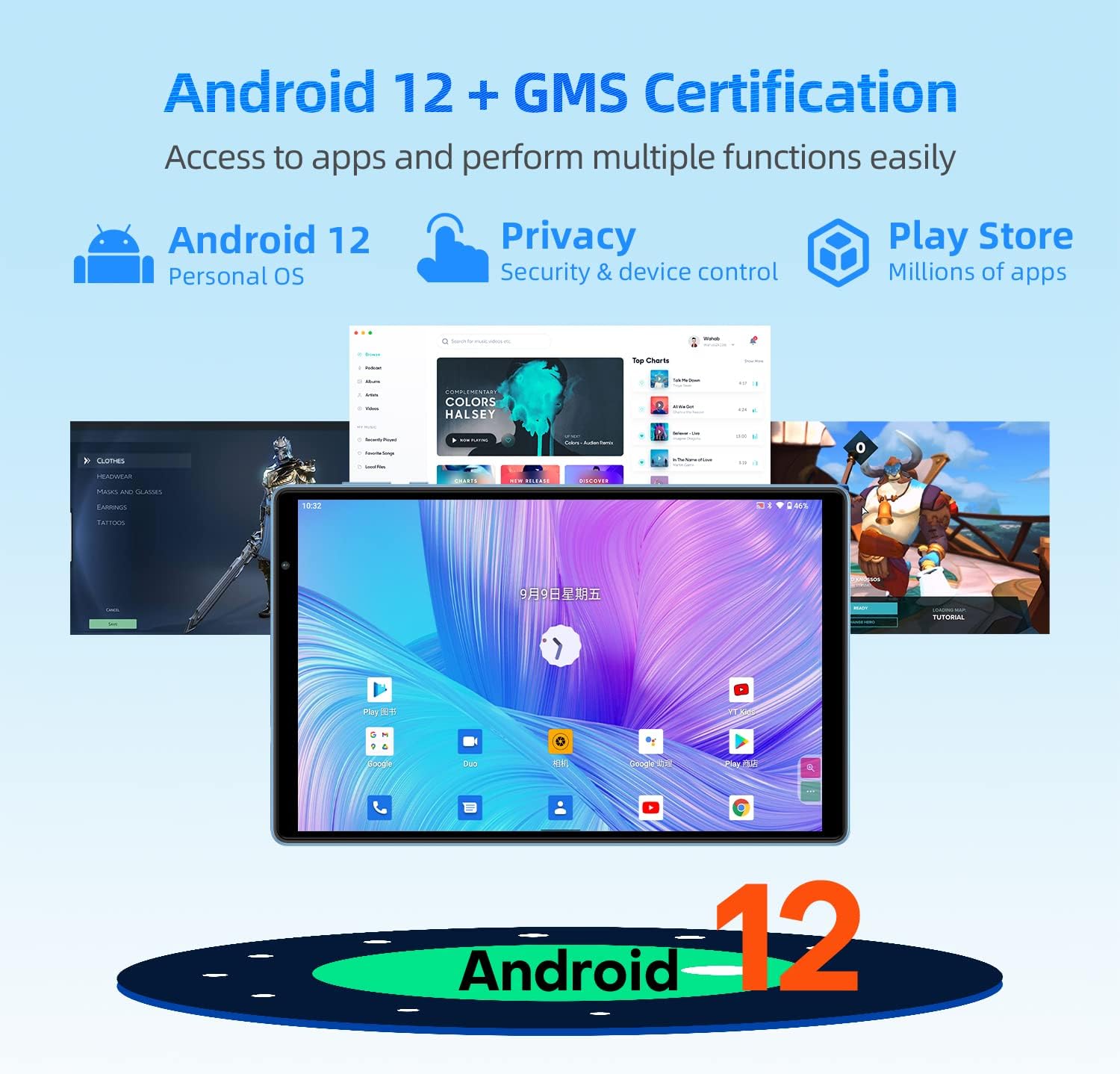
Figure 5.1: Android 12 and GMS Certification
This image highlights the Android 12 operating system and GMS certification, indicating access to millions of apps via the Play Store and improved security and device control features.

Figure 5.2: Android 12 Privacy Dashboard
This image illustrates the Android 12 Privacy Dashboard, showing how users can monitor and control app access to sensitive data like camera, microphone, and location.
5.2 Дисплей жана визуалдык көрүнүштөр
The 10.1-inch IPS display with 1280x800 resolution provides a comfortable viewing experience for videos and browsing. The tablet incorporates T-Colour color optimization and GE8300 GPU for enhanced visuals.
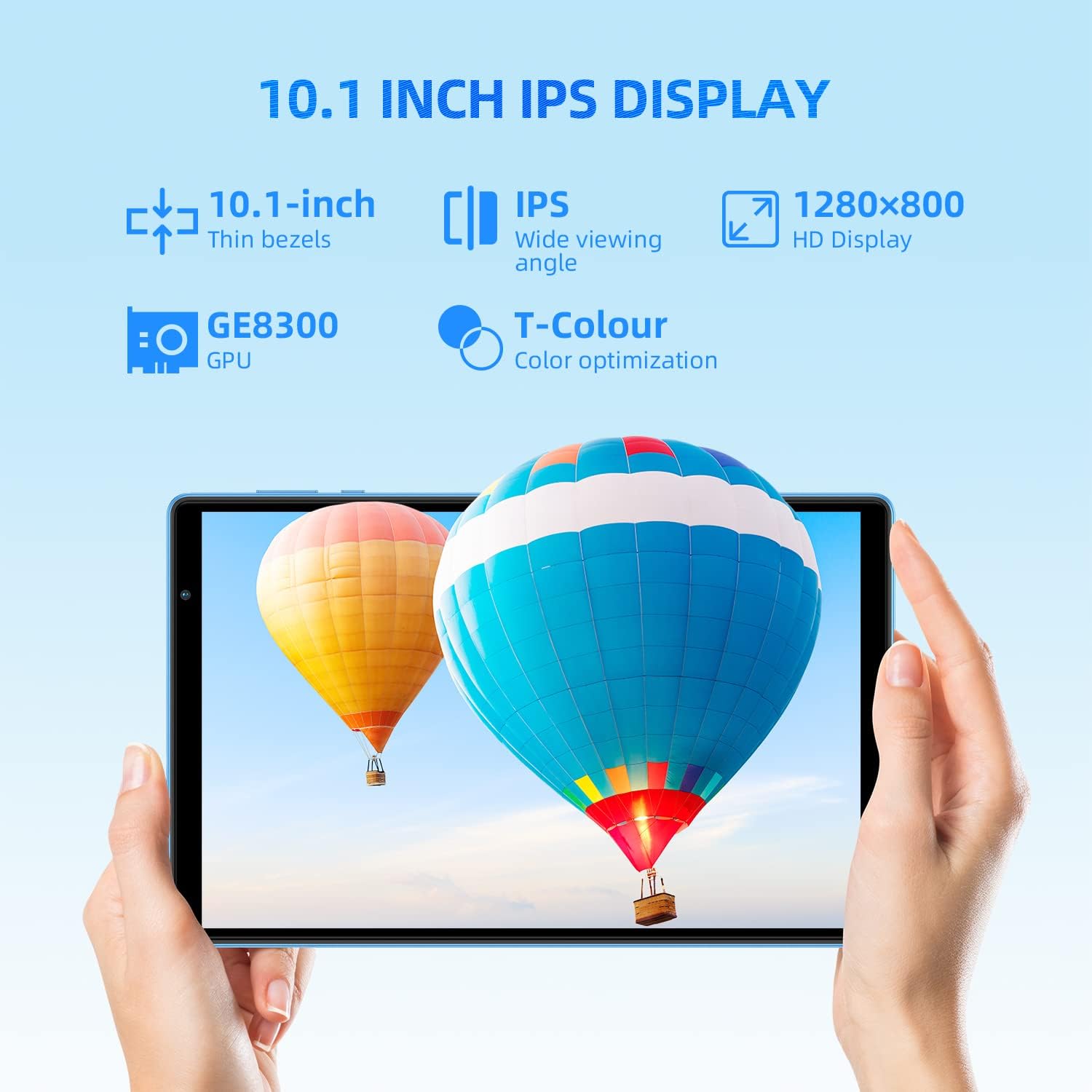
5.3-сүрөт: 10.1 дюймдук IPS дисплей
This image highlights the 10.1-inch IPS display of the tablet, emphasizing its thin bezels, wide viewing angle, 1280x800 HD resolution, GE8300 GPU, and T-Colour optimization for vibrant colors.
5.3 Аткаруу жана сактоо
Equipped with an Allwinner A133 4-core CPU, 3GB RAM, and 64GB ROM, the P25T ensures smooth operation and ample storage. The storage can be expanded up to 1TB using a MicroSD card (sold separately).

Figure 5.4: Storage and Processor
This image details the tablet's storage capabilities (3GB RAM, 64GB ROM, Micro SD Expansion) and features the Allwinner 64-bit processor, indicating its capacity for various media and applications.
5.4 Байланыш
The tablet supports the latest Wi-Fi 6 standard (802.11 a/b/g/n/ac/ax) for faster and more stable wireless connections, along with dual-band 2.4G+5G Wi-Fi. Bluetooth 5.0 provides efficient wireless peripheral connections.

Figure 5.5: Ultra-Fast Wi-Fi 6 and Bluetooth 5.0
This image highlights the tablet's advanced connectivity features, including ultra-fast Wi-Fi 6 (802.11 b/g/n/ac/ax 2.4G+5G) and high-fidelity Bluetooth 5.0 for seamless wireless communication.
5.5 Камеранын өзгөчөлүктөрү
Capture moments with the tablet's dual cameras: a 2MP front camera for video calls and a 5MP rear autofocus camera with an LED flashlight for low-light photography.

Figure 5.6: Dual Cameras and Battery
This image showcases the tablet's camera specifications (2MP front for video calls, 5MP rear autofocus with LED flashlight) and its 5000mAh battery, emphasizing power for all-day use.
5.6 Digital Health and Parental Controls
The Android 12 system includes Digital Health and Parental Controls, allowing users to monitor and manage screen time and app usage, which is beneficial for balancing education and entertainment, especially for children.
6. Техникалык тейлөө
Proper care and maintenance will extend the life of your TECLAST P25T tablet.
- Тазалоо: Экранды жана корпусту тазалоо үчүн жумшак, мамыксыз чүпүрөктү колдонуңуз. Абразивдүү тазалоочу каражаттарды же эриткичтерди колдонбоңуз.
- Сактагыч: Планшетти күн нурунан жана экстремалдык температурадан алыс салкын, кургак жерде сактаңыз.
- Батареяга кам көрүү: Avoid fully discharging the battery frequently. For long-term storage, charge the battery to about 50% and power off the device.
- Коргоо: Consider using a protective case and screen protector to prevent scratches and damage from drops.

Figure 6.1: Anti-Slip Wave Pattern Texture
This image showcases the vibrant sky blue finish and the anti-slip wave pattern texture on the back of the P25T tablet, designed for a better grip and appealing aesthetic.
7. Кыйынчылыктарды
If you encounter issues with your tablet, refer to the common problems and solutions below.
| Көйгөй | Мүмкүн себеп | Чечим |
|---|---|---|
| Планшет күйбөйт | Аз батарея; Системанын бузулушу | Планшетті кеминде 30 мүнөт кубаттаңыз. Эгер дагы эле жооп бербесе, өчүрүп-күйгүзүү үчүн Күйгүзүү баскычын 10-15 секунд басып туруңуз. |
| Wi-Fi'га туташпай жатат | Туура эмес сырсөз; Роутердеги көйгөй; Wi-Fi өчүрүлгөн | Check Wi-Fi password. Restart your router. Ensure Wi-Fi is enabled in settings. Try forgetting and re-adding the network. |
| Колдонмолор жай же бузулуп жатат | Too many apps running; Low storage; App bug | Close background apps. Clear app cache/data. Free up storage space. Update the app or tablet's system. |
| Батарея бат эле түгөнөт | High screen brightness; Background apps; Weak signal | Reduce screen brightness. Close unused apps. Disable Wi-Fi/Bluetooth when not in use. Check for system updates. |
| Экран жооп бербей жатат | Убактылуу программалык ката | Планшетті күч баскычын кармап туруп, мажбурлап өчүрүп-күйгүзүңүз. |
If the problem persists, please contact TECLAST customer support for further assistance.
8. Техникалык шарттар
Detailed technical specifications for the TECLAST P25T Tablet.
| Өзгөчөлүк | Спецификация |
|---|---|
| Модель аты | П25Т |
| Операция системасы | Android 12 |
| Screen Size | 10.1 дюйм |
| Screen Resolution | 1280 x 800 Pixels (IPS) |
| Процессор | Allwinner A133 1.8 GHz 4-core CPU |
| Графикалык процессор | IMG PowerVR GE8300 |
| RAM | 3 ГБ DDR3 SDRAM |
| Ички сактагыч | 64 ГБ ROM |
| Кеңейтүүчү сактагыч | Up to 1TB (MicroSD, FAT32 format) |
| Зымсыз байланыш | 802.11 a/b/g/n/ac/ax Wi-Fi 6 (2.4G+5G) |
| Bluetooth | Bluetooth 5.0 |
| Арткы камера | 5 MP (Autofocus, LED Flash) |
| Алдыңкы камера | 2 депутат |
| Батарея сыйымдуулугу | 5000mAh |
| Порттар | USB Type-C, 3.5 мм гарнитура уячасы |
| Элемент Салмагы | 2.07 фунт |
| Өлчөмдөр | 11.06 x 7.28 x 2.05 дюйм |
9. Кепилдик жана колдоо
The TECLAST P25T Android 12 tablet comes with a 1 жылдык кепилдик. In the unlikely event that the product is defective or you require assistance, please contact TECLAST customer support through your Amazon purchase history or the official TECLAST webсайт.
Расмий продукт Video:
Video 9.1: P25T Tablet - Product 360 Panorama
Бул видео 360 градустук көрүнүштү камсыз кылат view of the TECLAST P25T tablet, showcasing its design and physical features from all angles.


