1. Продукт бүтүп калдыview
The NexiGo PJ30 is a native 1080P LCD projector designed for both indoor and outdoor entertainment. It delivers crisp, clear images with 500 ANSI lumens brightness and supports Dolby Sound for an immersive audio experience. Equipped with 5G Wi-Fi and Bluetooth 5.1, it offers versatile connectivity options for various devices.
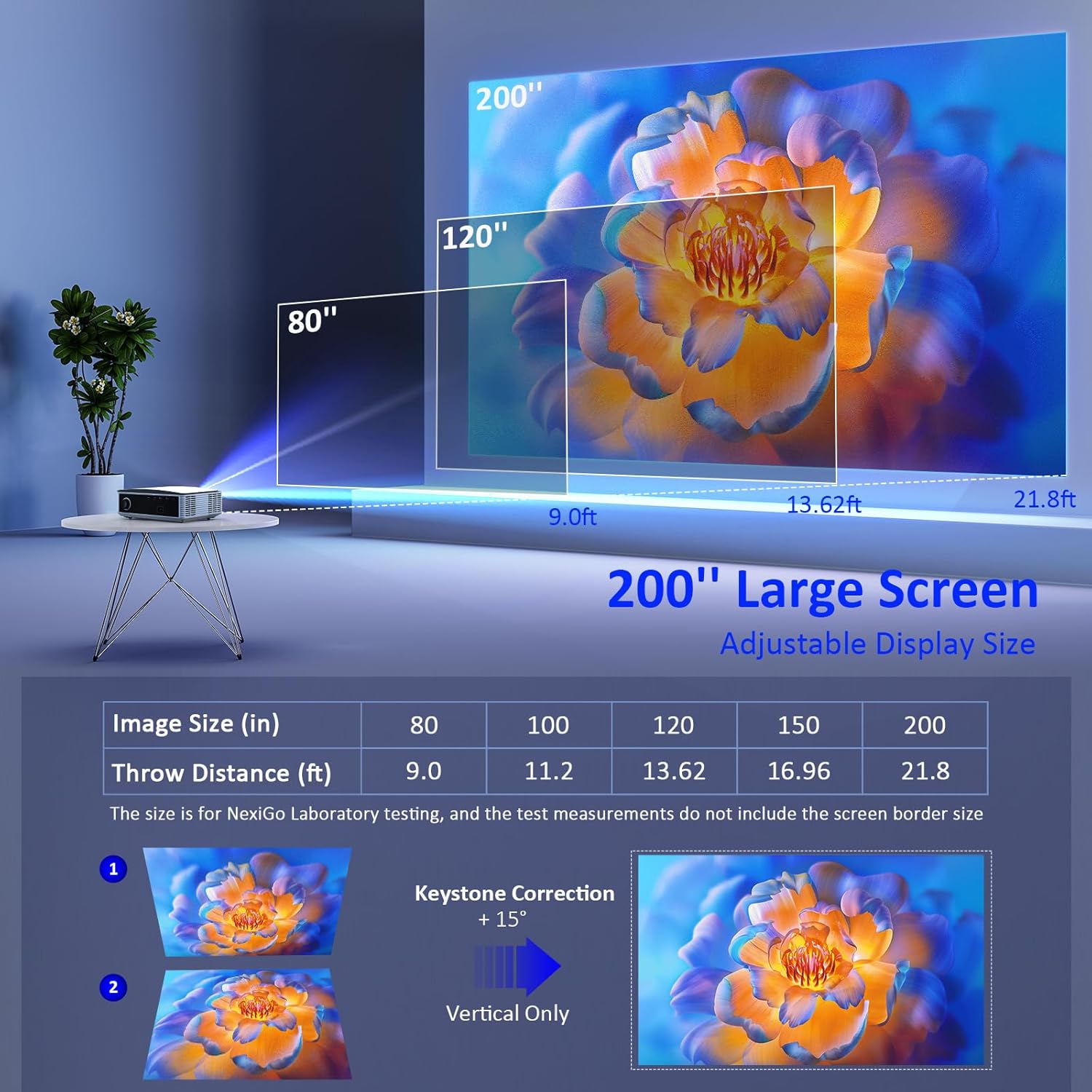
Image: The NexiGo PJ30 projector, a compact white device with a black lens, positioned to project an image.
Негизги өзгөчөлүктөрү:
- Native 1080P Resolution & 500 ANSI Lumens: Provides high-resolution, bright, and clear images.
- Зымсыз экранды чагылдыруу: Supports 5G Wi-Fi for seamless mirroring from iOS, Android, and Windows devices.
- Dolby Sound & Bluetooth 5.1: Built-in speaker with lifelike Dolby sound and Bluetooth 5.1 for external audio devices.
- Кеңири шайкештик: Multiple ports including HDMI, USB, AV, and 3.5mm audio jack for various devices.
- Чоң дисплей өлчөмү: Adjustable projection from 42" to 200" with a projection distance of 4.8ft to 21.8ft.
- Digital Zoom: Easily adjust screen size with the remote control (available for local video via USB).
2. Кутуда эмне бар
Upon unboxing your NexiGo PJ30 projector, ensure all the following items are present:
- NexiGo PJ30 Projector
- Алыстан башкаруу пульту (2 x AAA батарейкалары кошулган эмес)
- Электр кабели
- AV Cable
- User Manual
- Cleaning Kit (cloth and cotton swabs for lens/screen)
3. Орнотуу
Орнотуу жана орнотуу
The NexiGo PJ30 offers flexible installation options to suit your environment:
- Иш тактага орнотуу: Проекторду тегиз жерге кой.
- Шыпка орнотуу: Install the projector upside down on the ceiling (mounting hardware not included).
- Дубалга орнотуу: Secure the projector to a wall shelf (shelf not included).

Image: Diagrams illustrating desktop, ceiling, and wall mounting options for the projector.
Кубатка туташуу
- Электр кабелин проектордун кубат киргизүү портуна туташтырыңыз.
- Электр кабелинин экинчи учун розеткага сайыңыз.
Проекциялык аралык жана экрандын өлчөмү
Adjust the distance between the projector and the screen to achieve your desired display size. The optimal projection distance ranges from 4.8ft to 21.8ft for screen sizes between 42" and 200".

Image: A diagram showing recommended throw distances for various screen sizes (80" at 9.0ft, 120" at 13.62ft, 200" at 21.8ft).
4. Иштөө нускамалары
Күйгүзүү/өчүрүү
- Аппаратты күйгүзүү же өчүрүү үчүн проектордун же пульттун кубат баскычын басыңыз.
Фокус жана негизги ташты оңдоо
- Сүрөт даана болгонго чейин проектордун линзасындагы фокус шакекчесин тууралаңыз.
- Use the keystone dial on the rear of the projector to correct any trapezoidal distortion of the image.
Киргизүү булагын тандоо
Проектор бир нече киргизүү булактарын колдойт:
- HDMI: Connect devices like TV boxes, gaming consoles (PS5), laptops, or TV sticks via HDMI 1 or HDMI 2 ports.
- USB: Connect USB flash drives for direct media playback.
- OF: Use the provided AV cable to connect older devices.
- Зымсыз экранды чагылдыруу: For iOS, Android, and Windows devices.

Image: The rear panel of the NexiGo PJ30 projector highlighting HDMI, USB, AV, and 3.5mm audio jack ports, with icons of compatible devices like iPhones, iPads, laptops, TV boxes, and USB drives.
Зымсыз экранды чагылдыруу
The PJ30 supports 5G Wi-Fi for wireless screen mirroring. Navigate to the 'MultiScreen' option in the input source menu.
- IOS түзмөктөрү үчүн: Connect your iOS device and the projector to the same Wi-Fi network. Open Control Center on your iOS device, tap 'Screen Mirroring', and select the projector's name (e.g., NexiGo-PJ30-XXXX).
- For Android/Windows Devices: Ensure your device supports Miracast or Wi-Fi Display. Connect the projector to Wi-Fi. On your device, open display settings or screen mirroring and select the projector's name.
- Note: Due to copyright protection, streaming services like Netflix, Amazon Prime Video, and Hulu do not support screen mirroring.

Image: The NexiGo PJ30 projector displaying a racing game on a large screen, with icons for 5G WiFi and Bluetooth 5.1, and logos for iOS, Android, and Windows devices, indicating wireless screen mirroring capability.
Bluetooth аудио туташуу
Жакшыртылган аудио тажрыйбасы үчүн тышкы Bluetooth динамиктерин же гарнитураны туташтырыңыз.
- Go to 'Settings' on the projector's main menu and select 'Bluetooth'.
- Bluetooth'ду иштетиңиз жана жеткиликтүү түзмөктөрдү издеңиз.
- Жупташтыруу үчүн тизмеден каалаган Bluetooth динамигиңизди же кулакчыныңызды тандаңыз.

Image: The NexiGo PJ30 projector on a coffee table, surrounded by sound waves, with headphones and a Bluetooth speaker, illustrating its immersive Dolby Audio capabilities.
Сүрөт орнотуулары
Access 'Settings' from the main menu to adjust various picture parameters:
- Проекция режими: Adjust based on projector orientation (Normal Front, Normal Back, Invert Front, Invert Back).
- Сүрөттү масштабдоо: Scale the image up or down (e.g., 100% to 99%).
- Аспект катышы: Choose between Auto, 4:3, or 16:9.
- Сүрөт режими: Select predefined modes (Standard, Soft, Dynamic) or customize your own.
Digital Zoom
Use the remote control to digitally zoom in or out on the projected image.
- Note: Digital zoom functionality is only available when playing local video content via a USB connection.

Image: A person using a remote control to adjust the digital zoom on a projected image of a dolphin, showing 0.5X and 2X zoom levels.
5. Өзгөчөлүктөрү
The NexiGo PJ30 projector is engineered to provide a versatile and high-quality viewтажрыйбасы:
- Жогорку жарыктык: With 500 ANSI lumens, the projector delivers bright images suitable for various lighting conditions.
- Long-lasting LED Lamp: The energy-saving LED light bulb technology ensures a lifespan of up to 30,000 hours, equivalent to approximately 10 years with 8 hours of daily use.
- Ар тараптуу көңүл ачуу: Ideal for home theater setups, gaming, outdoor movie nights, and presentations.

Image: A collage of four images depicting different uses for the NexiGo PJ30 projector: home theater, playing games, outdoor movie night, and as a holiday gift.
Расмий продукт Video
Video: An official product video from NexiGo USA showcasing the features and capabilities of the PJ30 Native 1080P Movie Projector, including its brightness, sound, and connectivity options.
6. Техникалык тейлөө
Чаң чыпкасын тазалоо
To maintain optimal performance and prolong the projector's life, regularly clean the dust filter.
- Locate the dust filter cover on the bottom of the projector.
- Gently press and slide out the dust filter.
- Clean the filter with a soft, dry cloth or a small brush to remove accumulated dust.
- Reinsert the clean filter back into its slot until it clicks into place.
- It is recommended to clean the dust filter monthly.

Сүрөт: жакын план view of the NexiGo PJ30 projector showing the removable dust cover at the bottom, with text indicating the importance of regular cleaning.
Линзаны тазалоо
Use a soft, lint-free cloth to gently wipe the projector lens. Avoid using abrasive cleaners or excessive force.
7. Кыйынчылыктарды
- Сүрөт жок: Ensure the power cable is securely connected and the projector is turned on. Check the input source selection matches your connected device. Verify HDMI/AV cables are properly connected.
- бүдөмүк сүрөт: Adjust the focus ring on the lens. Ensure the projector is within the recommended projection distance. Use keystone correction to fix distorted images.
- Үн жок: Check the volume settings on both the projector and your connected device. If using Bluetooth, ensure it's properly paired and connected. If using external speakers via 3.5mm jack, ensure the cable is fully inserted.
- Экранды чагылдыруудагы көйгөйлөр: Ensure both the projector and your device are connected to the same 5G Wi-Fi network. Some streaming apps do not support mirroring due to copyright.
- Ашыкча ысып кетүү: Ensure the projector's vents are not blocked. Clean the dust filter regularly.
8. Техникалык шарттар
| Өзгөчөлүк | Деталь |
|---|---|
| Модель номери | PJ30 |
| Native Resolution | 1920 x 1080 (1080P) |
| Жарыктык | 500 ANSI челинин |
| Байланыш технологиясы | 5G Wi-Fi, Bluetooth 5.1 |
| Дисплей өлчөмү | 42-200" |
| Проекциялык аралык | 4.8 футтан 21.8 футка чейин |
| Аудио колдоо | Dolby Sound, Built-in Speaker, 3.5mm Audio Jack |
| Киргизүү порттору | 2x HDMI, 2x USB, AV, 3.5mm Audio Jack |
| Элемент Салмагы | 5.51 фунт |
| Продукциянын өлчөмдөрү | 12.2 x 8.66 x 3.14 дюйм |
9. Кепилдик жана колдоо
For warranty information and technical support, please refer to the official NexiGo website or contact their customer service directly. The product was first available on September 1, 2022.
Өндүрүүчү: Nexight INC


