1. Киришүү
This manual provides comprehensive instructions for the OMAIC BN59-01312A Replacement Voice Remote Control. It covers setup, operation, compatibility, and troubleshooting to ensure optimal performance with your compatible Samsung television.
2. Продукт бүтүп калдыview
The OMAIC BN59-01312A remote control is designed as a direct replacement for various Samsung Smart TV remotes, offering voice control functionality and quick access buttons for popular streaming services. It features a durable design tested for extensive use.

Figure 1: OMAIC Replacement Voice Remote Control with highlighted shortcut buttons.

2-сүрөт: Шайкештик аяктадыview of the remote with different Samsung Smart TV types.
3. Орнотуу жана жупташтыруу
To use your OMAIC Replacement Voice Remote Control, it must first be paired with your Samsung TV. Follow these steps:
- Сыналгыңыз күйгүзүлгөнүн текшериңиз.
- Point the new remote control towards your Samsung TV.
- басып, кармап туруңуз Артка/Чыгуу баскычы жана Ойнотуу/Тыныгуу button simultaneously for 5-8 seconds.
- A "Pairing complete" message should appear on your TV screen, indicating successful pairing.
- If pairing fails, repeat the steps. It may be helpful to turn the TV off and then on again before re-attempting the pairing process.

Figure 3: Visual guide for pairing the remote control with a Samsung Smart TV.
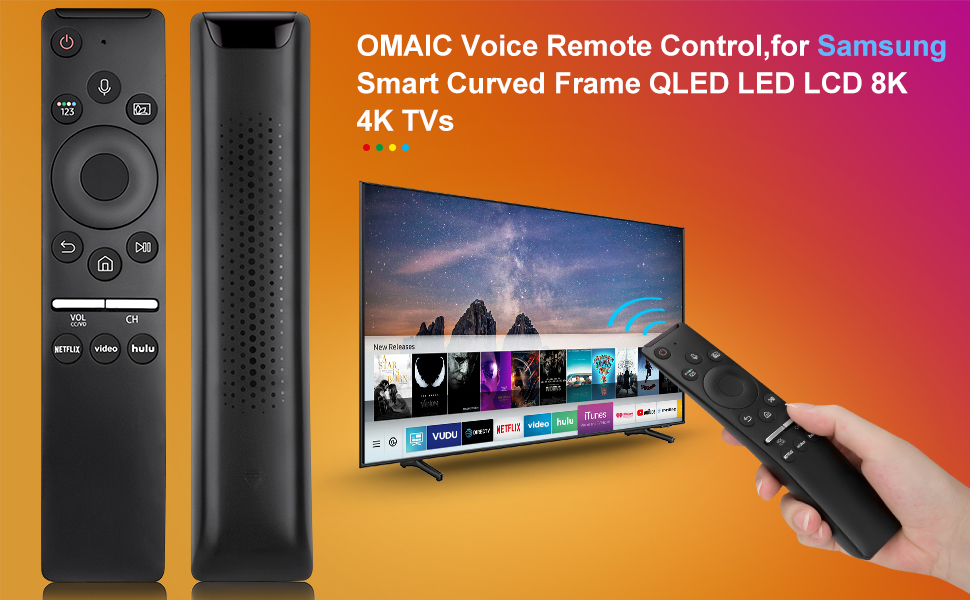
Figure 4: Detailed steps for connecting your Smart TV remote.
4. Иштөө нускамалары
The remote control offers intuitive navigation and quick access to various functions:
- Үн менен башкаруу: Press the microphone button and speak your commands to interact with your Smart TV.
- Жарлык баскычтары: Dedicated buttons for Netflix, Prime Video, and Hulu provide instant access to these streaming applications.
- Volume and Channel: Use the dedicated volume (VOL) and channel (CH) buttons to adjust audio levels and navigate channels.
- Навигация аянтчасы: The circular navigation pad allows for easy menu navigation and selection.
- Full-Angle Control: The remote is tested to control your TV from any angle within 40 feet.

Figure 5: Key features including voice search and streaming service shortcuts.

Figure 6: Demonstrating voice control functionality to open applications.
5. Батареяны орнотуу
The remote control requires 2 AA batteries for operation. These batteries are typically included with your purchase.
- Slide open the battery cover located on the back of the remote control.
- Туура полярдуулукту (+ жана -) камсыз кылып, эки AA батарейкасын салыңыз.
- Батареянын капкагын бекем чыккыча ордуна жылдырыңыз.
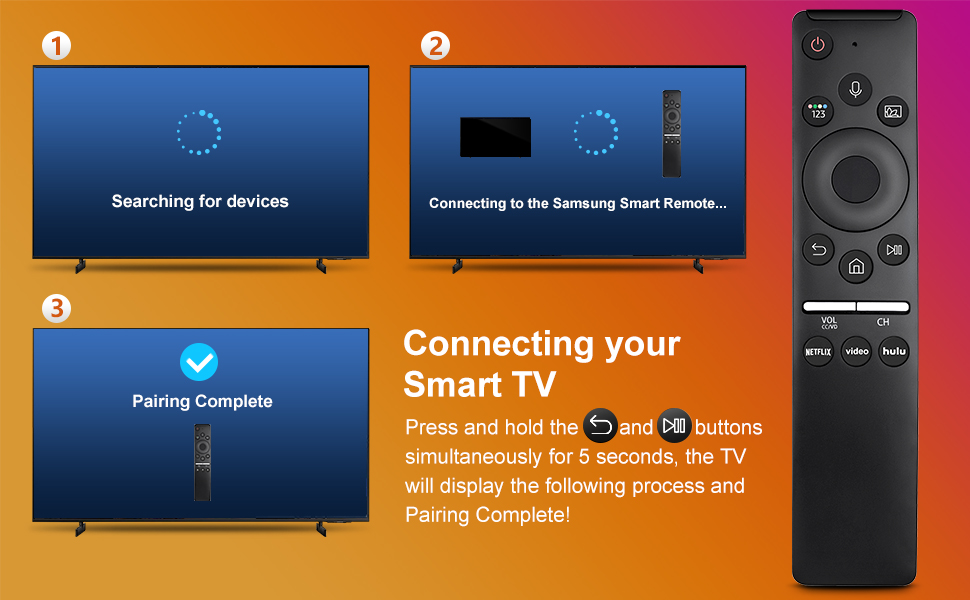
Figure 7: Battery installation and other key features.
6. Шайкештик
This remote control is compatible with a wide range of Samsung TV models and original remote control models. Refer to the lists below for specific compatibility:
Compatible Samsung TV Remote Control Models:
- BN59-01312A, BN59-01312F, BN59-01312D, BN59-01312E, BN59-01312G, BN59-01312K, BN59-01312L, BN59-01312M, BN59-01312X, BN59-01312U, BN59-01312T
- BN59-01329A, BN59-01329C, BN59-01329F
- BN59-01330A, BN59-01330C, BN59-01330H, BN59-01330N, BN59-01330Q, BN59-01330M, BN59-01330H, BN59-01312Q
Samsung телевизорлорунун шайкеш келген моделдери:
- QN75Q60RAFX, QN43Q60RAFX, QN49Q60RAFX, QN49Q70RAFX, QN55Q60RAFX, QN55Q70RAFX, QN55Q80RAFX, QN65Q60RAFX, QN65Q70RAFX, QN65Q80RAFX, QN65Q90RAFX, QN75Q70RAFX, QN75Q80RAFX, QN75Q90RAFX, QN82Q60RAFX, QN82Q70RAFX, QN82Q80RAFX, QN82Q90RAFX
- QN55Q900RBFX, QN65Q900RBFX, QN75Q900RBFX, QN82Q900RBFX, QN85Q900RBFX, QN98Q900RBFX
7. Кыйынчылыктарды
- Алыстан жооп бербейт: Батареялар туура орнотулганын жана заряды жетиштүү экендигин текшериңиз. Зарыл болсо, батарейкаларды алмаштырыңыз.
- Жупташтыруу маселелери: If the remote does not pair, ensure no other remotes are actively paired with the TV. Turn the TV off and on, then re-attempt the pairing process as described in Section 3.
- Үн менен башкаруу иштебей жатат: Ensure the remote is properly paired. Some TV models may require specific settings to enable voice control. Consult your TV's user manual for details.
- Чектелген диапазон: Ensure there are no obstructions between the remote and the TV. The remote is designed for optimal performance within 40 feet.
8. Техникалык шарттар
| Өзгөчөлүк | Деталь |
|---|---|
| Продукциянын өлчөмдөрү | 6.35 x 1.42 x 0.66 дюйм |
| Элемент Салмагы | 1.76 унция |
| Элемент моделинин номери | BN59-01312A |
| Батареялар | 2 AA батарейка талап кылынат (кошулган) |
| Өзгөчө өзгөчөлүк | Үн менен издөө |
| Колдоого алынган түзмөктөрдүн максималдуу саны | 18 |
| Шайкеш түзмөктөр | Телевидение |

Figure 8: Physical dimensions of the OMAIC Replacement Voice Remote Control.
9. Кепилдик жана колдоо
OMAIC provides 100 days of after-sales support for this product. If you have any questions or encounter issues, please contact us. We aim to reply within 12 hours and are committed to assisting you.


