1. Киришүү
This manual provides essential information for the proper installation, operation, and maintenance of your LIAN LI SP850 White SFX 850W 80+ Gold Power Supply. Please read this manual thoroughly before using the product to ensure optimal performance and safety.
2. Коопсуздук маалыматы
- Always disconnect the power supply from the main power outlet before installation or maintenance.
- Электр менен камсыздоо блогун ачпаңыз. Жогорку томtages are present inside, which can cause electric shock.
- Электрдик коркунучтарды алдын алуу үчүн туура жерге туташтырууну камсыз кылыңыз.
- Бул кубат булагы менен кошо берилген модулдук кабелдерди гана колдонуңуз. Шайкеш келбеген кабелдерди колдонуу түзмөккө же туташкан компоненттерге зыян келтириши мүмкүн.
- Ашыкча ысып кетүүнүн алдын алуу үчүн электр менен камсыздоону жакшы желдетилген жерге орнотуңуз.
- Түзмөктү суудан, нымдуулуктан жана өтө жогорку температурадан алыс кармаңыз.
3. Пакеттин мазмуну
Пакетиңизде бардык буюмдар бар экенин текшериңиз:
- LIAN LI SP850 White SFX 850W 80+ Gold Power Supply Unit
- Modular Cable Set (White)
- SFX - ATX кашаа
- Монтаждоо бурамалар
- AC Power Cord
- User Manual
4. Продукт бүтүп калдыview
The LIAN LI SP850 White is a high-performance SFX form factor power supply designed for compact PC builds. It features 80 PLUS Gold efficiency for reduced heat and lower operating costs, and a full modular design for improved cable management.
Негизги өзгөчөлүктөрү:
- 80 PLUS алтындын эффективдүүлүгү: Ensures high power efficiency, reducing energy waste and heat generation.
- Full Modular Design: Allows for custom cable management, connecting only the necessary cables to reduce clutter and improve airflow.
- 12VHPWR Connector: Includes a 12VHPWR connector cable (without sideband contact) for compatibility with modern GPUs (note: not compatible with 40 series graphic cards requiring sideband contact).
- Өркүндөтүлгөн коргоо: Features an added inrush current limiter for improved system protection.
- Optimized Fan Control: Adjusted fan start/stop limit to 60°C for quieter operation under lower loads.
Visual Overview:


Кутудан чыгуучу видео:
Video 1: An unboxing video of the Lian Li SP V2 PSU, demonstrating the packaging and initial contents. This video provides a visual guide to what to expect when opening your new power supply.
5. Орнотуу (Орнотуу)
Follow these steps to install your LIAN LI SP850 Power Supply:
- Prepare the Power Supply: Connect all necessary modular cables to the power supply unit first. Refer to the labels on the PSU and cables to ensure correct connections.
- Монтаждоо: If installing in an ATX case, attach the provided SFX to ATX bracket to the power supply. Secure the power supply into your PC case using the appropriate mounting screws.
- Компоненттерге туташуу: Route the modular cables to your motherboard, CPU, GPU, and storage devices. Ensure all connections are firm and correctly seated.
- Дубал розеткасына туташуу: Once all internal connections are made and verified, connect the AC power cord to the power supply and then to a grounded wall outlet.
- Күйгүзүү: Кубат блогунун арткы жагындагы кубат которгучун "ON" абалына коюңуз.
Modular Connections:

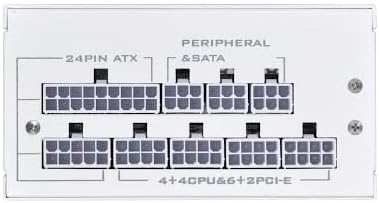
Installation Guide Video:
Video 2: An installation guide for Vetroo 850W SFX PSUs, demonstrating the process of connecting modular cables and mounting the power supply into a PC case. This video is highly relevant for understanding the physical installation steps.
6. Иштөө нускамалары
The LIAN LI SP850 is designed for reliable and efficient operation. Once installed and connected, the power supply will provide stable power to your system. The fan operates intelligently, only spinning up when a certain core temperature is reached, ensuring quiet operation under light loads.
7. Техникалык тейлөө
- Regularly check for dust accumulation on the fan and ventilation grilles. Use compressed air to gently clean dust from the unit.
- Бардык кабелдер бекем туташтырылган жана бузулбаганын текшериңиз.
- Avoid placing objects on top of the power supply or obstructing its airflow.
8. Кыйынчылыктарды
- Кубат жок: Check if the AC power cord is securely connected to both the power supply and the wall outlet. Ensure the power switch on the PSU is in the 'ON' position. Verify all modular cables are correctly seated.
- желдеткич айланбай жатат: The fan is designed to remain off under low load conditions until the internal temperature reaches 60°C. This is normal operation and not a fault. If the system is under heavy load and the fan is still not spinning, check for obstructions or contact support.
- Системанын туруксуздугу: Ensure all power connections to your components (motherboard, CPU, GPU) are correct and secure. If issues persist, consult the motherboard and component manuals or contact support.
9. Техникалык шарттар
| Өзгөчөлүк | Спецификация |
|---|---|
| Энергия менен жабдуунун дизайны | Толук модулдук |
| Материал | Steel / Brush Aluminum Housing |
| Форма фактору | SFX |
| Сертификация | 80 PLUS Gold |
| Max. DC Output | 850 Вт |
| Combined +3.3V & +5V | 100 Вт |
| Combined +12V | 840 Вт |
| Киргизүү көлөмүtage | 100 ~ 264 Vrms |
| Киргизүү жыштык диапазону | 47 Гц - 63 Гц |
| PFC | Active PFC (PF)>0.90 at full load |
| Натыйжалуулук | 92.6 ~ 90.9% at 20% ~ 100% Load |
| Ызы-чуу деңгээли | 17.1 – 40.6 дБА |
| Өлчөмдөрү (LxWxH) | 9.5 x 4 x 7 дюйм |
| Түс | Ак |
Туташтыргычтар:
- 1x 24/20-Pin Motherboard Connector (300mm)
- 2x 8/4+4 Pin CPU/ATX12V Connector (600mm)
- 1x 8/6+2 Pin PCIe Connector (400mm)
- 2x 8/6+2 Pin PCIe Connector (400mm-120mm)
- 2x 4x SATA Connector (120mm-120mm-120mm-120mm)
- 1x 4x 4-Pin Peripheral Connector (120mm-120mm-120mm-120mm)
- 1x 12VHPWR Connector Cable without sideband contact (400mm)
10. Кепилдик жана колдоо
The LIAN LI SP850 White SFX 850W 80+ Gold Power Supply comes with a 5 жылдык кепилдик from the date of purchase. For technical support, warranty claims, or further assistance, please visit the official Lian Li webсайтка же кардарларды тейлөө бөлүмүнө кайрылыңыз.
Көбүрөөк маалымат алуу үчүн, киргиле Lian Li Store.


