1. Киришүү
Metapen Pencil A11 колдонуучу колдонмосуна кош келиңиз. Бул документте Metapen Pencil A11 түзмөгүңүздү кантип орнотуу, иштетүү, техникалык тейлөө жана мүчүлүштүктөрдү оңдоо боюнча кеңири көрсөтмөлөр берилген, бул сиздин түзмөгүңүздөн максималдуу пайда алууну камсыздайт. Metapen Pencil A11 iPad менен иштөө тажрыйбаңызды тактык жана колдонуунун оңойлугу менен жакшыртуу үчүн иштелип чыккан.
2. Продукт бүтүп калдыview
Metapen Pencil A11 – бул 2018-жылдан 2025-жылга чейинки ар кандай iPad моделдери менен шайкеш келген көп функциялуу стилус калеми. Ал ыңгайлаштырылуучу каптал баскычы, пикселдин тактыгы үчүн өркүндөтүлгөн сигнал жөндөгүчү, тез кубаттоо жана алаканды четке кагуу технологиясы менен жабдылган.
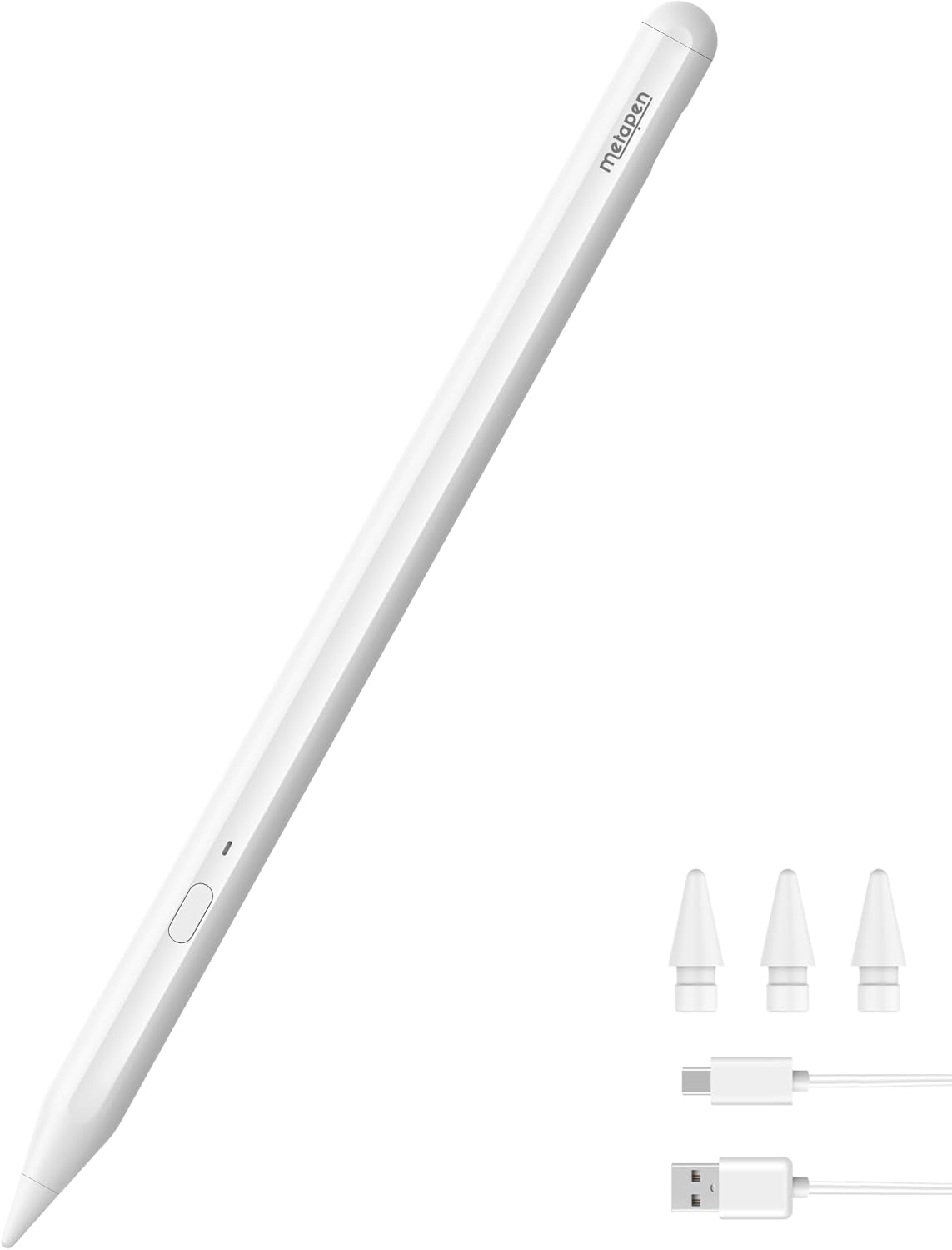
2.1-сүрөт: Metapen A11 карандашы, учтары жана кубаттоочу кабели менен.
Негизги өзгөчөлүктөрү:
- Шайкештик: iPad 11/10/9/8/7/6 муун, iPad Air 3/4/5/M2/M3, iPad Pro 13 дюймдук M4, iPad Pro 11 дюймдук 1/2/3/4/M4, iPad Pro 12.9 дюймдук 3/4/5/6 муун, iPad Mini 5/6 муун үчүн атайын иштелип чыккан.
- Ыңгайлаштырылуучу каптал баскыч: Жекелештирилген функцияларды дайындоо үчүн Wellnote колдонмосу аркылуу бир, эки же үч жолу чыкылдатуу менен программаланат.
- Заманбап сигнал жөндөгүч: Ар кандай учтук параметрлеринде 0.1 мм пикселдик тактык жана жооп берүү үчүн P2 чипи.
- Тез кубаттоо: 30 мүнөт кубаттоо 8 саат иштөө мөөнөтүн камсыздайт; 4 мүнөт кубаттоо 100 мүнөт колдонууну камсыздайт.
- Батареянын заматта көрсөткүчү: Bluetooth байланышы аркылуу iPad'дагы батарея виджети.
- Алаканды четке кагуу: Экранга кокусунан тийбестен ыңгайлуу жазууга же сүрөт тартууга мүмкүндүк берет.
- Магниттик тиркеме: Оңой сактоо жана көтөрүп жүрүү үчүн күчтүү магниттер (Эскертүү: Бардык эле iPad моделдери магниттик тиркемени колдобойт).

2.2-сүрөт: Натыйжалуу жумуш агымы үчүн ыңгайлуу каптал баскычтардын кыска жолдору.

2.3-сүрөт: Metapen Pencil A11 тез кубаттоо мүмкүнчүлүктөрү.
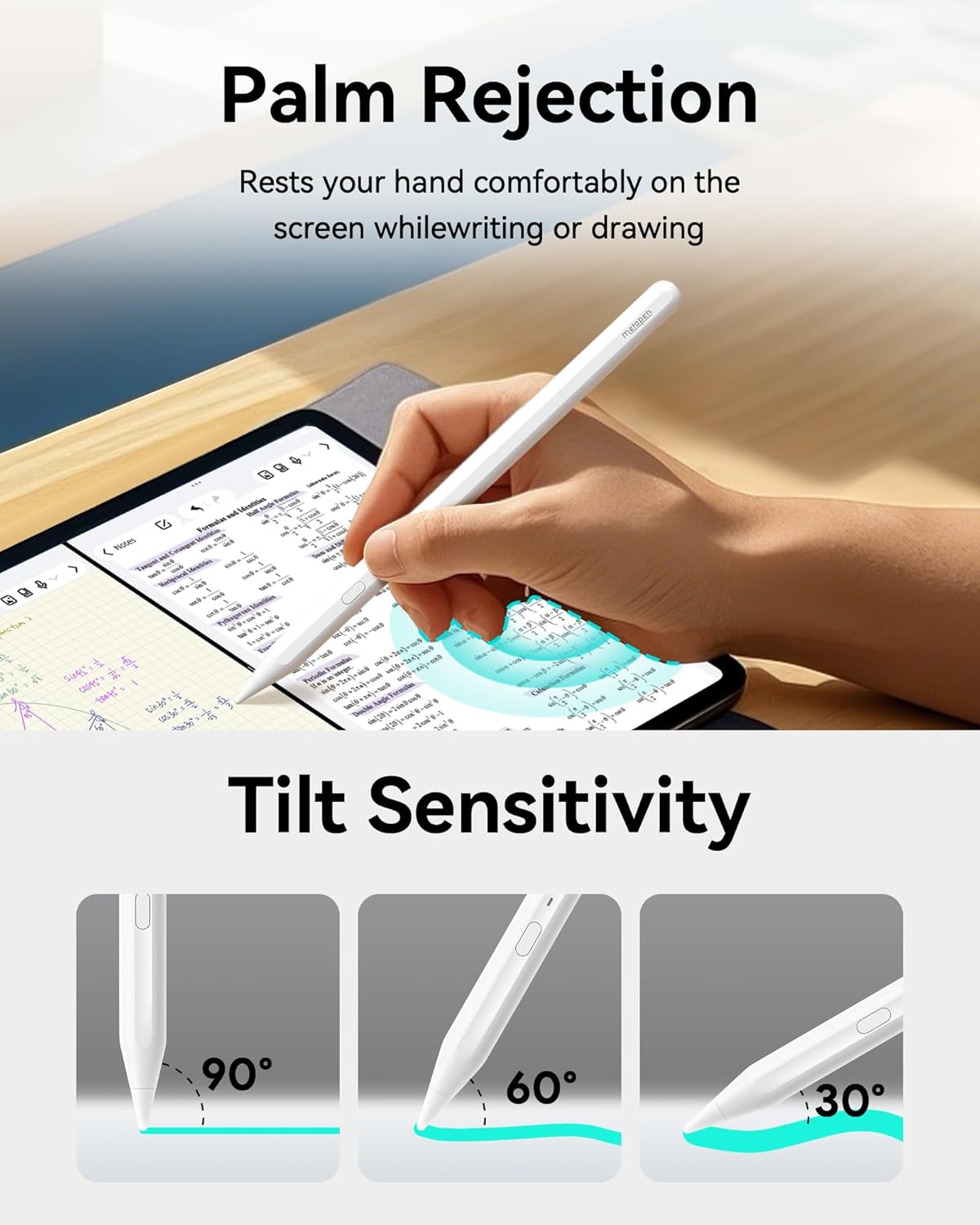
2.4-сүрөт: Ыңгайлуу колдонуу үчүн алакан менен баш тартуу функциясын көрсөтүү.

2.5-сүрөт: Эңкейиш сезгичтиги калемдин бурчуна негизделген сызыктын калыңдыгын өзгөртүүгө мүмкүндүк берет.

2.6-сүрөт: Metapen Pencil A11 үчүн шайкеш келген iPad моделдеринин тизмеси.

2.7-сүрөт: Metapen Pencil A11 менен жылмакай жана так жазуу тажрыйбасы.

2.8-сүрөт: Жакшыртылган жазууларды жүргүзүү жана ыңгайлаштыруу үчүн Wellnote колдонмосу.
3. Орнотуу жана орнотуу
Metapen Pencil A11 түзмөгүңүздү орнотуу жана аны iPad'ыңызда колдоно баштоо үчүн төмөнкү кадамдарды аткарыңыз.
3.1 Таңгактан чыгаруу жана таңгактын мазмуну
Пакетти ачкандан кийин, бардык компоненттер бар экенин текшериңиз:
- 1x Metapen карандашы A11
- 1x USB кубаттоо кабели
- 2x калем учтары
- 2x кубаттоо портунун капкактары
- 1x Колдонуучунун колдонмосу
Видео 3.1: Metapen A11 колдонуучусунун колдонмосу - Таңгактан чыгаруу жана таңгактоо тизмеси. Бул видеодо Metapen Pencil A11 таңгагынын мазмуну көрсөтүлгөн.
3.2 Күйгүзүү/өчүрүү жана жупташтыруу
- Metapen A11 калемчесин күйгүзүү үчүн, капталдагы баскычты бир жолу басыңыз. Ак жарык күйөт.
- Калемди өчүрүү үчүн капталдагы баскычты эки секунд басып туруңуз. Кызыл жарык өчөт.
- Баштапкы жупташтыруу үчүн, жупташтыруу режимин көрсөткөн кызыл жарык күйүп-өчкөнгө чейин капталдагы баскычты басып туруңуз.
- iPad'иңизден төмөнкүгө өтүңүз Орнотуулар > Bluetooth жана Bluetooth күйгүзүлгөнүн текшериңиз.
- Түзмөктөрдүн тизмесинен "Metapen Pencil A11" таап, туташуу үчүн таптаңыз. Суралганда "Жупташтыруу" баскычын басыңыз.
- Жупташтырылгандан кийин, батареянын деңгээли iPad'дын плагин тилкесинде көрсөтүлөт.
Видео 3.2: Metapen A11 колдонуучусунун колдонмосу - iPad менен жупташтыруу. Бул видеодо Metapen Pencil A11ди iPad менен күйгүзүү, өчүрүү жана жупташтыруу кадамдары көрсөтүлгөн.
3.3 Заряддоо
Metapen Pencil A11 тез кубаттоо функциясына ээ. Берилген USB-C кабелин калемдин кубаттоо портуна жана кубат булагына туташтырыңыз. Толук кубаттоо болжол менен 30 мүнөткө созулат, бул батареянын 8 саат иштөө мөөнөтүн камсыз кылат. Тез 4 мүнөттүк кубаттоо 100 мүнөт колдонууну камсыздайт.

3.1-сүрөт: Metapen Pencil A11 үчүн кубаттоо индикаторлору жана убакыттары.
3.4 Магниттик тиркеме
Metapen A11 калеми ыңгайлуу сактоо жана көтөрүп жүрүү үчүн шайкеш келген iPad моделдерине магниттик түрдө бекитилет. Калемдин жалпак тарабын iPad'ыңыздын магниттик четине коюңуз.
Эскертүү: Магниттик тиркеме Apple iPad Air 3-муунда, iPad 6/7/8/9/10-муунда жана iPad mini 5-муунда колдоого алынбайт.

3.2-сүрөт: Metapen Pencil A11 калеминин iPadга магниттик бекитилиши.
4. Операция
Metapen A11 калеми санариптик тажрыйбаңызды жакшыртуу үчүн ар кандай функцияларды сунуштайт.
4.1 Негизги колдонуу
- Жупташтыргандан кийин, жазуу же сүрөт тартуу үчүн iPad экранын калем менен таптаңыз.
- Калем жазууларды жана слайд скриншотторун тез алып чыгууну колдойт.
- Сызыктарды үзбөй, жылмакай жазуудан ырахат алыңыз жана ар кандай штрихтер үчүн эңкейиш жана басым сезгичтигин колдонуңуз.

4.1-сүрөт: Экранда колдун табигый жайгашуусуна мүмкүндүк берген алаканды четке кагуу функциясы колдонулууда.

4.2-сүрөт: Metapen A11 калемчесин кыйшайтып, сызыктын калыңдыгын тууралоо.
4.2 Тез эссе жана текст киргизүү
iPad'ыңыздын кулпуланган экранын эки жолу таптап, Notes интерфейсине тез кирип, идеяларыңызды жаздыра баштаңыз. Калем ошондой эле шайкеш келген тиркемелерде түз текст киргизүүнү, акылдуу сүрөт тартууну жана белгилөөнү колдойт.

4.3-сүрөт: Кулпуланган экрандан заматта жазууларды алуу үчүн тез эскерүү функциясы.

4.4-сүрөт: Тез жупташтыруу боюнча көрсөтмөлөр жана батареянын деңгээлинин дисплейи.
5. Техникалык тейлөө
5.1 Калемдин учтарын алмаштыруу
Metapen A11 калеми калемдин учтарын оңой алмаштырууга мүмкүндүк берет. Аны алып салуу үчүн эски учту саат жебесине каршы бурап, андан кийин жаңы учту бекитүү үчүн саат жебеси боюнча бурап коюңуз. Бул ырааттуу иштөөнү жана тактыкты камсыз кылат.
5.1-сүрөт: Калемдин учун алмаштыруу боюнча нускамалар.
6. Кыйынчылыктарды
Эгерде сиз Metapen A11 калемиңиз менен кандайдыр бир көйгөйлөргө туш болсоңуз, төмөндөгү кеңири таралган көйгөйлөрдү жана чечимдерди караңыз:
- Менин iPad'ым A11 менен шайкеш келет. Эмне үчүн ал иштебей жаткандай сезилет?
- Биринчи жолу колдонуудан мурун, A11ди 10 мүнөт кубаттаңыз.
- iPad'ыңыз iOS 12.2 же андан кийинки версиясында иштеп жатканын текшериңиз.
- Apple Pencil'ди (эгер бар болсо) төмөнкү дарекке өтүп, ажыратыңыз Орнотуулар > Bluetooth > таптоо (i) Apple Pencilдин жанында > Бул түзмөктү унут.
- In Орнотуулар > Apple Pencil, "Apple Pencil менен гана тартуу" функциясын өчүрүңүз.
- Эгер iPad'ыңыздын баштапкы экраны алмаштырылган болсо, A11 иштебей калышы мүмкүн.
- Эмне үчүн батареясы мынчалык тез түгөнүп калды?
Кадимки шарттарда, A11 толук кубатталганда болжол менен 10 саатка чейин иштеши керек. Эгерде батарея тез түгөнүп калса, анда сизде бузук продукт болушу мүмкүн. Кардарларды колдоо кызматына кайрылыңыз.
- Эмне үчүн iPad'ымды Bluetooth аркылуу A11 менен жупташтыра албай жатам?
Wellnote Bluetooth уруксатын текшериңиз: iPad'да, өтүңүз Орнотуулар > Wellnote > Bluetooth > Күйгүзүңүз.
- Эмне үчүн сызыктарды чийгенде ал үзгүлтүктүү жана жылмакай эмес?
- Калемдин учун бошотуп/калемдин учун алмаштырып көрүңүз.
- Калемдин учунун сигналын тууралоо үчүн "Wellnote" колдонмосундагы күчөтүүнү жөндөөнү чыкылдатыңыз.
- Эгерде жогорудагы аракеттер көйгөйдү чече албаса, биз менен байланышыңыз.
- Эмне үчүн эңкейиш сезгичтиги иштебейт?
Эңкейүү сезгичтиги карандаш, бор жана маркер сыяктуу айрым щеткалар үчүн иштелип чыккан. iPad Notes же Procreate'теги "Sketch" астынан "HB Pencil" сыяктуу каалаган карандаш щеткасын тандап, ар кандай көлөкө эффекттерин алуу үчүн калемди ар кандай бурчтарга эңкейтсеңиз болот.
- Эмне үчүн алакан менен баш тартуу иштебейт?
iPad'га өтүңүз Орнотуулар > Apple Pencil > "Apple Pencil менен гана тартууну" күйгүзүңүз.

6.1-сүрөт: Metapen Pencil A11 үчүн жалпы көйгөйлөрдү чечүү кадамдары.

6.2-сүрөт: Жазуунун жылмакайлыгы жана алакан менен басуунун четке кагылышы боюнча кошумча көйгөйлөрдү чечүү.
7. Техникалык шарттар
| Атрибут | Нарк |
|---|---|
| Бренд | Metapen |
| Модель номери | ME-APP412 |
| Элемент Салмагы | 0.529 унция (15 грамм) |
| Продукциянын өлчөмдөрү (LxWxH) | 6.5 x 0.37 x 0.37 дюйм |
| Түс | Классикалык ак |
| Батарея түрү | Литий-ион полимери |
| Батареялар талап кылынат | Ооба (1 CR5 кошулган) |
| Батареянын орточо иштөө мөөнөтү күтүү режиминде | 365 күн |
| Шайкеш түзмөктөр | 2025-жылкы iPad 11-чи, iPad Air M3, 11 дюймдук жана 13 дюймдук (M2), iPad Pro 11 дюймдук (M4), iPad Pro 13 дюймдук (M4), iPad (2022-жылдын 6-, 7-, 8-, 9- жана 10-муундары), iPad Air (2022-жылдын 3-, 4- жана 5-муундары), iPad Pro 12.9 дюймдук (2022-жылдын 3-, 4-, 5- жана 6-муундары), iPad Pro 11 дюймдук (2022-жылдын 1-, 2-, 3- жана 4-муундары), iPad mini (5- жана 6-муун) |
8. Кепилдик жана колдоо
Metapen кардарларды тейлөө жана продукцияны колдоо боюнча эң сонун кызматтарды көрсөтүүгө умтулат.
- 2 жылдык кам көрүү: Кеңейтилген кепилдик жана колдоодон ырахат алыңыз.
- 30 күндүк алмаштыруу: Сатып алынгандан кийин 30 күндүн ичинде көйгөйсүз алмаштыруу.
- 7x24 Саат Кардарларды тейлөө: Атайын колдоо күнү-түнү жеткиликтүү.
Бардык суроолор же жардам үчүн биз менен байланышыңыз: support@metapen.com

8.1-сүрөт: Metapen кардарларды тейлөө кызматынын чоо-жайы.


