1. Киришүү
Сатып алганыңыз үчүн рахматasing the HXSJ 2.4G Wireless Rechargeable Keyboard Mouse Combo (L99). This manual provides detailed instructions on how to set up, operate, and maintain your new keyboard and mouse set. Please read this manual carefully before use to ensure optimal performance and longevity of your product.
2. Продукциянын өзгөчөлүктөрү
The HXSJ L99 Keyboard Mouse Combo offers a range of features designed for enhanced gaming and office productivity:
- 2.4 ГГц зымсыз берүү: Provides stable and delay-free connectivity with strong anti-interference capabilities.
- 96-Key Compact Design: Space-saving layout, convenient for portability.
- RGB Backlight Keyboard: Enhances gaming ambiance with customizable lighting.
- Multi-function Shortcut Keys (FN Group): Allows quick access to various functions for office work and gaming.
- Adjustable DPI Mouse: 3-gear adjustable DPI (1000/1600/2400DPI) for precise cursor control.
- Эргономикалык дизайн: Keyboard and mouse are shaped to fit the hand curve, providing comfortable use and reducing fatigue.
- Plug and Play: Easy setup via a single USB receiver.
- 19 Негизги Анти-Гостинг: Ensures accurate input during intense gaming sessions.
- 7-Color Auto Changing Breathing Backlight Mouse: Aesthetic lighting for the mouse.
- Energy-saving Mouse: 8 мүнөт аракетсиз тургандан кийин автоматтык түрдө энергияны үнөмдөө режимине өтөт.

Image: The HXSJ L99 Wireless Keyboard and Mouse Combo, showcasing its RGB backlighting and ergonomic design.
3. Орнотуу колдонмосу
Follow these steps to set up your HXSJ L99 Keyboard Mouse Combo:
- Мазмунду таңгактан чыгаруу: Carefully remove the keyboard, mouse, and USB receiver from the packaging.
- USB кабыл алгычты табыңыз: The wireless tiny receiver is typically stored in a slot next to the battery compartment of the mouse for safe keeping.
- Кабылдагычты туташтыруу: USB ресиверди компьютериңиздеги жеткиликтүү USB портуна салыңыз.
- Күйгүзүү: Ensure both the keyboard and mouse are powered on. The keyboard usually has a power switch, and the mouse will activate once the receiver is connected and it detects movement.
- Автоматтык туташуу: The keyboard and mouse should automatically connect to your computer. No additional drivers are typically required for basic functionality.
- Заряддоо: If the devices are low on power, connect the provided Type-C to USB charging cable to the keyboard and a USB power source. The mouse is also rechargeable.

Image: Illustration showing the USB receiver being inserted into a computer's USB port, and the keyboard and mouse in use.
4. Иштөө нускамалары
4.1 Баскычтоптун функциялары
The keyboard features various function key combinations for enhanced control:
- Backlight Switching: Басыңыз FN + 1, 2, 3, 4, or 5 to cycle through different backlight modes (continuous flow, colorful horse racing, colorful cyclic breathing, colorful gradient, seven sets of monochrome).
- Backlight Brightness Control: Колдонуу FN + ↑ жарыктыгын жогорулатуу жана FN + ↓ to decrease brightness (3 levels of adjustment).
- Backlight Breathing/Racing Speed Control: Adjust speed with FN + ← (reduces frequency period) and FN + → (extends frequency period) (4 steps of adjustment).
- WIN Key Lock Function: Басыңыз WIN + L to lock or unlock the WIN key function.
- Game Direction Keys Exchange: Колдонуу FN + W to swap WASD keys with arrow keys (↑↓←→). Default is normal function.
- Арткы жарык күйгүзүү/өчүрүү: Басыңыз FN + PGDN to turn the backlight off or on.
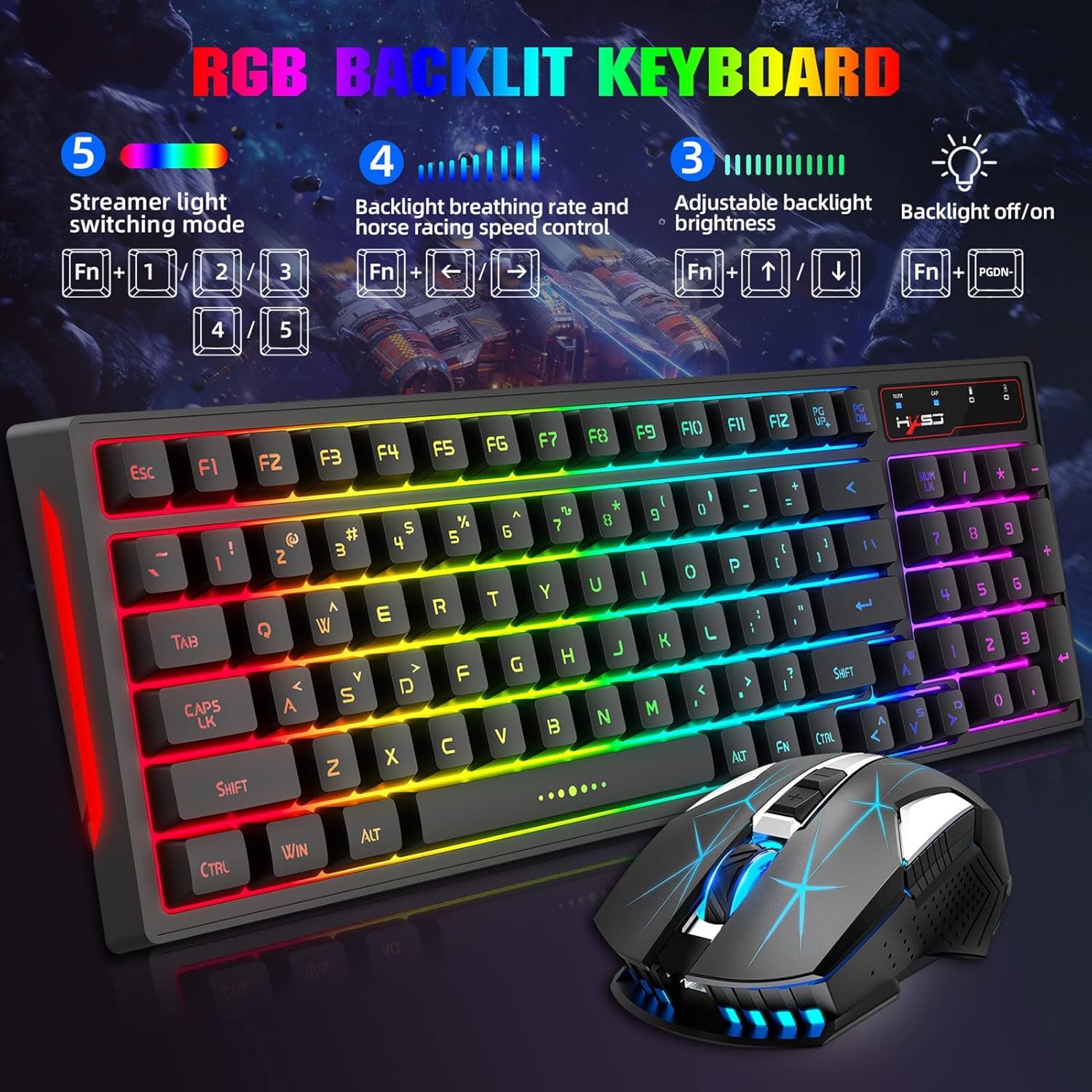
Image: Diagram illustrating the keyboard's FN key combinations for backlight control, brightness, and speed adjustments.
4.2 Чычкан функциялары
- DPI жөндөө: The mouse features three adjustable DPI levels: 1000, 1600, and 2400 DPI. Use the DPI button (usually located near the scroll wheel) to cycle through these settings for desired cursor sensitivity.
- Энергияны үнөмдөө режими: To conserve battery life, the mouse will automatically enter a power-saving mode if not used for over 8 minutes. Move the mouse or click a button to wake it up.

Image: Close-up of the HXSJ L99 mouse, highlighting its ergonomic shape and RGB lighting.
5. Техникалык тейлөө
Proper maintenance ensures the longevity and optimal performance of your HXSJ L99 combo:
- Тазалоо: Клавиатура менен чычканды жумшак, кургак чүпүрөк менен сүртүңүз. Өтө кир болсо, бир аз сүртүңүз.amp cloth with mild soap can be used, but ensure no liquid enters the device. Avoid harsh chemicals or abrasive cleaners.
- Клавиатураны тазалоо: For deeper cleaning, keycaps can be carefully removed (if designed to be removable) and cleaned separately. Ensure they are completely dry before reattaching.
- Заряддоо: Recharge the devices when the battery indicator shows low power. Avoid overcharging for extended periods.
- Сактагыч: Клавиатураны жана чычканды көпкө чейин колдонбогон учурда, аны салкын, кургак жерде, күндүн нуру түз тийбеген жана өтө жогорку температурадан алыс сактаңыз.
- USB кабыл алгыч: Always store the USB receiver in its designated slot within the mouse when transporting the combo to prevent loss.
6. Кыйынчылыктарды
| Көйгөй | Мүмкүн себеп | Чечим |
|---|---|---|
| Баскычтоп/чычкан жооп бербей жатат | Low battery; USB receiver disconnected; Interference; Device not paired. | Charge devices; Re-insert USB receiver; Move closer to receiver; Try a different USB port; Re-pair if necessary (refer to setup guide). |
| Кечигүү же кечигүү менен жооп берүү | Distance from receiver; Interference from other wireless devices. | Reduce distance between devices and receiver; Move away from other 2.4GHz devices (e.g., Wi-Fi routers). |
| Арткы жарык иштебейт | Арткы жарык өчүрүлгөн; Батареянын кубаты аз. | Басыңыз FN + PGDN to toggle backlight; Charge the keyboard. |
| Чычкан курсору туура эмес же жылмакай эмес | Кир сенсор; Ылайыксыз бет; Батареянын заряды аз. | Clean the optical sensor; Use on a clean, non-reflective mouse pad; Charge the mouse. |
7. Техникалык шарттар
| Өзгөчөлүк | Деталь |
|---|---|
| Бренд | HXSJ |
| Модель номери | L99 |
| Байланыш | 2.4G зымсыз |
| Баскычтоп баскычтары | 96 Ачкычтар |
| Баскычтоптун арткы жарыгы | RGB (Multiple modes) |
| Чычкан DPI | 1000/1600/2400 DPI (Жөнгө салынуучу) |
| Чычкан баскычтары | 6 баскычтар |
| Чычкандын арткы жарыгы | 7-color auto changing breathing backlight |
| Power Source | Батарея менен иштейт (кайра заряддалуучу) |
| Шайкештик | PC (Windows, macOS compatible) |
| Элемент Салмагы | 750 г |
8. Кепилдик жана колдоо
For warranty information and technical support, please refer to the official HXSJ webсайтка же түздөн-түз кардарларды тейлөөгө кайрылыңыз. Сатып алуу квитанциясын кепилдик дооматтары үчүн сатып алуунун далили катары сактаңыз.
Кошумча жардам алуу үчүн, сиз иш сапары менен болот Amazon'догу HXSJ дүкөнү.


