1. Киришүү
The N-Gear The Flash Banger 777 is a portable Bluetooth speaker designed for powerful audio output and dynamic light effects. It features an 8-inch subwoofer, a clear wide-range tweeter, and synchronized RGB LED lighting. This versatile system supports various audio inputs and includes microphones for karaoke functionality, making it suitable for a wide range of entertainment needs.

Figure 1: N-Gear The Flash Banger 777 Portable Bluetooth Speaker
2. Пакеттин мазмуну
Сураныч, пакетте төмөнкү нерселерди текшериңиз:
- 1 x N-Gear The Flash Banger 777 Portable Bluetooth Speaker
- 1 x Зымсыз Микрофон
- 1 x Зымдуу микрофон
- 1 x Алыстан башкаруу
- 1 х AUX кабели
- 1 x USB 220V Charger (Power Adapter)
- 1 x Quick Start Guide

Figure 2: Speaker and Included Accessories
3. Орнотуу
3.1 Динамикти заряддоо
The Flash Banger 777 is powered by an integrated rechargeable Lithium-ion battery. Before first use, fully charge the speaker using the provided USB 220V charger. A full charge provides up to 5 hours of music playback. The USB port can also be used to charge external devices like smartphones.
3.2 Күйгүзүү/өчүрүү
Locate the POWER switch on the control panel. Slide the switch to the 'ON' position to power on the speaker. Slide it to 'OFF' to power off.
3.3 Башкаруу панелинин үстүнөview

3-сүрөт: Башкаруу панели
Башкаруу панелинин өзгөчөлүктөрү:
- VOLUME баскычы: Негизги динамиктин үнүн тууралайт.
- BASS/TREBLE баскычтары: Аудио чыгаруу үчүн басс жана жогорку жыштыктардын деңгээлдерин тууралайт.
- MIC.VOL баскычы: Туташкан микрофондордун үнүн тууралайт.
- ECHO баскычы: Adjusts the echo effect for microphone input.
- MODE баскычы: Cycles through input modes (Bluetooth, USB, TF Card, AUX).
- EQ баскычы: Activates or changes equalizer presets.
- USB порт: For USB drive playback and charging external devices.
- TF CARD Slot: MicroSD карталарын ойнотуу үчүн.
- AUX кирүү порту: тышкы аудио түзмөктөр үчүн 3.5 мм киргизүү.
- MIC порт: Зымдуу микрофон үчүн 6.35 мм киргизүү.
- LED которуу: Toggles the RGB light effects.
4. Иштөө нускамалары
4.1 Bluetooth байланышы
- Power on the Flash Banger 777. The speaker will automatically enter Bluetooth pairing mode, indicated by a flashing light or display message.
- Смартфонуңузда же Bluetooth иштетилген түзмөгүңүздө Bluetooth жөндөөлөрүнө өтүңүз.
- Издөө available devices and select "FLASH BANGER 777" from the list.
- Once connected, the speaker will emit a confirmation sound, and the Bluetooth indicator will become solid.
4.2 USB/MicroSD Card Playback
- Insert a USB drive or MicroSD card (up to 64GB) containing MP3 audio files тиешелүү портко.
- The speaker will automatically switch to USB or TF Card mode and begin playback. If not, press the РЕЖИМ туура киргизүүнү тандоо үчүн баскыч.
- Use the playback controls (Play/Pause, Next/Previous Track) on the speaker or remote control to manage your music.
4.3 AUX киргизүү
- Тышкы аудио түзүлүштү (мисалы, MP3 ойноткуч, ноутбук) туташтырыңыз AUX IN port using the provided 3.5mm AUX cable.
- басыңыз РЕЖИМ button until "AUX" is displayed or the speaker switches to AUX mode.
- Туташкан түзмөгүңүздөн ойнотууну жана үндү башкаруу.
4.4 Microphone Usage (Karaoke Function)
The Flash Banger 777 includes both a wired and a wireless microphone for karaoke.
- Зымдуу микрофон: Зымдуу микрофонду туташтырыңыз MIC башкаруу панелиндеги порт.
- Зымсыз микрофон: Ensure the wireless microphone is powered on. It should automatically connect to the speaker.
Микрофондун үнүн төмөнкү аркылуу тууралаңыз MIC.VOL баскычын басып, менен жаңырык эффекттерин кошуңуз ECHO knob. Bass and treble for the microphone can also be adjusted.

Figure 4: Wireless Microphone
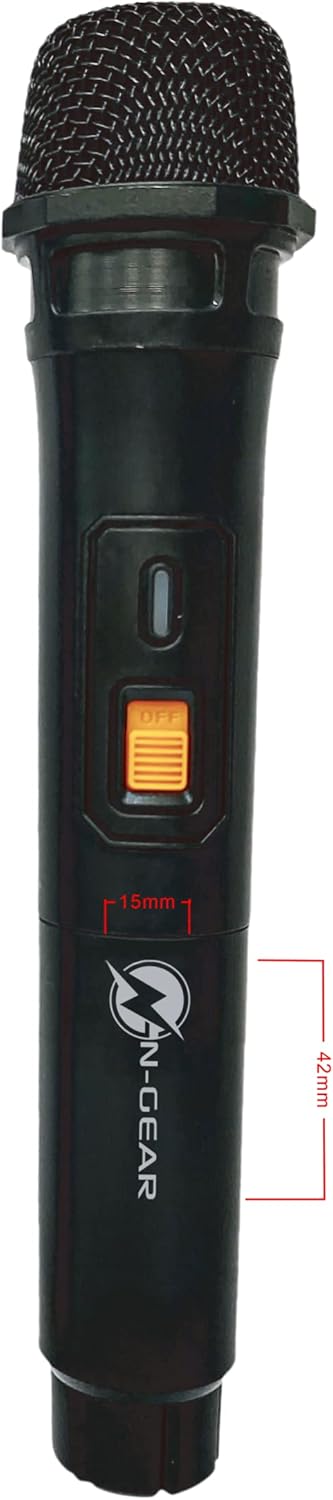
Figure 5: Wired Microphone
4.5 TWS (чыныгы зымсыз стерео) функциясы
The TWS function allows you to connect two Flash Banger 777 speakers wirelessly for a stereo sound experience. Refer to the Quick Start Guide for detailed pairing instructions for TWS mode.
4.6 RGB Light Effects
Toggle the RGB light effects using the LED switch on the control panel. The lights synchronize with the music to enhance the atmosphere.
5. Техникалык тейлөө
- Тазалоо: Динамиктин сыртын тазалоо үчүн жумшак, кургак чүпүрөктү колдонуңуз. Абразивдүү тазалагычтарды же эриткичтерди колдонбоңуз.
- Сактагыч: Динамикти түз күн нурунан жана өтө температурадан алыс салкын, кургак жерде сактаңыз.
- Батареяга кам көрүү: Батареянын иштөө мөөнөтүн узартуу үчүн, бат-баттан батарейканы толук зарядсыздандырбаңыз. Узак убакыт колдонулбаса да, динамикти үзгүлтүксүз заряддап туруңуз.
- Суу каршылык: This product is not waterproof. Avoid exposure to water or moisture.
6. Кыйынчылыктарды
- Кубат жок: Ensure the speaker is charged and the POWER switch is in the 'ON' position.
- Үн жок: Check the main VOLUME knob and ensure it is not set to minimum. Verify the audio source is playing and correctly connected (Bluetooth, USB, AUX).
- Bluetooth жупташтыруу маселелери: Ensure the speaker is in pairing mode. Turn off Bluetooth on other nearby devices to avoid interference. Try restarting both the speaker and your Bluetooth device.
- Микрофон иштебейт: Check microphone connections (for wired mic) and ensure the microphone is powered on (for wireless mic). Adjust the MIC.VOL баскыч.
- Бурмаланган үн: Reduce the volume of the speaker or the connected audio source. Ensure audio fileлар бузулган эмес.
7. Техникалык шарттар
| Өзгөчөлүк | Спецификация |
|---|---|
| Модель аты | The Flash Banger 777 |
| Модель номери | FB777 |
| Бренд | N-Gear |
| Динамик чыгаруу күчү | 160 Ватт (макс) |
| Сабвуфердин диаметри | 8 дюйм |
| Tweeter өлчөмү | 1 дюйм |
| Байланыш технологиясы | Bluetooth, USB, AUX, Micro SD |
| Зымсыз байланыш | Bluetooth |
| Power Source | Батарея менен иштейт (литий-ион) |
| Батареянын иштөө мөөнөтү | 5 саатка чейин |
| Өлчөмдөрү (L x W x Y) | 25 x 24 x 38 см |
| Элемент Салмагы | 4.47 килограмм |
| Түс | Кара |
| Материал | Plastic, paper or polypropylene |
| Суу өткөрбөйт | False |
| Башкаруу ыкмасы | Алыстан башкаруу |

6-сүрөт: Динамиктин өлчөмдөрү
8. Кепилдик жана колдоо
For warranty information and customer support, please refer to the documentation included with your purchase or contact N-Gear customer service directly. Keep your proof of purchase for any warranty claims.


