1. Киришүү
This manual provides detailed instructions for the installation, operation, and maintenance of your OOYCYOO MPPT 60A Solar Charge Controller. This device is designed to efficiently manage power flow from your solar panels to your battery bank, ensuring optimal charging and system protection. It supports automatic 12V/24V system voltage identification and is compatible with various battery types.
Key features include a backlit LCD display, a 4-stage battery charging algorithm, and comprehensive protection functions.
2. Коопсуздук нускамалары
- Always connect the battery first, then the solar panel, and finally the load. Disconnect in reverse order.
- Ensure all wiring is correctly polarized to prevent damage.
- Do not connect inverters or inductive loads directly to the controller's load terminals.
- Контроллерди күйүүчү материалдардан алыс, жакшы желдетилген жерге орнотуңуз.
- The controller generates heat during operation; ensure adequate airflow. The integrated cooling fan activates when the temperature exceeds 45°C and turns off below 40°C.
- Бардык байланыштар үчүн тиешелүү автоматтык өчүргүчтөрдү жана сактагычтарды колдонуңуз.
- This device is for indoor use only. Protect it from water and moisture.
3. Продукт бүтүп калдыview
The OOYCYOO MPPT 60A Solar Charge Controller is designed for efficient solar power management. It features an LCD display for real-time data, multiple protection functions, and support for various battery types.
3.1 Пакеттин мазмуну
- 1 x OOYCYOO MPPT 60A Solar Charge Controller
- 1 x Температура сенсору
- 1 x Колдонуучунун колдонмосу (англисче)
3.2 Компонентти идентификациялоо

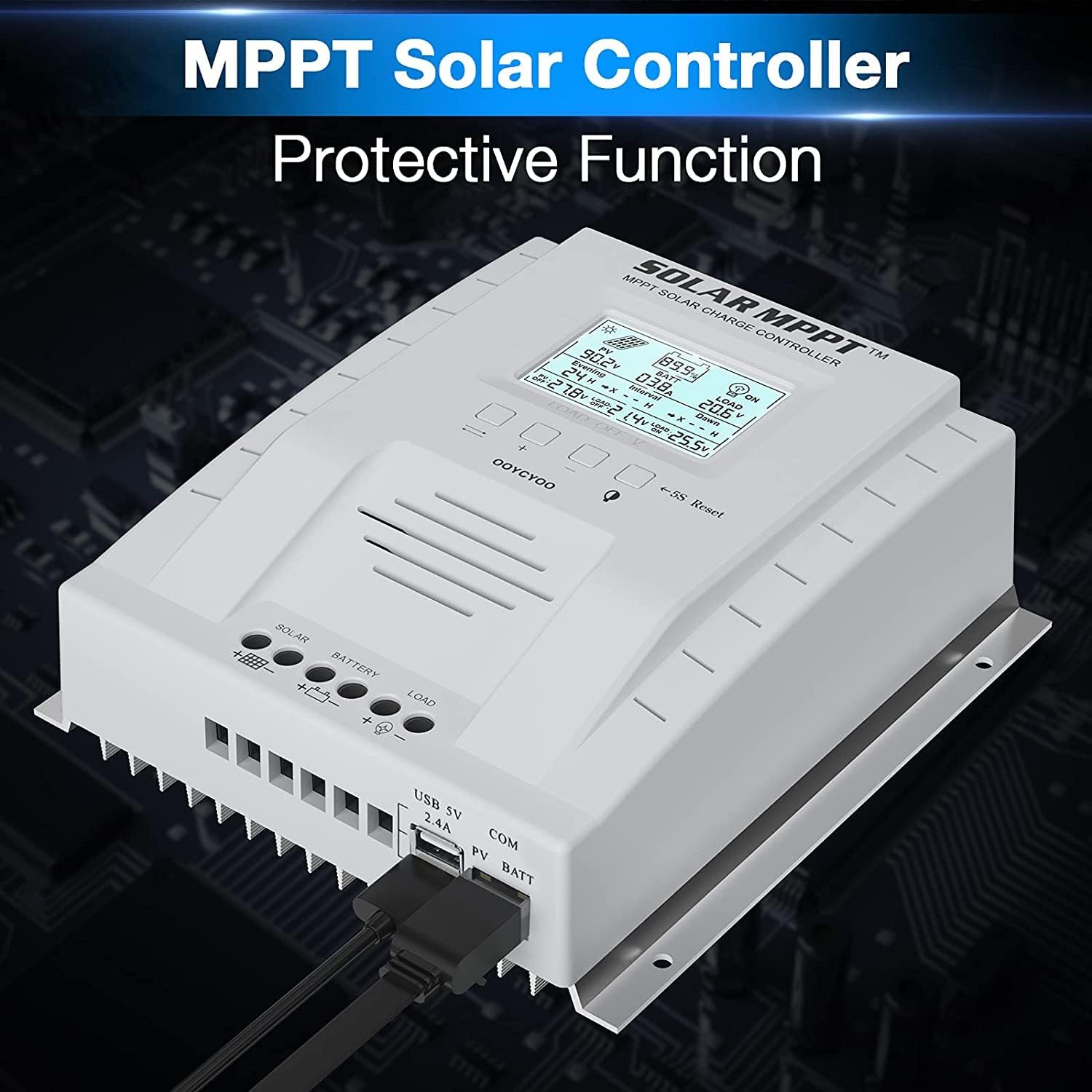
The controller features a clear LCD display on the front for monitoring system status. Below the display are control buttons for navigation and settings. Connection terminals for solar panels, battery, and load are located at the bottom. USB ports and an RS485 communication port are on the side.
4. Орнотуу жана орнотуу
Proper installation is crucial for the safe and efficient operation of your solar charge controller. Follow these steps carefully.
4.1 Контроллерди орнотуу
- Choose a dry, well-ventilated location, protected from direct sunlight, high temperatures, and water.
- Ensure there is sufficient space around the controller for heat dissipation.
- Mount the controller vertically on a wall or stable surface using the provided mounting holes.
4.2 Зымдарды туташтыруу
Follow the connection order precisely to avoid damage to the controller or other components.
- Батареяны туташтыруу: Connect the positive and negative terminals of the battery to the corresponding battery terminals on the controller. Ensure correct polarity. The controller will automatically detect the system voltage (12V же 24V).
- Күн панелдерин туташтыруу: Connect the positive and negative leads from your solar panel array to the corresponding PV terminals on the controller. Ensure correct polarity. Do not exceed the maximum PV input voltage DC 100V
- Жүктөөнү туташтыруу (кошумча): Connect your DC loads to the load terminals on the controller. Note that the load output is for DC loads only. Do not connect inverters or inductive loads directly to these terminals.
- Connect the Remote Temperature Sensor: Plug the temperature sensor into its dedicated port. This sensor helps the controller optimize charging based on battery temperature.

Маанилүү эскертүү: Always connect the battery first and disconnect the solar panel last. Incorrect connection order can damage the controller.
5. Иштөө нускамалары
Once installed, the controller will begin operation automatically. The LCD display provides real-time system information.
5.1 ЖК дисплей жана баскычтар

The backlit LCD displays critical system parameters such as PV voltagд, батарея томtage, charging current, load current, and accumulated energy (KWH). The four buttons below the display are used for navigation and settings adjustment:
- Которуу баскычы: Used to cycle through display screens or confirm selections.
- '+' (Plus) Key: Increases values or moves forward in menus.
- '-' (Minus) Key: Decreases values or moves backward in menus.
- Manual Switch Load Key: Toggles the load output on/off manually.
- 5S Reset: Заводдук орнотууларды калыбына келтирүү үчүн 5 секунд басып туруңуз.
5.2 Battery Charging Algorithm
The controller utilizes a 4-stagбатареянын иштөө мөөнөтүн жана иштешин оптималдаштыруу үчүн электрондук кубаттоо алгоритми:
- Жапырт акы: Charges the battery at maximum current until the voltage күчтөндүрүүчү томго жететtage.
- Тездетет акысыз: Туруктуу көлөмдө заряддарtage for a set period to ensure full charge.
- Float акысы: Батареяны төмөнкү көлөмдө кармайтtage to prevent self-discharge and overcharging.
- Equalization (for specific battery types): Periodically overcharges the battery to balance cell voltages and prevent sulfation.
5.3 Supported Battery Types
The controller is compatible with various battery types, including:
- Lead-Acid (Sealed, Gel, Flooded)
- Литий (LFP)
- User-defined parameters for other battery types.
Pre-set charging parameters are available for Sealed, Gel, Flooded, and LI (LFP) batteries. Users can customize parameters for other battery types as needed.
6. Коргоо функциялары
The OOYCYOO MPPT 60A Solar Charge Controller incorporates multiple protection mechanisms to ensure system safety and longevity:
- PV Overcurrent/Overpower Protection
- Күн нурунан кыска туташуудан коргоо
- PV тескери полярдуулукту коргоо
- Reverse Charging at Night Protection
- Батареяны тескери полярдуулуктан коргоо
- Батарея Overvoltage Коргоо
- Батареянын ашыкча разряддан коргонуусу
- Battery Overtemperature Protection
- Controller Overtemperature Protection
- Литий батареясынын төмөн температурадан коргоосу
- Кыска туташуулардан коргоону жүктөө
- Ашыкча жүктөн коргоо
- TVS High Voltage Transient Protection
7. Техникалык тейлөө
Regular maintenance ensures optimal performance and extends the lifespan of your solar charge controller.
- Байланыштарды текшерүү: Periodically inspect all wiring connections for tightness and corrosion. Tighten any loose connections.
- Контроллерди тазалоо: Keep the controller clean and free of dust. Use a dry cloth to wipe the exterior. Ensure ventilation openings are not obstructed.
- Зыянды текшерүү: Check for any signs of physical damage, overheating, or unusual odors.
- Батареяны текшерүү: Follow the manufacturer's maintenance guidelines for your specific battery type.
8. Кыйынчылыктарды
Бул бөлүмдө сиз күн зарядын контролдоочу менен кабылышы мүмкүн болгон жалпы маселелерди карайт.
| Көйгөй | Мүмкүн себеп | Чечим |
|---|---|---|
| Controller not powering on / LCD blank | No battery connected or battery voltage too low. Reverse polarity connection. | Ensure battery is connected first and has sufficient voltage. Check battery polarity. |
| Күн батареяларынан кубатталбайт | Solar panels not connected or reverse polarity. Insufficient sunlight. PV voltage өтө төмөн же өтө жогору. | Күн батареяларынын туташууларын жана полярдуулугун текшериңиз. Күн нурунун жетиштүү болушун камсыз кылыңыз. Күн нурунун көлөмүн текшериңизtage is within operating range (e.g., 18V-96V for 12V system, 36V-96V for 24V system). |
| Жүк иштебейт | Load output disabled. Load short circuit or overload. Battery voltage өтө төмөн. | Check load output status on LCD. Disconnect load and check for short circuit. Ensure battery is sufficiently charged. |
| Контроллердин ысып кетиши | Poor ventilation. Excessive load or charging current. | Ensure adequate airflow around the controller. Reduce load or charging current if possible. |
| Так эмес томtagэ окуулар | Loose connections. Faulty temperature sensor. | Check all wiring connections. Ensure temperature sensor is properly connected. |
9. Техникалык шарттар
Technical specifications for the OOYCYOO MPPT 60A Solar Charge Controller.
| Параметр | Нарк |
|---|---|
| Номиналдуу заряд ток | 60A |
| System Voltage | 12V/24V Auto Identification |
| Макс. PV Open Circuit Voltage | 100V DC |
| Максималдуу фотоэлектрдик киргизүү кубаттуулугу (12V системасы) | 750 Вт |
| Максималдуу фотоэлектрдик киргизүү кубаттуулугу (24V системасы) | 1500 Вт |
| DC/DC Transfer Efficiency | 98.7% чейин |
| Иштөө температурасы | -20 градустан +55 градуска чейин |
| Терминалдын көлөмү | 10 AWG |
| Өлчөмдөрү (L*W*H) | 8.3 x 8.4 x 3.4 дюйм (21.2 x 20.8 x 8.4 см) |
| Салмагы | 3 фунт (1.28 кг) |
| Дисплей түрү | LCD арткы жарык |
| UPC | 768461886785 |
| Модель номери | П 60А |


10. Кепилдик жана колдоо
For warranty information or technical support, please contact your retailer or the manufacturer directly. Refer to the product packaging or purchase documentation for specific contact details.


