1. Киришүү
This manual provides comprehensive instructions for the Novation Launchpad Mini [MK3] and AKAI Professional MPK Mini MK3, a powerful combination of portable MIDI controllers designed for music production. These devices offer seamless integration with various digital audio workstations (DAWs) and provide intuitive control over your music creation process.
The Novation Launchpad Mini [MK3] features 64 RGB pads for clip launching and scene control within Ableton Live, with extensive customization options via Novation Components. The AKAI Professional MPK Mini MK3 is equipped with 25 velocity-sensitive mini keys, 8 MPC-style pads, and 8 assignable knobs, making it ideal for playing virtual instruments, programming beats, and controlling music production software.
Both controllers are designed to be slim, lightweight, and highly portable, making them perfect companions for music production on the go. The Launchpad Mini is USB bus-powered, ensuring ease of use and setup.

Figure 1: Novation Launchpad Mini [MK3] and AKAI Professional MPK Mini MK3 controllers.
2. Орнотуу колдонмосу
Follow these steps to set up your Novation Launchpad Mini [MK3] and AKAI Professional MPK Mini MK3 controllers.
2.1. Системалык талаптар
- Compatible computer with a USB port.
- Supported operating system (Windows, macOS).
- Digital Audio Workstation (DAW) software (e.g., Ableton Live, MPC Beats, GarageBand, Logic Pro, Studio One, Cubase, Pro Tools, Reason Studios).
- Internet connection for software downloads and registration.
2.2. Программалык камсыздоону орнотуу
- Продуктуңузду каттаңыз: Visit the respective manufacturer's website (Novation for Launchpad Mini, AKAI Professional for MPK Mini) and register your devices using the provided serial numbers. This will grant you access to bundled software and drivers.
- Драйверлерди жүктөп алып, орнотуңуз: If required, download and install the latest drivers for your controllers from the manufacturer's support pages.
- Install Bundled Software:
- For Launchpad Mini: Access the interactive onboarding site after registration to download Ableton Live Lite and other included sounds/plugins.
- For MPK Mini: Install MPC Beats music production software, along with the 6 virtual instruments (AIR Hybrid, Mini Grand, Velvet) and 2GB of sounds included in the bundle.
2.3. Аппараттык туташуу
- Connect the USB cable from your controller to an available USB port on your computer. Both devices are USB bus-powered, meaning they draw power directly from the USB connection.
- Allow your computer to recognize the new hardware. This may take a few moments.
- Launch your preferred DAW. The controllers should be automatically detected or can be manually configured in your DAW's MIDI/controller settings.
3. Иштөө нускамалары
3.1. Novation Launchpad Mini [MK3]
The Launchpad Mini [MK3] is designed for intuitive control of Ableton Live and other MIDI-compatible software.

Figure 2: Novation Launchpad Mini [MK3] with its 64 RGB pads.
- 64 RGB төшөкчөлөрү: These pads illuminate to perfectly match your clips and scenes in Ableton Live, providing visual feedback for your session. Use them to launch clips, scenes, and navigate your project.
- Ableton Live Integration: The Launchpad Mini offers seamless integration, allowing you to control Live's performance features directly from the device.
- Башкаруу баскычтары: Dedicated buttons for Stop, Solo, and Mute allow for quick manipulation of tracks within your session.
- Режимдер:
- Сеанс режими: For launching clips and scenes.
- Note Mode: For playing instruments and melodies.
- Барабан режими: For programming beats and drum patterns.
- Ыңгайлаштырылган режимдер: Utilize Novation Components software to customize MIDI mappings and assign controls to almost anything. Firmware version 2.0 introduces the Custom Mode keystroke widget, allowing assignment of essential DAW shortcuts for a faster workflow.
- Sound Collective: Registering your Launchpad Mini grants access to Novation's Sound Collective, offering free plugins, offers, and discounts periodically.

Figure 3: User interacting with the Launchpad Mini [MK3] connected to a laptop.
3.2. AKAI Professional MPK Mini MK3
The MPK Mini MK3 is a versatile MIDI keyboard controller designed for comprehensive control over your music production.
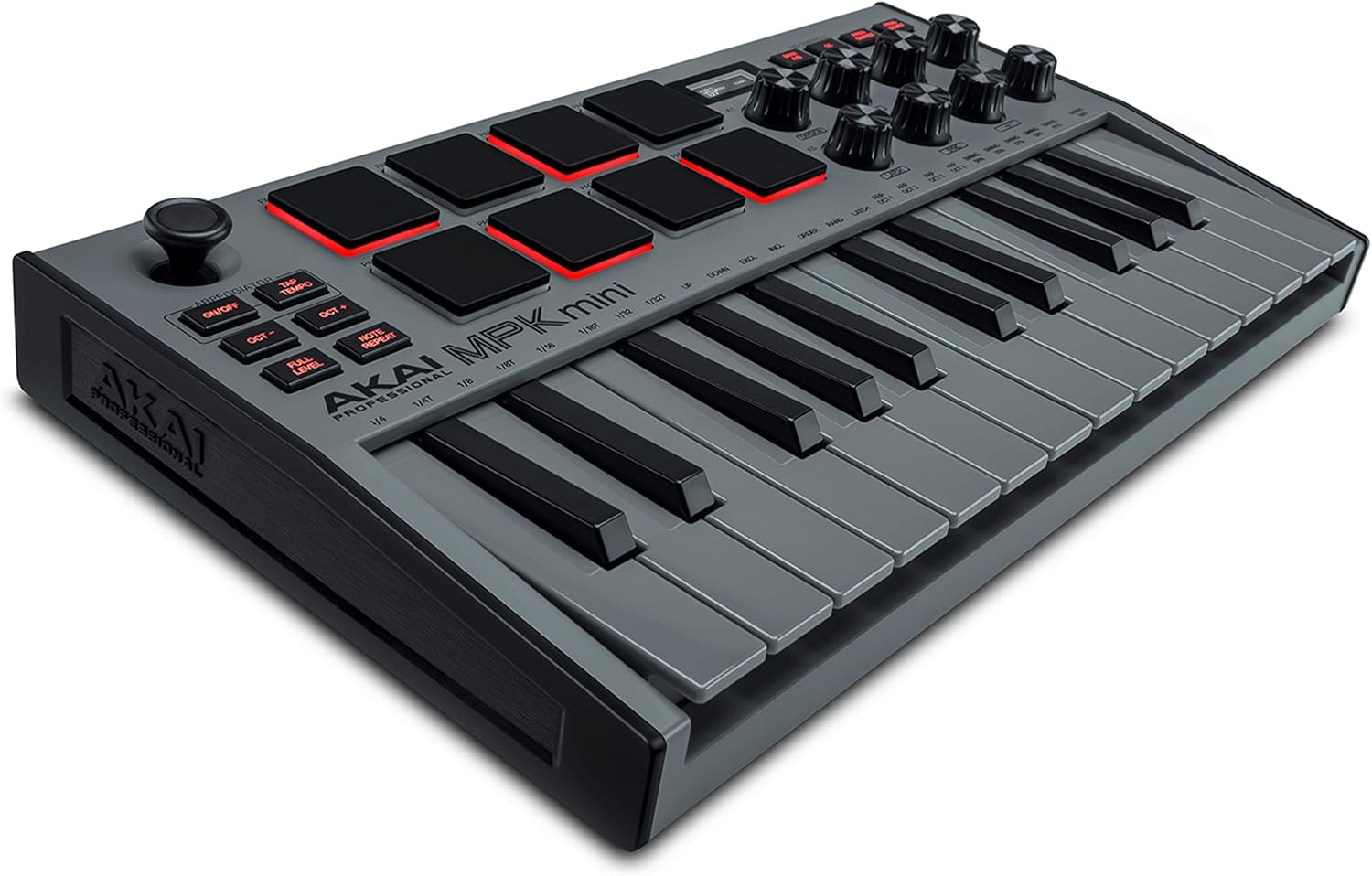
Figure 4: AKAI Professional MPK Mini MK3 controller.
- 25 Velocity-Sensitive Mini Keys: The Gen 2 enhanced dynamic keybed ensures that every subtle inflection of your performance is captured.
- 8 Backlit MPC-Style Drum Pads: These pads are ideal for finger drumming, triggering samples, and launching clips. They feature MPC Note Repeat and Full Level functions for classic MPC workflow.
- 8 Assignable Knobs: Control parameters within your DAW or virtual instruments, such as volume, pan, filter cutoff, and more.
- 4-Way Joystick: Provides dynamic control over pitch bend and modulation, offering expressive performance capabilities.
- Arpeggiator: Generate complex melodic patterns with ease.
- Жалпы шайкештик: The MPK Mini MK3 offers instant integration with popular DAWs including MPC Beats, GarageBand, Logic Pro, Studio One, Cubase, Pro Tools, and Reason Studios.

Figure 5: The MPK Mini MK3 offers broad compatibility with various music production software.

Figure 6: Key features of the AKAI Professional MPK Mini MK3.
4. Техникалык тейлөө
Proper care and maintenance will ensure the longevity and optimal performance of your MIDI controllers.
- Тазалоо: Use a soft, dry, lint-free cloth to wipe down the surfaces of the controllers. For stubborn dirt, slightly dampen the cloth with water. Avoid using abrasive cleaners, solvents, or aerosol sprays, as these can damage the finish or internal components.
- Сактагыч: When not in use, store the controllers in a clean, dry environment away from direct sunlight, extreme temperatures, and excessive dust. Consider using a protective case or cover, especially if transporting the devices.
- Кабелдик башкаруу: Ensure USB cables are not kinked or strained. Disconnect cables by pulling the plug, not the cable itself, to prevent damage to the connectors.
5. Кыйынчылыктарды
If you encounter issues with your controllers, refer to the following common troubleshooting steps:
- Контроллер таанылган жок:
- USB кабелинин контроллерге да, компьютериңизге да бекем туташтырылганын текшериңиз.
- Компьютериңиздеги башка USB портун колдонуп көрүңүз.
- Restart your computer and the DAW software.
- Verify that the latest drivers (if applicable) are installed.
- Check your DAW's MIDI/controller settings to ensure the device is enabled.
- Баскычтар/коддор жооп бербей жатат:
- Confirm the controller is powered on (indicated by illuminated pads/lights).
- Check if the correct MIDI input is selected in your DAW for the track you are trying to control.
- Ensure the controller is in the appropriate mode (e.g., Note mode for keys, Drum mode for pads).
- Программалык камсыздоо маселелери:
- Ensure your DAW and controller firmware are up to date.
- Consult the software's user manual or online support for specific configuration details.
For more detailed troubleshooting or technical support, please refer to the official user manuals or contact the manufacturer's support channels.
6. Техникалык шарттар
| Өзгөчөлүк | Деталь |
|---|---|
| Модель аталыштары | Novation Launchpad Mini [MK3], AKAI Professional MPK Mini MK3 |
| Байланыш технологиясы | USB |
| Аппараттык интерфейс | USB |
| Number of Keyboard Keys (MPK Mini) | 25 (Velocity-Sensitive Mini Keys) |
| Pads (Launchpad Mini) | 64 RGB Pads |
| Pads (MPK Mini) | 8 Backlit MPC-Style Drum Pads |
| Knobs (MPK Mini) | 8 дайындалган баскычтар |
| Joystick (MPK Mini) | 4-Way (Pitch & Modulation Control) |
| Өзгөчөлүктөр | Compact, Lightweight, Portable, USB Bus-Powered |
| Колдоого алынган программалык камсыздоо | Ableton Live, MPC Beats, GarageBand, Logic Pro, Studio One, Cubase, Pro Tools, Reason Studios |
| Түс | Black (Launchpad Mini), Grey (MPK Mini) |
| Биринчи жеткиликтүү күн | 8-сентябрь, 2022-жыл |
7. Кепилдик жана колдоо
For detailed warranty information, please refer to the documentation included with your product or visit the official websites of Novation and AKAI Professional.
Additional resources and support can be found at:
- Расмий колдонуучу колдонмо (PDF): PDF колдонмосун жүктөп алыңыз
- Novation Store: Visit Novation Store on Amazon
- AKAI Professional Support: Refer to AKAI Professional's official website for support and resources.
For technical assistance, software updates, and frequently asked questions, please visit the support sections of the respective manufacturer's webсайттар.


