Introduction
Sharp Big Bang ойготкуч саатын тандаганыңыз үчүн рахмат. Бул колдонмодо жаңы ойготкуч саатыңызды орнотууга, иштетүүгө жана тейлөөгө жардам берүүчү деталдуу көрсөтмөлөр берилген. Колдонуудан мурун бул колдонмону кылдаттык менен окуп чыгып, келечекте колдонуу үчүн сактап коюңуз.
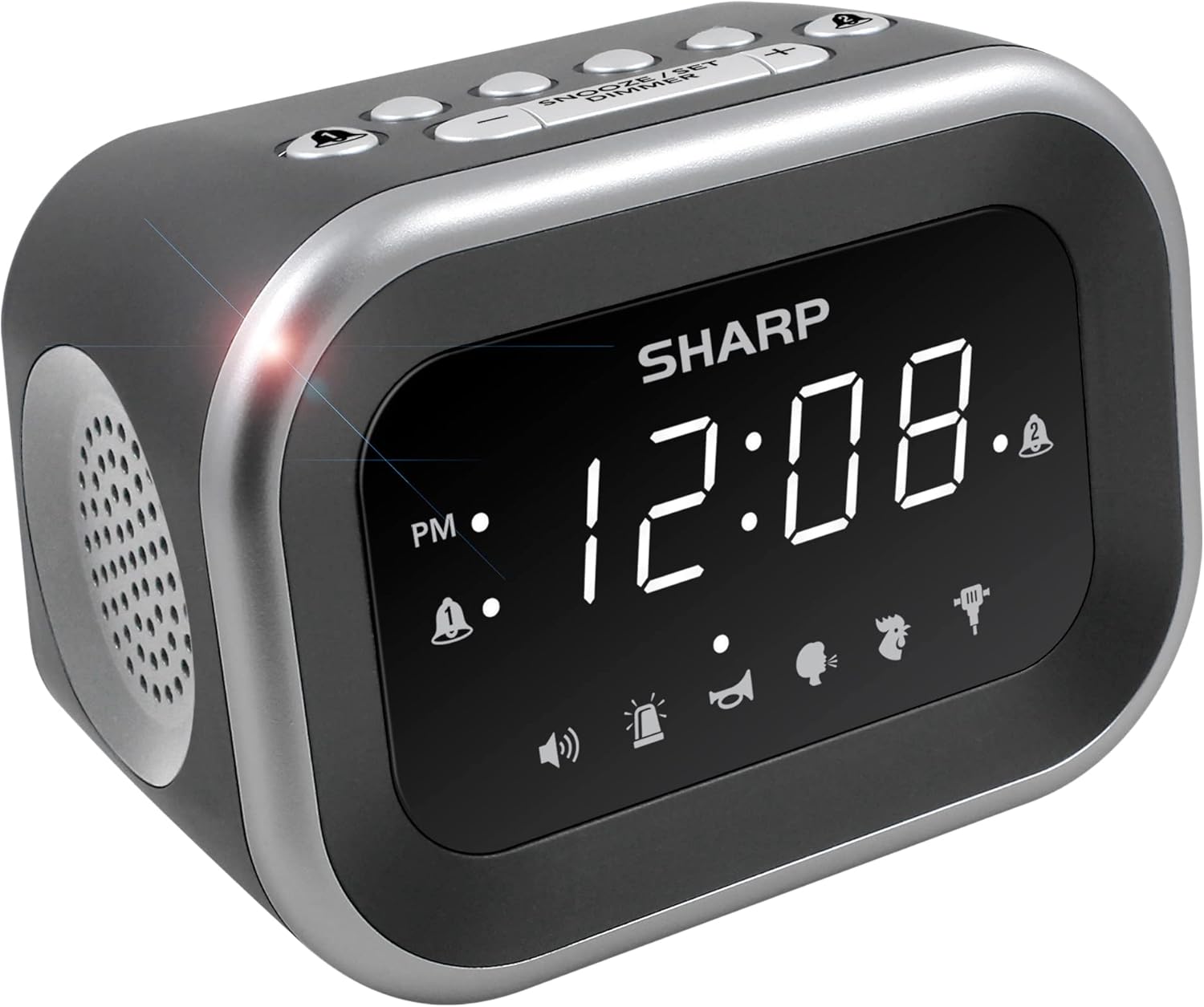
Сүрөт: алдыңкы view санарип дисплейди жана динамиктин торчосун көрсөткөн Sharp Big Bang ойготкуч саатынын.
Коопсуздук маалыматы
- Аппаратты экстремалдык температурага, түз күндүн нуруна же жогорку нымдуулукка дуушар кылбаңыз.
- Агрегатты суудан же башка суюктуктардан алыс кармаңыз.
- Белгиленген кубат адаптерин гана колдонуңуз.
- Агрегатты ажыратууга же өзгөртүүгө аракет кылбаңыз.
- Балдар жетпеген жерде сактаңыз.
Пакеттин мазмуну
- Sharp Big Bang ойготкуч сааты
- AC кубат адаптери
- Колдонуучунун Колдонмосу (бул документ)
Продукт бүттүview
Ойготкуч саатыңыздын ар кандай компоненттери жана башкаруу элементтери менен таанышып алыңыз.
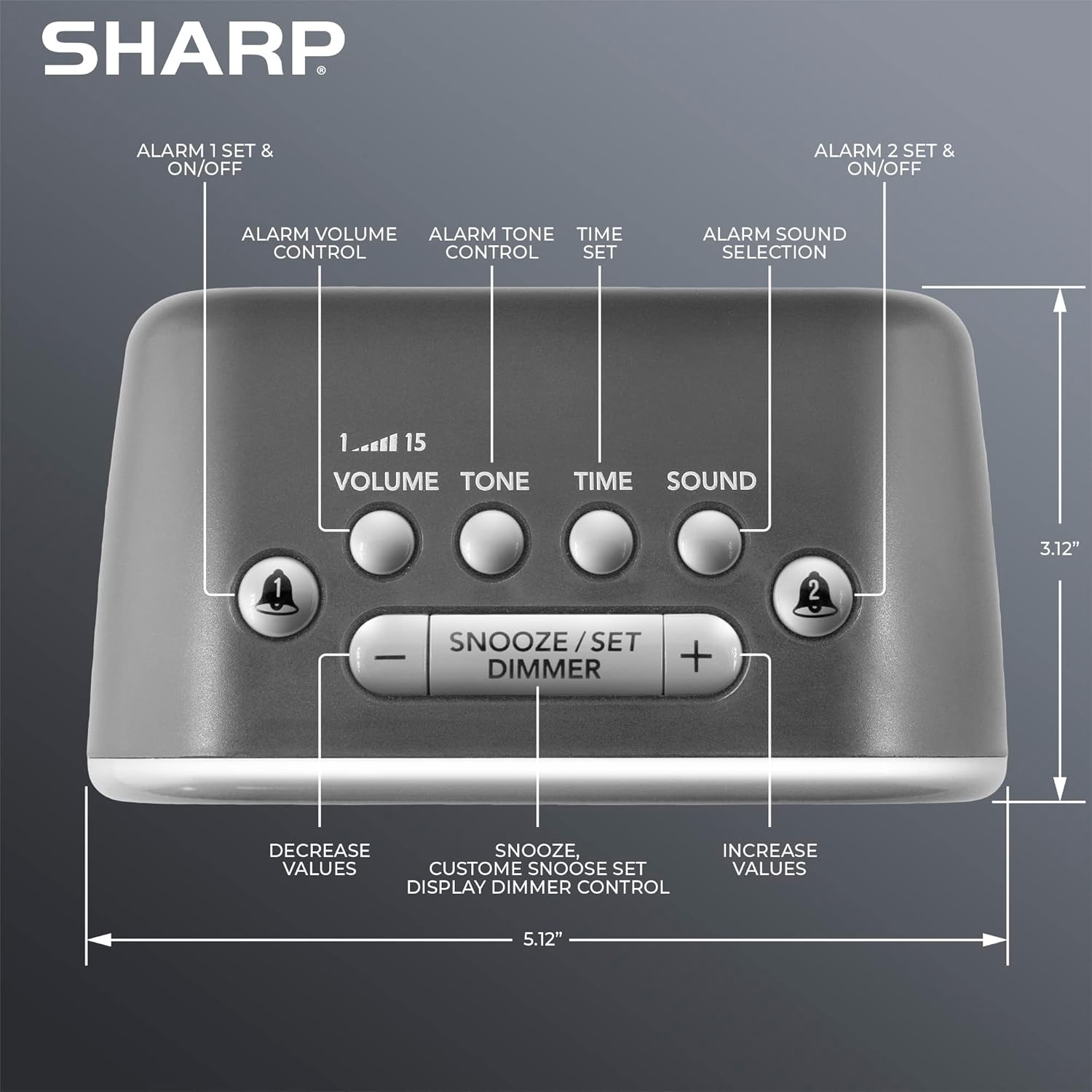
Сүрөт: Жогорку view ойготкуч сааттын баскычтарын белгилеп, 1-ойготкуч, 2-ойготкуч, Үн, Тон, Убакыт, Үн, Тындыруу/Коюу/Күңүрттөө жана +/- башкаруу элементтерин белгилейт.
- Дисплей: Убакыт жана жөндөөлөрдү көрсөтүү үчүн чоң ак LED дисплей.
- 1 жана 2-сигнализация баскычтары: Жеке ойготкучтарды иштетүү/өчүрүү жана коюу.
- Үн баскычы: Сигналдын үнүн жөндөйт (1-15 деңгээлдери).
- Тон баскычы: Ойготкучтун үнүн тууралайт.
- Убакыт баскычы: Учурдагы убакытты орнотуу үчүн колдонулат.
- Үн баскычы: Алты ойготкуч үнүнүн бирин тандайт.
- Тынчтандыруу/Коюу/Күңүрттөө баскычы: Тынчтандырууну иштетет, жөндөөлөрдү ырастайт жана дисплейдин жарыктыгын тууралайт.
- +/- баскычтары: Убакыт, үн деңгээли, тон жана тындыруу узактыгы үчүн маанилерди тууралаңыз.
Жайгашуу
1. Power Connection
- AC кубат адаптерин ойготкучтун арткы жагындагы DC IN уячасына сайыңыз.
- Адаптердин экинчи учун стандарттуу 110V/120V үй розеткасына сайыңыз.
- Дисплей күйүп, электр кубатына туташкандыгын көрсөтөт.
2. Батареянын резервдик көчүрмөсүн орнотуу
Ойготкуч сааттын батареясын камдык көчүрмө менен иштетүү үчүн 2 AAA батарейка талап кылынат (кошумча кошулган эмес). Бул функция электр энергиясы өчүп калганда убакытты жана ойготкучтун жөндөөлөрүн сактайт. Батареяны камдык көчүрмө менен иштетүү режиминде дисплей күйбөйт.
- Аппараттын астындагы батарея бөлүкчөсүнүн капкагын ачыңыз.
- Туура полярдуулукту (+ жана -) сактап, 2 жаңы AAA батарейкасын салыңыз.
- Батарея уясынын капкагын бекем жабыңыз.

Сүрөт: Тумбочкага коюлган ойготкуч саат колдонууга даяр.
Иштөө нускамалары
1. Учурдагы убакытты орнотуу
- басып, кармап туруңуз TIME баскычын сааттын цифралары жарк этмейинче басыңыз.
- колдонуу + or - саатты тууралоо үчүн баскычтар. PM индикаторуна көңүл буруңуз.
- басыңыз TIME Саатты ырастоо үчүн баскычын кайра басыңыз, ошондо мүнөттөрдүн сандары күйүп-өчүп турат.
- колдонуу + or - мүнөттөрдү тууралоо үчүн баскычтар.
- басыңыз TIME Убакыт жөндөөсүн сактоо үчүн баскычын дагы бир жолу басыңыз.
2. Ойготкучтарды орнотуу (ойготкуч 1 жана Ойготкуч 2)
Бул саат эки көз карандысыз ойготкучка ээ.
- басып, кармап туруңуз 1-ДАБЛ or 2-ДАБЛ ойготкуч сааттын цифралары жарк этмейинче басыңыз.
- колдонуу + or - ойготкуч саатын тууралоо үчүн баскычтар. PM индикаторуна көңүл буруңуз.
- Тиешелүү баскычты басыңыз АЛАРМ Саатты ырастоо үчүн баскычын кайра басыңыз, ошондо мүнөттөрдүн сандары күйүп-өчүп турат.
- колдонуу + or - ойготкуч мүнөттөрдү тууралоо үчүн баскычтар.
- басыңыз АЛАРМ Ойготкучтун убакытын сактоо үчүн баскычын дагы бир жолу басыңыз. Дисплейде коюлган ойготкучтун ойготкуч индикатору (коңгуроо сүрөтчөсү) пайда болот.
- Ойготкучту иштетүү же өчүрүү үчүн жөн гана баскычын басыңыз 1-ДАБЛ or 2-ДАБЛ баскычын кыска басыңыз. Коңгуроо сүрөтчөсү ойготкуч иштеп турганын көрсөтөт.
3. Сигнализация үндөрүн тандоо
Саат 6 башка ойготкуч үндөрүн сунуштайт: Короз, Зыңылдаган үн, Назик эне, Балка, Сирена жана Бип.

Сүрөт: Алты жеткиликтүү ойготкуч үнүнүн визуалдык чагылдырылышы.
- Ойготкуч коюлганда, баскычын басыңыз ҮН баскычын басыңыз. Учурдагы үн сүрөтчөсү күйүп-өчүп турат.
- колдонуу + or - жеткиликтүү үндөрдү которуу үчүн баскычтарды басыңыз.
- басыңыз ҮН тандооңузду ырастоо үчүн кайра басыңыз.
4. Ойготкучтун үнүн жана үнүн тууралоо
Тандалган ойготкучтун үнүнүн үнүн (115 дБ чейин) жана тонун өзгөртө аласыз.

Сүрөт: Децибелдин шилтеме шкаласы, ойготкуч сааттын катуулугун кадимки үндөргө салыштырмалуу көрсөтөт.
- басыңыз VOLUME баскычын басыңыз. Учурдагы үн деңгээли (1-15) күйүп-өчөт.
- колдонуу + or - үнүн тууралоо үчүн баскычтар.
- басыңыз VOLUME ырастоо үчүн кайра басыңыз.
- басыңыз ООН баскычын басыңыз. Учурдагы үн жөндөөсү күйүп-өчөт.
- колдонуу + or - үнүн жөндөө үчүн баскычтар.
- басыңыз ООН ырастоо үчүн кайра басыңыз.
5. Тындырма функциясы
Сигнал чыкканда чоң баскычты басыңыз ЖАҢЫЛЫКТЫ ТЫНЧТЫККА КАЙТАРУУ/КОЮУ/КҮҢҮЛДӨТҮҮ Ойготкучту убактылуу өчүрүү үчүн сааттын жогору жагындагы баскычты басыңыз. Демейки тындыруу убактысы 9 мүнөт.
Тынчтандыруу узактыгын ыңгайлаштыруу:
- Ойготкуч чырылдап жатканда, баскычын басып кармап туруңуз ЖАҢЫЛЫКТЫ ТЫНЧТЫККА КАЙТАРУУ/КОЮУ/КҮҢҮЛДӨТҮҮ баскычын тындыруу убактысы күйүп-өчкөнгө чейин басыңыз.
- колдонуу + or - каалаган тындыруу узактыгын (1-59 мүнөт) орнотуу үчүн баскычтарды басыңыз.
- басыңыз ЖАҢЫЛЫКТЫ ТЫНЧТЫККА КАЙТАРУУ/КОЮУ/КҮҢҮЛДӨТҮҮ Ыңгайлаштырылган тындыруу убактысын сактоо үчүн баскычты кайра басыңыз.
6. Дисплейдин жарыктыгын күңүрттөөнү башкаруу
Дисплейдин жарыктыгынын 3 деңгээли бар (өчүк, төмөн, жогорку).
- баскычын кыскача басыңыз ЖАҢЫЛЫКТЫ ТЫНЧТЫККА КАЙТАРУУ/КОЮУ/КҮҢҮЛДӨТҮҮ жарыктык деңгээлдерин которуу үчүн баскычын (ойготкуч иштебей турганда) басыңыз: Жогорку > Төмөн > Өчүк.

Сүрөт: бүттүview дисплей, үн деңгээли, үндөр жана башкаруу элементтери сыяктуу негизги функциялардын тизмеси.
Техникалык тейлөө
Тазалоо
- Тазалоодон мурун ойготкуч саатты электр розеткасынан сууруп алыңыз.
- Сырткы беттерди жумшак, кургак чүпүрөк менен сүртүңүз.
- Абразивдүү тазалагычтарды, момдорду же эриткичтерди колдонбоңуз.
Батареяны алмаштыруу
- Эгерде электр энергиясын өчүрүү учурунда саат убакытты же ойготкучтун жөндөөлөрүн жоготсоtage, AAA камдык батареяларын алмаштыруу керек болушу мүмкүн.
- Батареяларды алмаштыруу үчүн Орнотуу бөлүмүндөгү батареяны орнотуу кадамдарын аткарыңыз.
Проблемаларды чечүү
| Көйгөй | Мүмкүн себеп | Чечим |
|---|---|---|
| Сигнализация үнү чыкпай жатат же өтө акырын иштеп жатат. | Ойготкуч иштетилген эмес; Үн өтө төмөн; Туура эмес үн тандалды. | Коңгуроо сөлөкөтүнүн көрсөтүлүп турганын текшериңиз. Үндү ҮН баскычын колдонуп тууралаңыз. Тандалган ойготкучтун үнүн текшериңиз. |
| Электр жарыгы өчүп турганда дисплей өчүкtage. | Батареянын камдык көчүрмөсү жөндөөлөрдү гана сактап калат, дисплейдин кубаттуулугун эмес. | Бул кадимки режимде иштейт. Электр кубаты калыбына келтирилгенде дисплей кайрадан күйөт. Жөндөөлөрдү сактоо үчүн камдык батареялардын жаңы экенин текшериңиз. |
| Убакыт же ойготкуч жөндөөлөрү жоголду. | Электр энергиясынын үзгүлтүккө учурашы жана/же резервдик батареялардын түгөнүп калышы. | 2 AAA камдык батареяны алмаштырыңыз. Убакытты жана ойготкуч жөндөөлөрүн баштапкы абалга келтириңиз. |
| Баскычтар жооп бербейт. | Убактылуу программалык ката. | Түзмөктү розеткадан бир нече мүнөткө сууруп, андан кийин кайра сайыңыз. |
Техникалык шарттар
- Бренд: Sharp
- Модел: B0BDPQNVMR
- Кубат булагы: Зымдуу электр (110V/120V шайкеш келет)
- Батареянын камдык көчүрмөсү: 2 x AAA батарейкалар (киргизилген эмес)
- Ойготкучтун үнү: 115дБ чейин
- Сигнал үндөрү: 6 (Короз, Коңгуроо, Наалып жаткан эне, Балка, Сирена, Бип)
- Дисплей: 3 деңгээлдүү күңүрттөөчүсү бар ак LED (Жогорку, Төмөн, Өчүк)
- Өлчөмдөрү (болжол менен): 5.12" (туурасы) x 3.12" (бийиктик) x 3.55" (тереңдик)
- Салмагы: 12.5 унция
- Материал: Акрилонитрил бутадиен стирол (ABS)
- UPC: 049353008608
Кепилдик жана колдоо
Кепилдик жөнүндө маалымат жана кардарларды колдоо кызматы үчүн, сатып алуу учурунда берилген документтерди караңыз же Sharp кардарларды тейлөө кызматына түз кайрылыңыз. Көбүрөөк маалымат алуу үчүн расмий Sharp дүкөнүнө да кайрылсаңыз болот:


