1. Киришүү
This manual provides detailed instructions for the safe and efficient operation of your WiMiUS P61 Mini Projector. Please read this manual thoroughly before using the product and retain it for future reference.

Image 1.1: The WiMiUS P61 Mini Projector, a compact and portable device with a handle.
2. Коопсуздук нускамалары
- l болгондо проектордун объективине тике карабаamp күйүк.
- Ашыкча ысып кетүүнүн алдын алуу үчүн проектордун айланасында туура желдетүүнү камсыз кылыңыз.
- Avoid placing the projector in unstable locations or near water.
- Проектор менен келген кубат адаптерин гана колдонуңуз.
- Проекторду өз алдынча бөлүктөргө бөлүүгө же оңдоого аракет кылбаңыз. Квалификациялуу тейлөө кызматкерлерине кайрылыңыз.
- Keep the projector away from extreme temperatures, dust, and humidity.
3. Пакеттин мазмуну
Сураныч, бардык элементтер бар экенин текшериңиз:
- WiMiUS P61 Mini Projector
- Алыстан башкаруу
- Кубаттуу адаптер
- HDMI кабели
- User Manual
4. Продукт бүтүп калдыview
4.1. Проектор компоненттери

Сүрөт 4.1: Бүттүview of the WiMiUS P61 Projector highlighting its key features such as 1080P support, 8500 Lumens, Bluetooth 5.2, and 5G/2.4G WiFi.
The WiMiUS P61 is a compact and portable projector designed for ease of use. It features a lens, ventilation grilles, and various input/output ports.

Image 4.2: The WiMiUS P61 Projector being held, illustrating its portable design and compact size.
4.3. Киргизүү/чыгыш порттору

Image 4.3: The projector's connectivity options, including HDMI, USB, AV, and 3.5mm audio, compatible with various devices like smartphones, laptops, TV sticks, and gaming consoles.
- HDMI порту: Connect to laptops, gaming consoles (PS4/PS5, Switch), TV sticks, and other HDMI-enabled devices.
- USB порт: Медиа ойнотуу үчүн USB дисктерди туташтырыңыз.
- AV порт: Эски түзмөктөргө AV кабели аркылуу туташыңыз.
- 3.5 мм аудио уячасы: Тышкы кулакчындарды же динамиктерди туташтырыңыз.
- Кубат киргизүү: Кубат адаптерин туташтырыңыз.
5. Орнотуу
5.1. Power Connection
- Кубат адаптерин проектордун кубат киргизүү портуна туташтырыңыз.
- Кубат адаптерин розеткага сайыңыз.
- Проектордогу кубат индикаторунун жарыгы күйөт.
5.2. Жайгаштыруу
Position the projector on a stable, flat surface. For optimal image quality, ensure the projector is placed directly in front of the projection screen or wall. The projector includes a standard tripod screw mount for flexible positioning.

Image 5.1: Illustration of projection distance for a 100-inch screen, showing the WiMiUS P61 requires approximately 2.5 meters.
The projector supports various projection methods: front, rear, front ceiling, and rear ceiling. Adjust the projection mode in the settings menu according to your installation.
5.3. Фокусту тууралоо
The WiMiUS P61 features electric focus for precise image clarity.
- Проекторду күйгүзүңүз.
- Use the focus buttons on the remote control to adjust the image sharpness.
- Adjust until the projected image is clear and crisp.
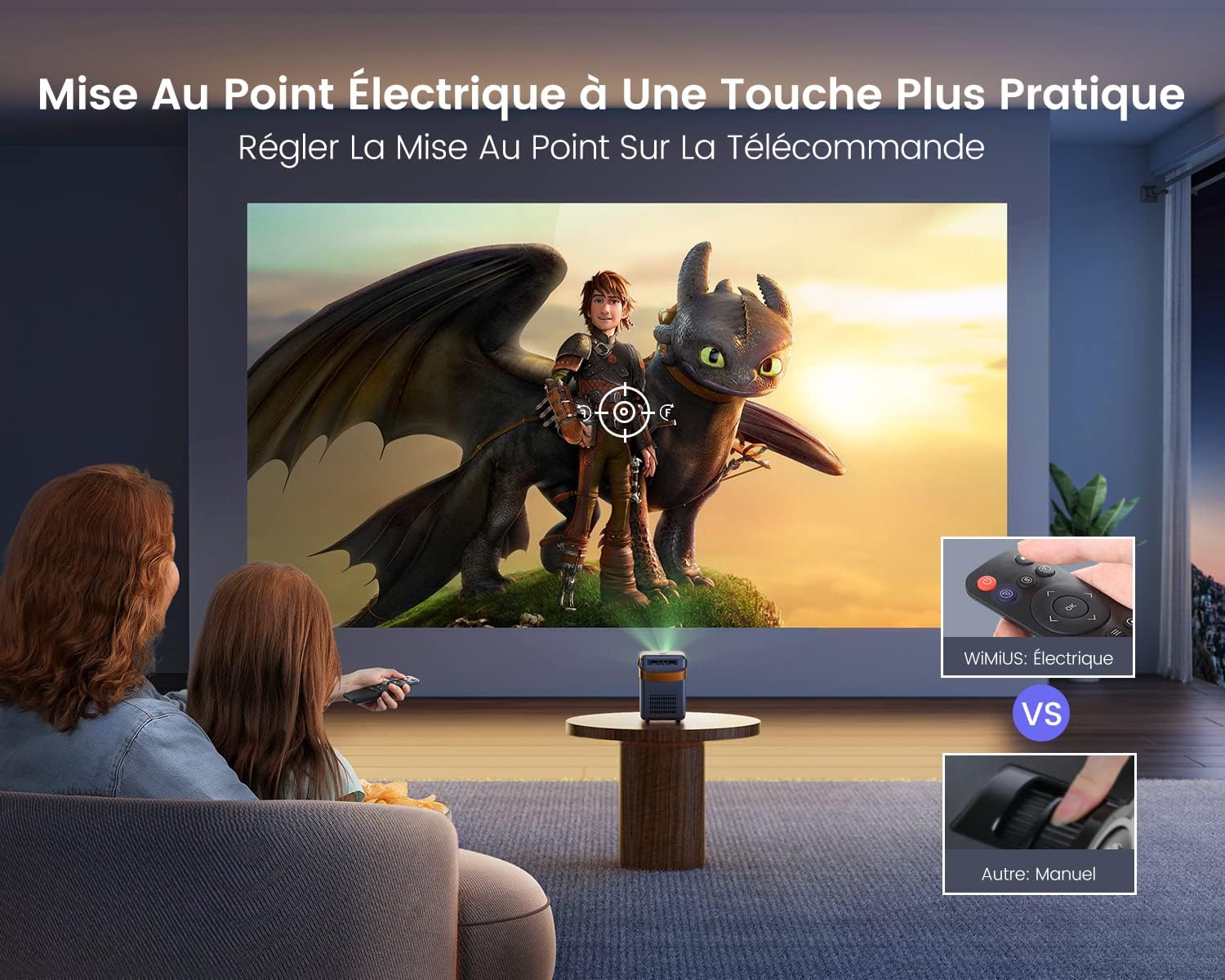
Image 5.2: The remote control allows for convenient electric focus adjustment, providing a clearer image compared to manual focus.

Image 5.3: Demonstrates the rapid 0.1-second electric focus adjustment feature of the WiMiUS P61 Projector.
6. Иштөө нускамалары
6.1. Күйгүзүү/өчүрүү
- Күйгүзүү: Проектордун же пульттун кубат баскычын басыңыз.
- Өчүрүү: Кубат баскычын кайра басыңыз. Проектор күтүү режимине өтөт.
6.2. Киргизүү булагын тандоо
Use the "Source" button on the remote control to cycle through available input sources (HDMI, USB, AV, Screen Mirroring).
6.3. Зымсыз байланыш (WiFi жана Bluetooth)
6.3.1. WiFi туташуу
The projector supports dual-band 2.4G and 5G WiFi for stable and fast connections.

Image 6.1: The projector supports both 2.4G and 5G WiFi for ultra-fast wireless connectivity.

Image 6.2: Demonstrates the high-speed 5G WiFi connection for smooth content streaming.
- Navigate to the WiFi settings in the projector's menu.
- Select your desired WiFi network and enter the password.
- Once connected, you can use screen mirroring or access network features.
6.3.2. Bluetooth туташуусу
The projector features integrated Bluetooth 5.2 for connecting external audio devices.

Image 6.3: The projector's Bluetooth 5.2 allows connection to various audio devices like Bluetooth speakers, headphones, and earbuds for enhanced sound.

Image 6.4: The projector connected via Bluetooth 5.2 to a soundbar for immersive audio.
- Go to the Bluetooth settings in the projector's menu.
- Bluetooth'ду иштетиңиз жана жеткиликтүү түзмөктөрдү издеңиз.
- Select your Bluetooth speaker or headphones to pair.
Note on Audio Output: If you connect external audio devices via Bluetooth or the 3.5mm audio jack, the projector's internal speakers will typically be muted. If you wish to use the projector's speakers while an external device is connected, you may need to adjust the volume settings or disconnect the external device.
6.4. Экранды чагылдыруу
The WiMiUS P61 supports screen mirroring for both Android and iOS devices.
- Android түзмөктөрү үчүн: Use the Miracast function. Ensure your Android device and the projector are connected to the same WiFi network, or connect directly via the projector's Miracast feature without a router.
- iOS түзмөктөрү үчүн (iPhone/iPad): Connect your iOS device and the projector to the same WiFi network. Then, use the screen mirroring function on your iOS device to project the screen.
6.5. Тышкы түзмөктөрдү туташтыруу
- HDMI: Connect an HDMI cable from your device (e.g., laptop, game console, TV stick) to the projector's HDMI port. Select HDMI as the input source.
- USB: Insert a USB drive into the USB port. The projector will typically prompt you to select media fileойнотуу үчүн.
- OF: Connect an AV cable from your device to the projector's AV port. Select AV as the input source.

Image 6.5: The WiMiUS P61 Projector displaying content from various streaming applications, suitable for home entertainment.
7. Орнотуулар менюсу
Access the settings menu using the remote control to adjust various parameters:
- Сүрөт жөндөөлөрү: Adjust brightness, contrast, color temperature, and aspect ratio (16:9 or 4:3).
- Үн орнотуулары: Adjust volume, bass, treble, and balance.
- Тармак орнотуулары: Configure WiFi connections and check network information.
- Проекция режими: Select front, rear, front ceiling, or rear ceiling projection.
- Тил: Change the system language.
- Программалык камсыздоону жаңыртуу: Update the projector's firmware via network or USB.
- Уйку таймери: Автоматтык түрдө өчүрүү үчүн таймерди коюңуз.
Settings are typically saved automatically after adjustment.
8. Техникалык тейлөө
8.1. Тазалоо
- Объектив: Оптикалык линзалар үчүн атайын жасалган жумшак, түксүз кездемени колдонуңуз. Абразивдүү тазалагычтарды колдонбоңуз.
- Casing: Wipe the projector's exterior with a soft, dry cloth. Do not use liquid or aerosol cleaners.
- Вентиляция: Аба агымынын туура болушун камсыз кылуу жана чаңдын топтолушун алдын алуу үчүн желдетүү торчолорун мезгил-мезгили менен текшерип жана тазалап туруңуз.
8.2. Сактоо
Проекторду узак убакыт бою колдонбогон учурда, аны салкын, кургак жерде, күндүн түз нурунан жана чаңдан алыс сактаңыз. Баштапкы таңгагын же мүмкүн болсо, коргоочу капты колдонуңуз.
9. Кыйынчылыктарды
| Көйгөй | Мүмкүн себеп | Чечим |
|---|---|---|
| Сүрөт көрсөтүлгөн жок | Power not connected; Incorrect input source; Device not connected properly. | Check power cable; Select correct input source; Ensure HDMI/USB/AV cables are securely connected. |
| Сүрөт бүдөмүк | Фокус туураланган эмес; Проектор экрандан өтө алыс/жакын. | Adjust focus using the remote control; Reposition the projector. |
| Үн жок | Volume too low; Muted; Incorrect audio output selected; External device volume low. | Increase projector volume; Unmute; Check audio settings; Increase volume on connected device. |
| WiFi туташуусу туруксуз | Distance from router; Interference; Incorrect password. | Move projector closer to router; Reduce interference; Re-enter WiFi password. |
| Экранды чагылдыруу иштебей жатат | Not on same WiFi network; Device compatibility; Network issues. | Ensure both devices are on the same WiFi; Check device's screen mirroring function; Restart devices. |
| Dust spots on image | Dust between lens components. | This issue may require professional cleaning. Contact customer support. |
10. Техникалык шарттар
| Өзгөчөлүк | Деталь |
|---|---|
| Бренд | WiMiUS |
| Модель номери | P61 проектор |
| Түс | Кара |
| Дисплейдин чечилиши (Түпнуска) | 1280 x 720p |
| Max Display Resolution Supported | 1920 x 1080p (Full HD) |
| Жарыктык | 8500 Lumens |
| Контраст катышы | 10000:1 |
| Байланыш технологиясы | HDMI, USB, AV, 3.5mm Audio, Wi-Fi (2.4G/5G), Bluetooth 5.2 |
| Максималдуу экран өлчөмү | 300 дюйм |
| Өлчөмдөрү (L x W x Y) | 14 см х 10.2 см х 15.5 см |
| Өзгөчөлүктөр | Portable, Electric Focus |

Image 10.1: Detailed dimensions of the WiMiUS P61 Projector, highlighting its compact and portable design.
11. Кепилдик жана колдоо
Information regarding warranty coverage and customer support was not available in the provided product details. Please refer to the product packaging or contact the retailer/manufacturer directly for warranty terms and technical assistance.


