Продукт бүттүview
The ID-COOLING SE-207-XT Slim is a high-performance dual-tower CPU air cooler designed for efficient heat dissipation. It features 7 heat pipes and a 120mm PWM fan, ensuring optimal cooling for your CPU while maintaining a compact 135mm height for broad case compatibility.

1-сүрөт: The ID-COOLING SE-207-XT Slim CPU Cooler, showcasing its dual-tower design and all-black aesthetic.
Негизги өзгөчөлүктөр төмөнкүлөрдү камтыйт:
- Кош мунаралуу дизайн: Maximizes surface area for heat exchange.
- 7 Heat Pipes: Efficiently transfers heat away from the CPU.
- 120mm PWM Fan: Provides high airflow (76.16 CFM) with adjustable speed for optimal performance and low noise (max 35 dB).
- Compact Бийиктиги: At 135mm, it fits most tower cases.
- Кеңири шайкештик: Supports Intel LGA1700/1200/1150/1151/1155/1156 and AMD AM5/AM4 sockets.
Пакеттин мазмуну
Verify that all components listed below are included in your package before proceeding with installation.

2-сүрөт: All components included with the SE-207-XT Slim CPU Cooler, including mounting hardware, thermal paste, and fan clips.
- SE-207-XT Slim Heatsink (Dual Tower)
- 120mm PWM муздатуучу
- Mounting Hardware Kit (for Intel and AMD sockets)
- Термикалык паста
- Fan Clips (2 extra included for optional second fan)
- Screwdriver
Орнотуу жана орнотуу
Before beginning installation, ensure your system is powered off and unplugged. Refer to your motherboard manual for specific CPU socket and backplate information.
1. Энелик платаны даярдаңыз
Identify your CPU socket type (Intel LGA or AMD AM) and select the corresponding mounting brackets from the kit. Install the appropriate backplate behind the motherboard if required by your socket type.
2. Термикалык пастаны сүйкөңүз
Clean the surface of your CPU and the cooler's base. Apply a small amount of thermal paste (included) to the center of the CPU's integrated heat spreader (IHS). A pea-sized dot is usually sufficient. Do not spread the paste; the pressure from the cooler will distribute it evenly.

3-сүрөт: The cooler's base featuring Direct Contact Technology, designed for efficient heat transfer from the CPU.
3. Радиаторду орнотуңуз
Carefully place the heatsink onto the CPU, aligning the mounting holes with the standoffs or backplate screws. Secure the heatsink using the provided screws, tightening them in a diagonal pattern to ensure even pressure. Use the included screwdriver for this step.
4. Вентиляторду орнотуңуз
Attach the 120mm PWM fan to the heatsink using the provided fan clips. Ensure the fan is oriented correctly to push air through the heatsink fins towards the rear of your PC case for optimal airflow.
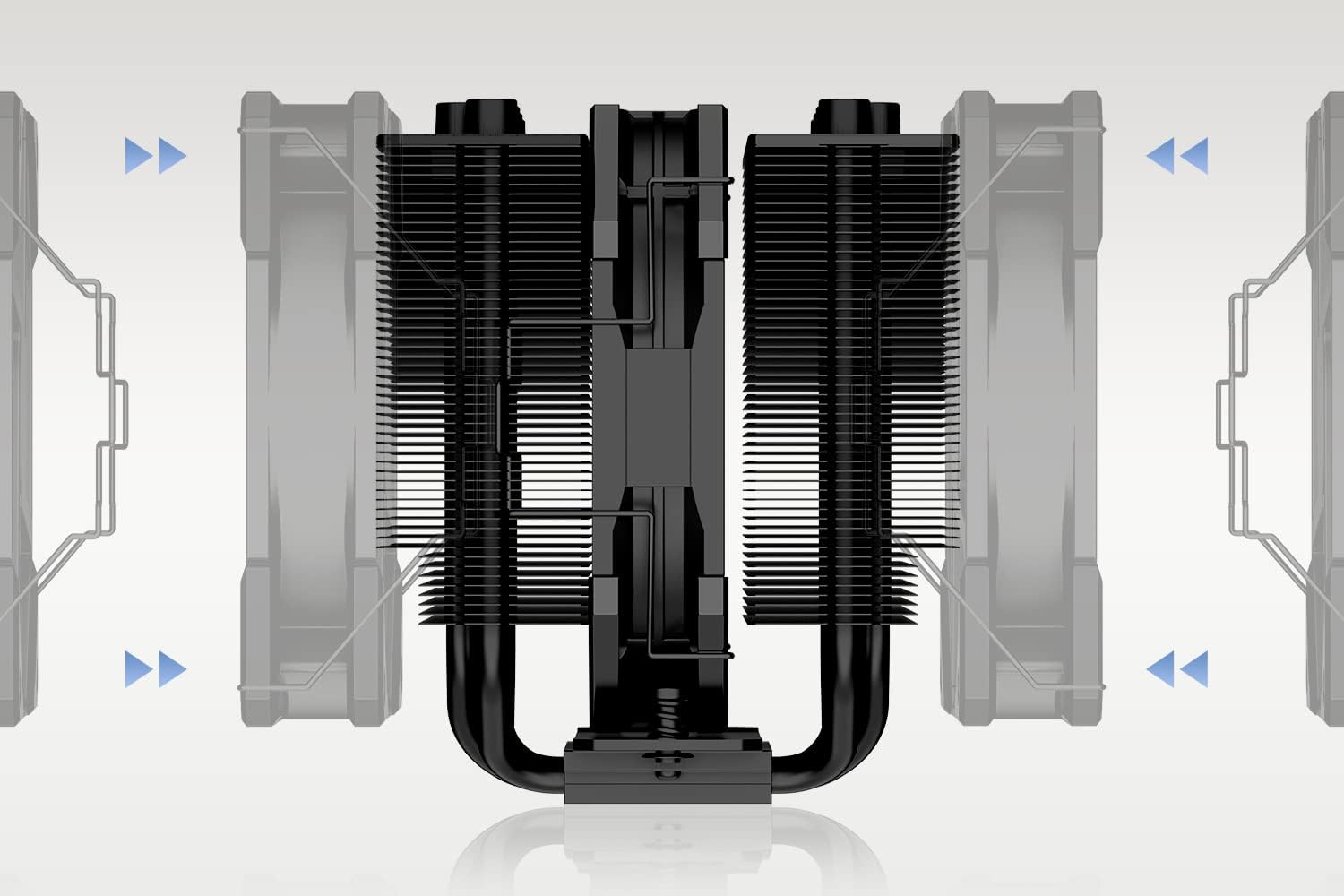
4-сүрөт: Illustration of how to attach the fan to the heatsink using the fan clips, ensuring proper airflow direction.
Connect the fan's 4-pin PWM cable to the CPU_FAN header on your motherboard. If installing an optional second fan, connect it to another available fan header (e.g., SYS_FAN) or use a fan splitter (not included).

5-сүрөт: А деталдуу view of the 120mm PWM fan, highlighting its design for efficient airflow and quiet operation.

6-сүрөт: The SE-207-XT Slim CPU Cooler installed within a PC case, viewed from above, demonstrating its fit and clearance.

7-сүрөт: The SE-207-XT Slim CPU Cooler installed in a PC case, viewed from the side, showing its compact height and RAM compatibility.
Иштөө нускамалары
Once installed, the ID-COOLING SE-207-XT Slim CPU Cooler operates automatically, regulated by your motherboard's fan control settings. The PWM (Pulse Width Modulation) function allows the fan speed to adjust based on CPU temperature, providing efficient cooling when needed and quieter operation during lighter loads.
Fan Control Settings
You can typically adjust fan control settings through your motherboard's BIOS/UEFI or dedicated software provided by your motherboard manufacturer. Common settings include:
- Standard/Silent Mode: Prioritizes quiet operation, suitable for general use.
- Аткаруу режими: Increases fan speed at lower temperatures for maximum cooling, ideal for gaming or heavy workloads.
- Custom Curve: Allows you to define specific fan speeds at different temperature thresholds.

8-сүрөт: Visual representation of the fan's strong airflow and air pressure capabilities, indicating its performance range.
The fan operates within a speed range of 700-1800 RPM (PWM) and produces a noise level between 15.2-35.2 dB(A).
Техникалык тейлөө
Үзгүлтүксүз техникалык тейлөө CPU муздаткычыңыздын оптималдуу иштешин жана узак мөөнөттүү иштешин камсыз кылат.
Чаңды тазалоо
Over time, dust can accumulate on the heatsink fins and fan blades, reducing cooling efficiency. It is recommended to clean the cooler every 3-6 months, or more frequently in dusty environments.
- Компьютериңизди өчүрүп, аны розеткадан сууруп коюңуз.
- Carefully remove the side panel of your PC case.
- Use compressed air to blow dust out of the heatsink fins. Hold the fan blades gently to prevent them from spinning excessively during cleaning, which can damage the fan bearings.
- Wipe down the fan blades and frame with a soft, dry cloth.
- Reassemble your PC.
Термикалык пастаны кайра колдонуу
While not frequently required, reapplication of thermal paste may be considered every few years or if you notice a significant increase in CPU temperatures. This involves carefully removing the heatsink, cleaning off old thermal paste from both the CPU and cooler base, and applying new thermal paste before re-mounting.
Проблемаларды чечүү
| Көйгөй | Мүмкүн себеп | Чечим |
|---|---|---|
| CPU temperatures are too high. | Insufficient thermal paste, improper heatsink mounting pressure, dust accumulation, incorrect fan orientation, or fan not spinning. | Check thermal paste application and reapply if necessary. Ensure heatsink is securely mounted with even pressure. Clean dust from heatsink and fan. Verify fan is oriented to exhaust air from the heatsink. Check fan cable connection to motherboard. |
| желдеткич айланбай жатат. | Fan cable disconnected, faulty fan header on motherboard, or fan failure. | Ensure the 4-pin PWM fan cable is securely connected to the CPU_FAN header. Try connecting the fan to a different fan header on the motherboard. If the fan still does not spin, it may be faulty and require replacement. |
| Ашыкча желдеткичтин ызы-чуусу. | Fan speed set too high, dust buildup on fan blades, or faulty fan bearing. | Adjust fan speed settings in BIOS/UEFI to a quieter profile (e.g., Silent Mode). Clean dust from fan blades. If noise persists, the fan bearing may be failing and require replacement. |
| Cooler does not fit in case. | Case height limitation. | The SE-207-XT Slim has a height of 135mm. Verify your PC case's CPU cooler clearance. If it does not fit, a different case or a smaller cooler may be required. |
Техникалык шарттар
| Өзгөчөлүк | Деталь |
|---|---|
| Модель номери | SE-207-XT SLIM |
| Өлчөмдөрү (L x W x Y) | 120 x 110 x 135 мм |
| Салмагы | 1 кг |
| Жылуулук түтүктөрү | 7 |
| Fan Size | 120мм x 120мм x 25мм |
| Fan Speed | 700-1800 RPM (PWM) |
| Макс. Аба агымы | 76.16 CFM |
| Ызы-чуу деңгээли | 15.2-35.2 дБ(А) |
| Rated Voltage | 12V DC |
| Power Connector | 4-пин PWM |
| TDP | 220 Вт |
| Материал | Алюминий |
| Подшипник түрү | Гидравликалык подшипник |
| Шайкеш розеткалар | Intel LGA1700/1200/115X, AMD AM5/AM4 |

9-сүрөт: Official specifications table for the SE-207-XT Slim, providing detailed technical data.
Кепилдик жана колдоо
ID-COOLING products are designed for reliability and performance. For warranty information and technical support, please refer to the official ID-COOLING webсайтка же кардарларды тейлөөгө кайрылыңыз.
- Официалдуу Webсайт: www.idcooling.com
- Колдоо электрондук почтасы: support@idcooling.com
- YouTube каналы: youtube.com/c/idcooling
- Facebook: idcooling.global
Кепилдик дооматтары үчүн сатып алганыңыздын далилин сактап коюңуз.


