1. Киришүү
Thank you for choosing the RALENO LED Video Panel Light VL-S300K. This professional lighting kit is designed to provide soft, uniform, and adjustable illumination for various photography, videography, and live streaming applications. Featuring bi-color temperature adjustment, dimmable brightness, and convenient remote control, this kit enhances your creative work.

Image 1.1: RALENO LED Video Panel Light in a typical studio setup, providing eye-friendly and even lighting.
2. Пакеттин мазмуну
Бардык буюмдардын бар экенин жана жакшы абалда экенин текшерүү үчүн таңгактын ичиндегисин текшериңиз:
- LED Video Light (45W) * 2
- Tripod (78'') * 2
- Алыстан башкаруу * 2
- Адаптер * 2
- Cold Shoe * 2
- Phone Holder * 1
- Multifunctional Crab Claw * 1
- Organizer Bag * 1

Сүрөт 2.1: Бүттүview of all items included in the RALENO LED Video Panel Light 2-pack kit.

Image 2.2: The heavy-duty Oxford cloth organizer bag included for transport and storage.
3. Коопсуздук нускамалары
- Аппаратты жамгырга же нымга тийгизбеңиз.
- Do not disassemble or modify the device. Repairs should only be performed by qualified personnel.
- Аппаратты жылуулук булактарынан жана түз күн нурунан алыс кармаңыз.
- Ашыкча ысып кетүүнүн алдын алуу үчүн туура желдетүүнү камсыз кылыңыз.
- Use only the provided power adapter or compatible NP-F960/970 batteries.
- LED жарыгына көздүн түз тийүүсүнө узак убакыт бою жол бербеңиз.
- Балдар жетпеген жерде сактаңыз.
4. Орнотуу колдонмосу
- Штативди чогултуу: Extend the tripod legs to a stable position and adjust the height using the locking mechanisms. The sturdy metal stands are adjustable from 28 to 75 inches.
- Жарык панелин тиркөө: Mount the LED video panel light onto the tripod's top screw. Ensure it is securely tightened to prevent accidental falling.
- Туташуу кубаты:
- DC кубаттуулугу: Connect the included power adapter to the DC 15V input port on the back of the light panel and plug it into a power outlet.
- Батарея кубаттуулугу: For outdoor use, insert two compatible NP-F960/970 batteries (not included) into the battery slots on the back of the panel.
- Attach Phone Holder (Optional): If using the phone holder, attach the multifunctional crab claw to the tripod stand. Then, secure the phone holder onto the crab claw.
- Алыстан башкаруу: The magnetic remote control can be attached to the light stand or any metal surface. It charges automatically when placed behind the studio lights for 3 seconds.
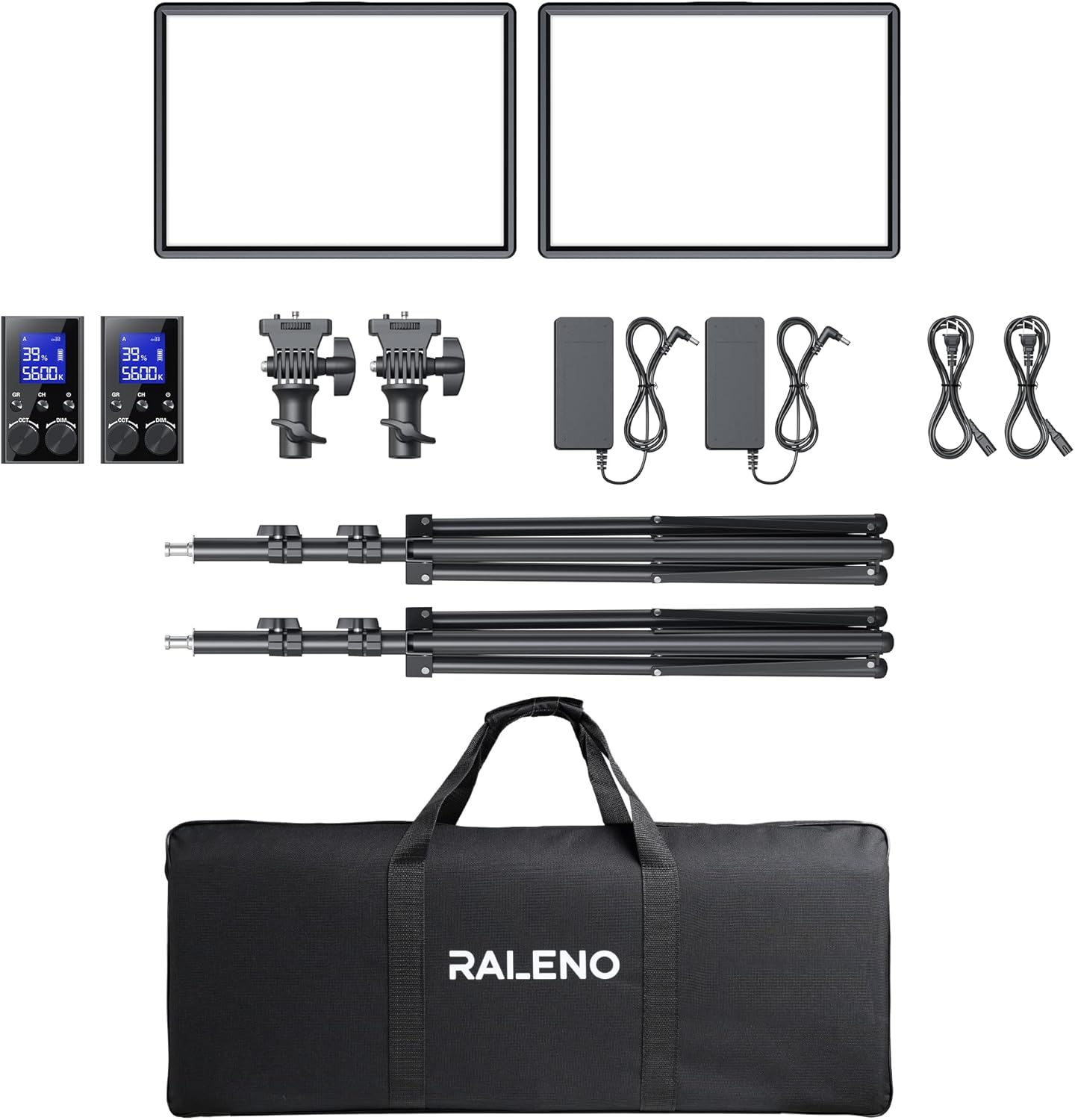
Image 4.1: RALENO LED Video Panel Light fully assembled on its adjustable stand.

Сүрөт 4.2: Арткы view of the light panel, highlighting the DC input and dual battery slots for versatile power options.

Image 4.3: The magnetic remote control conveniently charging by attaching to the back of the light panel.
Video 4.1: Official RALENO Photography Lighting Kit Operation Video, demonstrating setup and basic functions.
5. Иштөө нускамалары
- Күйгүзүү/өчүрүү: Use the power switch on the back of the light panel to turn the device on or off.
- Жарыктыкты жөндөө: Use the 'DIM' knob on the remote control or the physical controls on the light panel to adjust brightness from 1-100%. The LCD display will show the current percentage.
- Түс температурасын тууралоо: Use the 'CCT' knob on the remote control or the physical controls to change the color temperature from 3200K (warm) to 5600K (cold). The LCD display will show the current temperature.
- Алыстан башкаруу функциялары:
- GR (Group): Select between Group A, B, or C to control multiple lights simultaneously or individually.
- CH (Канал): Select from 40 available channels to avoid interference with other devices.
- The remote displays real-time parameters for brightness, color temperature, and battery level.
- LCD дисплей: The high-definition LCD display on the back of the light panel provides current brightness, color temperature, and battery power information, allowing for convenient and efficient operation.

Image 5.1: The remote control allows precise adjustment of brightness and color temperature, with real-time display.

Image 5.2: Visual representation of the adjustable color temperature (3200K-5600K) and brightness (0-100%) settings.
6. Техникалык тейлөө
- Clean the light panel and remote control with a soft, dry cloth. Avoid using harsh chemicals or abrasive materials.
- Store the kit in the provided organizer bag in a cool, dry place when not in use.
- Кабелдерди жана туташууларды эскирүүнүн же бузулуунун белгилерин үзгүлтүксүз текшерип туруңуз.
7. Кыйынчылыктарды
- Жарык күйбөйт: Ensure the power adapter is securely connected or that batteries are fully charged and correctly inserted. Check the power switch position.
- Пульт иштебей жатат: Ensure the remote is charged (place it behind the light panel for 3 seconds). Check if the remote and light panel are set to the same group and channel.
- Жарыктык/түс шайкеш келбегендиги: Verify that both light panels (if using a 2-pack) are set to the same brightness and color temperature settings via the remote or individual controls.
- Жарык бүлбүлдөгөн: Check power connections. If using batteries, ensure they are not low on charge.
8. Техникалык шарттар
- Модел: VL-S300K
- Чыгуу кубаттуулугу: жарыкка 45W
- LED мончоктор: жарык үчүн 288
- Жарыктык: Up to 4800lux/0.5m
- Түс температурасы: 3200K-5600K (Bi-Color)
- Жарыктык диапазону: 1-100%
- Түстөрдү көрсөтүү индекси (CRI): 97+
- Дисплей: Жогорку сапаттагы LCD дисплей
- Алыстан башкаруу: 2.4G Magnetic Rechargeable, 40 channels, 3 groups (A/B/C)
- Кубат параметрлери: DC 15V adapter (included) or NP-F960/970 batteries (not included)
- Туруктуу тууралоо: 28ден 75 дюймга чейин
- Продукциянын өлчөмдөрү: 30.91 x 4.13 x 13.19 дюйм
- Элемент Салмагы: 16.1 фунт
- UPC: 810112230871

Image 8.1: Detailed dimensions of the RALENO LED Video Panel Light.
9. Кепилдик жана колдоо
RALENO provides lifelong after-sales service and a 1-year guarantee. For any problems or inquiries, please contact our customer support. We will reply to all your questions within 24 hours.


