Konix 78441119954

Konix Mythics Starter Kit for Nintendo Switch Instruction Manual

Модель: 78441119954

Продукт бүттүview

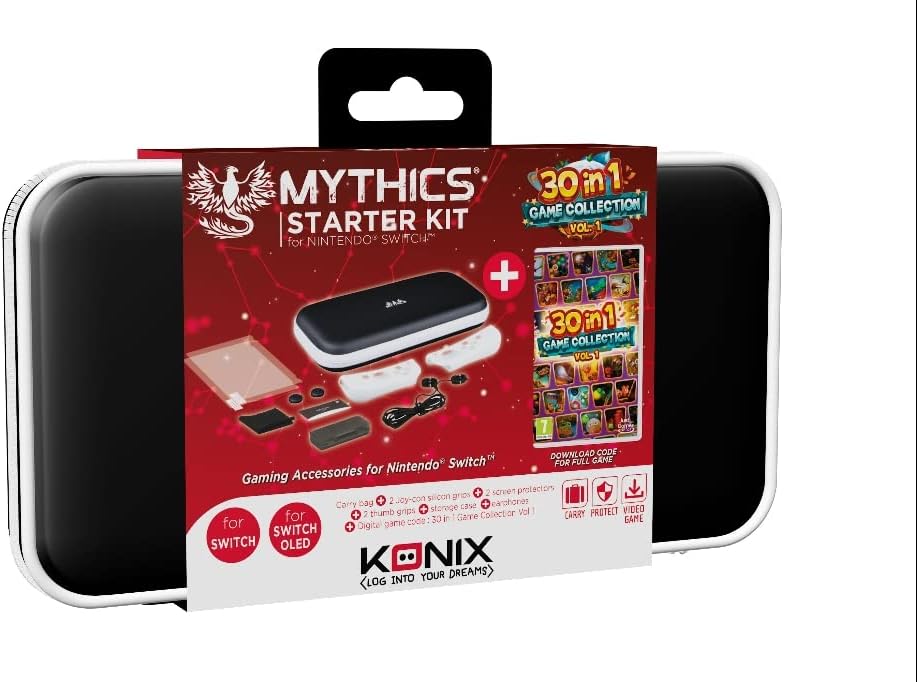
The Konix Mythics Starter Kit for Nintendo Switch provides essential accessories to enhance your gaming experience. This comprehensive bundle includes a protective carrying case, a tempered glass screen protector, in-ear headphones, a cleaning cloth, joystick caps, and a digital download code for the "30 in 1 Game Collection Vol. 1".

Contents of Konix Mythics Starter Kit including screen protectors, cleaning cloth, joystick caps, in-ear headphones, and game card.

Figure 1: Kit Contents - Screen protectors, cleaning cloth, joystick caps, in-ear headphones, and game collection download card.
Орнотуу нускамалары

  1. Install Screen Protector:

    Before applying the screen protector, ensure your Nintendo Switch screen is clean and free of dust. Use the included cleaning cloth to gently wipe the screen. Carefully align the tempered glass screen protector with your console's screen and apply it, pressing gently from the center outwards to remove any air bubbles.

  2. Place Console in Carrying Case:

    Open the protective carrying case. Carefully place your Nintendo Switch console into the designated compartment. The case features a double opening and multiple storage options for accessories. Ensure the console fits snugly to prevent movement during transport.

    Konix Mythics Starter Kit carrying case with Nintendo Switch console inside.

    Figure 2: Carrying Case - The protective case designed for the Nintendo Switch.

  3. Connect In-Ear Headphones:

    Plug the 3.5mm jack of the in-ear headphones into the headphone port of your Nintendo Switch console. Adjust the earbuds for a comfortable fit.

  4. Apply Joystick Caps:

    Gently place the joystick caps over the analog sticks of your Joy-Con controllers. These provide enhanced grip and protection.

  5. Redeem Game Collection:

    Locate the digital download code for the "30 in 1 Game Collection Vol. 1". On your Nintendo Switch, navigate to the Nintendo eShop, select "Redeem Code," and enter the provided code to download and install the game collection.

Иштөө нускамалары

Техникалык тейлөө

Проблемаларды чечүү

Screen Protector Bubbles:
If air bubbles appear after installation, gently lift the nearest edge of the protector and re-apply, pushing the bubble towards the edge with a soft card or cloth.
No Audio from Headphones:
Ensure the 3.5mm jack is fully inserted into the console's port. Check the volume settings on your Nintendo Switch. Test headphones with another device if possible to rule out a headphone issue.
Game Download Code Not Working:
Verify that you have entered the code correctly, paying attention to similar-looking characters (e.g., '0' and 'O', '1' and 'I'). Ensure your Nintendo Switch has an active internet connection. If issues persist, contact Nintendo support for assistance with eShop codes.
Console Does Not Fit in Case:
Ensure you are placing the correct model of Nintendo Switch (compatible with Switch, Switch Lite, OLED Switch) into the case. Remove any bulky external accessories from the console before placing it in the case.

Продукт спецификациялары

Модель номери78441119954
БрендKonix
Шайкеш түзмөктөрNintendo Switch, Switch Lite, OLED Switch
Иштин материалыТермопластикалык полиуретан (TPU)
Жабылуу түрүСыдырма
Бөлүмдөрдүн саны2
Элемент Салмагы9.2 унция (260 грамм)
Продукциянын өлчөмдөрү (LxWxH)1.97 x 6.3 x 11.02 дюйм
ТилКөп тилдүү

Кепилдик жана колдоо

Specific warranty information for the Konix Mythics Starter Kit is not provided in this manual. Please refer to the product packaging or the manufacturer's official website for detailed warranty terms and conditions. For product support, please contact Konix customer service through their official channels.

Тектеш документтер - 78441119954

Preview Konix Mythics Nemesis Gaming Headset for Nintendo Switch User Manual
User manual for the Konix Mythics Nemesis Gaming Headset, detailing product features, setup instructions, compatibility, and safety information for Nintendo Switch, smartphones, tablets, and computers.
Preview Nintendo Switch жана PC үчүн Konix Naruto Shippuden Wired Controller Колдонуучу колдонмосу
Konix Naruto Shippuden Wired Controller үчүн колдонуучу колдонмосу, Nintendo Switch жана PC үчүн орнотууларды жана колдонууну деталдаштырат. Джойстиктердин бузулууларын аныктоону жана тейлөө боюнча көрсөтмөлөрдү камтыйт.
Preview Konix KHXPIANO6188 Portable Electronic Piano User Manual
Konix KHXPIANO6188 портативдик электрондук пианино үчүн колдонуучу колдонмосу Shenzhen Konix Technology Co., Ltd компаниясынан орнотуу, иштетүү жана тейлөө маалыматын берет.
Preview Konix Drakkar Galar 27" Чексиз Wide Screen Monitor Колдонуучунун колдонмосу
Бул колдонуучу колдонмосу Konix Drakkar Galar 27 дюймдук чексиз кең экрандуу LED монитору (Модель: D27VA240A2) үчүн орнотууну, иштетүүнү, техникалык мүнөздөмөлөрдү жана бузулууларды аныктоону камтыган комплекстүү көрсөтмөлөрдү берет.
Preview Konix Naruto Shippuden оюн гарнитурасы Колдонуучунун колдонмосу
Konix Naruto Shippuden оюн гарнитурасы үчүн колдонуучунун колдонмосу, консол жана компьютер оюндары үчүн спецификациялар, функциялар жана коопсуздук көрсөтмөлөрү.
Preview KONIX MD862 Электрондук барабан топтому Колдонуучунун колдонмосу
KONIX MD862 Portable USB 7 Pads Roll Up Электрондук барабан топтому үчүн колдонуучу колдонмосу. Орнотуу нускамаларын, функцияларды жана программалык камсыздоону жүктөө маалыматын камтыйт.