1. Киришүү
The LogiLink SH0125 is a 2-gang Smart Home Wi-Fi Wall Switch designed to provide convenient control over your lighting. It integrates with existing Wi-Fi networks and can be managed via the Smart Life or Megos Smart Home application. This device also supports voice control through Amazon Alexa and Google Home, offering enhanced automation for your home environment.
2. Коопсуздук маалыматы
- Электр орнотуу: Installation must be performed by a qualified electrician in accordance with local electrical codes and regulations. Ensure the main power supply is disconnected before installation.
- Үй ичинде гана колдонуу: This device is intended for indoor use in dry locations. Do not expose to moisture or extreme temperatures.
- Кубат рейтинги: Do not exceed the maximum load rating of 230 Watts (AC 230V, 10.0 A). Overloading can cause damage to the switch and connected devices, and poses a fire hazard.
- Тазалоо: Тазалоодон мурун электр кубатынан ажыратыңыз. Жумшак, кургак чүпүрөктү колдонуңуз. Суюк же аэрозольдук тазалагычтарды колдонбоңуз.
3. Пакеттин мазмуну
Сураныч, пакетте төмөнкү нерселерди текшериңиз:
- 1x LogiLink SH0125 Smart Home Wi-Fi Wall Switch
- 1x User Manual (French version included, English provided here)
4. Продукт бүтүп калдыview
The LogiLink SH0125 features a sleek design with two touch-sensitive buttons for manual control. The rear of the device provides terminals for electrical wiring.

1-сүрөт: Фронт view of the LogiLink SH0125 Smart Home Wi-Fi Wall Switch. It features a white glass panel with two circular touch buttons, each marked with a power symbol. The 'Powered by Tuya' logo is visible in the bottom left corner.
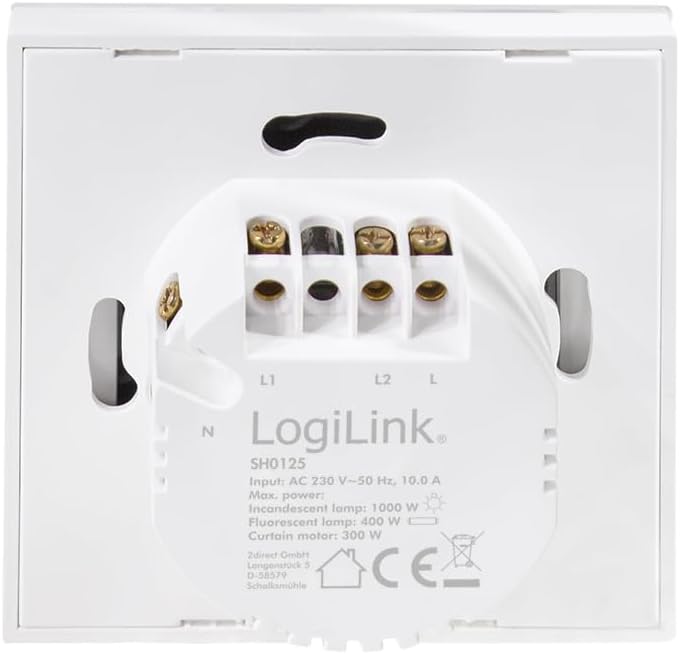
2-сүрөт: Артка view of the LogiLink SH0125 Smart Home Wi-Fi Wall Switch. This image displays the wiring terminals labeled L1, L2, L, and N, along with product specifications such as input voltage (AC 230V), frequency (50 Hz), and maximum power ratings for different lamp түрлөрү.
5. Орнотуу
5.1. Электр монтаждоо
- Кубатты өчүрүү: Before beginning any electrical work, ensure the main power supply to the circuit is turned off at the circuit breaker.
- Эски которгучту алып салуу: Дубал кутучасынан учурдагы дубал которгучуңузду этияттык менен алып салыңыз.
- Зымдарды аныктоо: Identify the Live (L), Neutral (N), and Load (L1, L2) wires. Refer to Figure 2 for terminal identification on the LogiLink SH0125.
- Коммутаторду туташтыруу: Connect the wires to the corresponding terminals on the LogiLink SH0125.
- Live зымды "L" терминалына туташтырыңыз.
- Нейтралдуу зымды 'N' терминалына туташтырыңыз.
- Connect the Load wire for the first light circuit to the 'L1' terminal.
- Connect the Load wire for the second light circuit to the 'L2' terminal.
- Которгучту орнотуу: Carefully place the wired switch into the wall box and secure it with screws. Attach the faceplate.
- Күчтү калыбына келтирүү: Автоматтык өчүргүчтөн негизги кубат булагын кайра күйгүзүңүз.
5.2. Колдонмону жупташтыруу
To control your switch via smartphone, you need to pair it with the Smart Life or Megos Smart Home app.
- Колдонмону жүктөп алуу: Download and install the 'Smart Life' or 'Megos Smart Home' app from your device's app store (iOS or Android).
- Катталуу/Кирүү: Колдонмону ачып, жаңы аккаунт түзүңүз же бар аккаунт менен кириңиз.
- Жупташтыруу режимине кирүү: With the switch powered on, press and hold one of the touch buttons for approximately 5-10 seconds until the LED indicator on the switch starts blinking rapidly. This indicates it is in pairing mode.
- Колдонмого түзмөк кошуу: In the app, tap the '+' icon (usually in the top right corner) to add a new device. Select 'Wall Switch (Wi-Fi)' or a similar category.
- Wi-Fi'га туташуу: Follow the on-screen instructions to connect the switch to your 2.4GHz Wi-Fi network. Ensure your phone is also connected to the same 2.4GHz network during pairing. Эскертүү: Бул түзмөк 5 ГГц Wi-Fi тармактарын колдобойт.
- Толук жупташтыруу: Once the switch is successfully added, you can rename it and assign it to a room within the app.
3-сүрөт: The LogiLink SH0125 Smart Home Wi-Fi Wall Switch positioned next to a smartphone displaying the 'Register' or 'Login with Existing Account' screen of the Smart Home application, illustrating the initial setup phase.
6. Которгучту иштетүү
6.1. Кол менен башкаруу
Each touch button on the switch controls one connected light circuit. Simply tap a button to toggle the corresponding light ON or OFF.
6.2. Колдонмону башкаруу
After successful pairing, you can control the switch from the Smart Life or Megos Smart Home app:
- Күйгүзүү/өчүрүү: Tap the virtual switch icons in the app to turn lights on or off.
- Пландаштыруу: Жарыктарыңыздын белгилүү бир убакыттарда автоматтык түрдө күйүп же өчүп турушу үчүн график түзүңүз.
- Сахналар: Create custom scenes to control multiple smart devices with a single command.
- Автоматташтыруу: Set up automations based on conditions like sunrise/sunset, temperature, or other smart device statuses.

4-сүрөт: Жакын план view of a hand holding a smartphone, showing the Smart Life application interface. The app displays two virtual light switches, labeled 'Switch 1' and 'Switch 2', allowing for remote control of connected lighting.
6.3. Үн менен башкаруу (Alexa/Google Home)
To enable voice control, link your Smart Life/Megos Smart Home account to Amazon Alexa or Google Home:
- Үн жардамчысы тиркемесин ачыңыз: Смартфонуңуздан Amazon Alexa же Google Home тиркемесин ачыңыз.
- Enable Skill/Link Account: Издөө the 'Smart Life' or 'Megos Smart Home' skill/service and enable it. You will be prompted to link your account using your app credentials.
- Түзмөктөрдү табуу: Once linked, ask your voice assistant to discover devices (e.g., "Alexa, discover my devices" or "Hey Google, sync my devices").
- Үн буйруктары: You can now control your lights using voice commands, such as:
- "Алекса, конок бөлмөсүнүн жарыгын күйгүз."
- "Hey Google, turn off Kitchen Light."
7. Техникалык тейлөө
The LogiLink SH0125 requires minimal maintenance. Ensure the power is off before cleaning.
- Тазалоо: Use a soft, dry, lint-free cloth to wipe the surface of the switch. Do not use abrasive cleaners, solvents, or chemical sprays, as these can damage the finish or internal components.
- Программалык камсыздоонун жаңыртуулары: Periodically check the Smart Life/Megos Smart Home app for available firmware updates to ensure optimal performance and security.
8. Кыйынчылыктарды
If you encounter issues with your LogiLink SH0125, refer to the following common solutions:
| Көйгөй | Мүмкүн себеп | Чечим |
|---|---|---|
| Которуу тийүүгө жооп бербейт. | No power; incorrect wiring; switch malfunction. | Check circuit breaker. Verify wiring (refer to Section 5.1). If problem persists, contact support. |
| Wi-Fi/Колдонмого туташуу мүмкүн эмес. | Incorrect Wi-Fi password; 5GHz Wi-Fi network; switch not in pairing mode; weak Wi-Fi signal. | Ensure correct 2.4GHz Wi-Fi password. Confirm switch is blinking rapidly (pairing mode). Move switch closer to router or improve Wi-Fi signal. |
| Үн башкаруу иштебейт. | Account not linked; device not discovered; incorrect voice command. | Ensure Smart Life/Megos Smart Home account is linked in Alexa/Google Home app. Ask assistant to discover devices. Use correct device names in commands. |
| Жарыктар жыпылыктайт же толугу менен өчпөйт. | Incompatible load (e.g., some LED lights); minimum load not met. | Ensure connected lights are compatible with smart switches. Some LED lights may require a bypass capacitor (not included) to prevent flickering. Consult a qualified electrician. |
9. Техникалык шарттар
| Өзгөчөлүк | Спецификация |
|---|---|
| Модель номери | SH0125 |
| Бренд | LogiLink |
| Киргизүү көлөмүtage | AC 230 V ~ 50 Гц |
| Макс. Учурдагы | 10.0 А |
| Max. Power (Total) | 230 Ватт |
| Өлчөмдөрү (L x W x Y) | 8.6 x 8.6 x 3.4 см |
| Салмагы | 90 грамм |
| Материал | Пластик |
| Түс | Ак |
| Wi-Fi стандарты | 2.4 ГГц (IEEE 802.11b/g/n) |
| Башкаруу ыкмасы | Application, Touch Button |
| Шайкештик | Tuya, Amazon Alexa, Google Home |
| Орнотуу түрү | Flush орнотулган |
10. Кепилдик жана колдоо
LogiLink products are designed and manufactured to the highest quality standards. For information regarding warranty terms and conditions, please refer to the documentation provided with your purchase or visit the official LogiLink website. For technical support or assistance with product setup and troubleshooting, please contact LogiLink customer service through their official channels.


