1. Киришүү
This manual provides detailed instructions for the installation, operation, and maintenance of your LSLYA RB-7018B Double Din Car Stereo. Please read this manual thoroughly before using the product to ensure proper function and safety.
2. Коопсуздук маалыматы
- Ensure the car stereo is only compatible with a 12V DC car power supply. Incorrect voltagе зыян келтириши мүмкүн.
- Professional installation is recommended for wiring to prevent electrical damage or fire.
- Аппаратты айдоодон алаксыта тургандай иштетпеңиз.
- Түзмөктү өтө жогорку температурага, күндүн түз тийген нуруна же нымдуулукка узак убакытка дуушар кылбаңыз.
- Always disconnect the car battery's negative terminal before starting any installation or wiring work.
3. Пакеттин мазмуну
Пакетте бардык буюмдар бар экенин текшериңиз:
- LSLYA RB-7018B Car Stereo Unit
- Алыстан башкаруу
- Арткы View Камера
- Электр кабели
- Колдонуучунун Колдонмосу (бул документ)
- Steering Wheel Control (SWC) Interface
- Микрофон

4. Продукт бүтүп калдыview
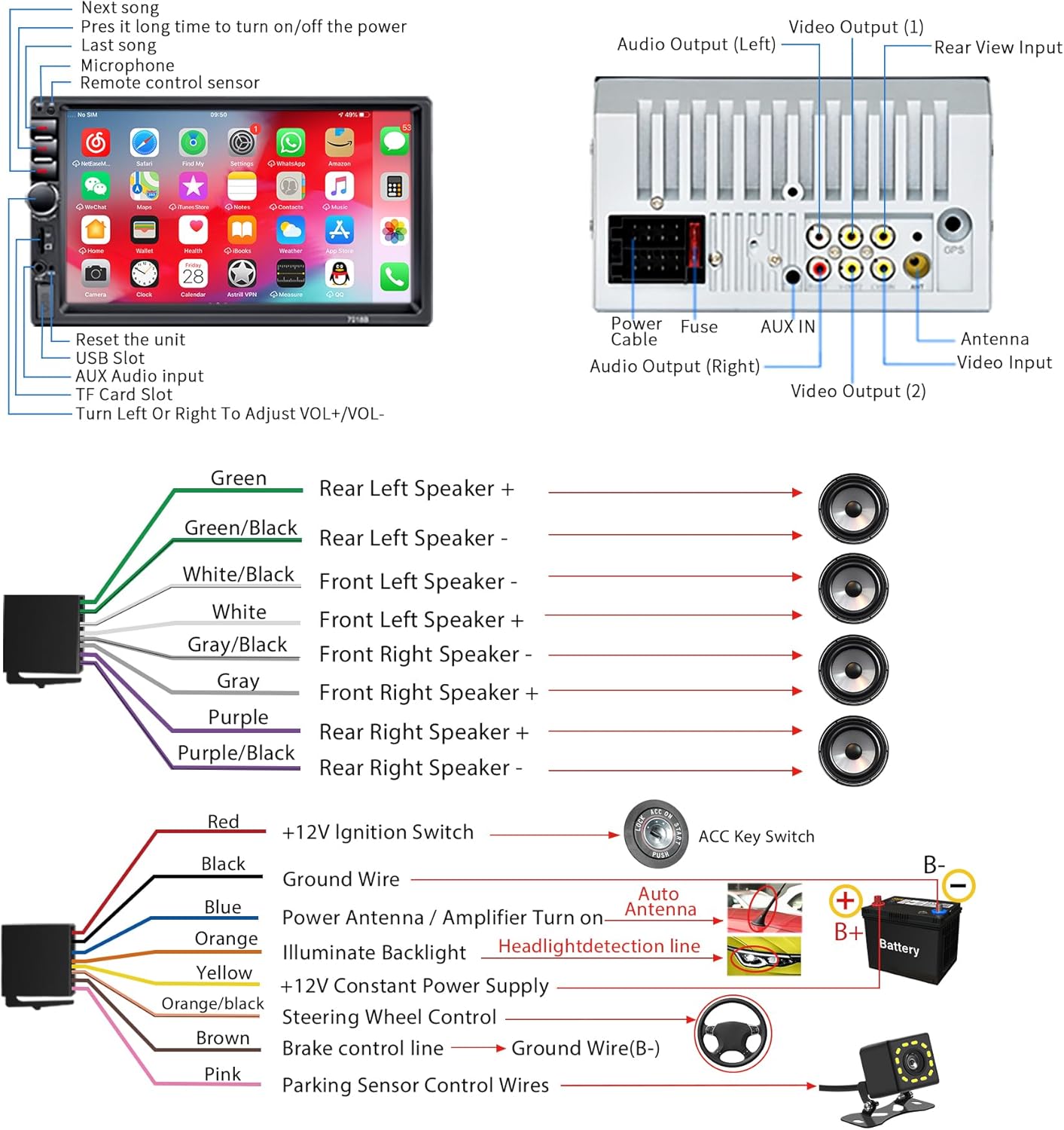
Familiarize yourself with the main components and connections of your car stereo.
5. Орнотуу
5.1 Электр энергиясы менен камсыздоого талаптар
This car audio system is designed for a 12V DC car power supply only. Before installation, confirm your vehicle's power supply specifications. Using an incorrect power supply can damage the unit and void the warranty.
5.2 Электр өткөргүч схемасы
Refer to the following diagram for correct wiring connections. It is highly recommended to have this unit installed by a qualified professional.
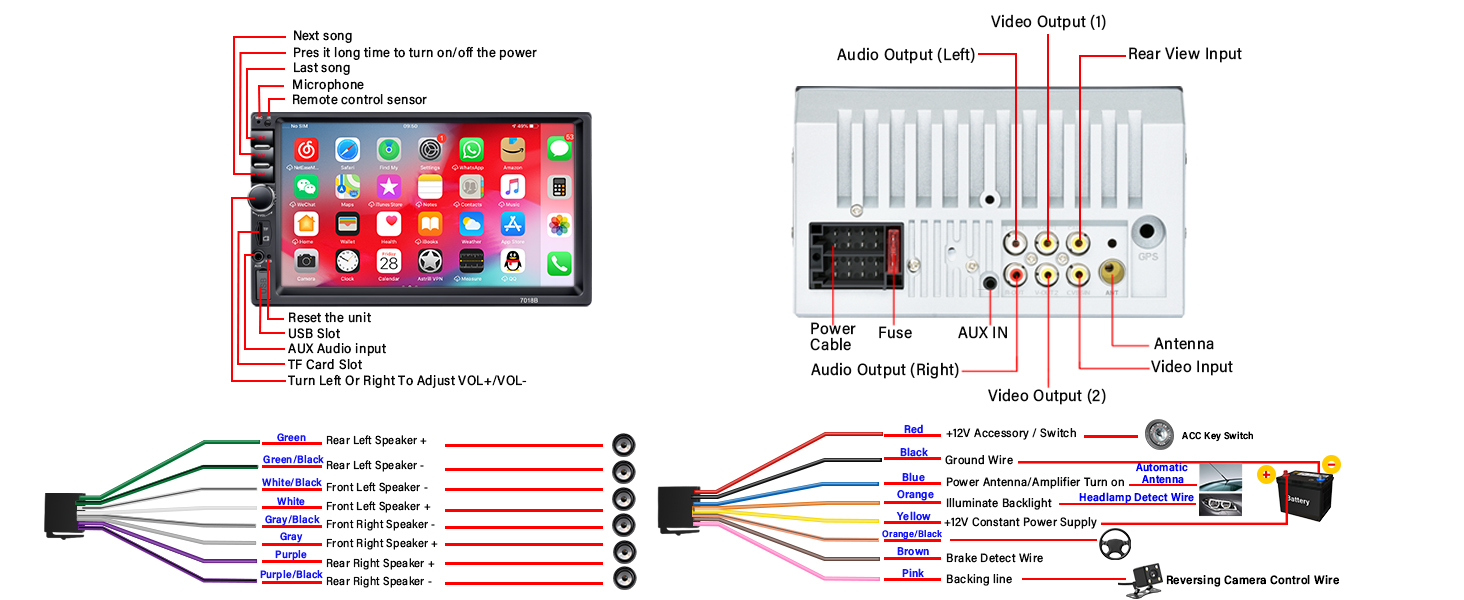
- Кызыл зым: Connect to +12V Ignition Switch (ACC).
- Кара зым: Connect to Ground (GND).
- Сары зым: Connect to +12V Constant Power Supply.
- Көк жип: Connect to Power Antenna or Ampкөтөргүчтү күйгүзүү.
- Кызгылт сары зым: Connect to Headlight Detection Line for backlight illumination.
- Күрөң зым: Connect to Brake Control Line.
- Кызгылт зым: Connect to Parking Sensor Control Wires for reversing camera trigger.
- Динамиктердин зымдары: Connect according to the color codes for front and rear, left and right speakers (Green, Green/Black, White, White/Black, Gray, Gray/Black, Purple, Purple/Black).
5.3 Реверс камерасын орнотуу
Арткы жагында HD түнкү көрүү системасы камтылган view camera provides a wide viewing angle and is fully waterproof. Connect it as shown in the diagram below for automatic display when reversing.

6. Иштөө нускамалары
6.1 Негизги операциялар
- Күйгүзүү/өчүрүү: Press and hold the power button on the front panel. A short press typically mutes/unmutes.
- Үндү көзөмөлдөө: Use the rotary knob on the front panel to adjust the volume.
- Кайтаруу: A small reset button is available on the front panel (refer to Figure 4.1) for system restarts if needed.
6.2 Bluetooth байланышы
The stereo supports Bluetooth for hands-free calling and audio streaming.

- Уюлдук телефонуңузда Bluetoothду иштетүү.
- Издөө available devices on your phone and select "RB-7018B" (or similar name).
- Эки түзмөктө тең жупташууну ырастаңыз.
- Туташкандан кийин, сиз чалууларды жасап/кабыл алып, зымсыз аудио агымын өткөрө аласыз.
6.3 Mirror Link функциясы
Mirror Link allows you to display your smartphone's screen on the car stereo. Android phones support two-way connection, while iOS phones support one-way projection.

- Connect your smartphone to the stereo using a USB data cable.
- Follow the on-screen prompts on the stereo and your phone to establish the connection.
- Once connected, your phone's screen will be displayed on the stereo.
6.4 FM радиосу
Access local radio stations and stay updated with news and music.

- Select the FM Radio application from the main menu.
- Use the "BAND" button to switch between FM bands.
- Use the search buttons to automatically scan for stations or manually tune to a frequency.
6.5 Media Playback (USB, TF Card, AUX)
The stereo supports multiple media input options for playing audio and video files.

- USB: Insert a USB drive into the USB slot. The system will automatically detect and play compatible media files. Supports fast charging for mobile phones.
- TF картасы: Insert a TF (MicroSD) card into the TF card slot. The system will access media fileкартада сакталат.
- AUX: Connect an external audio device using a 3.5mm audio cable to the AUX input. Select AUX mode on the stereo to play audio from the connected device.
6.6 Эквалайзер (EQ) орнотуулары
Customize your audio experience with the built-in equalizer settings.
- Аудио менюдан эквалайзер жөндөөлөрүнө кириңиз.
- Choose from preset equalizer modes or manually adjust frequency bands to suit your preferences.
6.7 Рулдун башкаруу каражаттары (SWC)
If your vehicle supports steering wheel controls, you can connect them to the stereo for convenient operation.

- Connect the SWC wires from your vehicle to the corresponding inputs on the stereo's wiring harness (refer to Figure 5.1).
- Access the SWC learning function in the stereo's settings menu to program the buttons.
7. Техникалык тейлөө
- Clean the screen with a soft, lint-free cloth. Do not use abrasive cleaners or solvents.
- Агрегатты чаңдан жана таштандыдан алыс кармаңыз.
- Ашыкча ысып кетүүнүн алдын алуу үчүн аппараттын айланасында туура желдетүүнү камсыз кылыңыз.
8. Кыйынчылыктарды
| Көйгөй | Мүмкүн себеп | Чечим |
|---|---|---|
| Күч жок | туура эмес зымдар; күйгөн сактагыч; Электр энергиясы жетишсиз. | Check all power connections (Red, Yellow, Black wires). Verify the fuse. Ensure 12V DC power supply. |
| Үн жок | Динамик зымдары туура эмес туташтырылган; Үнү өтө төмөн; Үнсүз режим функциясы иштеп турат. | Динамиктин зымдарын текшериңиз. Үнүн катуулатыңыз. Үнүн өчүрүңүз. |
| Bluetooth туташпай жатат | Bluetooth телефондо/стереодо иштетилген эмес; Түзмөк жупташтыруу режиминде эмес; Интерференция. | Ensure Bluetooth is active on both devices. Try restarting both devices. Move closer to the stereo. |
| Mirror Link issues (iPhone 16/17) | Compatibility challenges with newer iOS versions. | For iPhone 16 & 17 users experiencing issues, please contact customer support directly from your order page for an upgrade guide and assistance. |
| Арткы камера көрсөтүлбөй жатат | Camera not powered; Video cable loose; Pink trigger wire not connected. | Check camera power and video connections. Ensure the pink trigger wire is correctly connected to the reversing lamp. |
9. Техникалык шарттар
| Өзгөчөлүк | Деталь |
|---|---|
| Модель номери | RB-7018B |
| Screen Size | 7 дюймдук HD сенсордук экран |
| Электр камсыздоо | 12V DC |
| Байланыш | Bluetooth, USB, AUX, TF картасы |
| Өзгөчөлүктөр | Bluetooth Hands-Free Calling, Mirror Link, FM Tuner, EQ Settings, Reversing Camera Support, USB Fast Charging |
| Аудио чыгаруу режими | Стерео |
| Көлөмдүү үн каналынын конфигурациясы | 4.0 |
| Видеону коддоону колдоо | RM, RMVB, AVI, MP4, MKV, 3GP |
| Продукциянын өлчөмдөрү | 3.94 x 2.56 x 3.94 дюйм |
| Элемент Салмагы | 1.72 фунт |
10. Кардарларды колдоо кызматы
If you encounter any issues or have questions regarding your LSLYA RB-7018B Car Stereo, please contact our customer support team. For specific issues like those with iPhone 16 & 17 Mirror Link, reach out directly from your order page for specialized assistance and upgrade guides.
Кошумча жардам алуу үчүн, сураныч, баш багыңыз LSLYA Store on Amazon.


