1. Продукт бүтүп калдыview
The SCULPFUN S30 Pro is an advanced laser engraving and cutting machine designed for precision and efficiency. It features an innovative auto-controlled air assist system and a powerful 10000mW laser output, making it suitable for a wide range of materials and creative projects.

Figure 1.1: SCULPFUN S30 Pro Laser Engraver and example долбоорлор.
2. Коопсуздук чаралары
WARNING: Laser engravers are powerful tools. Failure to follow safety guidelines can result in serious injury or property damage.
- Always wear appropriate laser safety goggles (Class 4) when operating the machine.
- Түтүндү жана түтүндү жок кылуу үчүн жумуш ордун жакшы желдетип туруңуз.
- Иш учурунда машинаны эч качан кароосуз калтырбаңыз.
- Күйүүчү материалдарды лазер жолунан алыс кармаңыз.
- Do not engrave or cut unknown materials. Some materials can produce toxic fumes or catch fire.
- Балдарды жана үй жаныбарларын иштеп жаткан машинадан алыс кармаңыз.
- Машинанын туура жерге туташтырылганын текшериңиз.
3. Пакеттин мазмуну
Verify all components are present before assembly.

Figure 3.1: Complete package contents of the S30 Pro.
- SCULPFUN S30 Pro Laser Engraver Frame Components
- 10W лазердик модулу
- Air Assist Pump and Hose
- Кубаттуу адаптер жана кабель
- USB кабели
- Коопсуздук көз айнек
- Tool Kit (wrenches, screws, etc.)
- Test Material Samples
- User Manual
4. Орнотуу жана чогултуу
Follow these steps for initial setup and assembly of your SCULPFUN S30 Pro.

Figure 4.1: ашыкview of S30 Pro components and assembly.
- Рамка монтажы: Connect the aluminum profiles to form the main frame. Ensure all screws are tightened securely.
- Лазердик модулду орнотуу: Mount the laser module onto the gantry. Connect the laser cable to the main control board.
- Air Assist System Connection: Connect the air hose from the air assist pump to the nozzle on the laser module. Plug the air pump into the designated port on the control board.
- Кубат жана маалымат туташуу: Connect the power adapter to the machine and a power outlet. Connect the USB cable from the machine to your computer.
- Программалык камсыздоону орнотуу: Install the recommended operating software, LightBurn, on your computer. Ensure the correct drivers are installed for machine recognition.
For a visual guide on assembly and initial operation, refer to the official product video:
Video 4.1: SCULPFUN S30 Series Overview and DIY Project Examples. This video demonstrates the assembly process, key features, and various applications of the S30 series laser engraver.
5. Иштөө нускамалары
The S30 Pro offers precise control for both engraving and cutting tasks.
5.1 Automatic Air Assist System
The S30 Pro features an intelligent 32-bit motherboard that allows for automatic control of the air assist system via LightBurn software (M8 command). This optimizes air flow for different operations, ensuring cleaner results.

Figure 5.1: Automatic air assist control via LightBurn M8 switch.

Figure 5.2: Benefits of automatic air assist for clean edges.
5.2 Гравировка жана кесүү көрсөткүчтөрү
The 10W laser module provides significant power for various materials. The ultra-fine laser focus (0.06x0.08mm) and 0.005mm industrial linear guide ensure high precision and smooth results without wavy lines.
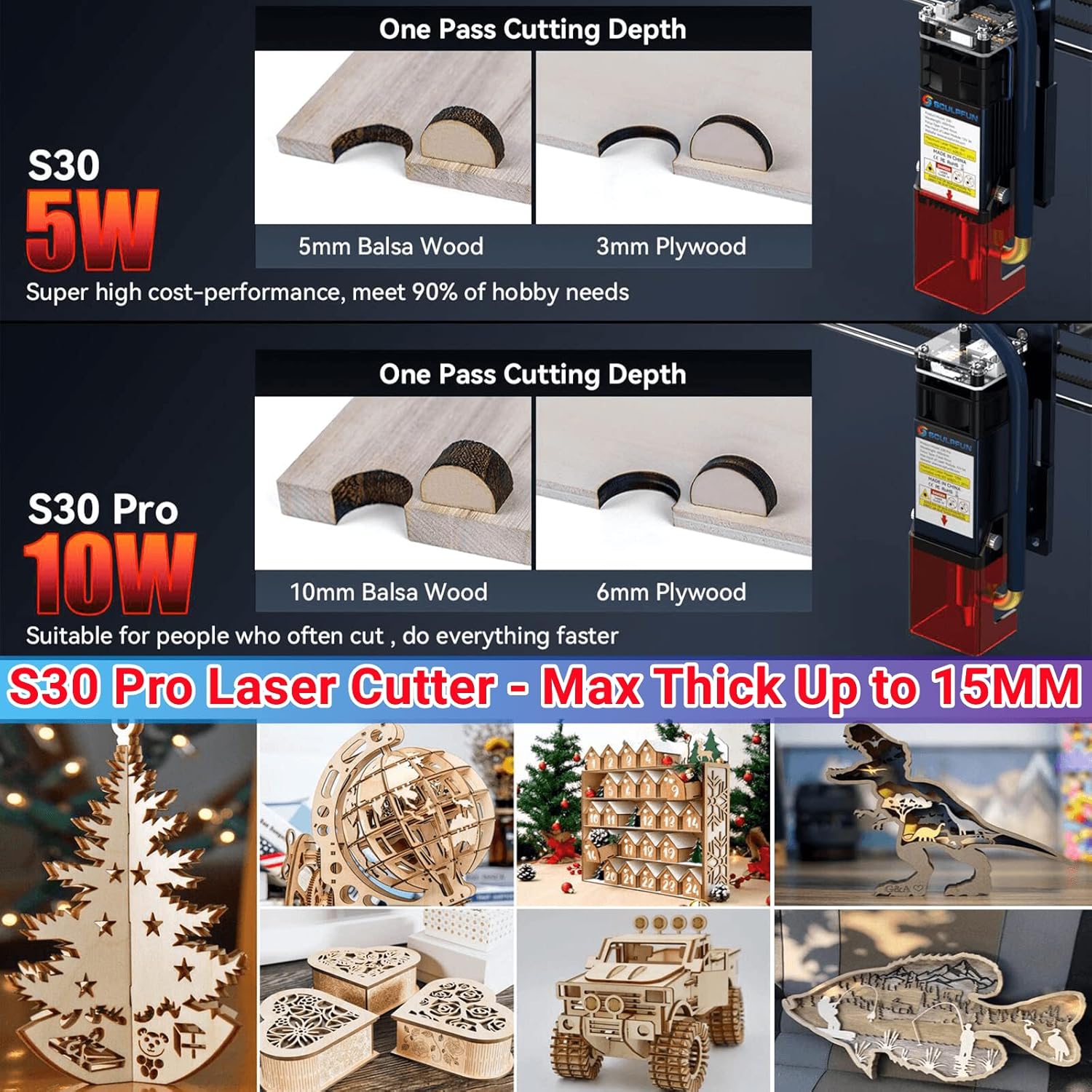
Figure 5.3: One-pass cutting capabilities of S30 Pro.
The S30 Pro can engrave and cut a wide variety of materials, including:
- Wood (walnut, cherry, MDF, balsa, plywood)
- Акрил тактасы
- Cardboard, non-woven fabric, bamboo
- Leather, some plastic boards, PCB boards
- Aluminum oxide, 304 stainless steel, ceramic, dark stone, rubber, glass

5.4-сүрөт: Мисamples of materials suitable for engraving and cutting.
6. Техникалык тейлөө
Үзгүлтүксүз техникалык тейлөө оптималдуу иштөөнү камсыз кылат жана лазердик гравёруңуздун иштөө мөөнөтүн узартат.
- Линзаны тазалоо: Periodically clean the laser lens to maintain engraving quality. Use a soft, lint-free cloth and lens cleaning solution.
- Линзаны алмаштыруу: The S30 Pro features an innovative replaceable lens design, significantly extending the laser's service life. Replace the lens when wear is observed or engraving quality degrades.
- Рельс майлоо: Apply a small amount of lubricant to the linear guide rails occasionally to ensure smooth movement of the laser module.
- Жалпы тазалоо: Keep the machine free of dust and debris, especially around moving parts and the laser module.
7. Кыйынчылыктарды
Бул бөлүм сиз кабылышы мүмкүн болгон жалпы көйгөйлөрдү карайт.
| Көйгөй | Мүмкүн себеп | Чечим |
|---|---|---|
| Лазер атылбайт | Power cable loose, software issue, laser module fault | Check power connections, restart software/computer, contact support if issue persists. |
| Гравировка/кесүү сапаты начар | Incorrect focus, dirty lens, wrong power/speed settings, material issue | Adjust laser focus, clean lens, optimize power/speed settings for material, ensure material is flat. |
| Машина компьютер тарабынан таанылган жок | USB cable issue, driver not installed, software port setting | Try a different USB port/cable, reinstall drivers, check COM port settings in software. |
| Wavy lines in engraving | Loose belts, unstable frame, linear guide issue | Check and tighten belts, ensure machine is on a stable surface, inspect linear guides for obstructions. |
8. Техникалык шарттар
- Модел: S30 Pro Laser Engraver
- Diode Laser Output Power: 10W (Light Energy)
- Машина күчү: Болжол менен 84 Вт
- Лазердик Фокус: 0.06x0.08мм
- Лазердик толкун узундугу: 455 ± 5нм
- Фокустоо ыкмасы: Fixed focus column + sliding device
- Гравюра тактыгы: 0.005мм
- Standard Engraving Area: 410x400mm (expandable)
- Операциялык программалык камсыздоо: LightBurn (with air assist function M8), LaserGRBL, Benbox, GrblController, LiteFire
- Колдоого алынган операциялык системалар: Windows, MAC
- Колдоого алынган File Форматтары: NC, BMP, JPG, PNG, DXF, and other image formats
- Data Transmission Method: USB connection or Bluetooth wireless connection
- Air Pump Type: Mainboard-controlled air pump
- Air Pump Voltage: 12V
- Air Pump Airflow: 30л/мин
- Air Hose Inner Diameter: 7.5мм
- Элемент Салмагы: 15 фунт
- Пакеттин өлчөмдөрү: 24.52 x 9.45 x 8.86 дюйм
- Өндүрүүчү: SCULPFUN, Co, Ltd
- Келип чыккан өлкө: Кытай
9. Кепилдик жана колдоо
For warranty information and technical support, please refer to the documentation provided with your product or visit the official SCULPFUN webсайт. Сатып алганыңыздын далили катары сатып алуу дүмүрчөгүңүздү сактаңыз.
Өндүрүүчү: SCULPFUN, Co, Ltd


