Introduction
This manual provides comprehensive instructions for the MAUL M112 calculator. It covers setup, basic operations, advanced functions, maintenance, and troubleshooting to ensure optimal performance and longevity of your device. Please read this manual thoroughly before using the calculator.
Продукт бүттүview

Сүрөт 1: Фронт view of the MAUL M112 calculator, showcasing its 12-digit display and key layout. The calculator features a silver front panel and black keys with colored function buttons.
The MAUL M112 is a compact, 12-digit display calculator designed for office, home, and school use. It features both solar and battery power for reliable operation in various lighting conditions. Key functions include percentage and tax calculations, memory functions, and an automatic shutdown feature to conserve energy.

Сүрөт 2: The MAUL M112 calculator held in a hand, illustrating its compact size (approximately 11.9 cm x 7.0 cm x 1.0 cm). This image highlights its portability and ergonomic design.
Жайгашуу
Power Source
The MAUL M112 calculator operates on a dual power system: solar and battery. This ensures continuous functionality even in low-light environments.
- Күн энергиясы: The calculator primarily uses solar energy when sufficient light is available. Ensure the solar panel, located above the display, is exposed to light for optimal performance.
- Батарея кубаттуулугу: For use in dark conditions or when solar power is insufficient, the calculator automatically switches to battery power. One LR1130 battery is included with the device.
Баштапкы колдонуу
Upon first use, the calculator should be ready for operation. If the display does not activate, ensure it is exposed to light or check the battery compartment.

Сүрөт 3: Арткы view of the MAUL M112 calculator, displaying the battery compartment cover. This is where the LR1130 battery is housed and can be accessed for replacement.
Иштөө нускамалары
Негизги операциялар
- Power On/Clear: Басыңыз ON C·CE to turn on the calculator or clear the current entry.
- All Clear: Басыңыз AC to clear all calculations and memory.
- Сан киргизүү: Use the number keys (0-9) and the decimal point (.) to enter values.
- Арифметикалык амалдар: Колдонуу + (кошумча), - (кемитүү), x (көбөйтүү), жана ÷ (division) for calculations.
- барабар: Басыңыз = to display the result of a calculation.
- Double Zero: The 00 button allows for quick entry of two zeros.
- Delete Last Digit: басыңыз → (backspace) button to delete the last entered digit.
Эс тутум функциялары
The calculator includes a 3-button memory function:
- M+: Көрсөтүлгөн маанини эс тутумга кошот.
- M-: Көрсөтүлгөн маанини эс тутумдан кемитип алат.
- MRC: Recalls the memory content (first press) or clears the memory (second press).
Атайын функциялар
- % (Процентtagд): Процентти эсептейтtages.
- Example (Add Percentagд): Enter value, press +, enter percentage, басыңыз %.
- Example (Discount): Enter value, press -, enter percentage, басыңыз %.
- САЛЫК+ / САЛЫК- (Салыкты эсептөө): These buttons are used for calculations involving tax rates.
- Салык ставкасын белгилөө: Басыңыз SET, then enter the tax rate (e.g., 5 for 5%), then press САЛЫК+Салык ставкасы эми сакталып турат.
- Add Tax: Enter original price, press САЛЫК+.
- Subtract Tax: Enter price including tax, press САЛЫК-.
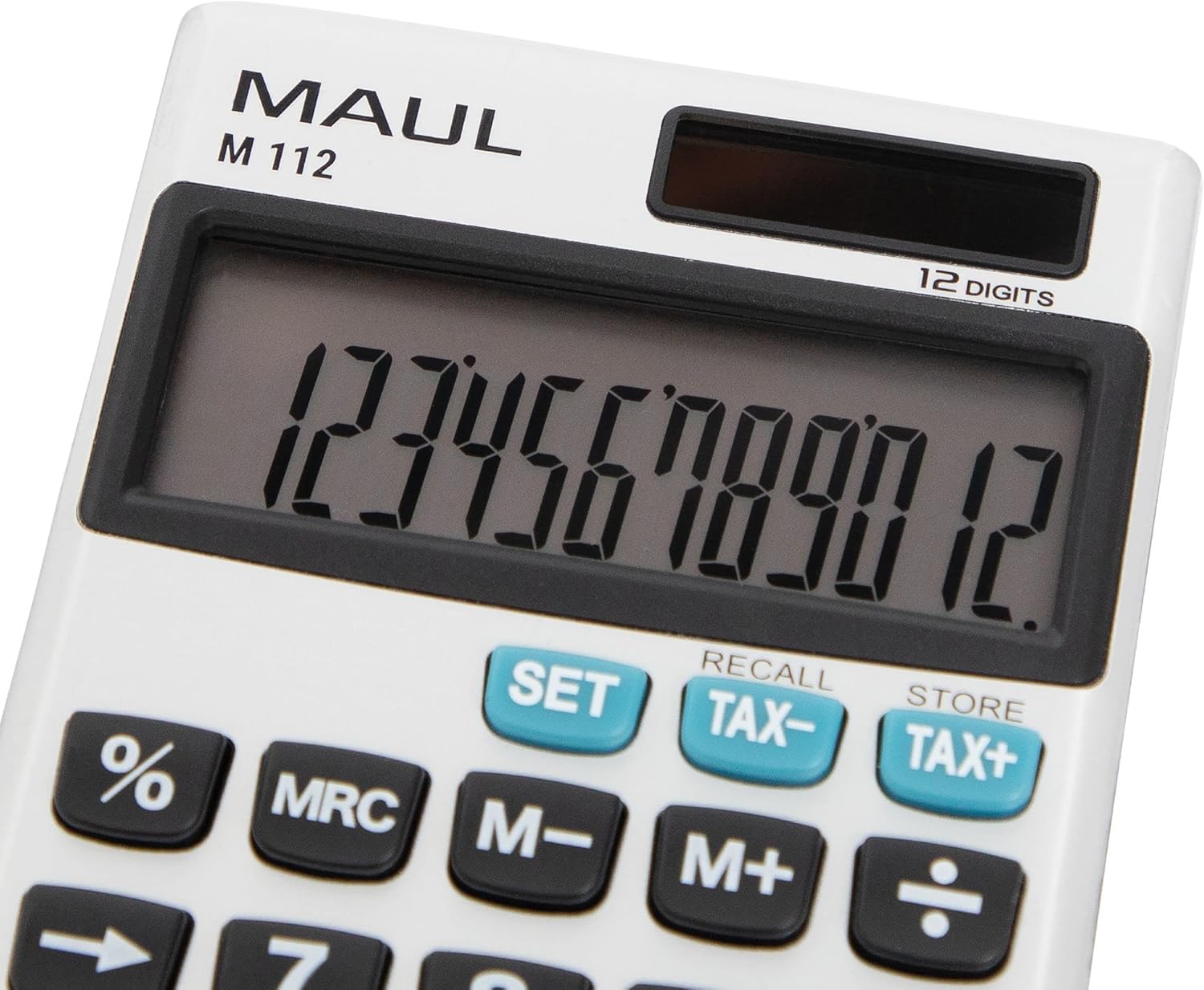
Сүрөт 4: А деталдуу view of the MAUL M112 calculator's 12-digit LCD display and the function keys, including SET, TAX-, TAX+, %, MRC, M-, M+, and the arithmetic operators. This image highlights the clear labeling and distinct coloring of important keys.
Техникалык тейлөө
Тазалоо
Калькулятордун көрүнүшүн жана иштешин сактоо үчүн:
- Wipe the calculator with a soft, dry cloth.
- өжөр кир үчүн, бир аз гampчүпүрөктү суу менен. Катуу химиялык заттарды же абразивдүү тазалагычтарды колдонуудан алыс болуңуз.
- Ensure no liquid enters the calculator's internal components.
Батареяны алмаштыруу
When the display becomes dim or unresponsive in low light, the LR1130 battery may need replacement.
- Калькуляторду которуңуз.
- Locate the battery compartment cover (refer to Image 3).
- Carefully open the cover using a small screwdriver or coin.
- Эски LR1130 батарейкасын алып салыңыз.
- Insert a new LR1130 battery, ensuring correct polarity (+/-).
- Батарея бөлүкчөсүнүн капкагын бекем орнотуңуз.
Эскертүү: Колдонулган батарейкаларды жергиликтүү эрежелерге ылайык жок кылыңыз.
Проблемаларды чечүү
- Дисплей бош:
- Калькулятор күн энергиясы үчүн жетиштүү жарыкка туш болушун камсыз кылыңыз.
- Check if the battery needs replacement (refer to Battery Replacement section).
- Басыңыз ON C·CE аппаратты күйгүзүү үчүн.
- Туура эмес эсептөөлөр:
- Басыңыз AC to clear all previous entries and memory.
- Double-check your input values and the sequence of operations.
- Ачкычтар жооп бербейт:
- Ensure the keys are clean and free from debris.
- If the issue persists, try replacing the battery.
Техникалык шарттар
| Модель аты | M112 |
| Дисплей | 12-digit LCD, 1-line display |
| Power Source | Solar powered and battery operated (LR1130) |
| Өлчөмдөрү (L x W x Y) | 11.9 x 7.0 x 1.0 см |
| Материал | Plastic (front made of aluminium) |
| Эс тутум функциялары | 3-button memory (M+, M-, MRC) |
| Атайын функциялар | Персенtage (%), Tax Calculation (TAX+, TAX-), Double Zero (00), Delete Last Digit (→) |
| Автоматтык өчүрүү | Ооба |
| Өндүрүүчү | Jakob Maul GmbH |
Кепилдик
The MAUL M112 calculator comes with a 5 жылдык кепилдик from the date of purchase. This warranty covers manufacturing defects under normal use. Please retain your proof of purchase for warranty claims. For detailed warranty terms and conditions, please refer to the official MAUL webсайтка же кардарларды колдоо менен байланышыңыз.
Колдоо
For further assistance, technical support, or inquiries regarding your MAUL M112 calculator, please visit the official MAUL webсайтка же кардарларды тейлөө бөлүмүнө кайрылыңыз. Байланыш маалыматы, адатта, продуктунун таңгагында же өндүрүүчүнүн дарегинде тапса болот webсайт.
Өндүрүүчү: Jakob Maul GmbH


