1. Киришүү
This manual provides essential information for the safe and efficient operation of your Gearlux SP184 18 LED 10 Watt RGBW PAR Stage Light. Please read this manual thoroughly before installation and use, and retain it for future reference.
2. Коопсуздук маалыматы
- электр менен жабдууну камсыз кылуу voltage көрсөтүлгөн томго дал келетtagаппаратта e.
- Always disconnect the power before cleaning or servicing the unit.
- Do not operate the device if the power cord is damaged.
- Жарык булагына түздөн-түз көз тийбеңиз.
- This device is for indoor use only. Protect it from moisture and extreme temperatures.
- Ашыкча ысып кетүүнүн алдын алуу үчүн аппараттын айланасында жетиштүү желдетүүнү камсыз кылыңыз.
3. Продукт бүтүп калдыview
3.1 Негизги өзгөчөлүктөрү
- Quad-Color LEDs: Equipped with 18x10-watt RGBW (Red, Green, Blue, White) LEDs for versatile color mixing and high output.
- Натыйжалуу муздатуу: Features a quiet cooling fan for effective heat dissipation, contributing to a longer product lifespan.
- RDM Functionality: Supports RDM (Remote Device Management) via 8 DMX channels for simplified configuration and control.
- ийкемдүү орнотуу: Includes an adjustable metal handle/bracket for easy installation on walls, trusses, or for ground placement.
3.2 Компоненттер
Familiarize yourself with the main components of the Gearlux SP184 PAR light:

1-сүрөт: Фронт view of the Gearlux SP184 PAR Stage Light, showing the 18 RGBW LED lenses.

2-сүрөт: Арткы view of the control panel, featuring DMX In/Out, Power In/Out, digital display, and control buttons.
- LED Array: 18 individual 10-watt RGBW LEDs on the front panel.
- Башкаруу панели: Located on the rear, includes a digital display and four control buttons (MENU, UP, DOWN, ENTER).
- DMX байланыштары: XLR 3-pin DMX In and DMX Out ports for linking with DMX controllers and other fixtures.
- Кубат туташуулары: Power In and Power Out ports for daisy-chaining power to multiple units. Includes a fuse holder.
- Монтаждык кронштейн: An adjustable metal bracket for secure positioning.
4. Орнотуу жана орнотуу
4.1 Пакеттен чыгаруу
Carefully remove the fixture from its packaging. Inspect the unit for any signs of damage during transit. Retain the packaging for future transport or storage.
4.2 Монтаждоо
The Gearlux SP184 can be mounted in various positions using its adjustable bracket:
- Полго орнотуу: Place the unit on a stable, level surface. Adjust the bracket to direct the light as desired.
- Дубалга орнотуу: Securely attach the bracket to a sturdy wall using appropriate hardware (not included). Ensure the mounting surface can support the weight of the fixture.
- Truss Mount: Attach the bracket to a lighting truss using a suitable clamp (not included). Always use a safety cable when mounting overhead.
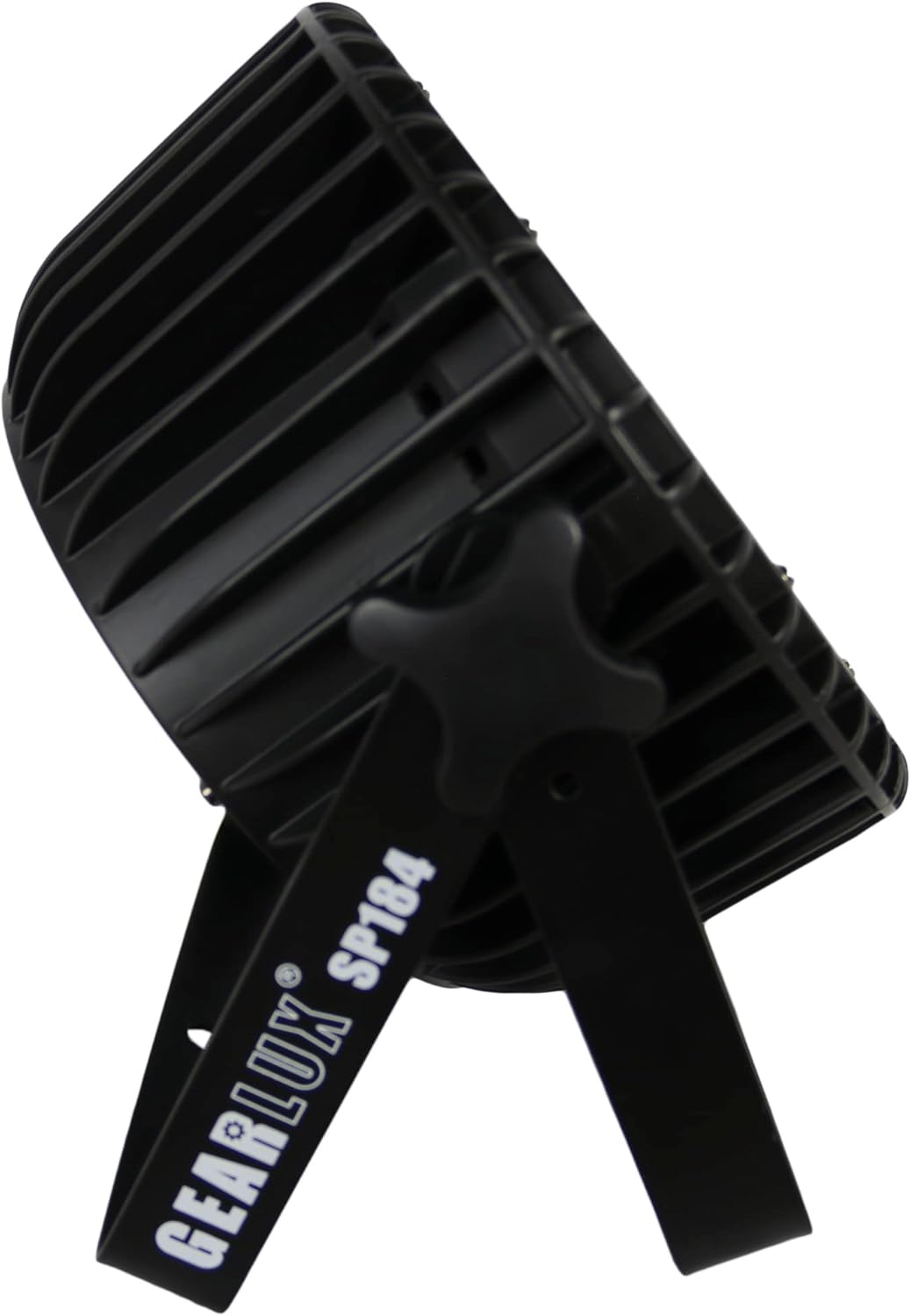
3-сүрөт: Side view illustrating the adjustable mounting bracket and knob for angle adjustment.
4.3 Кубат туташтыруу
Connect the provided power cable to the "Power In" port on the rear of the unit and then to a suitable power outlet (AC 100-240V, 50/60Hz). Multiple units can be daisy-chained using the "Power Out" port, but ensure the total current draw does not exceed the circuit's capacity.

4-сүрөт: Detail of the Power In port with a connected power cable.
4.4 DMX туташуу
For DMX control, connect a DMX cable from your DMX controller's output to the "DMX In" port of the first fixture. For multiple fixtures, connect the "DMX Out" of the first fixture to the "DMX In" of the next, and so on. Use a DMX terminator on the last fixture in the chain for optimal signal integrity.
5. Иштөө нускамалары
5.1 Башкаруу панелинин навигациясы
The digital display and four buttons on the rear panel allow you to navigate menus and select operating modes:
- МЕНЮ: Негизги меню параметрлери аркылуу циклдик режимде иштейт.
- ЖОГОРУ / ТӨМӨН: Navigates through sub-menu options or adjusts parameter values.
- КИРҮҮ: Confirms a selection or saves a setting.
5.2 Иштөө режимдери
The Gearlux SP184 typically offers several operating modes:
- DMX режими: Allows external control via a DMX controller. Set the DMX address for the fixture. The unit uses 8 DMX channels.
- Авто режим: Арматура алдын ала программаланган жарык көрсөтүүлөр аркылуу автоматтык түрдө иштейт.
- Үн активдүү режими: The light reacts to sound detected by its built-in microphone.
- Master/Slave режими: Link multiple units where one acts as the master (controlling) and others as slaves (following).
- Статикалык түс режими: Select and display a single static color (Red, Green, Blue, White, or mixed colors).

5-сүрөт: The PAR light displaying a white output, demonstrating its RGBW capabilities.

6-сүрөт: The PAR light displaying a pink/magenta output, showcasing color mixing.

7-сүрөт: The PAR light displaying a green output.
5.3 RDM Function
The RDM (Remote Device Management) function allows for two-way communication between the DMX controller and the fixture. This enables remote setting of DMX addresses, mode changes, and monitoring of fixture status directly from an RDM-compatible DMX controller, simplifying setup and troubleshooting.
6. Техникалык тейлөө
6.1 Тазалоо
To maintain optimal light output and cooling efficiency, regularly clean the fixture's lenses and cooling vents. Use a soft, lint-free cloth and a mild glass cleaner for the lenses. Ensure the unit is powered off and disconnected before cleaning.
6.2 Сактагычты алмаштыруу
If the unit does not power on, check the fuse located near the power input. Disconnect power, unscrew the fuse holder, and replace the fuse with one of the same type and rating (e.g., T2A 250V). Never use a fuse with a higher rating.
6.3 Сактоо
When not in use, store the fixture in its original packaging or a suitable case in a dry, dust-free environment.
7. Кыйынчылыктарды
| Көйгөй | Мүмкүн себеп | Чечим |
|---|---|---|
| Шам күйбөйт. | No power supply; Blown fuse; Damaged power cable. | Check power connection; Replace fuse; Inspect/replace power cable. |
| DMX башкаруусу жок. | Incorrect DMX address; Faulty DMX cable; No DMX signal; Missing terminator. | Verify DMX address; Check DMX cables; Ensure DMX controller is active; Add DMX terminator. |
| Жарыктын чыгышы күңүрт же шайкеш келбейт. | Dirty lenses; Overheating; Incorrect mode/settings. | Clean lenses; Ensure proper ventilation; Check operating mode and dimmer settings. |
| Fixture is overheating. | Бөгөттөлгөн желдетүү; Жетишсиз аба агымы. | Clear all obstructions from vents; Ensure adequate space around the unit. |
8. Техникалык шарттар
| Өзгөчөлүк | Деталь |
|---|---|
| Модел | SP184 |
| Бренд | Gearlux |
| Жарык булагы | 18 x 10 Watt RGBW LEDs |
| Power Source | Электр зымдары |
| Киргизүү көлөмүtage | AC 100-240V, 50/60Hz |
| Ватtage | 10 Watts (per LED) |
| DMX каналдары | 8 канал |
| Beam Angle | 25 градус |
| Материал | Металл (алюминий) |
| Аяктоо түрү | Алюминий, металл |
| Монтаж түрү | Дубалга орнотуу, полго орнотуу |
| Продукциянын өлчөмдөрү | 11.61"L x 6.1"W x 11.81"H |
| Элемент Салмагы | 7.67 фунт |
9. Кепилдик жана колдоо
Кепилдик маалыматы же техникалык колдоо үчүн, сатып алуу учурунда берилген документтерди караңыз же сатуучуга кайрылыңыз. Ар кандай кепилдик дооматтары үчүн сатып алганыңыздын далилин сактаңыз.