1. Киришүү
The AIHOOR A4ANC Wireless Earbuds offer a premium audio experience with advanced features designed for daily use and active lifestyles. Key features include Hybrid Active Noise Cancelling, wireless charging capability, deep bass sound, and enhanced call clarity.

Figure 1: AIHOOR A4ANC Wireless Earbuds and Charging Case. The image shows the dark blue earbuds resting in their open charging case, highlighting their sleek design and compact form factor.
Негизги өзгөчөлүктөрү:
- Hybrid Active Noise Cancelling (ANC): Long press for 2 seconds to activate ANC, canceling ambient noise by 30dB for an immersive listening experience.
- Зымсыз кубаттоо: Conveniently charge your earbuds and case wirelessly.
- Shocking Deep Bass: Expertly tuned sound delivering high-quality stereo with extra bass, rounded vocals, and surprising highs.
- Enhanced Calls: Six microphones with Environmental Noise Cancellation (ENC) technology ensure clear voice pickup.
- Жалпы шайкештик: Easily pair with iOS/Android phones, Mac or Windows laptops/desktops, or smart TVs via Bluetooth 5.1.
2. Кутуда эмне бар
- 1 x Pair of Bluetooth Earbuds (Left & Right)
- 1 x USB-C заряддоо кутусу
- 1 x USB-C Charging Cable (20cm/0.8in)
- 4 x Pairs of Eartips (L*2, M*2 (Installed), S*2, XS*2)
- 1 x Gift Carton Packaging
3. Орнотуу
3.1 Кулакчындарды жана кутучаны заряддоо
Before first use, fully charge the earbuds and charging case. The case can be charged via the included USB-C cable or wirelessly using a compatible wireless charging pad.
- Кулакчындарды заряддоо убактысы: Approximately 15 minutes for 5 hours of playtime (when placed in the charging case).
- Ишти заряддоо убактысы: Толук кубаттоо үчүн болжол менен 2 саат.
- The charging case provides up to 3 full charges for the earbuds.

Figure 2: The AIHOOR A4ANC earbuds charging wirelessly on a charging pad, alongside a smartphone and smartwatch also charging. This illustrates the convenience of wireless charging for the earbuds.
Video 1: Experience Using AIHOOR A4 ANC Bluetooth Wireless Earbuds. This video demonstrates the charging process and general usage of the earbuds, including placing them in the charging case and observing the indicator lights.
3.2 Сиздин аппаратыңыз менен жупташуу
The earbuds are designed for universal compatibility with various Bluetooth-enabled devices.
- Кулакчындардын заряддалганын жана кубаттоочу кутуга салынганын текшериңиз.
- Кубаттоочу кутучаны ачыңыз. Кулакчындар автоматтык түрдө жупташтыруу режимине өтөт (кулакчындардагы жаркылдаган жарыктар менен көрсөтүлөт).
- On your device (smartphone, laptop, etc.), go to Bluetooth settings.
- Select "AIHOOR A4" from the list of available devices to connect.
- Once connected, you will hear an audio prompt, and the earbud lights will stop flashing.
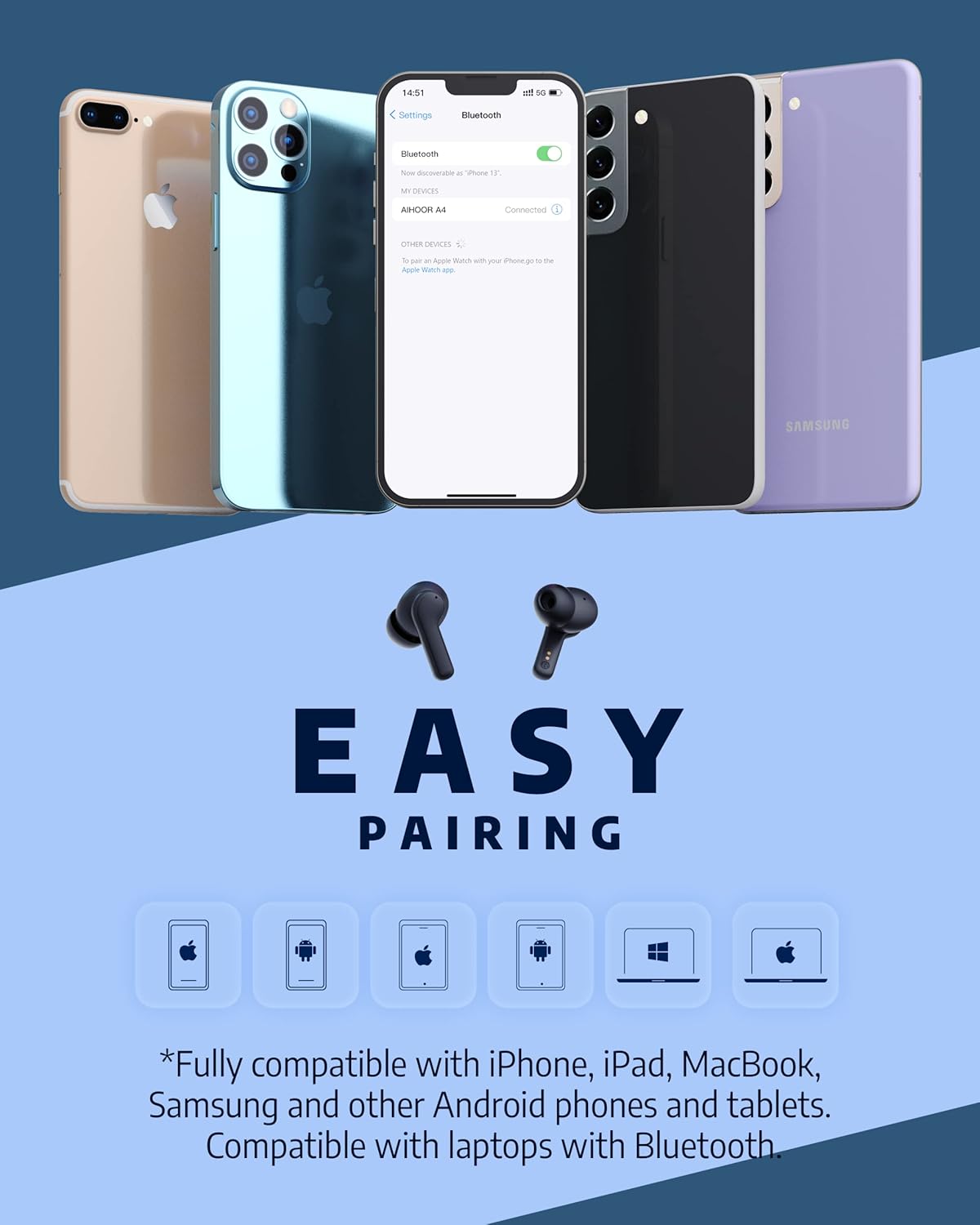
Figure 3: The AIHOOR A4ANC earbuds demonstrating easy pairing with various devices including iPhones, Android phones, and laptops. This image highlights the broad compatibility of the earbuds.
4. Иштөө нускамалары
4.1 Сенсордук башкаруу
The AIHOOR A4ANC earbuds feature intuitive touch controls on each earbud for easy management of audio and calls.
- Ойнотуу/тындыруу: Кулакчындарды бир жолу таптаңыз.
- Кийинки трек: Оң кулакчынды эки жолу таптаңыз.
- Мурунку трек: Сол кулакчынды эки жолу таптаңыз.
- Көлөмү: Оң кулакчынды көпкө басыңыз.
- Үнүн азайтуу: Сол кулакчынды көпкө басыңыз.
- Үн жардамчысын иштетүү (Siri/Google Жардамчысы): Кулакчындын бирин үч жолу таптаңыз.
Video 2: Honest Review & Touch Control Demonstration. This video provides a clear demonstration of the touch controls for managing music playback, volume, and calls directly from the earbuds.
4.2 Чалууларды башкаруу
The earbuds are equipped with 6 microphones and Environmental Noise Cancellation (ENC) for clear hands-free calls.
- Чалууга жооп берүү/аяктоо: Кулакчындарды бир жолу таптаңыз.
- Чакырууну четке кагуу: Кулакчындын бирин 2 секунд басып туруңуз.
4.3 Активдүү ызы-чууну жокко чыгаруу (ANC)
Activate ANC to minimize ambient noise and enhance your listening experience.
- ANC иштетүү: Long press either earbud for 2 seconds. You will hear an audio prompt confirming ANC activation.
- ANC reduces ambient noise by up to 30dB.

Figure 4: A visual representation of the earbuds' Active Noise Cancelling feature, showing a person enjoying quiet on an airplane. The image emphasizes the ability to reduce 35dB of ambient noise.
5. Техникалык тейлөө
Proper maintenance ensures the longevity and optimal performance of your AIHOOR A4ANC earbuds.
- Тазалоо: Кулакчындарды жана кубаттоочу кутучаны дайыма жумшак, кургак, түксүз чүпүрөк менен сүртүп туруңуз. Катуу химиялык заттарды же абразивдүү материалдарды колдонуудан алыс болуңуз.
- Наушниктер: Кулактардын учун мезгил-мезгили менен суу жана жумшак самын менен алып салып, тазалап туруңуз. Кайра орнотуудан мурун алардын толугу менен кургаганын текшериңиз.
- Суу каршылык: The earbuds have an IPX5 water resistance level, meaning they are protected against low-pressure water jets from any direction. They are not designed for submersion in water. Avoid exposing them to excessive moisture or liquids.
- Сактагыч: Колдонулбаганда, кулакчындарды коргоо жана кубаттоо үчүн кубаттоочу кутучага сактаңыз.
6. Кыйынчылыктарды
6.1 Байланыш маселелери
- Кулакчындар жупташкан жок: Ensure both earbuds are in the charging case, then open the lid to activate pairing mode. Check your device's Bluetooth settings to ensure "AIHOOR A4" is visible.
- Бир гана кулакчын туташтырылат: Place both earbuds back into the charging case, close the lid, wait a few seconds, then open it again. This often resets the connection. If the issue persists, try forgetting the device on your phone's Bluetooth settings and re-pairing.
- Үзгүлтүксүз туташуу: Ensure your device is within the Bluetooth range (10 meters/33 feet) and there are no significant obstacles between the earbuds and your device.
6.2 Заряддоо көйгөйлөрү
- Кулакчындар төмөнкү учурларда кубатталбай жатат: Ensure the charging contacts on both the earbuds and inside the case are clean and free of debris. Make sure the earbuds are properly seated in the case.
- Куту заряддалбай жатат: Verify the USB-C cable is securely connected to both the case and the power source. If using wireless charging, ensure the case is correctly positioned on the charging pad.
6.3 Үн сапаты маселелери
- Үндүн деңгээли төмөн же үн начар: Ensure the eartips are the correct size for a snug fit in your ear canal. Clean the earbud mesh to remove any wax or debris that might be obstructing sound. Adjust volume on both your device and the earbuds.
- Бурмаланган аудио: Move closer to your connected device to avoid interference. Try disconnecting and reconnecting the earbuds.
7. Техникалык шарттар
| Өзгөчөлүк | Спецификация |
|---|---|
| Модель аты | A4-FT001 |
| Байланыш технологиясы | Зымсыз (Bluetooth 5.1) |
| Noise Control | Активдүү Шумду Жоюу (ANC) |
| Микрофондор | 6 (ENC менен) |
| Батареянын иштөө мөөнөтү (наушник) | Заряддоого 5 саатка чейин |
| Жалпы ойноо убактысы (Кеп менен) | 30 саатка чейин |
| Заряддоо убактысы (капка) | 2 саат |
| Зымсыз заряддоо | Колдоого алынган |
| Сууга туруктуулук деңгээли | IPX5 |
| Башкаруу ыкмасы | тийүү |
| Кулак жайгаштыруу | Кулакта |
| Продукциянын өлчөмдөрү | 2.28 x 1.93 x 1.18 дюйм |
| Элемент Салмагы | 2.39 унция |
8. Кепилдик жана колдоо
AIHOOR products are designed with quality and reliability in mind. For warranty information, technical support, or any inquiries regarding your AIHOOR A4ANC Wireless Earbuds, please refer to the contact information provided in your product packaging or visit the official AIHOOR webсайт.
Note: Specific warranty terms and conditions may vary by region. Please retain your proof of purchase for warranty claims.


