1. Киришүү
This manual provides essential information for the safe and effective operation of your Walfront BR-6 Nuclear Radiation Detector. Please read this manual thoroughly before using the device to ensure proper function and accurate readings. This device is designed for detecting Beta (β), Gamma (γ), and X-ray radiation.
2. Коопсуздук маалыматы
Always handle the device with care. Do not expose it to extreme temperatures, moisture, or strong impacts. This device is for informational detection purposes only and should not be used for medical diagnosis or as a substitute for professional safety equipment in high-risk environments. Ensure batteries are inserted correctly to prevent damage.
3. Продукциянын өзгөчөлүктөрү
- Кеңири аныктоо диапазону: Capable of detecting Beta (β), Gamma (γ), and X-ray radiation.
- Жогорку тактык: Inherent error controlled within ±10%.
- Колдонуучуга ыңгайлуу операция: Simple and convenient steps for environmental radiation parameter detection.
- Бир нече үн режимдери: Features real particle sound, alarm sound, and mute options.
- Туруктуу курулуш: Made from high-quality ABS material for impact and scratch resistance.
- Таза дисплей: Large TFT screen for real-time data monitoring, precise mean data, and intuitive trend graphs.
- Портативдик дизайн: Small size for easy carrying and inspection.

Image: The Walfront BR-6 Nuclear Radiation Detector with a list of its key features, including nuclear radiation detection, radioactive detector, βγx ray trend graph, particle sound, alarm sound, and power supply options.
4. Пакеттин мазмуну
Пакетти ачканда, бардык буюмдардын бар экенин жана бузулбаганын текшериңиз:
- 1 x Walfront BR-6 Nuclear Radiation Detector
- 1 х Колдонуучунун колдонмосу (бул документ)
Note: 2 x 1.5V AA batteries and a USB cable are not included and must be purchased separately.
5. Продукт бүтүп калдыview
Familiarize yourself with the components of your Walfront BR-6 detector:
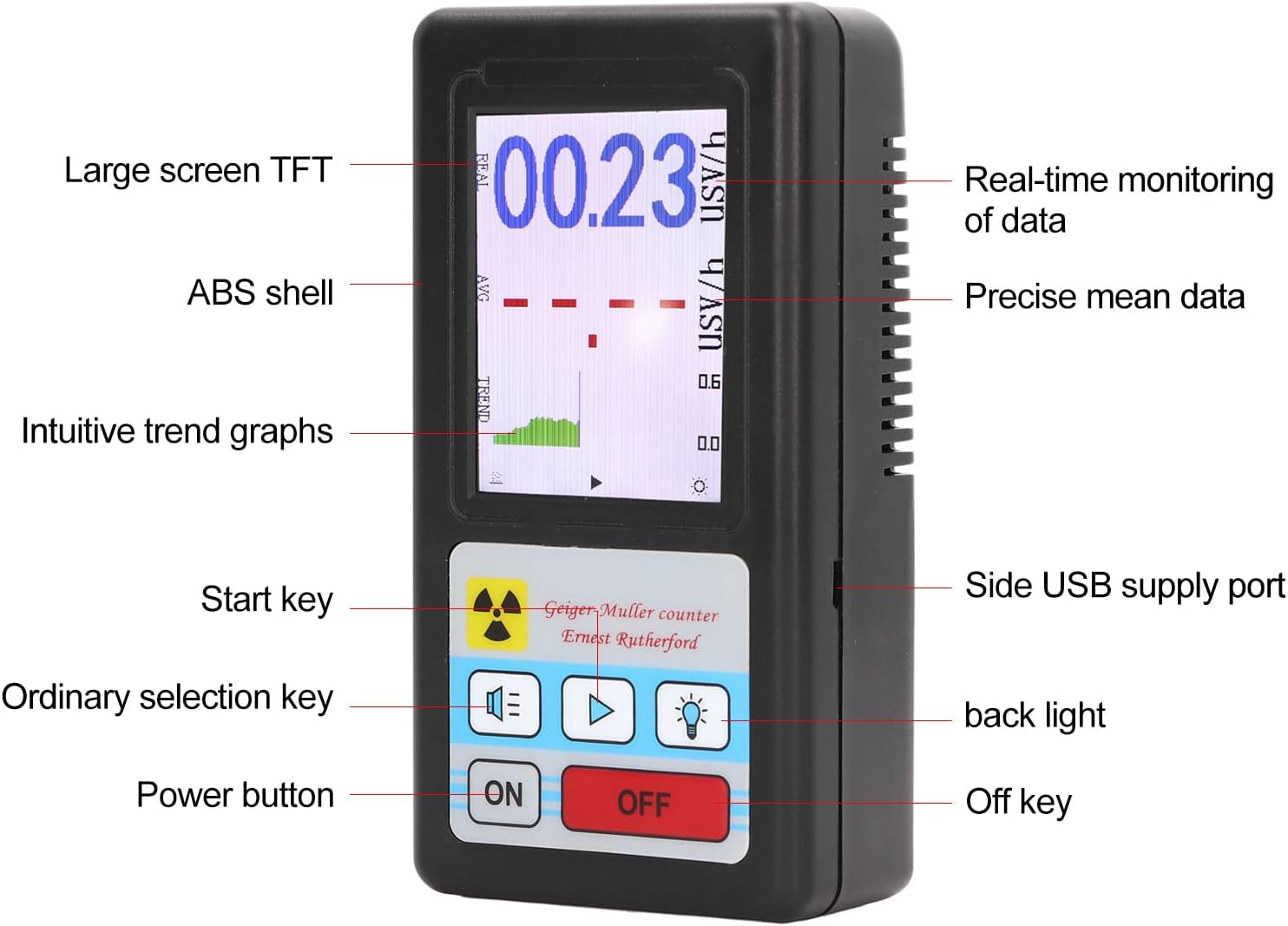
Image: A detailed diagram of the Walfront BR-6 detector, labeling its parts including the large screen TFT, ABS shell, intuitive trend graphs, start key, ordinary selection key, power button, real-time monitoring of data, precise mean data, side USB supply port, backlight, and off key.
6. Орнотуу
6.1 Батареяны орнотуу
- Аппараттын артындагы батарея бөлүкчөсүнүн капкагын табыңыз.
- Капкакты жылдырыңыз.
- Туура полярдуулукту (+/-) камсыз кылып, эки (2) 1.5V AA батарейкасын салыңыз.
- Батарея уясынын капкагын бекем жабыңыз.

Сүрөт: арткы view of the Walfront BR-6 Nuclear Radiation Detector, showing the battery compartment cover and product label with model number BR-6.
6.2 Күйгүзүү
басыңыз ON button located on the front panel to power on the device. The LCD screen will illuminate and display the current readings.
7. Иштөө нускамалары
7.1 Автоматтык аныктоо
Once powered on, the device automatically begins detecting radiation. The main display will show the real-time radiation dose rate in µSv/h. The trend graph provides a visual representation of radiation level changes over time.

Image: A close-up of the Walfront BR-6 detector's LCD screen, showing a digital reading of 00.23 µSv/h, an average reading (AVG), and a trend graph (TREND) indicating radiation levels over time.
7.2 Adjusting Alarm Threshold
The device allows you to set an alarm threshold. If the detected radiation level exceeds this threshold, an audible alarm will sound (if not muted).
- басыңыз Ordinary selection key (usually represented by a speaker icon or similar) to cycle through sound modes or alarm settings.
- Available alarm thresholds are typically 0.5, 1.0, 2.0, and 5.0 µSv/h. Select the desired threshold.
7.3 Үн орнотуулары
The device supports different sound modes:
- Real Particle Sound: Emits a click sound for each detected radiation particle.
- Ойготкуч Үн: Sounds when the radiation level exceeds the set threshold.
- Үнсүз: Disables all sounds.
колдонуу Ordinary selection key to switch between these sound modes.
7.4 Жарыкты башкаруу
басыңыз Арткы жарык button (usually represented by a light bulb icon) to turn the screen backlight on or off, improving visibility in different lighting conditions.
7.5 Өчүрүү
басыңыз ӨЧҮРҮҮ button to turn off the device when not in use.
8. Тиркемелер
The Walfront BR-6 Nuclear Radiation Detector is suitable for a variety of detection scenarios:
- Home decoration environment detection
- Distance detection after ion implantation
- Radiological protection detection
- Airport security inspection machine detection
- Overseas shopping goods residue detection (e.g., Japanese goods)
- Maternity and baby products radioactivity detection
- Jewelry, stone, and jade articles radioactivity detection
- Cosmetics radiation residue detection

Image: The Walfront BR-6 detector centrally placed, surrounded by images depicting various application scenarios such as signal towers, factories, medical facilities, reflective substances, and microwave ovens, illustrating its wide detection capabilities.
9. Техникалык тейлөө
To ensure the longevity and accuracy of your device, follow these maintenance guidelines:
- Keep the device clean and dry. Use a soft, dry cloth to wipe the exterior. Do not use abrasive cleaners or solvents.
- Avoid exposing the device to direct sunlight, high temperatures, or high humidity for extended periods.
- When storing the device for a long time, remove the batteries to prevent leakage and damage.
- Do not attempt to open or repair the device yourself, as this will void the warranty and may cause damage or injury.
10. Кыйынчылыктарды
If you encounter issues with your Walfront BR-6 detector, try the following steps:
- Түзмөк күйбөйт: Check if the batteries are inserted correctly with the right polarity. Replace with fresh AA batteries. Ensure the ON button is pressed firmly.
- No readings or erratic readings: Ensure the device is in an environment where radiation is expected. If in a known radiation source, and still no reading, the sensor might be obstructed or damaged.
- Сигнал чыкпай жатат: Check the sound settings to ensure the device is not in mute mode and the alarm threshold is set appropriately.
- Экрандагы көйгөйлөр: If the screen is dim or flickering, replace the batteries.
Эгерде бул көйгөйлөрдү чечүү кадамдарын жасагандан кийин да көйгөйлөр чечилбесе, кардарларды тейлөө кызматына кайрылыңыз.
11. Техникалык шарттар
| Модел | BR-6 |
| Материал | ABS |
| Сенсор | Energy compensation type tube |
| Аныктоо түрү | Beta (β), Gamma (γ), X-ray |
| Inherent Error | ±10% |
| Сезимталдуулук | 80cpm µSv (Co 60) |
| Өлчөө диапазону | 00.00~99.99 µSv/h |
| Sound Source Type | Real particle sound, alarm sound, mute |
| Ойготкуч босоголору | 0.5, 1.0, 2.0, 5.0 µSv/h |
| Батарея | 2 x 1.5V AA батарейка (киргизилген эмес) |
| Элемент Салмагы | 6 унция |
| Пакеттин өлчөмдөрү | 6.89 x 3.94 x 2.24 дюйм |
| Элемент моделинин номери | WALFRONT910x5ocs8i |
12. Кепилдик жана колдоо
Кепилдик жөнүндө маалымат же техникалык колдоо алуу үчүн, сатып алуу документтерин караңыз же сатуучуга түз кайрылыңыз. Кепилдик боюнча дооматтар үчүн сатып алууну тастыктаган документти сактап коюңуз.


