1. Киришүү
The AUTOPHIX FCAR F802 Plus is a professional heavy-duty truck diagnostic scanner designed for comprehensive vehicle system analysis. This tool supports a wide range of diesel engines and offers advanced functions such as Diesel Particulate Filter (DPF) regeneration, service/oil reset, and full system diagnostics for both heavy-duty trucks and cars. It is an essential tool for mechanics and vehicle owners seeking detailed diagnostic capabilities.

Сүрөт: бүттүview of the AUTOPHIX FCAR F802 Plus Heavy Duty Truck Scanner, highlighting its main features and robust design.

Image: Broad vehicle compatibility of the F802 Plus, showing support for various heavy-duty truck models and diesel engines including Freightliner, Peterbilt, Kenworth, International, Volvo, Caterpillar, Western Star, Ford Pickup, and GMC.
2. Пакеттин мазмуну
Пакетиңизде бардык буюмдар бар экенин текшериңиз:
- FCAR F802 Plus Diagnostic Unit
- User Manual
- OBDII 16-pin Cable
- Diesel 6-pin Cable
- Diesel 9-pin Cable
- CAT-9 Pin Cable
- Кубаттуу адаптер
- USB кабели

Image: The FCAR F802 Plus diagnostic unit, user manual, OBDII 16-pin cable, Diesel 6-pin cable, and Diesel 9-pin cable are displayed as part of the package contents.
Видео: кутудан чыгуу жана андан ашыкview of the OBDResource HD10 (similar to F802 Plus) Heavy Duty Truck Scan Tool, showing the device, user manual, and various diagnostic cables included in the package.
Video: A detailed look at the F802 Truck Scanner, showcasing its components and initial setup steps.
3. Орнотуу колдонмосу
3.1 Алгачкы күйгүзүү жана активдештирүү
- Күйгүзүү: Press and hold the power button on the device for a few seconds until the screen illuminates.
- Тил тандоо: Каалаган тилиңизди тандоо үчүн экрандагы көрсөтмөлөрдү аткарыңыз.
- Wi-Fi туташуусу: Connect the device to a stable Wi-Fi network. This is crucial for activation and software updates.
- Жандандыруу: Input your email address to activate the device. Ensure you agree to the user protocol and privacy policy.
- Системанын жаңыртуулары: Once activated and connected to Wi-Fi, check for available system and vehicle database updates. It is highly recommended to perform all updates to ensure optimal performance and access to the latest features.

Image: Steps for one-click activation of the diagnostic tool, including connecting to Wi-Fi and entering an email address.
3.2 Унаага туташуу
- Locate OBD Port: For most modern vehicles, the OBDII (On-Board Diagnostics II) port is located under the dashboard on the driver's side. For heavy-duty trucks, the diagnostic port may be a 6-pin, 9-pin, or CAT-9 pin connector, typically found in the cabin or near the engine compartment.
- Select Appropriate Cable: Choose the correct diagnostic cable (OBDII 16-pin, Diesel 6-pin, Diesel 9-pin, or CAT-9 pin) for your vehicle.
- Кабелди туташтыруу: Securely connect one end of the diagnostic cable to the FCAR F802 Plus unit and the other end to the vehicle's diagnostic port.
- От алдырууну күйгүзүү: Turn the vehicle's ignition to the 'ON' position (engine off) or start the engine as required by the specific diagnostic function.
4. Иштөө нускамалары
4.1 Толук системанын диагностикасы
The F802 Plus can access and diagnose all available electronic control modules (ECUs) in heavy-duty trucks and cars. This includes, but is not limited to, Engine, Transmission, ABS (Anti-lock Braking System), SRS (Supplemental Restraint System), SAS (Steering Angle Sensor), IMMO (Immobilizer), Suspension, Brake, Fuel, ESP, TPM, TPMS, Alarm ECU, Road Speed Control, Power Management, Vehicle Navigation, Cranking System, Anti-lock Brake System, Particulate Trap System, Environment Monitor, Transport Info System, Instrument Cluster, Adaptive Cruise Control, and Weighing System.
- ECU маалыматын окуу: Retrieve detailed information about the control unit.
- Ката коддорун окуңуз: Display Diagnostic Trouble Codes (DTCs) with descriptions.
- Таза ката коддору: Erase DTCs from the vehicle's memory after repairs.
- Display Live Data: View real-time sensor data in text or graph format for in-depth analysis.

Image: Illustration of the F802 Plus's enhanced full system diagnostic capabilities for heavy-duty trucks, covering various modules like Engine, ABS, SRS, SAS, Transmission, and more.
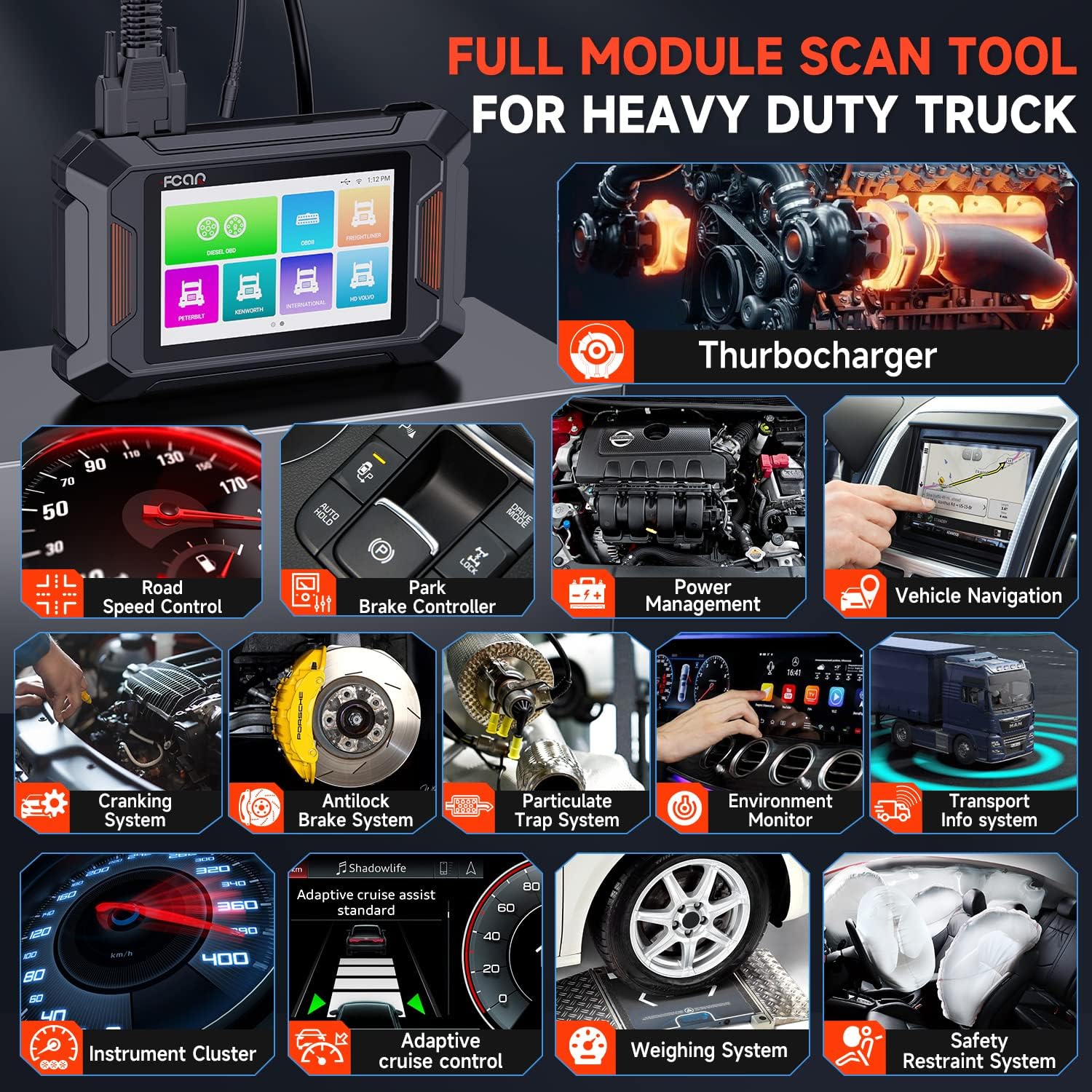
Image: The F802 Plus as a full module scan tool for heavy-duty trucks, showing its ability to diagnose systems like Turbocharger, Road Speed Control, Park Brake Controller, Power Management, Vehicle Navigation, Cranking System, Anti-lock Brake System, Particulate Trap System, Environment Monitor, Transport Info System, and Instrument Cluster.
4.2 DPF Reset & Regeneration
This function allows for the regeneration of the Diesel Particulate Filter, which is crucial for maintaining engine performance and emissions compliance in diesel vehicles. The F802 Plus supports DPF regeneration for a wide range of diesel engines, including:
- Камминс
- Caterpillar
- Детройт
- Эл аралык
- Volvo
- Paccar
- Isuzu
- Хино
- Fuso

Image: Diagram illustrating the DPF regeneration process and the F802 Plus's role as a DPF regen and reset tool for various diesel engines.

Image: Professional DPF reset and regeneration functions, showing support for 8 types of diesel engines including Cummins, Caterpillar, Detroit, International, Volvo, Isuzu, Hino, and Fuso.

Image: The F802 Plus as a professional DPF regen tool, compatible with 8 major diesel engine brands, offering functions like DPF Reset, DPF Regen, DPD Reset, Manual Ash, KOEO Test, and Ash Ratio Reset.
4.3 Service/Oil Reset
The service/oil reset function allows you to reset the oil life reminder and turn off the oil service light after an oil change. This ensures accurate maintenance scheduling and helps prevent potential engine damage from overdue oil changes. This function is supported for Isuzu and Fuso engines.

Image: Illustration of the powerful service/oil reset function, showing an oil change in progress and the dashboard indicating the oil warning light, with support for Isuzu and Fuso engines.

Image: Enhanced service reset and oil reset functions specifically for Isuzu and Fuso engines, demonstrating how to reset oil parameters and clear fault codes to turn off the oil warning light.
4.4 Full OBD2 Functions for Cars & Trucks
The F802 Plus provides comprehensive OBD2 functionality for all cars and trucks, enabling quick and accurate diagnosis of engine-related issues:
- Окуу коддору: Жалпы (P0, P2, P3 жана U0) жана өндүрүүчүгө тиешелүү (P1, P3 жана U1) коддорду алуу.
- Таза коддор: Clear Diagnostic Trouble Codes (DTCs) and reset the Check Engine Light (MIL).
- Show Live Data: Display real-time data stream from the vehicle's sensors.
- O2 сенсор тести: алуу жана view O2 sensor monitor test results.
- Code Lookup: Кодду тез аныктоо үчүн орнотулган DTC издөө китепканасы.
- IM даярдыгы: Чыгарылыштарга байланыштуу мониторлордун даярдык абалын текшериңиз.
- Кадр дайындарын тоңдуруп коюу: View эмиссияга байланыштуу ката кеткен учурдагы иштөө шарттарынын кыскача сүрөтү.
- Унаа жөнүндө маалымат: Унаанын идентификациялык номерин (VIN), калибрлөө IDсин (CALID) жана калибрлөөнү текшерүү номерин (CVN) алыңыз.
- Борттогу монитор тести: Retrieve test results for emission-related powertrain components and systems.
- EVAP системасы сыноо: Буулануучу эмиссияны көзөмөлдөө системасын сыноодон баштаңыз.

Image: Display of full OBD2 functions available for all cars and trucks, including Read Codes, Clear Codes, Show Live Data, O2 Sensor Test, Code Lookup, IM Readiness, Freeze Frame Data, Vehicle Information, On-Board Monitor Test, and EVAP System Test.
4.5 Өркүндөтүлгөн функциялар
The F802 Plus integrates several advanced features to enhance user experience and diagnostic efficiency:
- One-click Activate: Streamlined device activation process.
- Бир чыкылдатуу менен жаңыртуу: Easy and quick software updates via Wi-Fi.
- One-click Feedback: Convenient way to send feedback or report issues.
- Create/Send Report: Generate diagnostic reports that can be printed or emailed.
- Дайындарды ойнотуу: Review previously recorded live data streams.
- One-click Screenshot: Capture screen images for documentation.
- CodeScan Manager: Manage and organize diagnostic codes.
- Demo & Simulated Mode: Practice using the tool without connecting to a vehicle.

Сүрөт: бүттүview of one-click functions including PIN Detect, Screenshot, Feedback, Create Report, Print Report, and Email Report, simplifying various diagnostic tasks.

Image: The advanced simulate and demo mode, which records real diagnostic data from common trucks, providing a comprehensive understanding of the product for beginners and hands-on users.
5. Техникалык тейлөө
5.1 Программалык камсыздоо жаңыртуулары
Regular software updates are essential to ensure your FCAR F802 Plus remains compatible with the latest vehicle models and diagnostic protocols. Updates are performed via Wi-Fi and are typically a one-click process.
- Түзмөктүн туруктуу Wi-Fi тармагына туташканын текшериңиз.
- Navigate to the 'Update' section on the main menu.
- Select 'Update All' or choose specific updates for diagnostic systems and vehicle databases.
- Allow the device to download and install updates. Do not power off the device during this process.

Image: Steps for performing a one-click free update, including connecting to Wi-Fi and initiating the update for diagnostic systems and vehicle databases.
5.2 Аспапка кам көрүү
- Аппаратты чаңдан жана нымдан таза, таза кармаңыз.
- Аппаратты колдонбогондо салкын, кургак жерде сактаңыз.
- Аппаратты жерге түшүрүүдөн же катуу таасирлерден сактаныңыз.
- Use only the provided power adapter and cables to prevent damage.
6. Кыйынчылыктарды
If you encounter issues with your FCAR F802 Plus, refer to the following common troubleshooting tips:
- Түзмөк күйбөй жатат: Ensure the device is fully charged or connected to a power source. Check the power button for proper function.
- Унаа менен байланыш жок: Verify that the diagnostic cable is securely connected to both the device and the vehicle's OBD port. Ensure the vehicle's ignition is in the 'ON' position. Check if the correct cable for the vehicle type is being used.
- Update Failures: Confirm a stable Wi-Fi connection. Ensure sufficient storage space on the device for updates. Try restarting the device and attempting the update again.
- Туура эмес окуулар/коддор: Ensure the vehicle's software is up-to-date. Verify that the diagnostic software on the F802 Plus is the latest version.
For more detailed troubleshooting steps, please consult the comprehensive user manual accessible directly on the device or contact customer support.
7. Техникалык шарттар
| Өзгөчөлүк | Деталь |
|---|---|
| Өндүрүүчү | АВТОФИКС |
| Модел | F802Plus |
| Screen Size | 5 Inches (800*480 Resolution) |
| Операция системасы | Android |
| RAM | 1 ГБ |
| Flash сактагыч | 8 ГБ |
| Байланыш | 2.4 ГГц WiFi |
| Элемент Салмагы | 3.25 фунт |
| Продукциянын өлчөмдөрү | 8 x 3 x 1 дюйм |

Image: Details of the advanced hardware and software configuration, including 1GB RAM, Quad-Core ARM Cortex-A7 processor, 8GB Flash, 5" LCD screen with 800*480 resolution, 2.4GHz WiFi, and Android OS.

Image: A visual representation of the F802 Plus's advanced hardware and software, emphasizing its 1GB RAM, 8GB Flash, 5" LCD, 2.4GHz WiFi, and PIN Detect feature.
8. Кепилдик жана колдоо
AUTOPHIX is committed to providing high-quality products and excellent customer service.
- Кепилдик: The FCAR F802 Plus comes with a 36-month (3-year) warranty.
- Программалык камсыздоо жаңыртуулары: Enjoy lifetime free software updates to keep your device current.
- Кайтаруулар: 30 күндүк акысыз кайтаруу саясаты бар.
- Кардарларды тейлөө: 24/7 professional customer service is available to assist with any inquiries or technical support needs.
For technical assistance or warranty claims, please refer to the contact information provided in your user manual or visit the official AUTOPHIX webсайт.

Image: Information on exclusive technical support, including 24/7 customer service, 30-day free return, 36-month warranty, and lifetime free updates.


