1. Introduction and Overview
The MOES Wireless Smart Scene Switch Button is a battery-powered, 4-gang Zigbee device designed to enhance your smart home automation experience. This versatile switch allows you to control various MOES smart devices and activate pre-defined scenes with simple button presses. Each of its four buttons supports multiple actions (single click, double click, long press), offering up to 12 distinct scene activations. Please note that a MOES Zigbee Hub is required for the functionality of this device.

Image 1.1: The MOES Wireless Smart Scene Switch Button and its retail packaging.
2. Коопсуздук маалыматы
To ensure safe and proper operation of your MOES Wireless Smart Scene Switch Button, please observe the following safety guidelines:
- Аппаратты колдонуудан мурун бардык нускамаларды кылдат окуп чыгыңыз.
- Түзмөктү нымдуулукка, сууга же өтө жогорку температурага дуушар кылбаңыз.
- Аппаратты балдар жана үй жаныбарлары жетпеген жерде сактаңыз.
- Use only the specified CR2430 battery. Incorrect battery types may cause damage or malfunction.
- Do not attempt to disassemble, repair, or modify the device yourself. Contact qualified personnel for service.
3. Продукциянын өзгөчөлүктөрү
The MOES Wireless Smart Scene Switch Button offers several key features for convenient smart home control:
- MOES Gateway Required: This smart scene switch operates exclusively with a MOES Zigbee Hub (e.g., models B091BRGMTZ or B09LM644XJ). It does not support direct connection to Alexa/Echo, Google Home Assistant, or Siri. The device is powered by an included CR2430 battery.
- Smart DIY Control: Automate your MOES smart devices using the MOES App (also compatible with Smart Life App). Configure various scenes for your smart life. Each switch button can be customized to perform multiple actions, allowing for diverse scene activation with a single tap.
- 12 Scene Wall Switch: Each of the four buttons provides three pairing modes: single click, double click, and long press. This enables up to 12 distinct scene activations from a single 4-gang switch, such as 'away mode,' 'home mode,' or 'movie mode.' Create custom automations in your smartphone app for an intelligent lifestyle, reducing the need for voice commands or app navigation.
- Зымдар талап кылынбайт: This is a wireless, battery-powered switch, eliminating the need for complex electrical wiring. It is designed to control MOES Smart Devices for scene automation.
- Оңой орнотуу: The switch can be mounted as a wall switch using the included double-sided tape. Alternatively, it can be used as a portable remote control, allowing you to take it to any network-covered area in your home, such as the living room, bedroom, kitchen, or study. The device is slim (1.3cm thickness) and features low power consumption.

Image 3.1: Visual summary of the MOES Smart Scene Switch's key features.
4. Орнотуу жана орнотуу
4.1 Пререквизиттер
- A MOES Zigbee Hub (required for operation).
- The MOES App or Smart Life App installed on your smartphone.
- A stable Wi-Fi connection for your MOES Zigbee Hub.
4.2 Pairing the Scene Switch with Your MOES Zigbee Hub
- Ensure your MOES Zigbee Hub is powered on and successfully connected to the MOES App.
- Open the MOES App on your smartphone.
- Navigate to the main screen and tap the '+' icon to add a new device.
- Select 'Scene Switch' or 'Wireless Switch' from the device list.
- Follow the in-app instructions to put the scene switch into pairing mode. This typically involves pressing and holding one of the buttons for a few seconds until an indicator light flashes.
- The app will search for the device. Once found, confirm the pairing.
- Rename the device if desired for easier identification.
4.3 Физикалык орнотуу
The MOES Wireless Smart Scene Switch offers flexible installation options:
- Дубалга орнотуу: Clean the desired wall surface thoroughly. Remove the protective film from the double-sided tape on the back of the switch. Press the switch firmly onto the wall for secure adhesion.
- Портативдик колдонуу: The switch can also be used as a portable remote control. Simply place it on any flat surface or carry it with you within the range of your Zigbee network.

Image 4.1: Installation flexibility of the MOES Smart Scene Switch, including wall mounting with double-sided tape and placement in different rooms.
5. Иштөө нускамалары
5.1 Creating Smart Scenes in the MOES App
After pairing your scene switch, you can configure its buttons to trigger various smart scenes:
- Open the MOES App and select your paired scene switch.
- Within the device interface, look for options like 'Scene Settings' or 'Automation'.
- For each of the four buttons, you can assign up to three different actions:
- Бир чыкылдатуу: Тез басып, кайра чыгаруу.
- Эки жолу басуу: Катары менен эки тез басуу.
- Узак басуу: Баскычты бир нече секунд басып туруңуз.
- For each action, select the smart devices or pre-defined scenes you wish to control (e.g., turn on specific lights, adjust thermostat, activate 'movie night' scene).
- Конфигурацияңызды сактаңыз.

Image 5.1: MOES App interface demonstrating the process of creating smart scenes.
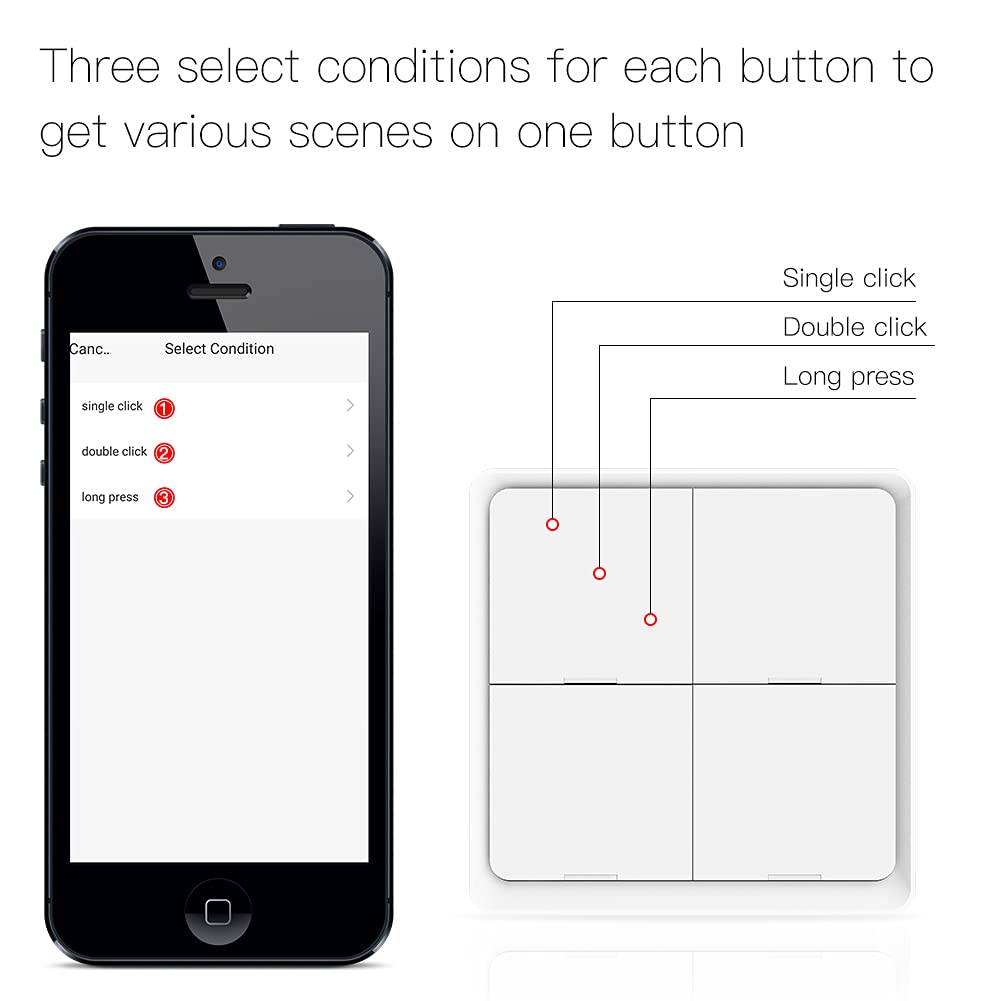
Image 5.2: App screen illustrating the three action types (single, double, long press) available for each button.
5.2 Using the Scene Switch
Once scenes are configured, operate the switch as follows:
- Бир чыкылдатуу: Press and immediately release a button to activate its assigned single-click scene.
- Эки жолу басуу: Press a button twice in quick succession to activate its assigned double-click scene.
- Узак басуу: Press and hold a button for approximately 3-5 seconds to activate its assigned long-press scene.

Сүрөт 5.3: Мисample of using the switch to activate a 'home mode' scene.
Video 5.1: Demonstration of the MOES Scene Button Switch controlling smart devices. This video illustrates the responsiveness and functionality of the switch in a smart home environment.

Image 5.4: Diagram illustrating the wireless remote control capabilities of the switch within a smart home ecosystem.
6. Техникалык тейлөө
6.1 Батареяны алмаштыруу
The MOES Wireless Smart Scene Switch Button is powered by a CR2430 battery. The battery life is approximately 730 days under normal usage conditions. When the battery is low, the device may become unresponsive, or the MOES App may indicate a low power status.
- Carefully pry open the back cover of the switch to access the battery compartment.
- Эски CR2430 батареясын алып салыңыз.
- Туура полярдуулукту (+/-) текшерип, жаңы CR2430 батарейкасын салыңыз.
- Арткы капкакты коопсуз жабыңыз.

Сүрөт 6.1: Ички view of the switch, highlighting the battery compartment and CR2032 battery (note: product uses CR2430).
6.2 Тазалоо
To clean the device, gently wipe its surface with a soft, dry cloth. Avoid using abrasive cleaners, solvents, or harsh chemicals, as these can damage the finish or internal components.
7. Кыйынчылыктарды
If you encounter issues with your MOES Wireless Smart Scene Switch Button, refer to the following troubleshooting steps:
- Түзмөк жооп бербейт:
- Батареянын деңгээлин текшериңиз. Эгерде заряд аз болсо, CR2430 батареясын алмаштырыңыз.
- Ensure your MOES Zigbee Hub is powered on and connected to your home network.
- Verify that the scene switch is within the effective range of your Zigbee Hub. Obstacles like thick walls can reduce signal strength.
- Attempt to re-pair the device with the hub following the instructions in Section 4.2.
- Scenes Not Activating:
- Confirm that the scene configurations in the MOES App are correct and saved.
- Check the status of the smart devices linked to the scene. Ensure they are powered on and connected to the Zigbee network.
- Verify the stability of your Zigbee network.
- Жупташуу кыйынчылыгы:
- Ensure the MOES Zigbee Hub is actively in pairing mode when attempting to add the switch.
- Move the scene switch closer to the hub during the pairing process.
- If issues persist, try resetting the scene switch. Refer to the MOES App or product documentation for the specific reset procedure.
8. Техникалык шарттар
| Продукциянын өлчөмдөрү | 3.94 x 3.94 x 0.79 дюйм; 3.21 унция |
| Элемент моделинин номери | ZT-SY-EU4S-WH-C-MS |
| Батареялар | 1 CR2430 батарейкасы талап кылынат (кошулган) |
| Иштөө режими | Manual |
| Operating Voltage | 3 вольт (ток) |
| Туташтыргыч түрү | Зымсыз (Zigbee) |
| Бренд | MES |
| Монтаж түрү | Дубалга орнотуу |
| Актуатор түрү | Push Button |

Image 8.1: Detailed specifications of the MOES Smart Scene Switch.
9. Кепилдик жана колдоо
Specific warranty details for the MOES Wireless Smart Scene Switch Button are not provided in this manual. For information regarding product warranty, technical support, or service inquiries, please refer to the official MOES website or contact MOES customer service directly through their provided channels.
You can typically find contact information on the MOES official website or within the MOES App.


