1. Introduction and Overview
The SVS Prime Wireless Pro Powered Speaker System delivers high-fidelity audio with versatile connectivity options. Designed for immersive sound, this 2-channel active/passive stereo speaker array features a powerful 200-watt amplifier (50 watts x 4) and a 24-bit/192kHz DAC for ultra high-resolution audio streaming.
Негизги өзгөчөлүктөр төмөнкүлөрдү камтыйт:
- Precision-tuned electronic crossover for powerful dynamics, deep bass, and stunning clarity.
- Wireless Hi-Res audio streaming via WiFi, Apple Airplay 2, and Chromecast.
- Bluetooth with aptX for high-quality wireless audio.
- Ample connectivity options: HDMI (ARC/eARC), Line Level (RCA), Optical, 3.5mm AUX, and Ethernet inputs.
- Бассты жакшыртуу үчүн сабвуфердин чыгышы.
- Control via smartphone/desktop app, front panel, and IR remote.

Figure 1: SVS Prime Wireless Pro Powered Speaker System (Piano Gloss White).
2. Кутуда эмне бар
Your SVS Prime Wireless Pro Powered Speaker System package includes the following components:
- SVS Prime Wireless Pro Powered Speaker Pair (one active, one passive)
- Электр кабели
- Inter-speaker cable (USB-C)
- Батареялар менен алыстан башкаруу
- Quick Start Guide
- Кепилдик маалымат

Figure 2: Included components with the SVS Prime Wireless Pro system.
3. Орнотуу
Follow these steps to set up your SVS Prime Wireless Pro speakers:
- Жайгашкан жери: Position the active (primary) speaker and passive (secondary) speaker in your desired stereo configuration. Ensure adequate space for optimal sound dispersion.
- Динамиктерди туташтыруу: Use the supplied USB-C inter-speaker cable to connect the primary and secondary speakers. This cable ensures proper compatibility and performance.
- Кубат туташуу: Connect the power cable to the primary speaker and then to a wall outlet.
- Колдонмону жүктөп алуу: Download the SVS app (or compatible control app like DTS Play-Fi) on your smartphone or desktop device.
- Тармакты орнотуу: Follow the in-app instructions to connect your speakers to your Wi-Fi network. This enables streaming features like Airplay 2 and Chromecast.
- Bluetooth жупташууда: If using Bluetooth, activate Bluetooth on your device and select the SVS Prime Wireless Pro from the list of available devices.
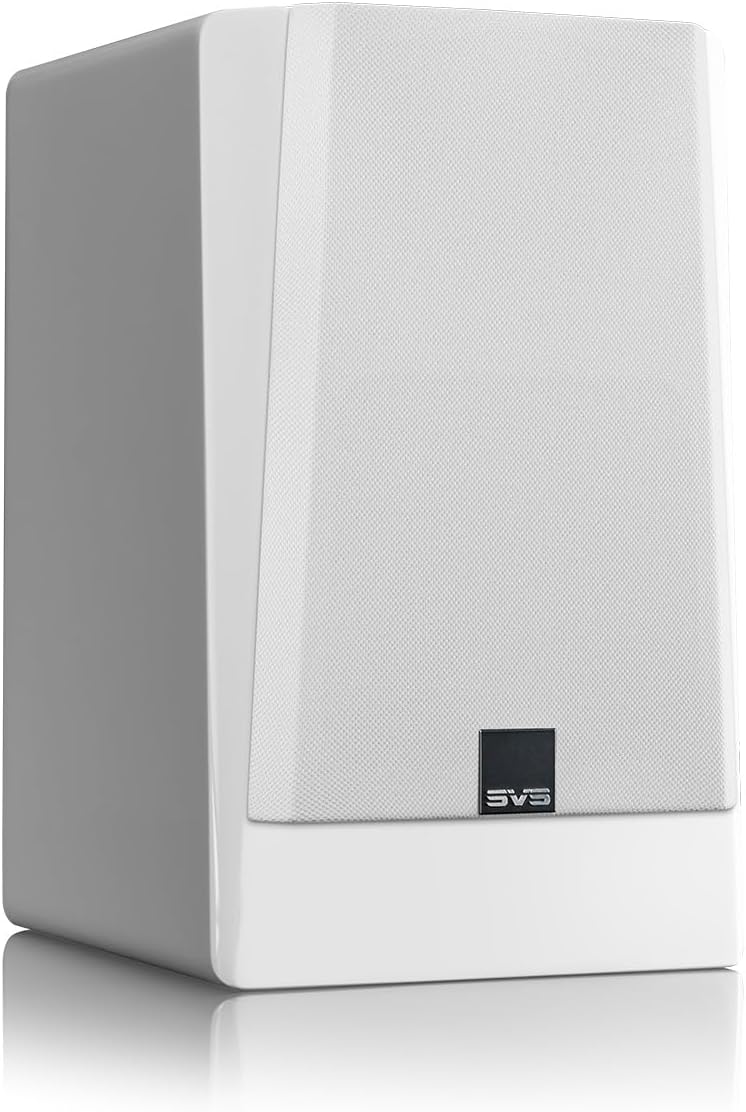
Figure 3: Rear panel connections for the SVS Prime Wireless Pro speaker.
4. Иштөө нускамалары
The SVS Prime Wireless Pro offers multiple ways to control your audio experience:
- Алдыңкы панелдин башкаруу элементтери: Use the knobs and buttons on the front panel of the primary speaker to adjust volume, select input sources, and manage presets. The data-rich front panel interface provides visual feedback.
- IR Remote: Utilize the included IR remote control for convenient adjustments from a distance.
- Smartphone/Desktop App: The dedicated SVS app provides comprehensive control over all speaker functions, including input selection, volume, EQ settings, and firmware updates.
- Үн буйруктары: Integrate with compatible voice assistants for hands-free control.

4-сүрөт: алдыңкы панелдин башкаруу элементтери жана дисплей.
5. Байланыш
The SVS Prime Wireless Pro offers extensive connectivity options:
- Зымсыз агым:
- Wi-Fi: Stream lossless Hi-Res audio.
- Apple Airplay 2: For iPhones and iOS devices.
- Chromecast: For Android phones and other devices.
- aptX менен Bluetooth: For high-quality wireless connection to various devices.
- Зымдуу киргизүүлөр:
- HDMI (ARC/eARC): Connect directly to your TV for a superior soundbar replacement or compact home theater system.
- Line Level (RCA): For traditional audio components.
- Оптикалык: Санариптик аудио булактары үчүн.
- 3.5 мм AUX: Көчмө аппараттар үчүн.
- Ethernet: Туруктуу зымдуу тармак туташуусу үчүн.
- Сабвуфердин чыгышы: Connect an external subwoofer for deeper, heart-pounding bass.

Figure 5: Wireless streaming options available.
6. Техникалык шарттар
| Өзгөчөлүк | Спецификация |
|---|---|
| Модель аты | Prime Wireless Pro |
| Элемент моделинин номери | PWPROWHT |
| Бренд | SVS |
| Динамик түрү | Китеп текчеси |
| Монтаж түрү | Кабат туруктуу |
| Динамиктин максималдуу чыгаруу күчү | 200 Вт (50 Вт х 4) |
| Аудио драйвер түрү | Динамикалык драйвер |
| Вуфердин диаметри | 5.25 дюйм |
| Frequency Response | 42000 Гц |
| Байланыш технологиясы | Auxiliary, Bluetooth, HDMI, Optical, RCA, Ethernet, Wi-Fi |
| Зымсыз байланыш технологиясы | Bluetooth, Wi-Fi (Airplay 2, Chromecast) |
| Аудио чыгаруу режими | Стерео |
| Көлөмдүү үн каналынын конфигурациясы | 2.0 |
| Башкаруу ыкмасы | Voice, Remote, App, Front Panel |
| Продукциянын өлчөмдөрү | 16"D x 12"W x 19"H |
| Элемент Салмагы | 28.9 фунт |
| Түс | Piano Gloss White |
| Материал | Алюминий |
| Камтылган компоненттер | FEA-optimized cabinet and bracing eliminates resonances |
| Кепилдик түрү | Толук |

Figure 6: Speaker dimensions.
7. Техникалык тейлөө
To ensure the longevity and optimal performance of your SVS Prime Wireless Pro speakers, follow these maintenance guidelines:
- Тазалоо: Use a soft, dry cloth to gently wipe the speaker cabinets. Avoid abrasive cleaners, solvents, or harsh chemicals, as these can damage the finish.
- Торлор: The protective cloth grilles can be carefully removed for cleaning. Use a soft brush or vacuum cleaner with a brush attachment to remove dust. Ensure grilles are securely reattached after cleaning.
- Жайгашкан жери: Avoid placing speakers in direct sunlight, near heat sources, or in areas with high humidity. Ensure proper ventilation around the speakers.
- Байланыштары: Periodically check all cable connections (power, inter-speaker, audio inputs) to ensure they are secure and free from damage.
8. Кыйынчылыктарды
If you encounter issues with your SVS Prime Wireless Pro speakers, refer to the following common troubleshooting steps:
- Кубат жок:
- Кубат кабелинин динамикке да, иштеп жаткан розеткага да бекем туташтырылганын текшериңиз.
- Башка аспапка сайып, розетка иштеп жатканын текшериңиз.
- Үн жок:
- Check that the correct input source is selected on the speaker (via app, remote, or front panel).
- Динамиктин да, баштапкы түзмөгүңүздүн да үнүн жогорулатыңыз.
- Ensure all audio cables are securely connected and undamaged.
- If using wireless, check Wi-Fi/Bluetooth connection status.
- Туташуу маселелери (Wi-Fi/Bluetooth):
- Ensure your router is working correctly and within range.
- Restart your router, source device, and the speakers.
- Try re-pairing Bluetooth devices or re-connecting to Wi-Fi via the app.
- Бурмаланган үн:
- Reduce the volume on both the speaker and your source device.
- Check audio source quality and try a different source.
- Ensure speaker placement is not causing unwanted resonances.
For further assistance, please refer to the full user manual available on the SVS website or contact SVS customer support.
9. Кепилдик жана колдоо
Your SVS Prime Wireless Pro Powered Speaker System comes with a Толук кепилдик. For specific terms and conditions, please refer to the warranty documentation included in your package or visit the official SVS webсайт.
For technical support, product inquiries, or service requests, please contact SVS customer support through their official webсайтты же Ыкчам баштоо колдонмоңузда берилген байланыш маалыматын.


