1. Продукт бүтүп калдыview
This document provides instructions for the NEWPAD Replacement Filter, specifically designed for the NEWPAD Air Purifier Model KJ-351H. This filter is crucial for maintaining the air quality provided by your air purifier.
Негизги өзгөчөлүктөрү:
- 3-ин-1 Сtaged Filtration: Combines a Pre-filter, H13 HEPA filter, and Activated Carbon filter for comprehensive air purification.
- Алдын ала чыпкалоо: Captures large particles exceeding 10 microns, such as dust and pet hair.
- H13 HEPA чыпкасы: Captures 99.97% of particles as small as 0.1 microns, including fine dust, pet dander, and wildfire smog.
- Активдештирилген көмүр чыпкасы: Effectively removes pet odors, cooking smells, and other household odors.
- Өлчөмдөрү: 12.1"L x 6.5"W x 6.5"H.
- Өмүрүнүн узактыгы: Each filter is designed to last approximately 4-6 months, depending on usage and air quality.

Image 1: The NEWPAD KJ-351H Replacement Filter, showcasinанын цилиндр формасындагы дизайны жана чыпкалоо катмарлары.
2. Шайкештик
This replacement filter is ГАНА compatible with the NEWPAD Air Purifier Model KJ-351H. Using this filter with other air purifier models may result in improper fit or reduced performance.
3. Орнотуу боюнча нускамалар
Follow these steps to replace the filter in your NEWPAD Air Purifier KJ-351H:
- Электрди өчүрүү жана розеткадан ажыратыңыз: Баштоодон мурун, электрдик коркунучтарды болтурбоо үчүн аба тазалагычыңыздын өчүрүлгөнүн жана розеткадан суурулганын текшериңиз.
- Кирүү чыпка бөлүмү: Locate the filter compartment cover on your NEWPAD KJ-351H air purifier. This is typically at the bottom or back of the unit. Refer to your air purifier's manual for exact instructions on opening the compartment.
- Эски чыпканы алып салуу: Carefully remove the used filter from the compartment. It may be dusty, so handle it over a waste bin.
- Жаңы чыпканы даярдоо: Unpack the new NEWPAD KJ-351H replacement filter from its protective packaging.
- Жаңы чыпка киргизүү: Insert the new filter into the compartment, ensuring it is seated correctly and securely. Follow any directional arrows on the filter or in your air purifier's manual.
- Жабуу бөлүм: Replace the filter compartment cover and secure it firmly.
- Күчтү калыбына келтирүү: Аба тазалагычты кайра розеткага сайып, аны күйгүзүңүз.
- Чыпка индикаторун баштапкы абалга келтирүү (эгер бар болсо): Эгерде аба тазалагычыңызда чыпканы алмаштыруу индикатору болсо, аны баштапкы абалга келтирүү үчүн аба тазалагычыңыздын колдонмосундагы көрсөтмөлөрдү аткарыңыз. Бул, адатта, белгилүү бир баскычты бир нече секунд басып, кармап турууну камтыйт.
4. Maintenance and Replacement Schedule
The NEWPAD KJ-351H Replacement Filter is designed for optimal performance for approximately 4-6 ай under normal operating conditions. The actual lifespan may vary based on air quality, usage frequency, and environmental factors.
- Жууга болбойт: The filter is not washable. Attempting to wash the filter will damage its filtration capabilities and render it ineffective.
- Үзгүлтүксүз текшерүү: Periodically check the filter for visible signs of heavy dust accumulation or discoloration. If the filter appears heavily soiled before the recommended replacement period, consider replacing it sooner.
- Жоюу: Dispose of the old filter with regular household waste.

Image 2: A comparison chart highlighting the features of the H13/P4 Replacement Filter, including size, coverage, capacity, and service life.
5. Кыйынчылыктарды
Чыпканы алмаштыргандан кийин аба тазалагычыңыз туура иштебей жатса, төмөндөгүлөрдү эске алыңыз:
- Фильтр отургучтары: Ensure the new filter is correctly seated within its compartment and the cover is securely closed. An improperly installed filter can prevent the unit from operating or reduce its efficiency.
- Кубат туташуу: Verify that the air purifier is properly plugged into a working power outlet.
- Чыпка көрсөткүчүн баштапкы абалга келтирүү: Аба тазалагычыңыздын көрсөтмөлөрүнө ылайык чыпканы алмаштыруу индикатору (эгер бар болсо) баштапкы абалга келтирилгенин ырастаңыз.
- Аба агымы маселелери: If airflow seems restricted, double-check that no packaging material was left on the filter during installation.
For further assistance, please refer to the support information in Section 7 or consult your NEWPAD Air Purifier KJ-351H user manual.
6. Техникалык шарттар
| Өзгөчөлүк | Деталь |
|---|---|
| Бренд | NEWPAD |
| Модель номери | KJ-351H |
| Фильтрация түрү | 3-in-1 (Pre-filter, H13 HEPA, Activated Carbon) |
| Материалдын түрү | Carbon Fiber |
| Продукциянын өлчөмдөрү | 12.1"L x 6.5"W x 6.5"H |
| Элемент Салмагы | 1.57 фунт |
| Шайкеш түзмөк | NEWPAD Air Purifier KJ-351H |
| Сунушталган алмаштыруу | Ар бир 4-6 ай |
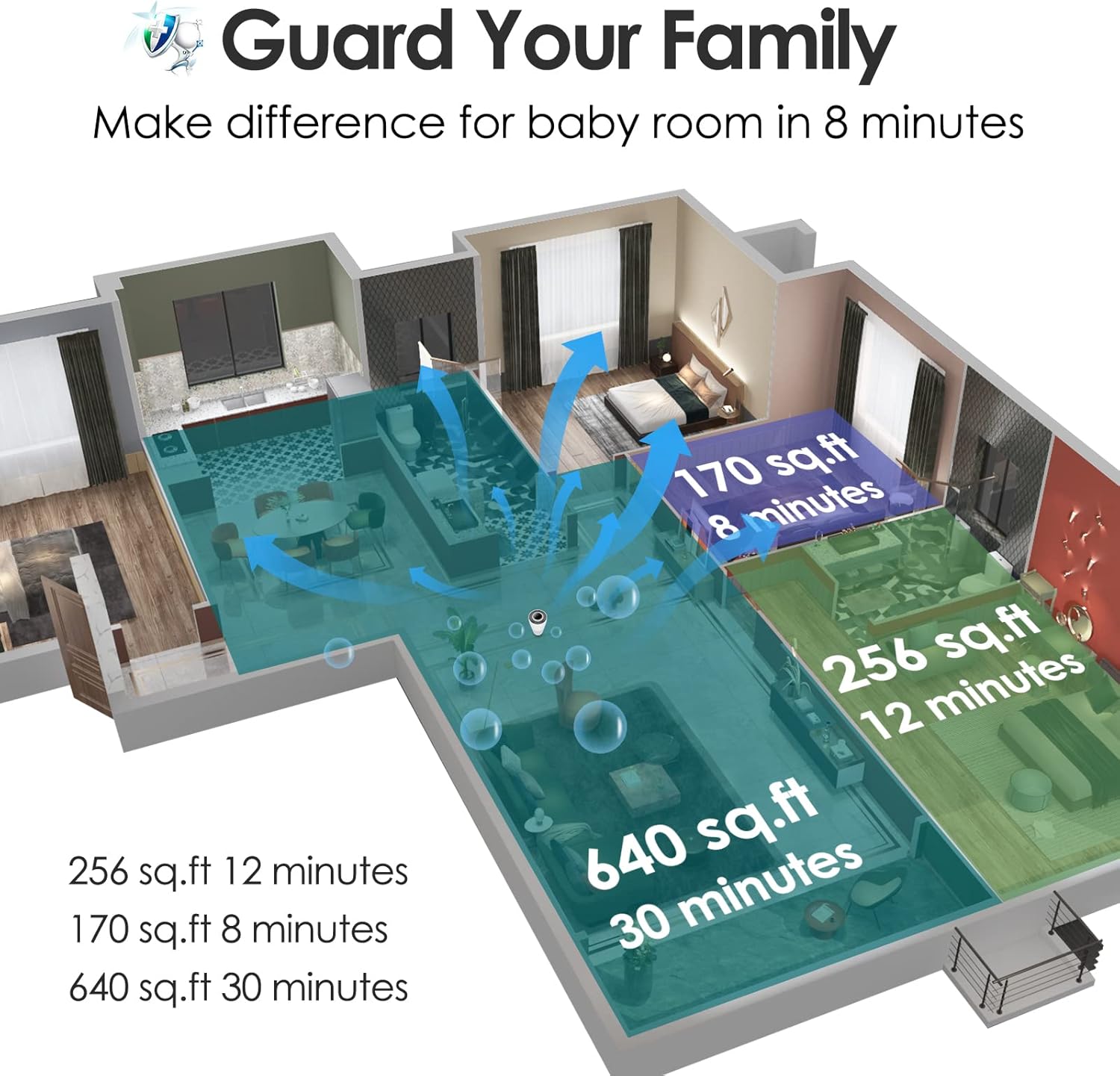
Image 3: An illustrative diagram demonstrating air circulation and purification effectiveness in various room sizes over time.
7. Колдоо жана Кепилдик маалыматы
For any questions, concerns, or support regarding your NEWPAD Replacement Filter or NEWPAD Air Purifier KJ-351H, please contact NEWPAD customer service.
- Кардарларды тейлөө: 7/24 online service is available for assistance.
- Алмаштыруу саясаты: Replacements are available within 90 days of purchase for defective products.
- Тейлөө: Lifetime maintenance support is provided for NEWPAD products.
Please retain your proof of purchase for warranty and support claims.


