Introduction
This manual provides detailed instructions for the EasySMX KW75 75% Mechanical Gaming Keyboard. It covers setup, operation, maintenance, and technical specifications to ensure optimal performance and user experience. Please read this manual thoroughly before using the product.

Image: The EasySMX KW75 mechanical keyboard, showcasing its compact 75% layout with RGB backlighting.
Негизги өзгөчөлүктөрү
- 75% компакттуу жайгашуусу: An 81-key design that balances functionality with a space-saving form factor.
- Үч режимдеги туташуу: Supports Bluetooth 5.0, 2.4GHz wireless, and wired (Type-C) connections for versatile use across multiple devices.
- Ысык алмаштырылуучу PCB: Compatible with most 3-pin and 5-pin MX-style mechanical switches, allowing for easy customization without soldering.
- Gasket-Mounted Structure: Provides a softer typing feel and a cleaner sound profile by cushioning keypresses.
- RGB жарыктандыруу: Customizable RGB lighting effects for personalized aesthetics.
- Multimedia Rotary Knob: A dedicated knob for convenient volume control and play/pause functions.
- Батареянын узак иштөө мөөнөтү: Equipped with a 4000mAh battery, offering extended usage in wireless modes.
- Платформалар аралык шайкештик: Supports both Windows and Mac operating systems.

Сүрөт: An overview highlighting the 81-key 75% compact layout and key features such as 3 modes connection, hot-swappable switches, RGB backlight, gasket mounted structure, Windows/Mac support, and multimedia rotary knob.
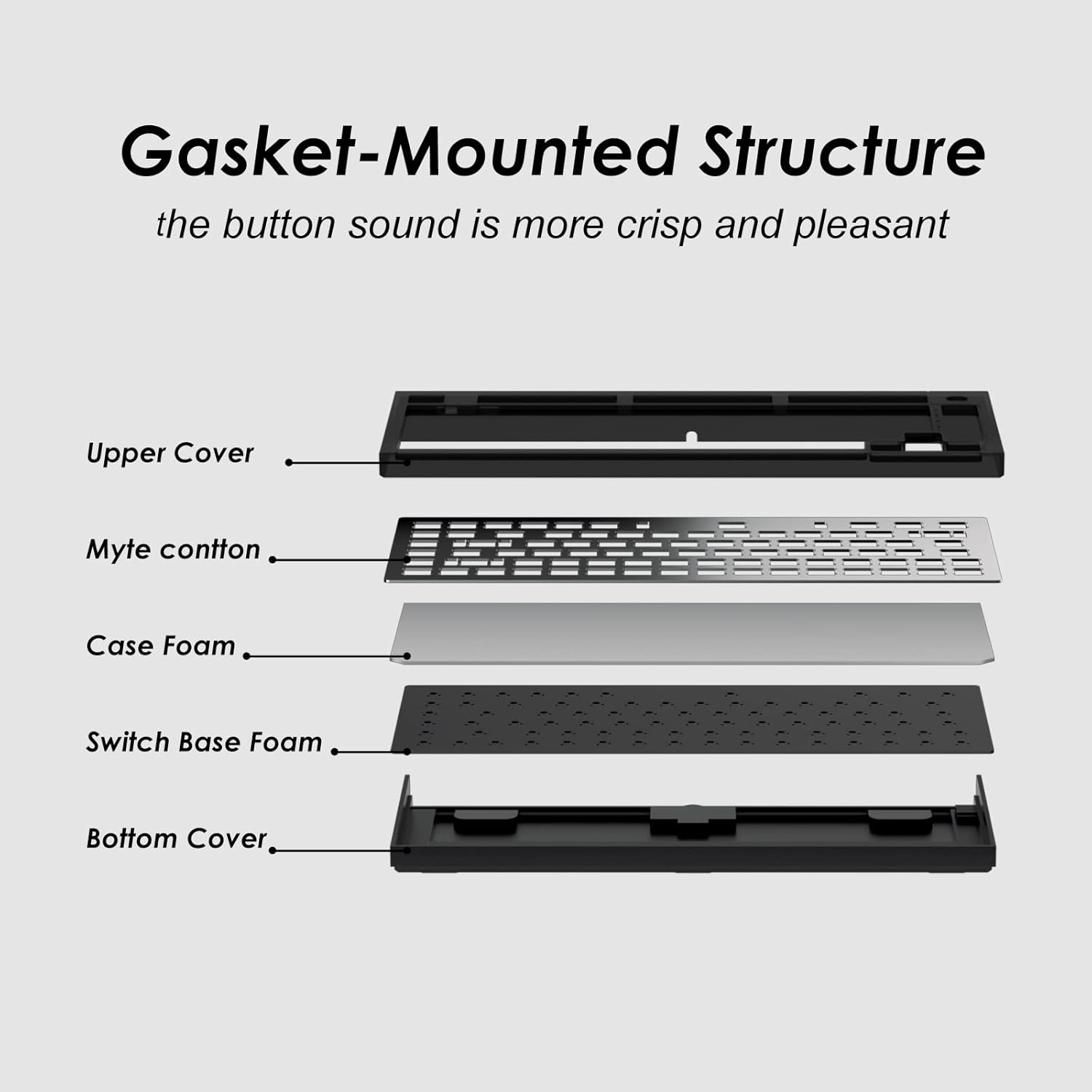
Image: An exploded diagram illustrating the components of the gasket-mounted structure, including the upper cover, Myte cotton, case foam, switch base foam, and bottom cover, designed for improved sound and feel.

Image: A graphic indicating the 4000mAh battery capacity, suggesting over 30 days of continuous use on a full charge.
Орнотуу нускамалары
Баштапкы заряддоо
Before first use, connect the keyboard to a USB power source using the provided Type-C cable to fully charge the internal battery. The charging indicator will show the charging status.
Баскычтопту туташтыруу
The EasySMX KW75 supports three connection modes:
- Зымдуу режим: Connect the keyboard directly to your computer using the supplied USB Type-C cable. The keyboard will automatically switch to wired mode.
- 2.4 ГГц зымсыз режими:
- Адатта клавиатурадагы бөлүмдө сакталган 2.4 ГГц USB кабыл алгычын табыңыз.
- USB ресиверди компьютериңиздеги жеткиликтүү USB портуна сайыңыз.
- Switch the keyboard to 2.4GHz mode (refer to the keyboard's physical switch or key combination for mode selection). The keyboard should connect automatically.
- Bluetooth режими:
- Баскычтопту Bluetooth режимине которуңуз.
- Activate Bluetooth on your device (computer, tablet, etc.).
- On your device, search for new Bluetooth devices. The keyboard should appear as "EasySMX KW75" or similar.
- Select the keyboard to pair. If prompted, enter the pairing code displayed on your screen.

Image: A diagram illustrating the wireless 2.4G, Bluetooth, and wired Type-C connection options, along with compatibility icons for Windows and Mac devices.
Иштөө нускамалары
Switching Operating Systems
The keyboard supports both Windows and Mac layouts. Use the designated key combination (e.g., Fn + A for Windows, Fn + S for Mac) to switch between operating system modes. Refer to the keyboard's specific keycap legends or included quick start guide for exact combinations.
RGB арткы жарыкты башкаруу
The keyboard features customizable RGB backlighting. Use the Fn key in combination with other keys (e.g., Fn + \ for lighting modes, Fn + arrow keys for brightness/speed) to adjust lighting effects, colors, and intensity. Specific key combinations may vary; consult the quick start guide.
Multimedia Rotary Knob
The rotary knob located on the top right of the keyboard provides convenient multimedia control:
- Сааттын жебеси боюнча айлануу: Үнүн көбөйтөт.
- Counter-Clockwise Rotation: Үн көлөмүн азайтат.
- Pressing the Knob: Toggles play/pause for media.

Сүрөт: жакын план view of the rotary knob, illustrating its functions: clockwise rotation for volume increase, counter-clockwise for volume decrease, and pressing the knob for play/pause.
Programmable Keys and Macros
The EasySMX KW75 keyboard supports programmable keys and macros. Utilize the dedicated software (available for download from the EasySMX official website) to customize key assignments, create macros, and further personalize RGB lighting effects.
Техникалык тейлөө
Баскычтопту тазалоо
- Тазалоодон мурун клавиатураны бардык кубат булактарынан ажыратыңыз.
- Баскычтоптун бетин сүртүү үчүн жумшак, кургак чүпүрөктү колдонуңуз.
- өжөр кир үчүн, бир аз гamp клавиатурага суюктук кирбеши үчүн жумшак самын менен кездеме колдонсо болот.
- Use compressed air to remove dust and debris from between keycaps.
- Катуу химиялык заттарды же абразивдүү материалдарды колдонуудан алыс болуңуз.
Ысык алмаштыруучу которгучтар
The KW75 features a hot-swappable PCB, allowing you to change mechanical switches without soldering.
- Gently remove the keycap using a keycap puller.
- Use a switch puller to carefully extract the switch from the PCB. Apply even pressure to avoid bending the pins.
- Align the pins of the new 3-pin or 5-pin MX-style switch with the holes on the PCB.
- Press the new switch firmly into place until it clicks. Ensure it is seated correctly and functions properly before replacing the keycap.

Сүрөт: жакын план view demonstrating the hot-swappable switch feature, showing a switch being inserted into the PCB, compatible with both 3-pin and 5-pin switches for easy customization.
Проблемаларды чечүү
- Баскычтоп жооп бербейт:
- Баскычтоп кубатталганын текшериңиз.
- Check the connection mode (wired, 2.4GHz, Bluetooth) and ensure it matches your device's connection.
- 2.4 ГГц үчүн, USB кабыл алгыч бекем сайылганын текшериңиз.
- For Bluetooth, ensure the keyboard is paired and selected on your device. Try re-pairing if necessary.
- Зымсыз көйгөйлөрдү болтурбоо үчүн USB-C кабели аркылуу туташтырып көрүңүз.
- Катталбаган ачкычтар же эки жолу терүү:
- This could indicate a faulty switch. Due to the hot-swappable design, try replacing the problematic switch.
- Коммутатордун платага толугу менен орнотулганын текшериңиз.
- Клавиатуранын капкагынын жана которгучтун айланасын тазалап, ар кандай таштандыларды кетириңиз.
- RGB жарыктандыруу иштебейт:
- Check if the lighting is turned off or set to minimum brightness using the Fn key combinations.
- Ensure the keyboard firmware is up to date via the official software.
- Bluetooth ажыратуу маселелери:
- Баскычтоп түзмөгүңүздүн диапазонунда экенин текшериңиз.
- Башка зымсыз аппараттардын кийлигишүүсүн текшериңиз.
- Баскычтопту түзмөгүңүз менен кайра жуптаңыз.
- Клавиатуранын батареясы жетиштүү заряддалганын текшериңиз.
Техникалык шарттар
| Бренд | EasySMX |
| Модель номери | KW75 |
| Макет | 75% (81 ачкыч) |
| Байланыш | Bluetooth 5.0, 2.4GHz Wireless, USB Type-C Wired |
| Которуу шайкештиги | 3-pin/5-pin MX-style Hot-Swappable |
| Арткы жарыктандыруу | RGB |
| Батарея сыйымдуулугу | 4000mAh |
| Операциялык системаны колдоо | Windows, Mac |
| Материал | Пластик |
| Камтылган компоненттер | USB кабели |
| Өлчөмдөрү (болжол менен) | 36.19 x 17.7 x 5.21 см |
| Салмагы (болжол менен) | 880 г |
Кепилдик жана колдоо
Кепилдик жөнүндө маалымат жана техникалык колдоо алуу үчүн, расмий EasySMX сайтына кайрылыңыз webсайтка же түздөн-түз кардарларды тейлөөгө кайрылыңыз. Сатып алганыңыздын далили катары сатып алуу дүмүрчөгүңүздү сактаңыз.


