Кош келдиңиз
Thank you for choosing the TobenONE 18-in-1 Multiport Docking Station. This universal docking station is designed to expand your workstation by connecting all your external devices to your computer through a single hybrid 2-in-1 USB cable. It supports dual 4K@60Hz displays and offers a wide array of ports for enhanced productivity. This manual provides detailed instructions for setup, operation, maintenance, and troubleshooting to ensure optimal performance of your device.
Продукт бүттүview жана Пакеттин мазмуну
The TobenONE docking station is a compact and powerful solution for expanding your laptop's connectivity. It features a robust design and a comprehensive set of ports to meet diverse needs.

Image: The TobenONE 18-in-1 Universal Docking Station, its power adapter, and the hybrid USB cable.
Пакеттин мазмуну:
- 1 x TobenONE 18-in-1 Docking Station
- 1 x 65W Power Supply
- 1 x Hybrid 2-in-1 USB Cable (3.3ft length)
- 1 x User Manual

Image: Visual representation of the items included in the product package.
Порттун жайгашуусу:
Familiarize yourself with the various ports on your docking station:
- Алдыңкы панели: SD/TF Card Slot, USB-C 3.1, USB-A 3.1, 3x USB-A 3.0, Audio In & Out.
- Арткы Panel: 2x Driver-Based HDMI (Display 1 & 2), 2x Driver-Based DisplayPort (Display 1 & 2), 3x USB 2.0, DC Port (Power Input), Gigabit Ethernet (LAN), Host (USB-C/USB 3.0 connection to laptop).
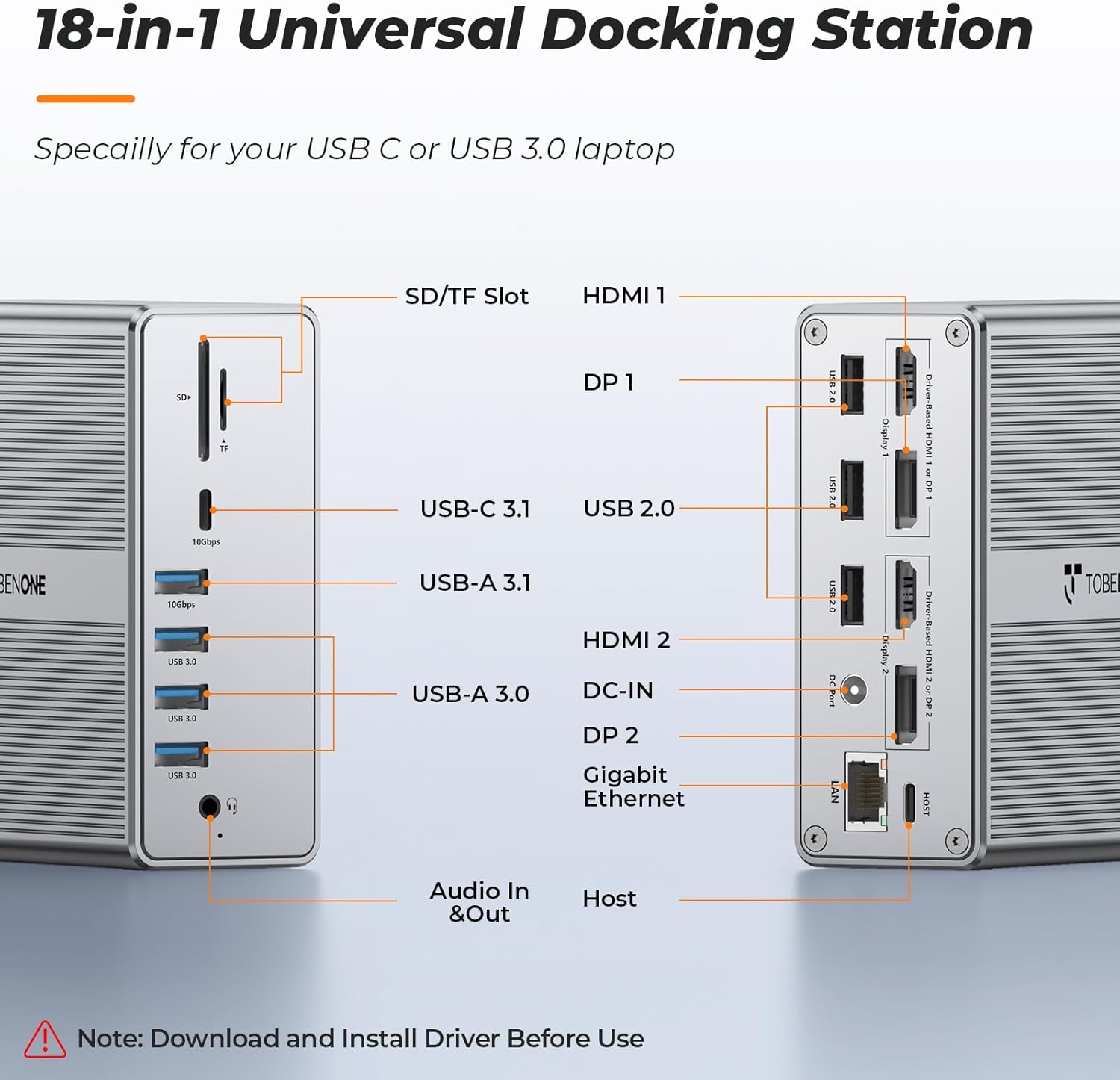
Сүрөт: алдыңкы жана арткы views of the docking station with all 18 ports clearly labeled.
Орнотуу колдонмосу
1. Driver Installation (Crucial First Step)
Before connecting the docking station, it is маанилүү to download and install the DisplayLink driver. This driver enables the multi-display functionality of the docking station.
- Go to the official DisplayLink webсайт: www.displaylink.com
- Choose your operating system (Windows, macOS, ChromeOS).
- Download and install the latest DisplayLink driver.
- Орнотууну аяктоо үчүн экрандагы нускамаларды аткарыңыз.
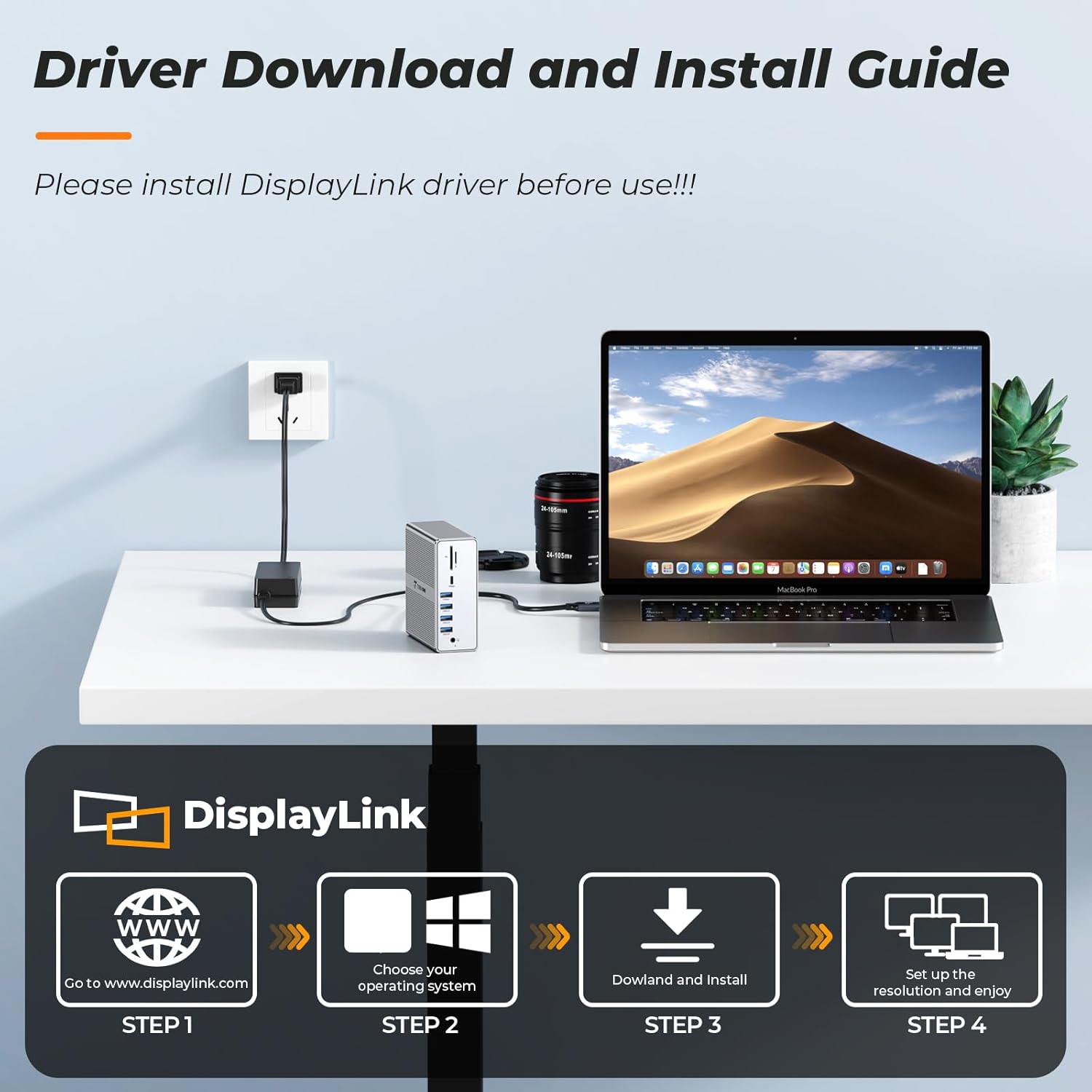
Image: Step-by-step guide for DisplayLink driver installation.
2. Док станциясын туташтыруу
Once the DisplayLink driver is installed, proceed with the hardware connections:
- Кубат туташуу: Connect the included 65W power adapter to the DC-IN port on the docking station and then plug it into a wall outlet. This provides stable power to the docking station and can charge your laptop.
- Хост туташуусу: Use the hybrid 2-in-1 USB cable to connect the docking station's 'Host' port to your laptop's USB-C or USB 3.0 port. An adapter is included for USB-A laptops.
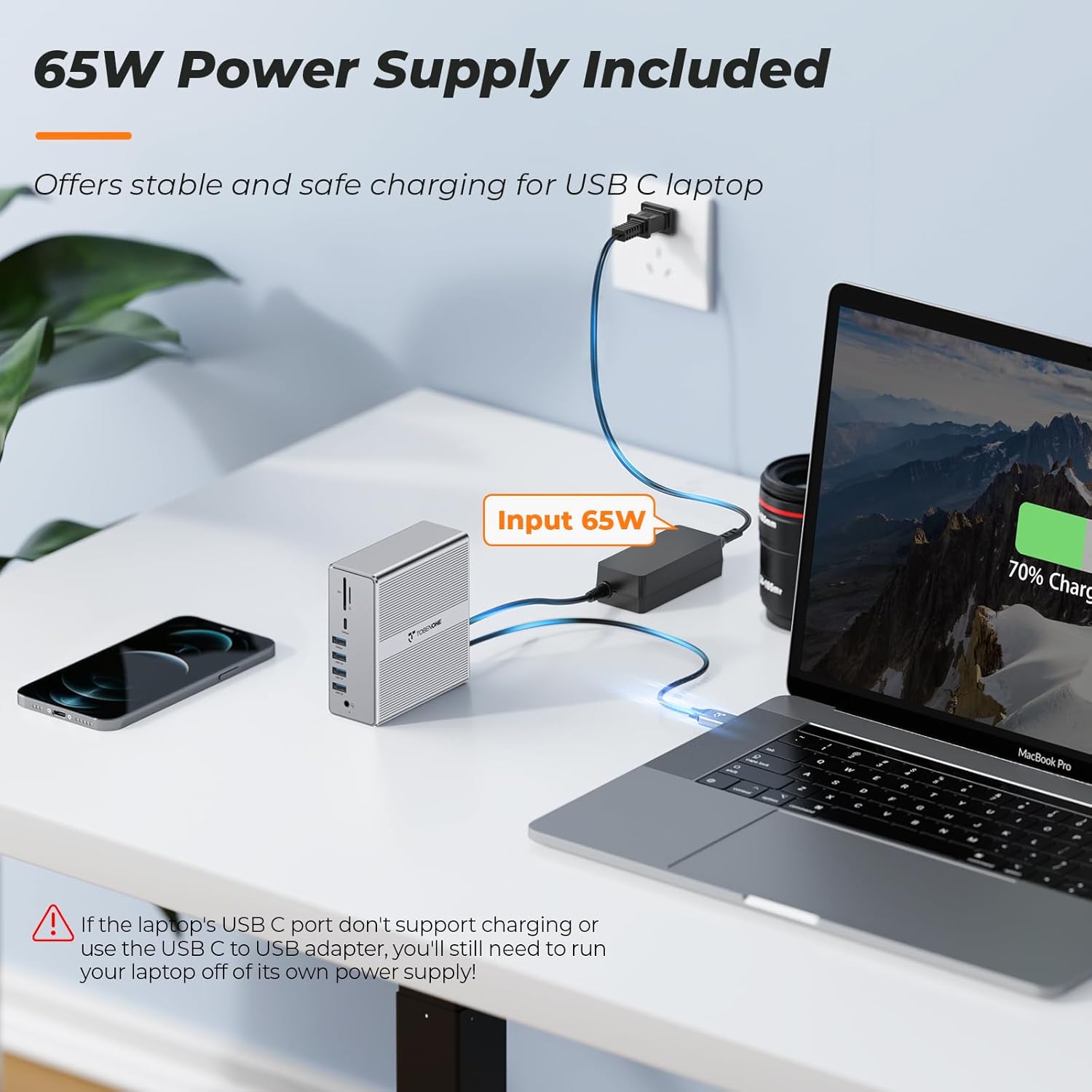
Image: Docking station connected to power and a laptop, illustrating the 65W power delivery.

Image: Demonstrates connecting the docking station to both USB-C and USB-A laptops.
Operating Your Docking Station
1. Dual 4K@60Hz Monitor Setup
The docking station supports dual 4K@60Hz displays via HDMI or DisplayPort. You can use a combination of both.
- Connect your monitors to the HDMI 1/2 or DP 1/2 ports on the rear of the docking station using appropriate cables.
- Мониторлоруңуздун күйгүзүлгөнүн жана туура киргизүү булагына коюлганын текшериңиз.
- Adjust display settings (resolution, arrangement) through your computer's operating system display settings.

Image: Dual 4K monitor setup with a MacBook and the docking station.

Image: Dual 4K monitor setup with a Windows laptop and the docking station.

Image: Multiple 4K@60Hz display mode options.
2. USB түзмөктөрүн туташтыруу
The docking station provides ample USB ports for all your peripherals:
- USB 3.0 порттору (3x): For high-speed devices like external hard drives, cameras, and printers.
- USB 2.0 порттору (3x): Ideal for keyboards, mice, and other low-bandwidth devices.
- USB 3.1 Ports (1x USB-A, 1x USB-C): Offer ultra-fast data transfer speeds up to 10Gbps, perfect for large file которуулар.

Image: Connecting up to 8 external USB devices to the docking station.

Image: Highlighting the high-speed data transfer capabilities of USB 3.1 ports.
3. Ethernet туташуусу
For a stable and ultra-fast network connection, use the Gigabit Ethernet port:
- Connect an Ethernet cable from your router or modem to the LAN port on the docking station.
- This provides a reliable wired internet connection, compatible with 10/100/1000Mbps networks.

Image: Docking station connected to an Ethernet cable for stable network access.
4. Audio and Card Reader
- 3.5mm Audio In & Out: Connect your headphones, speakers, or microphone to the dedicated audio ports on the front panel.
- SD/TF карта уячасы: Insert your SD or TF (microSD) cards for quick data transfer and access.
5. Шайкештик
The TobenONE docking station is widely compatible with various operating systems and laptop models:
- MacOS: Windows 10/11 & macOS 10.15.x and later, ChromeOS 100.x and later.
- Windows: Supports full-featured USB-C, USB 3.0, USB4.0 and Thunderbolt 5/ Thunderbolt 4/Thunderbolt 3 systems.
- Apple Silicon (M1/M2/M3/M4): Fully compatible with M1/M2/M3-based MacBook Pro/Air (Original M1/M2/M3/M4, M1 Pro, M1 Max, M2 Pro, M2 Max, M3 Pro, M3 Max, M4 Pro, M4 Max).
- Intel-based MacBooks: Compatible with Intel-based Thunderbolt 3 MacBooks (late 2016+).
- Other Laptops: Dell XPS 13/15, Dell Latitude, Dell Inspiron series; Microsoft Surface Pro/ Go/ Book/ Laptop models; HP ProBook, HP EliteBook, HP Spectre x360 series; Lenovo ThinkPad, Lenovo IdeaPad, and Lenovo Yoga; LG Gram; and thousands of other laptops compliant with USB-C ports (including Thunderbolt 5/ Thunderbolt 4/Thunderbolt 3 ports), USB 3.0 or USB 4.0 ports.

Image: Comprehensive compatibility overview for various operating systems and laptop models.
Кароо жана тейлөө
To ensure the longevity and optimal performance of your TobenONE docking station, follow these care and maintenance guidelines:
- Тазалоо: Use a soft, dry cloth to clean the exterior of the docking station. Avoid using liquid cleaners or aerosols, as they may damage the device.
- Сактагыч: Док-станцияны салкын, кургак жерде, күндүн түз тийген нурларынан жана өтө жогорку температурадан алыс сактаңыз.
- Колдонуу: Аппаратты этияттык менен колдонуңуз. Аны түшүрүүдөн же катуу таасирлерден сактаныңыз.
- Вентиляция: Ensure proper ventilation around the docking station to prevent overheating. Do not block the ventilation openings.
- Кабелдик башкаруу: Keep cables organized and untangled to prevent damage to ports and cables.
Жалпы көйгөйлөрдү чечүү
Эгерде сиз док-станцияңыз менен кандайдыр бир көйгөйлөргө туш болсоңуз, төмөнкү кеңири таралган чечимдерди караңыз:
- Дисплей чыгышы жок:
- Ensure the DisplayLink driver is correctly installed and updated.
- Check all cable connections (HDMI/DP, host cable, power).
- Verify monitor input settings.
- Компьютериңизди жана док станциясын өчүрүп-күйгүзүңүз.
- USB түзмөктөрү таанылбайт:
- Ensure the docking station is properly powered and connected to the host laptop.
- Try connecting the USB device to a different port on the docking station or directly to your laptop to rule out device issues.
- Компьютериңиздин USB драйверлерин жаңыртыңыз.
- Тармакка туташуу маселелери:
- Ethernet кабелинин док станциясына жана роутерге/модемге туташуусун текшериңиз.
- Компьютериңиздеги тармак жөндөөлөрүн текшериңиз.
- Ensure the Ethernet driver is installed and updated.
- Ноутбук заряддалбай жатат:
- 65 Вт кубат адаптери док станциясына жана иштеп жаткан розеткага бекем туташтырылганын текшериңиз.
- Confirm your laptop's USB-C port supports power delivery. If not, you will need to use your laptop's original power supply.
If you continue to experience issues, please refer to the Warranty and Customer Support section for assistance.
Продукт спецификациялары
| Өзгөчөлүк | Спецификация |
|---|---|
| Продукциянын өлчөмдөрү | 1.3 x 4.1 x 4.1 дюйм (3.3 x 10.4 x 10.4 см) |
| Элемент Салмагы | 1.23 фунт (0.56 кг) |
| Модель номери | AS048-2003250D1 |
| Бренд | Tobenone |
| Түс | Grey-65W power adapter |
| Аппараттык интерфейс | 3.5mm Audio, DisplayPort, Ethernet, HDMI, USB 2.0, USB 3.0, USB 3.1 Type C |
| Шайкеш түзмөктөр | Windows 10/11 & macOS 10.15.x and later, ChromeOS 100.x and later; Supports full-featured USB-C, USB 3.0, USB4.0 and Thunderbolt 5/4/3 systems, including M1/M2/M3/M4-based MacBooks; Intel-based Thunderbolt 3 MacBooks; Dell, Microsoft Surface, HP, Lenovo, LG Gram, and other USB-C/USB 3.0/USB 4.0 laptops. |
| Жалпы USB порттору | 8 (3x USB 3.0, 3x USB 2.0, 1x USB 3.1 Type-A, 1x USB 3.1 Type-C) |
| Порттардын саны | 18 |
| Жалпы HDMI порттору | 2 |
| Total DisplayPort Ports | 2 |
| Ватtage | 57W (Power Delivery via 65W adapter) |
Кепилдик жана Кардарларды колдоо
TobenONE is committed to providing excellent customer service and product reliability. All TobenONE products come with a comprehensive warranty and dedicated support.
Кепилдик маалыматы:
Your TobenONE docking station is covered by a 24 айлык кепилдик from the date of purchase. This warranty covers manufacturing defects and ensures peace of mind. For any warranty claims or product issues, please contact our support team.
Кардарларды колдоо:
TobenONE offers lifetime technical support. Our team is quick to respond to emails and assist with any issues you may encounter. You can reach us via email at: support@tobenone.com
For additional support and resources, you can also visit the TobenONE store on Amazon: TobenONE Amazon Store
Important Support Message:
Video: A message from TobenONE Tech regarding their 24-month warranty and lifetime technical support, emphasizing their commitment to customer satisfaction and quick response to inquiries.


