1. Киришүү
Сатып алганыңыз үчүн рахматasing the Thomson Soundbar System. This manual provides essential information for setting up, operating, and maintaining your soundbar, subwoofer, and wireless microphones. Please read these instructions carefully before use and retain them for future reference.

Image 1.1: Thomson Soundbar System components including the soundbar, subwoofer, two wireless microphones, and remote control.
2. Пакеттин мазмуну
Төмөндө тизмеленген нерселердин баары пакетиңизге камтылганын текшериңиз:
- Саундбар (1 даана)
- Subwoofer (1 unit)
- Алыстан башкаруу (1 бирдик)
- Зымсыз микрофондор (2 даана)
- Кубат адаптери (1 бирдик)
- Аудио кабель (1 бирдик)
- Coaxial Cable (1 unit)
- Optical Fiber Cable (1 unit)
- Wall Mounting Kit (includes padlocks, gel column, screws)
- Колдонуучунун Колдонмосу (бул документ)
3. Продукт бүтүп калдыview
3.1 Саундбар
The soundbar features four built-in full-frequency speakers with sound guide enhancement holes for stereo sound. It also includes an LED strip lamp for visual effects.

Image 3.1: Internal structure of the soundbar highlighting the 4 full-range driver speakers, guide holes, and LED strip lamp.
3.2 Сабвуфер
The external subwoofer is designed to deliver deep bass. It incorporates a bass diaphragm with high-roll foam surrounds for extended excursion and vibration-absorbing feet for stable performance.
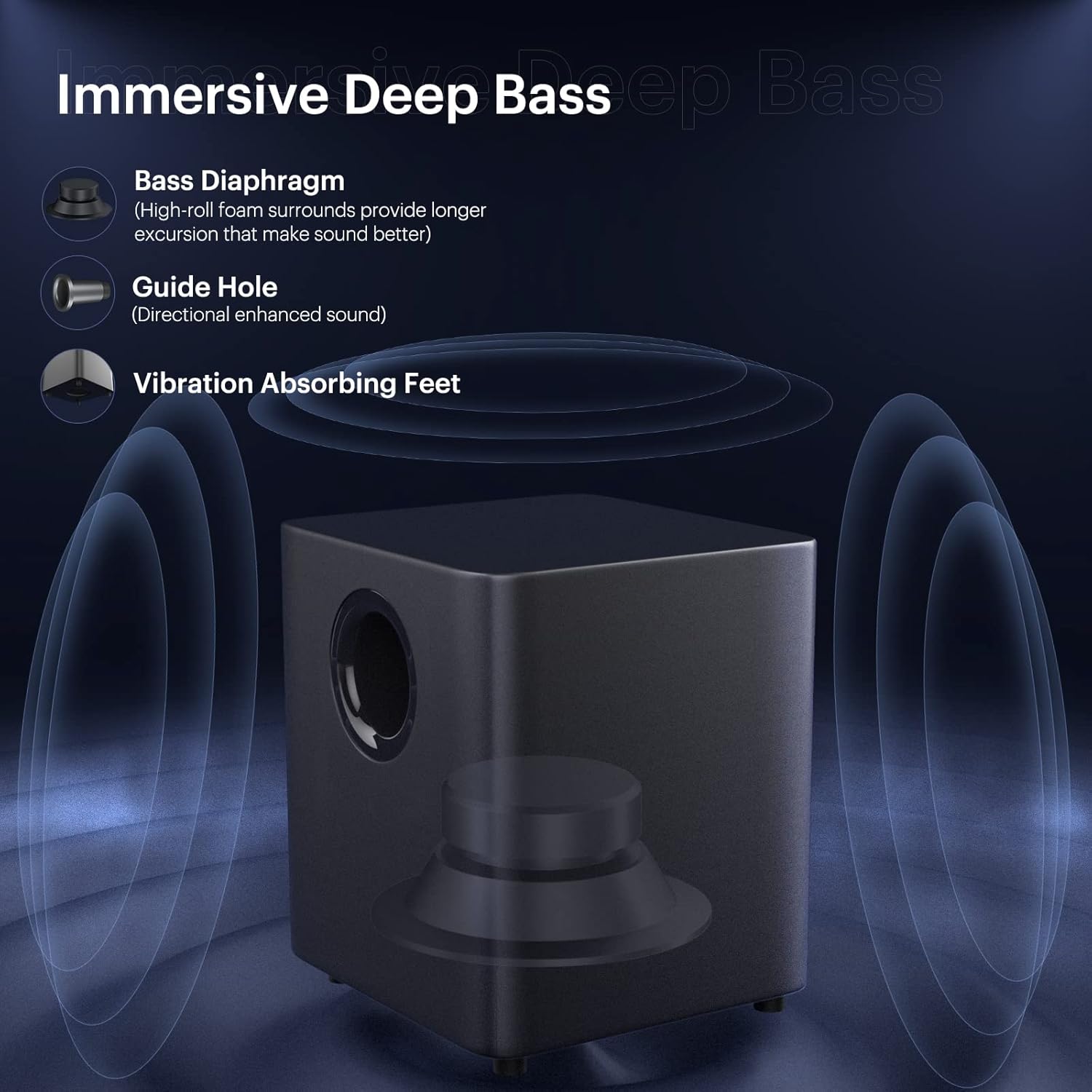
Image 3.2: Subwoofer design elements for immersive deep bass.
3.3 Зымсыз микрофон
Two wireless microphones are included for vocal applications. They operate on UHF frequencies and feature individual displays.

Image 3.3: Dual wireless microphones.
3.4 Алыстан башкаруу
The included remote control provides full functionality for operating the soundbar system, including power, input selection, volume, sound modes, and microphone adjustments.
4. Орнотуу
4.1 Орнотуу
Place the soundbar on a stable, flat surface in front of your television or mount it on the wall. Position the subwoofer on the floor near the soundbar for optimal bass performance.
4.2 Сабвуферди туташтыруу
Connect the subwoofer to the soundbar using the provided SUB OUT cable. Ensure a secure connection.
4.3 Кубат туташтыруу
Connect the power adapter to the DC IN port on the soundbar and then plug it into a power outlet. Ensure the subwoofer is also connected to a power source if it has a separate power input.
5. Байланыш параметрлери
The soundbar offers various wired and wireless connection methods:

Image 5.1: Available wired and wireless connectivity ports on the soundbar.
5.1 Bluetooth байланышы
- Press the 'Bluetooth' button on the remote control or soundbar to select Bluetooth input.
- The soundbar will enter pairing mode, indicated by a flashing LED.
- On your device (smartphone, tablet, computer), search for 'THOMSON Soundbar' in the Bluetooth settings and select it to pair.
- Once connected, the LED indicator will become solid.
5.2 HDMI ARC туташуусу
Connect an HDMI cable from the HDMI ARC port on the soundbar to the HDMI ARC port on your TV. Select the HDMI ARC input on the soundbar.
5.3 Оптикалык туташуу
Connect an optical cable from the OPT port on the soundbar to the optical output port on your TV or audio source. Select the Optical input on the soundbar.
5.4 AUX туташуусу
Connect a 3.5mm audio cable from the AUX IN port on the soundbar to the audio output port on your device. Select the AUX input on the soundbar.
5.5 USB ойнотуу
Insert a USB drive into the USB port on the soundbar. The soundbar will automatically switch to USB input and begin playing compatible audio files.
6. Иштөө нускамалары
6.1 Күйгүзүү/өчүрүү
Press the 'Power' button on the remote control or the soundbar to turn the system on or off.
6.2 Киргизүү булагын тандоо
Press the 'Input' or corresponding source buttons (e.g., 'Bluetooth', 'HDMI ARC', 'Optical', 'AUX', 'USB') on the remote control to switch between audio sources.
6.3 Үндү башкаруу
Use the 'Volume +' and 'Volume -' buttons on the remote control or soundbar to adjust the master volume.
6.4 Үн режимдери
The soundbar offers five equalizer modes to optimize audio for different content types:
- Films: Enhanced dialogue and cinematic effects.
- Оюндар: Immersive sound for gaming.
- Музыка: Музыканы ойнотуу үчүн тең салмактуу аудио.
- Концерт: Live performance audio experience.
- Жаңылыктар: Clear voice reproduction.
Press the 'Mode' button on the remote control to cycle through these sound modes.

Image 6.1: The five available sound modes for optimized audio.
6.5 Bass and Treble Adjustment
Use the 'Bass+' / 'Bass-' and 'Treble+' / 'Treble-' buttons on the remote control to fine-tune the bass and treble levels.
6.6 Микрофонду колдонуу
To use the wireless microphones:
- Ensure the microphones have batteries installed.
- Turn on the microphones. They should automatically pair with the soundbar.
- Adjust microphone volume and echo effects using the dedicated buttons on the remote control.

Image 6.2: Using the wireless microphones for an immersive audio experience.
7. Дубалга орнотуу
The soundbar can be wall-mounted using the included kit. Follow these steps:
- Determine the desired mounting location on the wall, ensuring it is level and structurally sound.
- Mark the positions for drilling using the provided template or by measuring the soundbar's mounting points.
- Зарыл болсо, багыттоочу тешиктерди бургулап, дубалга бекиткичтерди орнотуңуз.
- Бурамаларды колдонуп, бекитүүчү кронштейндерди дубалга бекитиңиз.
- Саундбарды орнотулган кронштейндерге кылдаттык менен бекитиңиз.
Ensure all cables are connected before mounting if possible, or leave enough slack for connection after mounting.
8. Кыйынчылыктарды
Эгер көйгөйлөргө туш болсоңуз, төмөнкү жалпы көйгөйлөрдү жана чечимдерди караңыз:
| Көйгөй | Мүмкүн чечим |
|---|---|
| Күч жок | Check if the power adapter is securely connected to the soundbar and a working power outlet. |
| Үн жок | Ensure the correct input source is selected. Check all audio cable connections. Increase the volume on both the soundbar and the connected device. |
| Bluetooth жупташуу көйгөйлөрү | Ensure the soundbar is in Bluetooth pairing mode. Delete 'THOMSON Soundbar' from your device's Bluetooth list and try pairing again. Move devices closer. |
| Микрофон иштебей жатат | Check microphone batteries. Ensure microphones are powered on and within range of the soundbar. |
| Пульт иштебей жатат | Check remote control batteries. Ensure there are no obstructions between the remote and the soundbar's sensor. |
9. Техникалык шарттар
- Динамик түрү: Саундбар
- Өзгөчө өзгөчөлүгү: Эквалайзер
- Сунушталган колдонуулар: Телевизорлор үчүн
- Шайкеш түзмөктөр: Смартфон, планшет, телевизор
- Сабвуфердин диаметри: 5 дюйм
- Көлөмдүү үн каналынын конфигурациясы: 5.1
- Башкаруу ыкмасы: Алыстан
- Зымсыз байланыш технологиясы: Bluetooth
- Soundbar өлчөмү: 37 дюйм
- Кубат булагы: Электр зымдары
- Продукциянын өлчөмдөрү (Саундбар): 93.6 x 10.97 x 8.76 см
- Элемент Салмагы: 8.91 кг (жалпы система)
- Динамиктин максималдуу чыгаруу күчү: 100 Ватт
- Аудио чыгаруу режими: Стерео, айлана
- Монтаж түрү: Бар тоо, дубал монтаждоо
10. Коопсуздук маалыматы
- Агрегатты жамгырга же нымдуулукка дуушар кылбаңыз.
- Агрегатты ажыратпаңыз. Тейлөө боюнча квалификациялуу кызматкерлерге кайрылыңыз.
- Ашыкча ысып кетүүнүн алдын алуу үчүн аппараттын айланасында туура желдетүүнү камсыз кылыңыз.
- Агрегатты күн нурунан, жылуулук булактарынан жана күчтүү магнит талаасынан алыс кармаңыз.
- Түзмөктү жумшак, кургак чүпүрөк менен тазалаңыз. Суюк тазалоочу каражаттарды колдонбоңуз.
11. Кепилдик жана колдоо
Кепилдик жөнүндө маалымат жана техникалык колдоо алуу үчүн, өнүмүңүз менен кошо берилген кепилдик картасын караңыз же расмий THOMSON дүкөнүнө баш багыңыз. webсайт. Сатып алганыңыздын далили катары сатып алуу дүмүрчөгүңүздү сактаңыз.


