Introduction
The ToolkitRC M7AC is a versatile multi-function smart balance charger designed for various battery types and applications. It features dual AC/DC input and supports 2-6S batteries. Beyond its primary charging capabilities, the M7AC integrates several useful tools, including a power supply, multimeter, signal source, drone charger, and signal tester, making it an indispensable tool for hobbyists and professionals alike.
Негизги өзгөчөлүктөр төмөнкүлөрдү камтыйт:
- Dual AC/DC Input for flexible power options.
- XT30/XT60 Output for broad compatibility.
- Supports 2-6S LiPo, LiHV, LiFe, Lion, LTO batteries, 1-16S NiMh, and 1-10S Pb batteries.
- Integrated functions: Power supply, multimeter, signal source, drone charger, and signal tester.
- IPS 2.4 inch LCD display for clear information.
Коопсуздук маалыматы
Please read and understand all safety warnings and instructions before using the M7AC charger. Improper use can lead to property damage, injury, or death.
- Заряддоо түзүлүштү дайыма жакшы желдетилген жерде, күйүүчү материалдардан алыс иштетиңиз.
- Заряддоочу түзүлүштү иштетүү учурунда кароосуз калтырбаңыз.
- Ensure correct battery type and cell count settings before charging.
- Use only compatible power sources and cables.
- Аппаратты суудан, нымдан жана экстремалдык температурадан алыс кармаңыз.
- Заряддагычты ажыратууга же өзгөртүүгө аракет кылбаңыз.
Продукт бүттүview
Familiarize yourself with the components and interfaces of your M7AC charger.

Сүрөт 1: Алдыңкы View. This image displays the front of the M7AC charger, highlighting its 2.4-inch IPS LCD screen. The screen shows real-time charging data, including voltage, current, capacity, and individual cell voltages. To the right of the screen are the navigation button and scroll wheel for menu interaction.

2-сүрөт: Каптал View (Ports). This image shows the side of the M7AC charger where various input and output ports are located. Visible ports include a USB-A output (5.0V 2.1A), a balance port (2-6S), and dual XT60 output ports labeled "OUTPUT".

Figure 3: Signal Output Display. This image captures the M7AC's screen displaying the "Signal Output" function, specifically for SBUS. It shows multiple channels with adjustable pulse widths, demonstrating the device's capability as a signal source or tester.
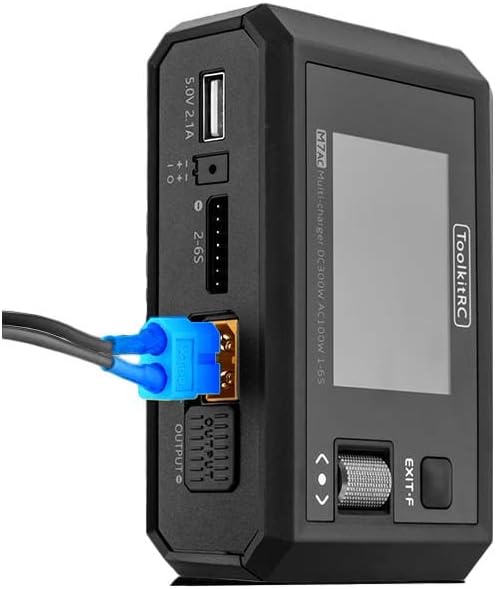
Figure 4: XT60 Output in Use. This image illustrates an XT60 connector plugged into one of the M7AC's output ports, demonstrating how a battery or device would connect for charging or power supply functions.
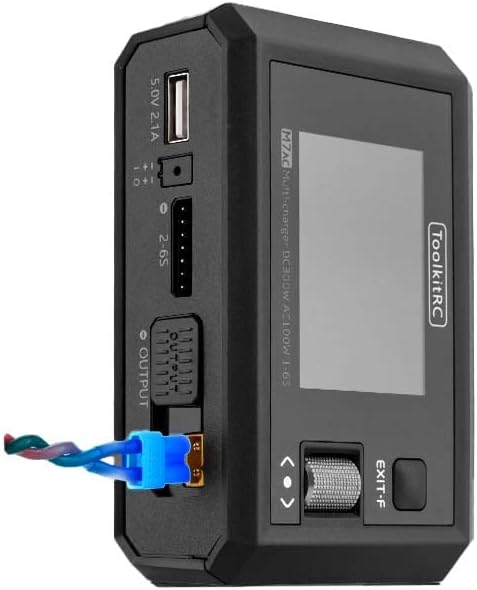
Figure 5: XT60 and Balance Lead Connected. This image provides another perspective of the M7AC with an XT60 connector and a balance lead connected, showing the typical setup for balanced charging of a multi-cell battery pack.
Жайгашуу
- Кубат туташуу:
- For AC input, connect the provided AC power cable to the charger's AC input port and then to a standard wall outlet (AC 100-240V).
- For DC input, connect a DC power source (7.0-28.0V) to the charger's DC input port. Ensure correct polarity.
- Баштапкы күйгүзүү: Once connected to power, the charger will automatically power on and display the main menu on the IPS LCD screen.
- Навигация: Use the scroll wheel and button on the right side of the charger to navigate through menus and select options.
Иштөө нускамалары
1. Батареяны кубаттоо
- Батареяны туташтыруу: Connect your battery's main discharge lead to one of the XT60 output ports. For multi-cell batteries, also connect the balance lead to the appropriate balance port (2-6S).
- Батарея түрүн тандоо: From the main menu, navigate to the "Charger" function. Select the correct battery type (LiPo, LiHV, LiFe, Lion, LTO, NiMh, Pb) and cell count (e.g., 3S, 6S).
- Set Charging Parameters: Adjust the charging current (up to 15A) and mode (e.g., Balance Charge, Fast Charge, Storage Charge) as required for your battery. The maximum charging power is 300W.
- Заряддоону баштоо: Confirm settings and start the charging process. The screen will display real-time charging status, including total voltage, current, charged capacity, and individual cell voltages.
2. Батареяны зарядсыздандыруу
The M7AC supports discharging batteries with a power of up to 300W in Recycle mode or 15W in Normal mode.
- Батареяны туташтыруу: Connect the battery to the XT60 output and balance port.
- Select Discharge Function: Navigate to the "Discharge" function in the menu.
- Параметрлерди коюу: Set the discharge current and target voltage.
- Start Discharging: Initiate the discharge process. Monitor the battery temperature and voltagе чыгаруу учурунда.
3. Power Supply Function
The M7AC can act as a regulated DC power supply (1.0-28.0V, 0.5-15A).
- Access Power Supply Mode: Select the "Power Supply" option from the main menu.
- Set Output Voltage жана Учурдагы: Каалаган чыгаруу көлөмүн тууралаңызtage and current limit using the scroll wheel.
- Түзмөктү туташтыруу: Connect your device requiring power to the XT60 output port.
- Чыгууну активдештирүү: Enable the power supply output.
4. Multimeter Function
Measure voltage and internal resistance of batteries.
- Тtage Өлчөө: Connect the battery to the balance port to measure individual cell voltages (1.0-5.0V per cell, 1-6S).
- Internal Resistance Measurement: The charger can measure internal resistance from 0.1 mR to 99mR for 1-6S batteries.
5. Signal Source / Tester
The M7AC can generate and test various signals.
- PWM чыгаруу: Generate PWM signals (500-2500us @ 20-1000Hz).
- PPM Output: Generate PPM signals (880-2200us * 8CH @ 20-50Hz).
- SBUS чыгаруусу: Generate SBUS signals (880-2200us * 16CH @ 20-100Hz).
6. USB-A чыгышы
The USB-A port provides 5.0V at 2.1A, suitable for charging mobile devices or powering small electronics.
Техникалык тейлөө
- Тазалоо: Use a soft, dry cloth to clean the charger's exterior. Do not use solvents or abrasive cleaners.
- Сактагыч: Заряддоо түзүлүштү күн тийбеген жана экстремалдык температурадан алыс, салкын, кургак жерде сактаңыз.
- Кабелдик текшерүү: Regularly inspect all cables and connectors for signs of wear or damage. Replace damaged cables immediately.
- Программалык камсыздоонун жаңыртуулары: Check the ToolkitRC official website periodically for firmware updates to ensure optimal performance and access to new features. The TF Card slot (128MB-16GB) is used for updates.
Проблемаларды чечүү
| Көйгөй | Мүмкүн себеп | Чечим |
|---|---|---|
| Заряддагыч күйбөйт. | No power input or faulty cable. | Check AC/DC power connection. Ensure power source is active. Try a different power cable. |
| Батарея аныкталган жок. | Incorrect connection or damaged battery. | Ensure main and balance leads are securely connected. Verify battery is not severely over-discharged or damaged. |
| Charging error message. | Incorrect battery settings (type, cell count) or battery fault. | Double-check battery type and cell count settings. Inspect battery for swelling or damage. |
| Экран жооп бербей жатат. | Убактылуу программалык ката. | Disconnect power, wait a few seconds, then reconnect to restart the device. |
Техникалык шарттар
| Категория | Параметр | Нарк |
|---|---|---|
| Заряддагыч | Киргизүү көлөмүtage | AC 100-240V MAX 100W 1.5A / DC 7.0-28.0V @MAX 20A |
| Батареянын түрүн колдоо | Lipo LiHV LiFe Lion LTO@1-6S / NiMh @1-16S Pb @1-10S | |
| Заряддоо күчү | 300W @MAX 15A | |
| Разряд кубаттуулугу | 300W @MAX 15A Recycle mode / 15W@3A Normal mode | |
| Баланс агымы | 800мА @ 4.2V | |
| USB-A чыгаруу | 10W @ 5.0V | |
| Генерал | LCD | IPS 2.4 inch LCD 320*240 resolution |
| Продукт өлчөмү | 112x73x38мм | |
| Продукт Салмагы | 245г | |
| TF картасын колдоо | 128МБ-16ГБ | |
| Түс | Кара | |
| Өлчөө | Ички каршылык | 0.1 mR-99mR @ 1-6S |
| Тtage | 1.0-5.0V @ 1-6S | |
| SBUS | 880-2200us * 16CH @ 20-100Hz | |
| PPM | 880-2200us * 8CH @ 20-50Hz | |
| PWM | 880-2200us @ 20-400Hz | |
| Чыгуу | Электр камсыздоо | 1.0-28.0V @0.5-15A mode: CC CVSBUS |
| SBUS | 880-2200us * 16CH @ 20-100Hz | |
| PPM | 880-2200us * 8CH @ 20-50Hz | |
| PWM | 500-2500us @ 20-1000Hz | |
| Башка | Элемент Салмагы | 12.96 унция (болжол менен 367 г) |
| Өндүрүүчүнүн сунуш кылган курагы | 14 жаш жана андан жогору | |
| Specification Met | UL |
Кепилдик жана колдоо
ToolkitRC products are manufactured to high quality standards. For warranty information and technical support, please refer to the official ToolkitRC webсайтка же түздөн-түз кардарларды тейлөөгө кайрылыңыз. Сатып алуу квитанциясын кепилдик дооматтары үчүн сатып алуунун далили катары сактаңыз.
Кошумча жардам алуу үчүн, баш багыңыз ToolkitRC Official Webсайт.